
kafka_2.11-0.10.0.1生产者producer的Java实现
转载自:http://blog.csdn.net/qq_26479655/article/details/52555283
首先导入包
- 将kafka目录下的
libs中的jar包导入 - 用maven建立
- <dependency>
- <groupId>org.apache.kafka</groupId>
- <artifactId>kafka-clients</artifactId>
- <version>0.10.0.1</version>
- </dependency>
写好properties配置文件
一下为项目结构
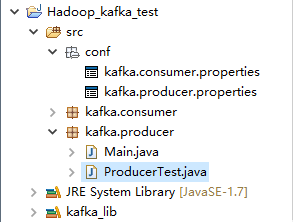
- #kafka集群地址
- bootstrap.servers = 192.168.168.200:9092
- client.id = testProducer
- key.serializer = org.apache.kafka.common.serialization.IntegerSerializer
- value.serializer = org.apache.kafka.common.serialization.StringSerializer
然后上代码
- package kafka.producer;
- import java.io.IOException;
- import java.util.Properties;
- import java.util.concurrent.ExecutionException;
- import org.apache.kafka.clients.producer.Callback;
- import org.apache.kafka.clients.producer.KafkaProducer;
- import org.apache.kafka.clients.producer.ProducerRecord;
- import org.apache.kafka.clients.producer.RecordMetadata;
- public class ProducerTest extends Thread{
- private final KafkaProducer<Integer, String> producer;
- private final String topic;
- private final Boolean isAsync;
- /*isAsync同步、异步*/
- public ProducerTest(String topic, Boolean isAsync) {
- Properties properties = new Properties();
- /*加载配置文件*/
- try {
- properties.load(ProducerTest.class.getClassLoader().getResourceAsStream("conf/kafka.producer.properties"));
- } catch (IOException e) {
- e.printStackTrace();
- }
- producer = new KafkaProducer<>(properties);
- this.topic = topic;
- this.isAsync = isAsync;
- }
- public void run() {
- int messageNo = 1;
- while (true) {
- String messageStr = "Message_" + messageNo;
- long startTime = System.currentTimeMillis();
- if (isAsync) { // Send asynchronously
- producer.send(new ProducerRecord<>(topic,
- messageNo,
- messageStr), new DemoCallBack(startTime, messageNo, messageStr));
- } else { // Send synchronously
- try {
- producer.send(new ProducerRecord<>(topic,
- messageNo,
- messageStr)).get();
- System.out.println("Sent message: (" + messageNo + ", " + messageStr + ")");
- } catch (InterruptedException | ExecutionException e) {
- e.printStackTrace();
- }
- }
- ++messageNo;
- }
- }
- }
- class DemoCallBack implements Callback {
- private final long startTime;
- private final int key;
- private final String message;
- public DemoCallBack(long startTime, int key, String message) {
- this.startTime = startTime;
- this.key = key;
- this.message = message;
- }
- /**
- * @param metadata The metadata for the record that was sent (i.e. the partition and offset). Null if an error
- * occurred.
- * @param exception The exception thrown during processing of this record. Null if no error occurred.
- */
- public void onCompletion(RecordMetadata metadata, Exception exception) {
- long elapsedTime = System.currentTimeMillis() - startTime;
- if (metadata != null) {
- System.out.println(
- "message(" + key + ", " + message + ") sent to partition(" + metadata.partition() +
- "), " +
- "offset(" + metadata.offset() + ") in " + elapsedTime + " ms");
- } else {
- exception.printStackTrace();
- }
- }
- }
测试代码
- package kafka.producer;
- public class Main {
- public static void main(String[] args) {
- ProducerTest test = new ProducerTest("TestTopic", true);
- test.start();
- }
- }
运行结果
- message(51215, Message_51215) sent to partition(0), offset(161830) in 3497 ms
- message(51216, Message_51216) sent to partition(0), offset(161831) in 3497 ms
- message(51217, Message_51217) sent to partition(0), offset(161832) in 3497 ms
- message(51218, Message_51218) sent to partition(0), offset(161833) in 3497 ms
- message(51219, Message_51219) sent to partition(0), offset(161834) in 3497 ms
- message(51220, Message_51220) sent to partition(0), offset(161835) in 3497 ms
- message(51221, Message_51221) sent to partition(0), offset(161836) in 3497 ms
- message(51222, Message_51222) sent to partition(0), offset(161837) in 3497 ms
- message(51223, Message_51223) sent to partition(0), offset(161838) in 3497 ms
- message(51224, Message_51224) sent to partition(0), offset(161839) in 3497 ms
- message(51225, Message_51225) sent to partition(0), offset(161840) in 3497 ms
- message(51226, Message_51226) sent to partition(0), offset(161841) in 3497 ms
- message(51227, Message_51227) sent to partition(0), offset(161842) in 3497 ms
- message(51228, Message_51228) sent to partition(0), offset(161843) in 3497 ms
- .............
kafka_2.11-0.10.0.1生产者producer的Java实现的更多相关文章
- kafka 0.10.2 消息生产者(producer)
package cn.xiaojf.kafka.producer; import org.apache.kafka.clients.producer.*; import org.apache.kafk ...
- Kafka: Producer (0.10.0.0)
转自:http://www.cnblogs.com/f1194361820/p/6048429.html 通过前面的架构简述,知道了Producer是用来产生消息记录,并将消息以异步的方式发送给指定的 ...
- kafka0.9.0及0.10.0配置属性
问题导读1.borker包含哪些属性?2.Producer包含哪些属性?3.Consumer如何配置?borker(0.9.0及0.10.0)配置Kafka日志本身是由多个日志段组成(log segm ...
- kafka_2.11-0.8.2.1生产者producer的Java实现
转载自:http://blog.csdn.net/ch717828/article/details/50818261 1. 开启Kafka Consumer 首先选择集群的一台机器,打开kafka c ...
- Kafka版本升级 ( 0.10.0 -> 0.10.2 )
升级Kafka集群的版本其实很简单,核心步骤只需要4步,但是我们需要在升级的过程中确保每一步操作都不会“打扰”到producer和consumer的正常运转.为此,笔者在本机搭了一个测试环境进行实际的 ...
- Kafka 0.10.0
2.1 Producer API We encourage all new development to use the new Java producer. This client is produ ...
- kafka 0.8.2 消息生产者 producer
package com.hashleaf.kafka; import java.util.Properties; import kafka.javaapi.producer.Producer; imp ...
- hive 0.10 0.11新增特性综述
我们的hive版本升迁经历了0.7.1 -> 0.8.1 -> 0.9.0,并且线上shark所依赖的hive版本也停留在0.9.0上,在这些版本上有我们自己的bug fix patch和 ...
- kafka 0.10.2 消息生产者
package cn.xiaojf.kafka.producer; import org.apache.kafka.clients.producer.KafkaProducer; import org ...
随机推荐
- c#帮助文档chm打不开的问题
c# 帮助文档,chm 格式, 不可以放在含有字符 # 的文件夹下(包括当前文件夹和上级文件夹),文件名也不可以含有 # 字符, 否则会打不开.
- [工作日志] 2018-11-21 主要: 改bug 自测 :校验图片后缀名
正则表达式 用以下方式去校验图片的后缀 String reg = ".+(.JPEG|.jpeg|.JPG|.jpg)$";String imgp= "Redocn_20 ...
- HDU 6049 17多校2 Sdjpx Is Happy(思维题difficult)
Problem Description Sdjpx is a powful man,he controls a big country.There are n soldiers numbered 1~ ...
- windows环境下安装Anaconda(Python)
参考网址:http://www.jianshu.com/p/169403f7e40chttp://blog.csdn.net/qq_26898461/article/details/51488326 ...
- 【leetcode】35-Search Insert Position
problem Search Insert Position 一种容易想到的是暴力破解法,一种是常用的二分法. 暴力破解法1(不推荐) class Solution { public: int sea ...
- nginx 重定向与反向代理
server{ listen 80; server_name dianxi.test.net; #将地址重定向为新的ip地址 #rewrite "^/env ...
- [LeetCode&Python] Problem 13. Roman to Integer
Roman numerals are represented by seven different symbols: I, V, X, L, C, D and M. Symbol Value I 1 ...
- python 中os的常用方法
1.更改当前的路径 import os os.chdir( "D:/java") 注意python中表示文件路径,文件夹之间用/或者\\不能使用\
- P2261 [CQOI2007]余数求和 (数论)
题目链接:传送门 题目: 题目背景 数学题,无背景 题目描述 给出正整数n和k,计算G(n, k)=k mod + k mod + k mod + … + k mod n的值,其中k mod i表示k ...
- Prism for WPF
Prism for WPF Prism for WPF初探(构建简单的模块化开发框架) 先简单的介绍一下Prism框架,引用微软官方的解释: Prism provides guidance to ...