
WPF Input Validation Using MVVM
Data validation is a key part in WPF.
Validation is used to alert the user that the data he entered is illegal.
In this post we will see how to Validate user input using MVVM binding.
I have created 2 different templates for input validation :
Click WPFInputValidation Link To Download full source.
Example 1 :
To impelment validation we need to use IDataErrorInfo interface.
IDataErrorInfo interface provides the functionality to offer custom error information that a user interface can bind to.
It has 2 Properties :
- Error : Gets an error message indicating what is wrong with this object.
- string this[string columnName] Indexer : it will return the error message for the property. The default is an empty string ("")
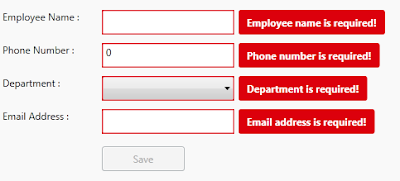
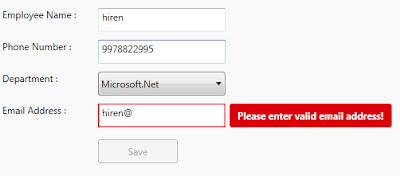
Let's go through step by step to understand validation with mvvm binding and styling the validation template.
Step 1 : First change ErrorToolTip style by customizing the Template.
<ControlTemplate x:Key="ErrorToolTipTemplate_1">

 <ControlTemplate.Resources>

  <Style x:Key="textblockErrorTooltip" TargetType="TextBlock">

   <Setter Property="HorizontalAlignment" Value="Center" />

   <Setter Property="VerticalAlignment" Value="Center" />

   <Setter Property="FontWeight" Value="Bold" />

   <Setter Property="Foreground" Value="White" />

   <Setter Property="Margin" Value="10 0 10 0" />

  </Style>

 </ControlTemplate.Resources>

 <DockPanel LastChildFill="true">

  <Border Height="Auto"

   Margin="5,0,0,0"

   Background="#DC000C"

   CornerRadius="3"

   DockPanel.Dock="right">

    <TextBlock Style="{StaticResource textblockErrorTooltip}"

Text="{Binding ElementName=customAdorner, Path=AdornedElement.(Validation.Errors)[0].ErrorContent}" />

  </Border>

  <AdornedElementPlaceholder Name="customAdorner">

   <Border BorderBrush="#DC000C" BorderThickness="1.3" />

  </AdornedElementPlaceholder>

 </DockPanel>

</ControlTemplate>
As shown in above source, created ControlTemplate and changed the error tooltip style by AddingBorder control in DockPanel, within Border TextBlock placed with Text property binded to the error message set to the property from viewmodel.
changed Backgroud of the border to Red so it will display error message surround with border fill with red color. This will dispaly error on right side of the TextBox control. like :

ErrorTemplate uses adorner layer. which is drawing layer, using adorner layer you can add visual appearance to indicate an error without replacing controltemplate.
AdornedElementPlaceholder is part of the Validation feature of data binding. it specify where a decorated control is placed relative to other elements in the ControlTemplate.
Step 2 : Create TextBox style and set Validation ErrorTemplate.
<Style TargetType="TextBox">

 <Setter Property="HorizontalAlignment" Value="Left" />

 <Setter Property="VerticalAlignment" Value="Top" />

 <Setter Property="Width" Value="150" />

 <Setter Property="Height" Value="30" />

 <Setter Property="Validation.ErrorTemplate"

                 Value="{DynamicResource ErrorToolTipTemplate_1}" />

 <Style.Triggers>

  <Trigger Property="Validation.HasError" Value="true">

   <Setter Property="ToolTip"

Value="{Binding RelativeSource={RelativeSource Self}, Path=(Validation.Errors)[0].ErrorContent}" />

  </Trigger>

 </Style.Triggers>

</Style>
Created style of TargetType=TextBox, and Validation.ErrorTemplate is set to previously created template (DynamicResource ErrorToolTipTemplate)
you have to set Resource using DynamicResource, if your temaplate/style is available at global place (App.xaml)
if your control style and template is created in page itself then set resource using StaticResourcekeyword.
Step 3 : Create ViewModel class, that contains Properties to Bind into view.
public class InputValidationViewModel : ViewModelBase

{

 public InputValidationViewModel()

 {

 }

 private string employeeName;

 public string EmployeeName

 {

  get { return employeeName; }

  set { employeeName = value; RaisePropertyChanged("EmployeeName"); }

 }

 private string email;

 public string Email

 {

  get { return email; }

  set {email = value; RaisePropertyChanged("Email"); }

 }

 private long phoneNumber;

 public long PhoneNumber

 {

  get { return phoneNumber; }

  set { phoneNumber = value; RaisePropertyChanged("PhoneNumber"); }

 }

 private bool IsValidEmailAddress

 {

  get { return emailRegex.IsMatch(Email); }

 }

}
as shown in above code, ViewModel created and added some propeties that need to bind in UserControl.
Step 4 : Implement IDataErrorInfo Interface
public class InputValidationViewModel : ViewModelBase, IDataErrorInfo

{

 private Regex emailRegex = new Regex(@"^([a-zA-Z0-9_\.\-])+\@(([a-zA-Z0-9\-])+\.)+([a-zA-Z0-9]{2,4})+$");

 public InputValidationViewModel()

 {

 }         private string error = string.Empty;

 public string Error

 {

  get { return error; }

 }

 public string this[string columnName]

 {

    get

    {

  error = string.Empty;

  if (columnName == "EmployeeName" && string.IsNullOrWhiteSpace(EmployeeName))

  {

   error = "Employee name is required!";

  }

  else if (columnName == "PhoneNumber" && PhoneNumber == 0)

  {

   error = "Phone number is required!";

  }

  else if (columnName == "PhoneNumber" && PhoneNumber.ToString().Length > 10)

  {

   error = "Phone number must have less than or equal to 10 digits!";

  }

  else if (columnName == "Email" && string.IsNullOrWhiteSpace(Email))

  {

   error = "Email address is required!";

  }

  else if (columnName == "Email" && !IsValidEmailAddress)

  {

   error = "Please enter valid email address!";

  }

  return error;

      }       }

}
IDataErrorInfo has Error property which returns the validation error that does not match the codition.
in above code, i set the error for each propeties by checking the codition, it coditiion is false then set the error for that property.
For valid email validation, created Regex expression to check entered email address is valid ro not.
This error appear on right side of the control that has property binded.
Step 5 : Last, Add TextBox cotrol in View
<TextBox Grid.Row="1"

 Grid.Column="1"

 Text="{Binding EmployeeName,

           Mode=TwoWay,

           UpdateSourceTrigger=PropertyChanged,

    ValidatesOnDataErrors=True}" />
Here EmployeeName proeprty is binded to TextBox control, you have to set ValidatesOnDataErrors=True to throw data error ( entered data is valida or not.)
Mode=TwoWay will allow user to change property from UI as well update UI from ViewModel property.
UpdateSourceTrigger=PropertyChanged will notify changes is updated as soon as the property changes.
If UpdateSourceTrigger is not set, then TextBox was not immediately sent back to the source. Instead, the source was updated only after focus was lost on the TextBox.
This behavior is controlled by a property on the binding called UpdateSourceTrigger.
Example 2 :
In this example, only ControlTemplate is chaned, other things like : ViewModels Property, Controls are same.
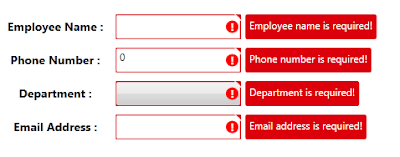
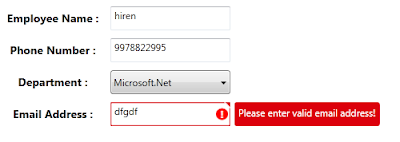
As shown in above image, tooltip style is changed, ! mark with red circle surrounded image is added on the errortemplate.
small triangle added on template, to show top right corner of the control if any data error exists.
below are the template change compare to previous example template :
<Border x:Name="ValidationErrorElement"

 BorderBrush="#FFDB000C"

 BorderThickness="1.2"

 CornerRadius="1"

 ToolTip="{Binding ElementName=customAdorner,

 Path=AdornedElement.(Validation.Errors)[0].ErrorContent}">

 <Grid Width="12"

  Height="12"

  Margin="1,-4,-4,0"

  HorizontalAlignment="Right"

  VerticalAlignment="Top"

  Background="Transparent">

  <Path Margin="1,3,0,0"

        Data="M 1,0 L6,0 A 2,2 90 0 1 8,2 L8,7 z"

        Fill="#FFDC000C" />

  <Path Margin="1,3,0,0"

        Data="M 0,0 L2,0 L 8,6 L8,8"

        Fill="#ffffff" />

 </Grid>

</Border>

<Border Grid.Column="0"

 Width="15"

 Height="15"

 Margin="0 0 3 0"

 HorizontalAlignment="Right"

 VerticalAlignment="Center"

 Background="Red"

 CornerRadius="10"

 ToolTip="{Binding ElementName=customAdorner,

 Path=AdornedElement.(Validation.Errors)[0].ErrorContent}">

 <TextBlock HorizontalAlignment="center"

  VerticalAlignment="center"

  FontWeight="Bold"

  Foreground="white"

  Text="!" />

</Border>
as shown in above code,
In First border, 2 shapes is created using path, this will create Triangle shape to disply on top right corner of the control.
To know more about how to draw shpaes using Path, Please refer Shapes & Drawing in WPF This Link
it will help you to create your custom shapes based on your requirement.
Second border will create red cirlce (by setting CornerRadius proeprty) with ! text wihin cirlce area.
it will display right side of the cotrol, if any data error is there for property.
Conclusion
This way you can create you custom error template for input controls.
Dwonload link
WPF Input Validation Using MVVM的更多相关文章
- 从PRISM开始学WPF(七)MVVM(三)事件聚合器EventAggregator-更新至Prism7.1
原文:从PRISM开始学WPF(七)MVVM(三)事件聚合器EventAggregator-更新至Prism7.1 事件聚合器EventAggregator [7.1updated]除了app部分,没 ...
- WPF学习08:MVVM 预备知识之COMMAND
WPF内建的COMMAND是GOF 提出的23种设计模式中,命令模式的实现. 本文是WPF学习07:MVVM 预备知识之数据绑定的后续,将说明实现COMMAND的三个重点:ICommand Comm ...
- 从PRISM开始学WPF(七)MVVM(三)事件聚合器EventAggregator?
原文:从PRISM开始学WPF(七)MVVM(三)事件聚合器EventAggregator? 从PRISM开始学WPF(一)WPF? 从PRISM开始学WPF(二)Prism? 从PRISM开始学WP ...
- 在 WPF 程序中使用 MVVM 模式
MVVM 模式是一个很久之前的技术了,最近因为一个项目的原因,需要使用 WPF 技术,所以,重新翻出来从前的一段程序,重温一下当年的技术. MVVM 模式 MVVM 实际上涉及三个部分,Model, ...
- (ZZ)WPF经典编程模式-MVVM示例讲解
http://www.cnblogs.com/xjxz/archive/2012/11/14/WPF.html 本篇从两个方面来讨论MVVM模式: MVVM理论知识 MVVM示例讲解 一,MVVM理论 ...
- 从PRISM开始学WPF(六)MVVM(二)Command?
从PRISM开始学WPF(一)WPF? 从PRISM开始学WPF(二)Prism? 从PRISM开始学WPF(三)Prism-Region? 从PRISM开始学WPF(四)Prism-Module? ...
- 从PRISM开始学WPF(六)MVVM(二)Command-更新至Prism7.1
命令绑定(Command) [7.1updated]这一节除了基础app部分,并没有什么变化 什么是Command? 先看下微软官方的说明: Commanding is an input mechan ...
- WPF 从属性赋值到MVVM模式详解
示例源码 这两天学习了一下MVVM模式,和大家分享一下,也作为自己的学习笔记.这里不定义MVVM的概念,不用苍白的文字说它的好处,而是从简单的赋值讲起,一步步建立一个MVVM模式的Simple.通过前 ...
- WPF学习笔记:MVVM模式下,ViewModel如何关闭View?
原文:http://blog.csdn.net/leftfist/article/details/32349731 矫枉过正,从一个极端走向另一个极端.MVVM模式,View只负责呈现,虽然也有后台代 ...
随机推荐
- c#textBox控件限制只允许输入数字及小数点
在textboxd的事件中的 KeyPress 事件,这样双击进入代码:输入以下代码 即可 //判断按键是不是要输入的类型. || () && ( && () e.Ha ...
- CNUTCon2017全球运维技术大会(持续更新中) - 斯达克学院 - 实战驱动的 IT 教育平台 - Powered By EduSoho
CNUTCon2017全球运维技术大会(持续更新中) - 斯达克学院 - 实战驱动的 IT 教育平台 - Powered By EduSoho https://new.stuq.org/cours ...
- 中文分词组件:thulac及jieba试用手记
一.THULAC THULAC由<清华大学自然语言处理与社会人文计算实验室>研制推出的一套中文词法分析工具包.官网地址:http://thulac.thunlp.org,该项目提供了多种语 ...
- Matplotlib新手上路(下)
接上篇继续,这次来演示下如何做动画,以及加载图片 一.动画图 import numpy as np import matplotlib.pyplot as plt import matplotlib. ...
- 微信小程序富文本渲染组件html2wxml及html2wxml代码块格式化在ios下字体过大问题
1.组件使用: 之前微信小程序的富文本渲染组件用的wxParse,对普通富文本确实可以,但是对于代码格式pre标签则无法使用. 下面这个html2wxml很不错,可以支持代码高亮. 详细文档:http ...
- python的匿名函数lambda解释及用法
lambda函数的语法只包含一个语句,如下: lambda arg1,arg2,.....argn:expression(主要是看下面的例子)代码示例: #-*- coding:utf-8 -* ...
- Andorid源码 4.4 TAG
Fetching project platform/frameworks/opt/timezonepickerremote: Counting objects: 11169, doneremote: ...
- EditText自动换行显示内容
默认的EditText是不会自动换行的,通过代码来实现: [java] view plain copy EditText editText = new EditText(this); //设置Edit ...
- 1分钟试用PowerShell 5.0新功能PowerShellGet安装Script Browser和Script Analyzer
微软PowerShell 产品组上周发布了PowerShell 5.0 PowerShellGet功能.有了它,IT 人员可以方便地搜索,安装,更新PowerShell Module.在这篇博客中,我 ...
- linux popen()与system()的区别
linux popen()与system()的区别 popen() 可以在调用程序和POSIX shell /usr/bin/sh 要执行的命令之间创建一个管道(请参阅sh-posix(1) ). p ...