
Android开发---如何操作资源目录中的资源文件3--圆角边框、背景颜色渐变效果、边框颜色
Android开发---如何操作资源目录中的资源文件3
效果图
1、圆角边框
2、背景颜色渐变效果
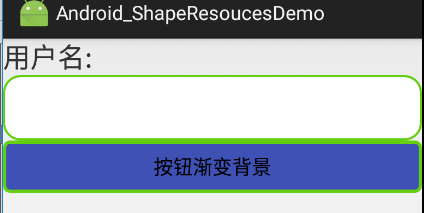
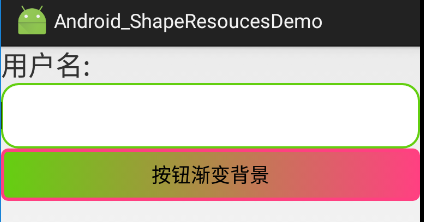
1、activity_main.xml
描述:
定义了一个shape资源管理按钮
<?xml version="1.0" encoding="utf-8"?>

<LinearLayout xmlns:android="http://schemas.android.com/apk/res/android"

    android:id="@+id/activity_main"

    android:layout_width="match_parent"

    android:layout_height="match_parent"

    android:orientation="vertical">

    <Button

        android:layout_width="match_parent"

        android:layout_height="wrap_content"

        android:text="Shape资源管理"

        android:onClick="test_3"

        />

</LinearLayout>
2、MainActivity.java
描述:
页面跳转
package com.example.android_shaperesoucesdemo;

import android.app.Activity;

import android.content.Intent;

import android.graphics.Typeface;

import android.os.Bundle;

import android.view.View;

import android.widget.Button;

public class MainActivity extends Activity {

    @Override

    protected void onCreate(Bundle savedInstanceState) {

        super.onCreate(savedInstanceState);

        setContentView(R.layout.activity_main);

    }

    public void test_3(View view){

        Intent intent = new Intent(this,ShapeActivity.class);

        startActivity(intent);

    }

}
3、activity_shape.xml
描述:
1、定义了一个文本输入框和一个按钮
2、其中文本输入框通过android:background="@drawable/back_shape_solid"引入back_shape_solid.xml中定义的资源,设置背景填充色为白色、边框颜色为绿色、边框为圆角、内边距
3、其中按钮通过android:background="@drawable/button_back_color"引入button_back_color.xml中定义的资源,没点击按钮前填充色为蓝色、边框颜色为绿色、圆角,当点击时,边框颜色变为红色,圆角,背景色从左往右由绿色变为红色
<?xml version="1.0" encoding="utf-8"?>

<LinearLayout xmlns:android="http://schemas.android.com/apk/res/android"

    android:id="@+id/activity_shape"

    android:layout_width="match_parent"

    android:layout_height="match_parent"

    android:orientation="vertical"

    >

    <TextView

        android:layout_width="match_parent"

        android:layout_height="wrap_content"

        android:text="用户名:"

        android:textSize="25dp"

        />

    <EditText

        android:layout_width="match_parent"

        android:layout_height="60dp"

        android:id="@+id/uname"

        android:background="@drawable/back_shape_solid"

        />

    <Button

        android:layout_width="match_parent"

        android:layout_height="wrap_content"

        android:background="@drawable/button_back_color"

        android:text="按钮渐变背景"

        />

</LinearLayout>
4、ShapeActivity.java
描述:
无操作
package com.example.android_shaperesoucesdemo;

import android.app.Activity;

import android.os.Bundle;

public class ShapeActivity extends Activity {

    @Override

    protected void onCreate(Bundle savedInstanceState) {

        super.onCreate(savedInstanceState);

        setContentView(R.layout.activity_shape);

    }

}
5、res资源目录下drawable包中创建一个back_shape_solid.xml文件
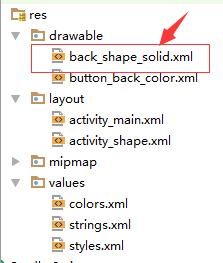
back_shape_solid.xml
描述:
设置了文本框的背景填充色、边框颜色、圆角、边距
<?xml version="1.0" encoding="utf-8"?>

<shape xmlns:android="http://schemas.android.com/apk/res/android">

    <!--整个UI的背景填充色-->

    <solid android:color="@android:color/white"/>

    <!--描边android:dashGap="10sp"

        android:dashWidth="5dp"-->

    <stroke android:color="@color/navicat_color"

        android:width="2dp"/>

    <!--圆角-->

    <corners android:radius="15dp"/>

    <!--内容和边框间距-->

    <padding android:bottom="0dp" android:left="0dp"/>

</shape>
6、res资源目录下drawable包中创建一个button_back_color.xml文件
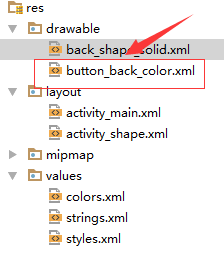
button_back_color.xml
描述:
设置了按钮的填充色、边框、圆角、背景色渐变效果
<?xml version="1.0" encoding="utf-8"?>

<selector xmlns:android="http://schemas.android.com/apk/res/android">

    <item android:state_pressed="false">

        <shape>

            <!--填充色-->

            <solid android:color="@color/colorPrimary"/>

            <!--描边-->

            <stroke android:color="@color/navicat_color"

                android:width="3dp"/>

            <!--圆角-->

            <corners android:radius="5dp"/>

        </shape>

    </item>

    <item android:state_pressed="true">

        <shape>

            <!--描边-->

            <stroke android:color="@color/colorAccent"

                android:width="3dp"/>

            <!--圆角-->

            <corners android:radius="5dp"/>

            <!--渐变背景色-->

            <gradient android:startColor="@color/navicat_color"

                android:endColor="@color/colorAccent"

                android:gradientRadius="3000"/>

        </shape>

    </item>

</selector>
7、res资源目录下values包中修改colors.xml文件
colors.xml
<?xml version="1.0" encoding="utf-8"?>

<resources>

    <color name="colorPrimary">#3F51B5</color>

    <color name="colorPrimaryDark">#303F9F</color>

    <color name="colorAccent">#FF4081</color>

    <color name="navicat_color">#63CF10</color>

</resources>
Android开发---如何操作资源目录中的资源文件3--圆角边框、背景颜色渐变效果、边框颜色的更多相关文章
- Android开发---如何操作资源目录中的资源文件4 ---访问xml的配置资源文件的内容
Android开发---如何操作资源目录中的资源文件4 XML,位于res/xml/,这些静态的XML文件用于保存程序的数据和结构. XmlPullParser可以用于解释xml文件 效果图: 描述: ...
- Android开发 ---如何操作资源目录中的资源文件2
Android开发 ---如何操作资源目录中的资源文件2 一.颜色资源管理 效果图: 描述: 1.改变字体的背景颜色 2.改变字体颜色 3.改变按钮颜色 4.图像颜色切换 操作描述: 点击(1)中的颜 ...
- Android开发---如何操作资源目录中的资源文件
效果图: 1.activity_main.xml <?xml version="1.0" encoding="utf-8"?> <Linear ...
- Android开发 ---如何操作资源目录中的资源文件5 ---Raw资源管理与国际化
效果图: 1.activity_main.xml 描述: 定义两个按钮,一个是Raw资源管理,一个是处理国际化语言,其中i18n表示简体中文 <?xml version="1.0&qu ...
- android开发之-查看、编辑手机sqlite数据库文件-实测
效果图: 1.开始——运行——输入cmd ,输入adb shell,错误:一是“adb不是内部命令或外部命令,也不是可运行的程序或批处理文件”,二是“error:device not found”. ...
- 在/proc文件系统中增加一个目录hello,并在这个目录中增加一个文件world,文件的内容为hello world
一.题目 编写一个内核模块,在/proc文件系统中增加一个目录hello,并在这个目录中增加一个文件world,文件的内容为hello world.内核版本要求2.6.18 二.实验环境 物理主机:w ...
- 创建一个目录info,并在目录中创建一个文件test.txt,把该文件的信息读取出来,并显示出来
/*4.创建一个目录info,并在目录中创建一个文件test.txt,把该文件的信息读取出来,并显示出来*/ #import <Foundation/Foundation.h>#defin ...
- python实现在目录中查找指定文件的方法
python实现在目录中查找指定文件的方法 本文实例讲述了python实现在目录中查找指定文件的方法.分享给大家供大家参考.具体实现方法如下: 1. 模糊查找 代码如下: import os from ...
- 如何查找一个目录中所有c文件的总行数
如何查找一个目录中所有c文件的行数 面试题问到了一题,如何统计wc文件夹下所有文件的行数,包括了子目录. 最后在 https://blog.csdn.net/a_ran/article/details ...
随机推荐
- 使用VueCLI的User Interface Tool(GUI)创建app的图文讲解
(英文原文) 需要安VueCLI3和nodejs. 在terminal输入vue可以看到命令列表: 其中vue ui [options] 就是用于开始和打开vue-cli ui的命令. 使用http: ...
- js时间字符串转为标准时间
//将字符串转换为时间格式,适用各种浏览器,格式如2016-09-09T17:02:37.227"function GetTimeByTimeStr(dateString) { var ti ...
- hammer.js方法总结(只做了一个简单的demo)
html <!DOCTYPE html> <html> <head> <meta charset="UTF-8"> <titl ...
- summary ranges leetcode java
问题描述: Given a sorted integer array without duplicates, return the summary of its ranges. For example ...
- 『计算机视觉』Mask-RCNN_项目文档翻译
基础介绍 项目地址:Mask_RCNN 语言框架:Python 3, Keras, and TensorFlow Python 3.4, TensorFlow 1.3, Keras 2.0.8 其他依 ...
- 浅谈cookie、session
揭秘Cookie: cookie说的直白点就是保存在用户浏览器端的一个键值对,举个例子,你现在登录了京东商城,你把浏览器关闭之后,你再打开京东,你还是可以对你的账户继续操作,已经购买的商品,订单都是可 ...
- python-day76--django-Form组件
django中Form组件 1. 用户请求数据验证 2. 自动生成错误信息 3. 打包用户提交正确信息 4. 错误:保留上次输入内容 5. 定制页面上显示的HTML标签 引入: from django ...
- leetcode-algorithms-28 Implement strStr()
leetcode-algorithms-28 Implement strStr() mplement strStr(). Return the index of the first occurrenc ...
- MongoDB 第一篇
概述 MongoDB是一个高性能,开源,无模式的文档型数据库,使用C++开发.是一个介于关系数据库和非关系数据库之间的产品,是非关系数据库当中功能最丰富,最像关系数据库的.他支持的数据结构非常松散,是 ...
- 在MongoDB中执行查询、创建索引
1. MongoDB中数据查询的方法 (1)find函数的使用: (2)条件操作符: (3)distinct找出给定键所有不同的值: (4)group分组: (5)游标: (6)存储过程. 文档查找 ...