
[qemu] qemu旧的net参数已经不再可用了,新的这样用。
老的命令:
/root/BUILD_qemu/bin/qemu-system-x86_64 -enable-kvm \

    -m 2G \

    -cpu Nehalem -smp cores=,threads=,sockets= \

        -numa node,mem=1G,cpus=-,nodeid= \

        -numa node,mem=1G,cpus=-,nodeid= \

    -display vnc=0.0.0.0: \

    -net nic,vlan=1,model=virtio,macaddr='00:00:00:01:00:01' \

    -net tap,vlan=1,ifname=tap-int,script=no,downscript=no \

    -device virtio-net-pci,netdev=dev1,macaddr='00:00:00:01:00:02',vectors=,mq=on \

    -netdev tap,ifname=tap-,id=dev1,script=no,downscript=no,vhost=on,queues=16 \

    -drive file=disk.img,if=virtio \

    -cdrom /root/CentOS--x86_64-DVD-.iso \

    -boot order=c \
在qemu-2.11-0 会报错如下:
qemu-system-x86_64: -net nic,vlan=,model=virtio,macaddr=:::::: 'vlan' is deprecated. Please use 'netdev' instead.
详细用法:https://qemu.weilnetz.de/doc/qemu-doc.html#Network-options
摘要:
-nic [tap|bridge|user|l2tpv3|vde|netmap|vhost-user|socket][,...][,mac=macaddr][,model=mn]

This option is a shortcut for configuring both the on-board (default) guest NIC hardware and the host network backend in one go.
The host backend options are the same as with the corresponding -netdev options below. The guest NIC model can be set with model=modelname.
Use model=help to list the available device types. The hardware MAC address can be set with mac=macaddr.

The following two example do exactly the same, to show how -nic can be used to shorten the command line length (note that the e1000 is
the default on i386, so the model=e1000 parameter could even be omitted here, too):

qemu-system-i386 -netdev user,id=n1,ipv6=off -device e1000,netdev=n1,mac=:::::

qemu-system-i386 -nic user,ipv6=off,model=e1000,mac=:::::
简单解释:
两个方法:
A,用 -netdev和-device配合,-device需要志明model和mac,已经netdev的名字(这里是n1)是两个配置连接起来。
所有可选的参数见:
[root@D128 j]# /root/BUILD_qemu/bin/qemu-system-x86_64 -device help
不同的设备参数不同,需要查询详细的选项,如e1000e
[root@D128 j]# /root/BUILD_qemu/bin/qemu-system-x86_64 -device e1000e,help

e1000e.rombar=uint32

e1000e.disable_vnet_hdr=uint8 (Do not use virtio headers, perform SW offloads emulation instead)

e1000e.x-pcie-lnksta-dllla=bool (on/off)

e1000e.bootindex=int32

e1000e.multifunction=bool (on/off)

e1000e.romfile=str

e1000e.vlan=int32 (Integer VLAN id to connect to)

e1000e.command_serr_enable=bool (on/off)

e1000e.x-pcie-extcap-init=bool (on/off)

e1000e.addr=int32 (Slot and optional function number, example: 06.0 or )

e1000e.mac=str (Ethernet -byte MAC Address, example: :::::)

e1000e.netdev=str (ID of a netdev to use as a backend)

e1000e.subsys_ven=uint16 (PCI device Subsystem Vendor ID)

e1000e.subsys=uint16 (PCI device Subsystem ID)
B, 使用简化的命令,-nic,功能同A。同样需要指明model和mac。可选参数见:
[root@D128 j]# /root/BUILD_qemu/bin/qemu-system-x86_64 -nic model=help

qemu: Supported NIC models: e1000,e1000-82544gc,e1000-82545em,e1000e,i82550,i82551,i82557a,i82557b,i82557c,i82558a,i82558b,i82559a,i82559b,i82559c,
i82559er,i82562,i82801,ne2k_pci,pcnet,rocker,rtl8139,virtio-net-pci,vmxnet3

[root@D128 j]#
改过之后的启动脚本:
/root/BUILD_qemu/bin/qemu-system-x86_64 -enable-kvm \

    -m 2G \

    -cpu Nehalem -smp cores=,threads=,sockets= \

        -numa node,mem=1G,cpus=-,nodeid= \

        -numa node,mem=1G,cpus=-,nodeid= \

    -display vnc=0.0.0.0: \

    -device e1000e,netdev=dev0,mac='00:00:00:01:00:01' \

    -netdev tap,ifname=tap-int,id=dev0,script=no,downscript=no,vhost=on \

    -device virtio-net-pci,netdev=dev1,mac='00:00:00:01:00:02',vectors=,mq=on \

    -netdev tap,ifname=tap-,id=dev1,script=no,downscript=no,vhost=on,queues=16 \

    -drive file=disk.img,if=virtio \

    -cdrom /root/CentOS--x86_64-DVD-.iso \

    -boot order=c \

    &
-----------------------------------------------------------------------------------------------------------------------
依照如下步骤。虽然能编译,也能用,但是用起来还是有问题的,不清楚为什么。
比如: 1. kvm不好用,运行起来特别慢。2。 旧的image无法boot。
----------------- update ---------------
改了些编译参数,再编译:
[root@D128 qemu-2.12.0-rc3]# yum install ncurses-devel
[root@D128 qemu-2.12.0-rc3]# ./configure --enable-curses --enable-vhost-user --prefix=/root/BUILD_qemu/ --target-list=x86_64-softmmu --disable-gtk --enable-docs --enable-numa --enable-kvm --enable-modules --enable-system --enable-linux-user
支持了什么,configure的输出里都会打印出来。
可能会造成影响的参数包括
--enable-modules --enable-system --enable-linux-user
以上的参数,对效果影响没有区别。。。。
跟其他同事又找了一组设置:
./configure \

    --disable-bluez \

    --disable-brlapi \

    --disable-curses  \

    --disable-debug-tcg \

    --disable-fdt \

    --disable-guest-agent \

--disable-live-block-migration              --disable-qom-cast-debug            \

--disable-sdl              --disable-sparse              --disable-strip         \

--disable-vnc-jpeg              --disable-xen      --enable-docs \

--enable-kvm \

--enable-lzo               --enable-seccomp              --enable-snappy \

--enable-werror           \

--block-drv-ro-whitelist=vmdk,vhdx,vpc,https   \

--block-drv-rw-whitelist=qcow2,raw,file,host_device,nbd,gluster,blkdebug,luks      \

--disable-xen-pci-passthrough --disable-guest-agent-msi              --enable-attr       \

--enable-coroutine-pool              --enable-debug-info             \

--enable-gnutls \

--enable-numa       \

--enable-system \

--enable-tools         \

--enable-vhost-net \

--enable-vhost-vsock     \

--enable-vnc \

--enable-debug \

--tls-priority=NORMAL \

--with-coroutine=ucontext       \

--extra-cflags="-O2 -g -pipe -Wall  -fexceptions \

-fstack-protector-strong --param=ssp-buffer-size= -m64 -mtune=generic -fPIE -DPIE"        \

--extra-ldflags=" -pie -Wl,-z,relro -Wl,-z,now" \

--target-list=x86_64-softmmu
还是不行。。。
再试一次:卸载掉qemu-2.0.0的rpm,安装自编译的qemu到系统目录。
[root@D128 qemu-2.12.-rc3]# yum autoremove qemu qemu-kvm
[root@D128 qemu-2.12.-rc3]# ./configure --enable-curses --enable-vhost-user --target-list=x86_64-softmmu --disable-gtk --enable-docs --enable-numa --enable-kvm --enable-system --enable-modules
还是不行。。。 算了。。。
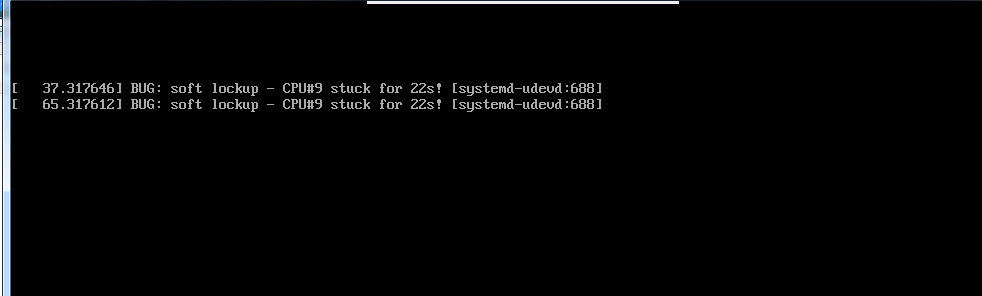
始终提示CPU STUCK
回退一个版本到2.10
[root@D128 qemu]# git branch

  master

* stable-2.10

[root@D128 qemu]# git submodule init

Submodule 'roms/QemuMacDrivers' (git://git.qemu.org/QemuMacDrivers.git) registered for path 'roms/QemuMacDrivers'

[root@D128 qemu]# git submodule update --recursive
再编译:
还是不行。。。。
错误类似:
[   28.050008] BUG: soft lockup - CPU# stuck for 23s! [systemd-udevd:]

[   56.050010] BUG: soft lockup - CPU# stuck for 23s! [systemd-udevd:]

[   84.050006] BUG: soft lockup - CPU# stuck for 23s! [systemd-udevd:]

[  112.050007] BUG: soft lockup - CPU# stuck for 22s! [systemd-udevd:]

[  140.050006] BUG: soft lockup - CPU# stuck for 22s! [systemd-udevd:]

[  168.050009] BUG: soft lockup - CPU# stuck for 22s! [systemd-udevd:]

[  196.050008] BUG: soft lockup - CPU# stuck for 22s! [systemd-udevd:]

[  224.050006] BUG: soft lockup - CPU# stuck for 22s! [systemd-udevd:]

[  252.050014] BUG: soft lockup - CPU# stuck for 22s! [systemd-udevd:]

[  280.050006] BUG: soft lockup - CPU# stuck for 22s! [systemd-udevd:]
退到2.9版本:
2.9也是这样。好的,放弃了。。。。
========================== 我又回来了,@ 2018-04-20 =====================
一直耿耿于怀这个问题。
那么,首先,soft lookup到底是什么问题? 见:
https://www.cnblogs.com/lyhabc/p/6640012.html
简单的说,就是内核出了问题。然后我用的是标准CentOS7的发行版,所以基本上就是驱动的问题。
那么对于一个qemu的虚拟机来说,唯一能做的就是改变硬件,如下:
我去掉了所有的网卡,并且去掉disk的virtio驱动。
果然正常运行了!
/root/BUILD_qemu/bin/qemu-system-x86_64 -enable-kvm \

    -m 2G \

    -cpu Nehalem -smp cores=,threads=,sockets= \

    -numa node,mem=1G,cpus=-,nodeid= \

    -numa node,mem=1G,cpus=-,nodeid= \

    -display vnc=0.0.0.0: \

    -drive file=disk.img \
查看文档,改变一下参数,重新把virtio用起来。
在那之前,再编一个qemu-2.12
[root@D128 qemu-2.12.-rc3]# ./configure --prefix=/root/BUILD_qemu/ --target-list=x86_64-softmmu --disable-gtk --enable-virtfs
不认识virtio,换了参数也不行:
#    -device virtio-blk-pci,scsi=off,bus=pci.,addr=0x7,drive=disk0,bootindex= \

#    -drive file=disk.img,if=none,id=disk0 \
kvm+virtio 就会有问题。很可能是VMware的原因。
--------------------------
差一个题外内容:
What is the difference and relationship between “xx-softmmu” and “xx-linux-user”?

To put it simply, xxx-softmmu will compile qemu-system-xxx, which is an emulated machine for xxx architecture (System Emulation).
When it resets, the starting point will be the reset vector of that architecture. While xxx-linux-user, compiles qemu-xxx,
which allows you to run user application in xxx architecture (User-mode Emulation). Which will seek the user applications'
main function, and start execution from there.

See https://en.wikipedia.org/wiki/QEMU#Operating_modes
https://stackoverflow.com/questions/32435138/what-is-the-difference-and-relationship-between-xx-softmmu-and-xx-linux-user?utm_medium=organic&utm_source=google_rich_qa&utm_campaign=google_rich_qa
[qemu] qemu旧的net参数已经不再可用了,新的这样用。的更多相关文章
- Apache服务停止:信号灯超时时间已到,指定的网络名不再可用
环境说明:Apache2.4.10,Windows Server 2008 R2 问题说明: apache服务用于下载文件,但是在运行一段时间后,突然挂了. 其错误提示如下所示: [error] (7 ...
- apache 指定的网络名不再可用 原因及解决方法
1.出现问题状况: 出现问题网站:http://www.ayyzz.cn/ 前段时间作文大全网出现有时候比较慢,有时候“找不到网页”404错误:另外在error.log里也报错: [Mon May 0 ...
- \\ip 映射 指定的网络名不再可用
问题:\\ip 映射 指定的网络名不再可用 解决方法:服务器端打开服务列表 services.msc 启动两个进程 1.Computer Browser 2. Workstation 就正常了~~ ...
- nginx gunicorn 部署flask,带参数链接不可用的现象(笔记)
微信小程序后台,开启 gunicorn之后屏幕会输出打印结果,一旦关闭shell 带参数链接不可用,只有开启shell才能使用, 一针见血 : 注释掉所有print语句,关闭shell 带参数的链接 ...
- AIO 开始不定时的抛异常: java.io.IOException: 指定的网络名不再可用
一天里会抛出几个这样的错误,但发现服务还在正常的运行. java.io.IOException: 指定的网络名不再可用. at sun.nio.ch.Iocp.translateErrorToIOEx ...
- ubuntu14.04 Samba服务无法访问 可能没有权限 指定的网络名不再可用的问题
按常规配置后,在windows资源管理器中登陆samba服务器,看得到分享目录却无法打开,弹出"无法访问.您可能没有权限使用网络资源,请与这台服务器的管理员联系以查明您是否有访问权限.指定的 ...
- Java1.0的AWT(旧AWT)和Java1.1以后的AWT(新AWT)有着很大的区别
Java1.0的AWT(旧AWT)和Java1.1以后的AWT(新AWT)有着很大的区别,新的AWT克服了旧AWT的很多缺点,在设计上有较大改进,使用也更方便,这里主要介绍新的AWT, 但在Java1 ...
- 关于“在从服务器接收结果时发生传输级错误。 (provider: TCP Provider, error: 0 - 指定的网络名不再可用。)”的解决方法之一
最近几天发现连sql数据库服务器的时候,总是提示“在从服务器接收结果时发生传输级错误. (provider: TCP Provider, error: 0 - 指定的网络名不再可用.)”的错误. 网上 ...
- [qemu] qemu从源码编译安装
环境:CentOS7-1804 下载最新的源码: ┬─[tong@T7:~/Src/thirdparty/PACKAGES]─[:: AM] ╰─>$ axel https://download ...
随机推荐
- Andorid开发(二十二)——获取上下文getApplicationContext()、Activity.this、 getBaseContext
getApplicationContext() //返回应用的上下文,生命周期是整个应用,应用摧毁它才摧毁 Activity.this的context //返回当前activity的上下文,属于act ...
- [firefox] Scrapbook Plus的改进版Scrapbook X
我在两年前的博文<Firefox上一些我用于知识管理的扩展> 里面提到过我在用Scrapbook Plus这个Firefox扩展, 用它来撷取网页构建自己的知识库(可以加标注.可以搜索.可 ...
- 模仿CyclicBarrier,自定义自己屏障类
简介 在这里模仿CyclicBarrier,自定义一个自己多线程屏障类,里面有个计时器count,count为0时,才唤醒线程,否则就await挂起,(没错就是用的object类的挂起和唤醒全部线程方 ...
- 【WPF】自定义形状的按钮Button
需求:做一个如下图所示的多边形按钮. <!-- 特殊形状的按钮 --> <Grid> <Polygon Points="0,0 140,0 190,42 140 ...
- Odoo 8 Graph 视图 之 雷达图 (Radar\Spider)
据说7.0是有Radar图的,但是8以后被阉割掉了.自己动手 ,丰衣足食. 经过一天的努力,雷达图现已成功加入群共享套餐.
- c++ clr编译dll在c#调用时出现“试图加载不正确的格式”“找不到dll”错误的解决
用depends发现缺了一堆API-MS-WIN什么的dll,网上查找是因为少了VC++2010,VC++2015等一系列,装好后仍然不行,原来这种错误并不是该原因导致的,也并不缺少那些dll(dep ...
- php 页面间传递数据
b.php <?php function getClientIP() { if (getenv("HTTP_CLIENT_IP")) $ip = getenv("H ...
- [IR] Concept Search and PLSA
[Topic Model]主题模型之概率潜在语义分析(Probabilistic Latent Semantic Analysis) 感觉LDA在实践中的优势其实不大,学好pLSA才是重点 阅读笔记 ...
- 【zheng阅读系列】shiro权限管理
一.配置文件 upms-server/springMVC-servlet.xml <?xml version="1.0" encoding="UTF-8" ...
- 跟bWAPP学WEB安全(PHP代码)--终结篇:文件目录遍历、文件上传、SSRF、CSRF、XXE、文件包含
前言 过年过的很不顺,家里领导和我本人接连生病,年前腊月29才都治好出院,大年初六家里的拉布拉多爱犬又因为细小医治无效离开了,没能过年回家,花了好多钱,狗狗还离世了.所以也就没什么心思更新博客.今天初 ...