
ElasticSearch6.2.3安装Head插件
1、环境
Linux centos7
elasticsearch-head的zip包,github网址如下:https://github.com/mobz/elasticsearch-head
nodejs的linux对应位数下载:https://nodejs.org/en/download/
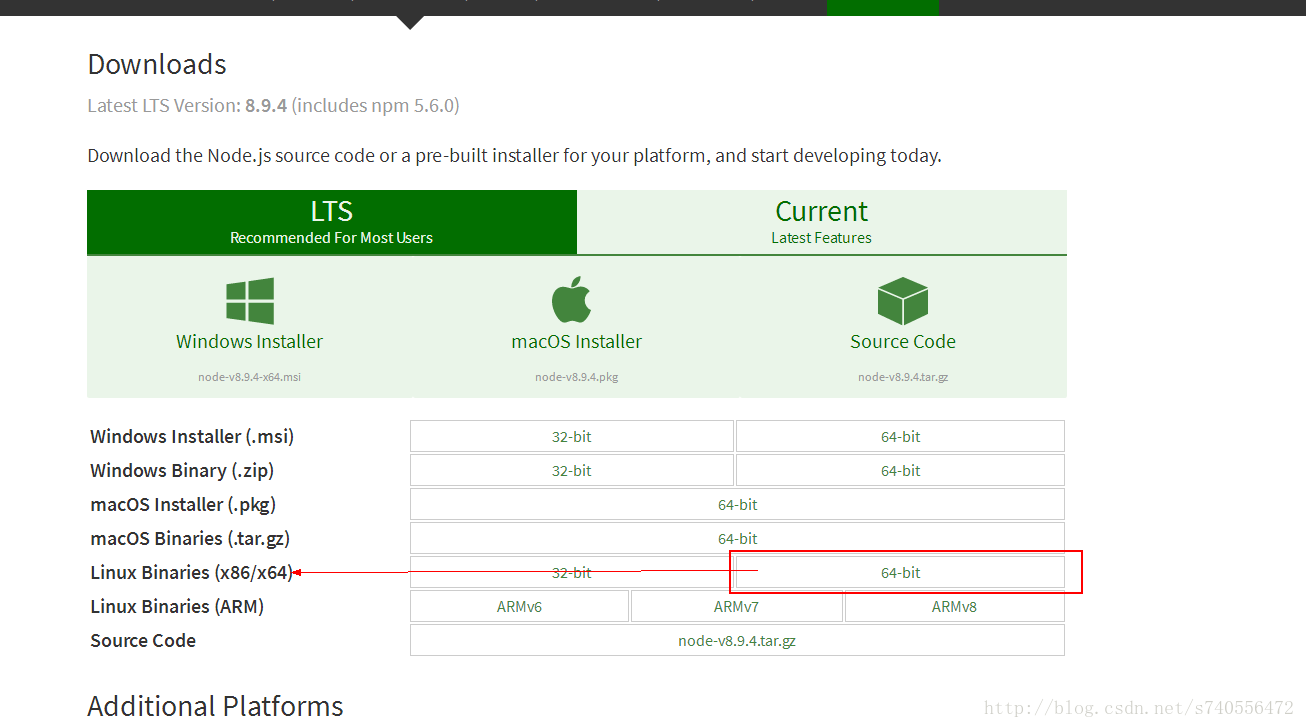
2、安装nodejs
解压后如下图所示:
进入bin执行下面的三个可执行文件:

[root@mycentos bin]# ./node -v

[root@mycentos bin]# ./npm -v

[root@mycentos bin]# ./npx -v
执行./npm -v会报错如下:
/usr/bin/env: node: 没有那个文件或目录
此时需要配置环境变量即可,修改/etc/profile,行尾追加如下命令:
[root@mycentos ~]# vim /etc/profile

export NODE_HOME=/opt/nodejs/node-v8.9.4-linux-x64/

export PATH=$PATH:$NODE_HOME/bin

export NODE_PATH=$NODE_HOME/lib/node_modules
#执行命令生效:
[root@mycentos ~]# source /etc/profile
3、安装elasticsearch-head
进入到elasticsearch-head主目录执行:
[elastic@mycentos elasticsearch-head-master]$ npm install
安装过程中出现错误:
Please report this full log at https://github.com/Medium/phantomjs
npm ERR! Darwin 15.0.0
npm ERR! argv "/usr/local/bin/node" "/usr/local/bin/npm" "install"
npm ERR! node v4.4.3
npm ERR! npm v3.10.9
npm ERR! code ELIFECYCLE
npm ERR! phantomjs-prebuilt@2.1.14 install: `node install.js`
npm ERR! Exit status 1
npm ERR!
npm ERR! Failed at the phantomjs-prebuilt@2.1.14 install script 'node install.js
解决方案如下:
#忽略脚本继续进行安装

npm install phantomjs-prebuilt@2.1. --ignore-scripts
最终安装成功!成功后当前目录多了一个node_modules文件夹。
4、配置
(1)配置Head主目录下的Gruntfile.js,默认文件中是没有hostname属性的,我们需要手动添加:
connect: {

          server: {

                   options: {

                        port: 9100,

                        base: '.',

                        keepalive: true,

                        hostname: '*'

                    }

          }

  }
(2)配置elasticsearch 的启动配置文件:
为什么需要修改配置文件:
head插件连接elasticsearch需要注意的点:
因为head插件是一个独立进程,启动后是一个独立的服务器外加端口,比如我的虚拟机ip地址:http://192.168.0.111:9100/
而elasticsearch启动后也是一个独立的进程,ip地址:http://192.168.0.111:9200/
这样两个独立进程,虽然服务器ip地址相同,但是端口不同,此时会发生跨域的情况。。
于是官方给出这样一段话,我们在对elasticsearch启动的时候追加两个配置文件属性即可防止跨域。
#在文件末尾添加即可
http.cors.enabled: true

http.cors.allow-origin: "*"
5、启动Head插件
#切回到head的主目录下,执行如下命令
[elastic@mycentos elasticsearch-head-master]$ npm run start

然后在浏览中打开:http://localhost:9100

安装完毕!
ElasticSearch6.2.3安装Head插件的更多相关文章
- (新)elasticsearch6.0版本安装head插件
ES6.0版本安装head插件 1.1 前言 不知道是我电脑问题还是最近的开源软件都比较**,mysql和elasticsearch新版本变动都比较大. elasticsearch6.0貌似已经不支持 ...
- elasticsearch6.0版本安装head插件
ES6.0版本安装head插件 1.1 前言 不知道是我电脑问题还是最近的开源软件都比较**,mysql和elasticsearch新版本变动都比较大. elasticsearch6.0貌似已经不支持 ...
- ES之一:Elasticsearch6.4 windows安装 head插件ik分词插件安装
准备安装目标:1.Elasticsearch6.42.head插件3.ik分词插件 第一步:安装Elasticsearch6.4 下载方式:1.官网下载 https://www.elastic.co/ ...
- (转)elasticsearch6.0版本安装head插件
1.1 前言 不知道是我电脑问题还是最近的开源软件都比较**,mysql和elasticsearch新版本变动都比较大. elasticsearch6.0貌似已经不支持命令行安装head插件了,反正我 ...
- Elasticsearch6.2.1安装elasticsearch-sq插件
参考 https://github.com/NLPchina/elasticsearch-sql 1.下载插件 wget https://github.com/NLPchina/elasticsear ...
- ELK(Elasticsearch6.0以上版本head插件安装)
参考:https://www.cnblogs.com/Onlywjy/p/Elasticsearch.html Elasticsearch6.0不能使用命令直接安装head插件 修改配置文件/etc/ ...
- elasticsearch6.6.0安装配置及elasticsearch-head插件安装
一.最小化安装centos7.6 cat /etc/redhat-release 二.配置网络,可以上外网 三.安装常用命令工具,修改系统时区,校对系统时间,关闭selinux,关闭firewalld ...
- windows下安装elasticsearch-6.4.3和elasticsearch-head插件
windows下安装elasticsearch-6.4.3和elasticsearch-head插件 博客分类: elasticsearch es ElasticSearch下载地址:https:/ ...
- elasticsearch-6.0.1安装
elasticsearch-6.0.1安装 0. 介绍: ElasticSearch是一个基于Lucene的搜索服务器.它提供了一个分布式多用户能力的全文搜索引擎:是目前全文搜索引擎的首选. ...
随机推荐
- maven assembly plugin使用
使用场景 在使用maven来管理项目时,项目除了web项目,还有可能为控制台程序,一般用于开发一些后台服务的程序.最近在工作中也遇到了这种场景,使用quartz开发一个任务调度程序.程序中依赖很多ja ...
- Linux内核编译指定输出目录
# kbuild supports saving output files in a separate directory.# To locate output files in a separate ...
- WPF .NET 4.0 OpenClipboard 失败 (异常来自 HRESULT:0x800401D0 (CLIPBRD_E_CANT_OPEN)) BUG解决
在项目 App.xaml 文件下 => Application 节点=> 添加 DispatcherUnhandledException="Application_Dispa ...
- easyui treegrid 动态展开数据(暂记)
ClassifyAdminSynMsgSvr.GetCLFLList("<%=CurUTag %>", 1, "", function (ret) ...
- LeetCode 112 Minimum Depth of Binary Tree
Given a binary tree, find its minimum depth. The minimum depth is the number of nodes along the shor ...
- 运行gedit报No protocol specified
No protocol specifiedxhost: unable to open display ":0" 这是因为在Xserver默认情况下,不允许Linux非当前登录用户( ...
- tensorflow的assgin方法
官网API是这么说的 This operation outputs a Tensor that holds the new value of 'ref' after the value has bee ...
- python basic
#遍历一个序列,很多传统语言过来的,习惯用下标遍历,Python中序列是可迭代的,直接for即可! colors=['red','green','blue','yellow'] for color i ...
- 把MP3保存到数据库中
使用JdbcUtils得到连接con java.sql包下的Interface Blob----其实现类SerialBlob Blob是一个可以存储二进制文件的容器. BLOB常常是数据库中用来存储二 ...
- tortoisegit 常见错误disconnected no supported authentication methods available(server sent: publickey)
按如图操作 如果不能应用,Enable Proxy Server选中,再点击下面的应用及确定. 操作完上一部,用tortoisegit 下拉一次(git pull),即可解决