
Hot Plug Detection, DDC, and EDID
Hot Plug Detection, DDC, and EDID
DataPro Tech Info > Hot Plug Detection, DDC, and EDID
Hot Plugging
A convenient feature of most modern displays is that they can be "hot plugged" into a source device while both are powered on, and will immediately become active with the correct display settings.
This behavior is made possible by three features: Hot Plug Detection, the Display Data Channel, and Extended Display Identification Data.
Index
What is Hot Plug Detection?
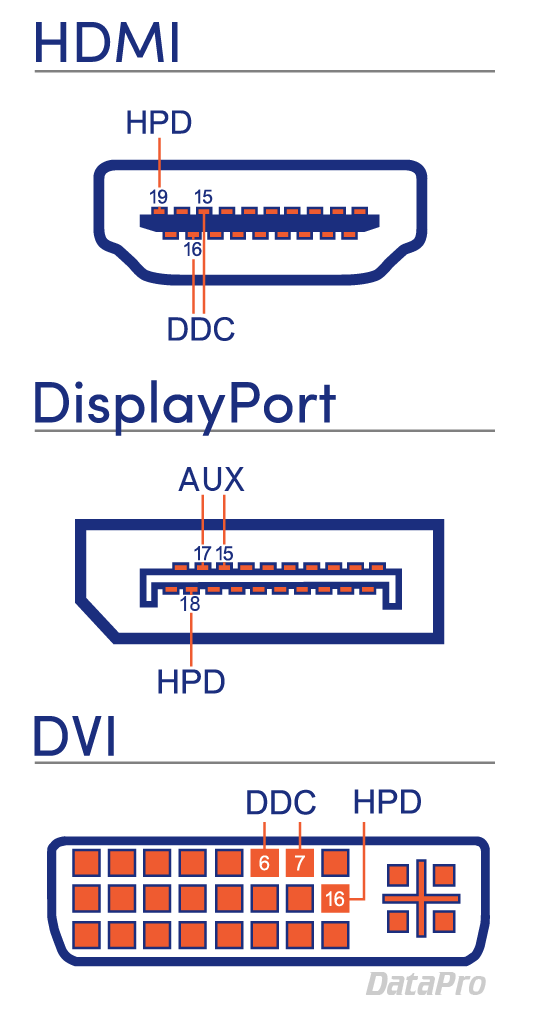
"Hot Plugging" a display into a source means the devices are connected while both are powered on. This differs from older technology which often needed to be "cold-plugged" with one or both devices powered off. Hot Plug Detect or "HPD" is a feature of the HDMI, DisplayPort, and DVI specifications. Typically it relies on a single pin in the connector making contact, which initiates the process.
What is DDC?
The DDC, or Display Data Channel, describes both the protocol and physical path used by the source and display to communicate. It is typically assigned to a pin or pins on the interface, and carries the EDID.
Instead of a dedicated DDC, DisplayPort uses a multifunction "AUX Channel" that serves as both a medium for user data (typically USB), and a means to transmit EDID and other topology information.
What is EDID?
EDID (Extended Display Identification Data) is information provided by the display to describe its capabilities and requirements to the source device. It contains information such as the manufacturer, serial number, maximum resolution, refresh rate, and color spaces.
Hot Plug Detection, DDC, and EDID的更多相关文章
- EDID:识别和解决常见问题指南
随着 HDMI.DVI 和 DisplayPort 的迅速采用,专业视音频行业正继续从模拟向数字视频技术转换.虽然在很大程度上取得了成功,但在向最终用户提供稳定.无故障的视频系统时,这种转变仍带来了诸 ...
- HDMI原理图信号PIN脚
HDMI(19Pin)/DVI(16 pin)的功能是热插拔检测(HPD),这个信号将作为主机系统是否对HDMI/DVI是否发送TMDS信号的依据.HPD是从显示器输出送往计算机主机的一个检测信号.热 ...
- HDMI信号解析
参考资料:http://blog.sina.com.cn/s/blog_6cfd49b00102w00i.html: http://blog.csdn.net/gtkknd/article/detai ...
- HDMI/DVI 显示器热插拔与检测原理(HPD)
HDMI(19Pin)/DVI(16 pin)的功能是热插拔检测(HPD),这个信号将作为主机系统是否对HDMI/DVI是否发送TMDS信号的依据.HPD是从显示器输出送往计算机主机的一个检测信号.热 ...
- 转HDMI
HDMI协议解析 2017年06月18日 14:19:27 阅读数:2987 转载请标明出处floater的csdn blog,http://blog.csdn.net/flaoter 本文从软件工程 ...
- HDMI之CEC DDC学习笔记(可能有误)
1 HDMI的音视频通路,有待学习: 2 DDC通路,大致是个IIC接口,读取上游器件的EDID或者E-EDID数据: EDID的前128字节数据格式如下:(可能有不同版本,格式可能有区别)
- HDMI EDID解读
现在的显示设备比如显示器,电视等都HDMI接口,那通常每个HDMI接口都保留有一份EDID数据,这个数据可以存在程序里面由系统启动过程中来初始化,更常见的做法是每个HDMI口会有一个EEPROM来保存 ...
- 【转】EDID的简介和解析
转自:https://www.cnblogs.com/beyond-rxl/p/9266997.html 一.EDID简介 EDID: Extended Display Identification ...
- HDMI EDID 处理过程
DDC的参数 EDID是一种VESA 标准数据格式,其中包含有关监视器及其性能的参数,包括供应商信息.最大图像大小.颜色设置.厂商预设置.频率范围的限制以及显示器名和序列号的字符串.EDID数据标准: ...
随机推荐
- iOS画折线图
代码例子效果: 下载地址:http://download.csdn.net/detail/qqmcy/6983187 LineChartViewDemo.h #import <UIKit/UI ...
- zookeeper频繁异常问题分析
Reference: https://blog.csdn.net/xjping0794/article/details/77784171 1.1 操作系统信息1.1.1 ...
- PentesterLab渗透演练平台
转载自: https://www.blackh4t.org/archives/1143.html http://www.91ri.org/5958.html 1. 什么是WebApp Pen ...
- Spring-boot(二)yml文件的使用
上一章创建了一个简单的springboot项目,配置可以说非常的简单. 不过,在实际开发中不可能都用默认的配置,还是需要根据自己的实际项目需求有自定义的配置的. 比如:端口号需要变更,模板引擎的缓存开 ...
- 浏览器关闭、刷新、关闭标签事件,兼容IE8,chrome,firefox
<!DOCTYPE HTML PUBLIC "-//W3C//DTD HTML 4.0 Transitional//EN"> <html> <head ...
- java 汉诺塔实现自动演示
1.增加计时功能,显示用户完成移动盘子所花费的时间 2.用户可以设置最大和最小盘子的大小 3.用户可以选择播放和暂停背景音乐 4.用户可以设置盘子的数目 5.用户可以设置盘子的颜色以及背景的颜色 6. ...
- numpy的介绍——总览
为什么有numpy这个库呢? 1. 准安装的Python中用列表(list)保存一组值,可以用来当作数组使用,不过由于列表的元素可以是任何对象,因此列表中所保存的是对象的指针.这样为了保存一个简单的[ ...
- Spring 3 Java Based Configuration with @Value
Springsource has released the Javaconfig Framework as a core component of Spring 3.0. There is a tre ...
- linux环境下,对于一个大文件,如何查看其中某行的内容
需求说明: 今天在做mysql数据导入的过程中,导入到最后有一个报错,报某张表不存在.然后就想看看这行到底是在做什么操作的时候报的错误. 报错信息: [mysql@host---- ~]$ cat n ...
- Nuxt.js项目实战
感悟 经过几个周六周日的尝试,终于解决了服务端渲染中的常见问题,当SEO不在是问题的时候,或许才是我们搞前端的真正的春天,其中也遇到了一些小坑,Nuxt.js官方还是很给力的,提issue后很积极的给 ...