
js中的offsetLeft和style.left
(1)style.left是带单位"px"的,而offsetLeft没有单位,另外,style.left必须是内联样式,或者在JS中通过style.left赋值,否则取得的将为空字符串(在内部样式和外部样式中指定left是无效的)
(2)如果没有已经定位的父元素,那么offsetLeft指向的是文档(document)的左边缘
<!DOCTYPE html>

<html lang="en">

<head>

    <meta charset="UTF-8">

    <title>OFFSET</title>

    <style>

        #div1{

            height: 500px;

            width:500px;

            border: 1px solid red;

        }

        #div2{

            width: 100px;

            height: 100px;

            background: blue;

            margin-left: 100px;

        }

    </style>

</head>

<body>

    <div id="div1">

        <div id="div2"></div>

    </div>

    <button onclick="handle()">click</button>

    <script>

        function handle(){

            var d2 = document.getElementById("div2");

            alert(d2.offsetLeft);  //

            console.log(d2.style.left)  //打印空白

        }

    </script>

</body>

</html>
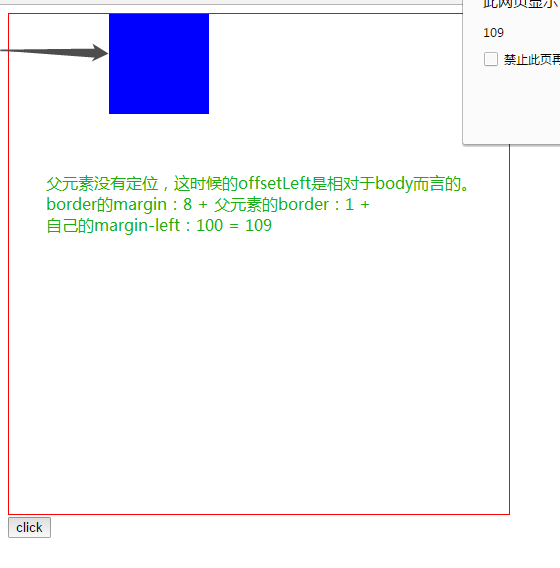
(3)父元素相对定位(代码结构如上,就是父元素增加position:relative)子元素的offsetLeft是相对于父元素
        #div1{

            height: 500px;

            width:500px;

            border: 1px solid red;

            position: relative;

        }

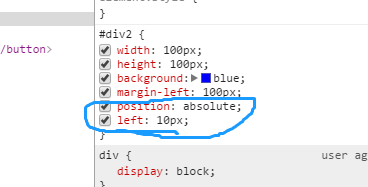
子元素增加了position:absolute和left:10px; offsetLeft依然是相对于父
(4)获取offsetLeft、offsetTop、offsetWidth、offsetHeight
<!DOCTYPE html>

<html lang="en">

<head>

    <meta charset="UTF-8">

    <title>OFFSET</title>

    <style>

        #div1{

            height: 500px;

            width:500px;

            border: 1px solid red;

            position: relative;

        }

        #div2{

            width: 100px;

            height: 100px;

            background: blue;

            margin-left: 100px;

            position: absolute;

        }

    </style>

</head>

<body>

    <div id="div1">

        <div id="div2"></div>

    </div>

    <button onclick="handle()">click</button>

    <script>

        function handle(){

            var d2 = document.getElementById("div2");

            console.log(offset(d2));

        }

          function offset(elem){

            var obj={

                left:elem.offsetLeft,

                top:elem.offsetTop,

                width:elem.offsetWidth,

                height:elem.offsetHeight

            }

            return obj;

  }

    </script>

</body>

</html>

(5)offsetParent的作用
<!DOCTYPE html>

<html lang="en">

<head>

    <meta charset="UTF-8">

    <title>OFFSET</title>

    <style>

        #div1{

            height: 500px;

            width:500px;

            border: 1px solid red;

            position: relative;

        }

        #div2{

            width: 100px;

            height: 100px;

            background: blue;

            margin-left: 100px;

            position: absolute;

        }

    </style>

</head>

<body>

    <div id="div1">

        <div id="div2"></div>

    </div>

    <button onclick="handle()">click</button>

    <script>

        function handle(){

            var d2 = document.getElementById("div2");

            console.log(offset(d2));

        }

        function offset(elem){

            var obj={

                left:elem.offsetLeft,

                top:elem.offsetTop,

                width:elem.offsetWidth,

                height:elem.offsetHeight

            }

           while(elem != document.body){

                elem = elem.offsetParent ;

                console.log(elem);

                obj.left += elem.offsetLeft ;  //得到是元素距离视口的左边距和上边距(不包括border)

                obj.top += elem.offsetTop ;

            }

            return obj;

}

    </script>

</body>

</html>
解释:
偏移量(offset dimension)是javascript中的一个重要的概念。涉及到偏移量的主要是offsetLeft、offsetTop、offsetHeight、offsetWidth这四个属性。当然,还有一个偏移参照——定位父级offsetParent。本文将详细介绍该部分内容

定位父级
在理解偏移大小之前,首先要理解offsetParent。人们并没有把offsetParent翻译为偏移父级,而是翻译成定位父级,很大原因是offsetParent与定位有关
定位父级offsetParent的定义是:与当前元素最近的经过定位(position不等于static)的父级元素,主要分为下列几种情况
【1】元素自身有fixed定位,offsetParent的结果为null
当元素自身有fixed固定定位时,我们知道固定定位的元素相对于视口进行定位,此时没有定位父级,offsetParent的结果为null
[注意]firefox浏览器有兼容性问题
<div id="test" style="position:fixed"></div>

<script>

//firefox并没有考虑固定定位的问题,返回<body>,其他浏览器都返回null

console.log(test.offsetParent);

</script>
【2】元素自身无fixed定位,且父级元素都未经过定位,offsetParent的结果为<body>
<div id="test"></div>

<script>

console.log(test.offsetParent);//<body>

</script>
【3】元素自身无fixed定位,且父级元素存在经过定位的元素,offsetParent的结果为离自身元素最近的经过定位的父级元素
<div id="div0" style="position:absolute;">

    <div id="div1" style="position:absolute;">

        <div id='test'></div>

    </div>

</div>

<script>

console.log(test.offsetParent);    //<div id="div1">

</script>
【4】<body>元素的parentNode是null
console.log(document.body.offsetParent);//null
IE7-浏览器Bug
对于定位父级offsetParent来说,IE7-浏览器存在以下bug
【bug1】当元素本身经过绝对定位或相对定位,且父级元素无经过定位的元素时,IE7-浏览器下,offsetParent是<html>
<div id="test" style="position:absolute;"></div>

<script>

//IE7-浏览器返回<html>,其他浏览器返回<body>

console.log(test.offsetParent);

</script>
<div id="test" style="position:relative;"></div>

<script>

//IE7-浏览器返回<html>,其他浏览器返回<body>

console.log(test.offsetParent);

</script>
<div id="test" style="position:fixed;"></div>

<script>

//firefox并没有考虑固定定位的问题,返回<body>,其他浏览器都返回null

console.log(test.offsetParent);

</script>
【bug2】如果父级元素存在触发haslayout的元素或经过定位的元素,且offsetParent的结果为离自身元素最近的经过定位或触发haslayout的父级元素
[注意]关于haslayout的详细信息移步至此
<div id="div0" style="display:inline-block;">

    <div id='test'></div>

</div>

<script>

//IE7-浏览器返回<div id="div0">,其他浏览器返回<body>

console.log(test.offsetParent);

</script>
<div id="div0" style="position:absolute;">

    <div id="div1" style="display:inline-block;">

        <div id='test'></div>

    </div>

</div>

<script>

//IE7-浏览器返回<div id="div1">,其他浏览器返回<div id="div0">

console.log(test.offsetParent);

</script>
<div id="div0" style="display:inline-block;">

    <div id="div1" style="position:absolute;">

        <div id='test'></div>

    </div>

</div>

<script>

//所有浏览器都返回<div id="div1">

console.log(test.offsetParent);

</script>
偏移量
偏移量共包括offsetHeight、offsetWidth、offsetLeft、offsetTop这四个属性
offsetWidth
offsetWidth表示元素在水平方向上占用的空间大小,无单位(以像素px计)
offsetWidth = border-left-width + padding-left + width + padding-right + border-right-width;
offsetHeight
offsetHeight表示元素在垂直方向上占用的空间大小,无单位(以像素px计)
offsetHeight = border-top-width + padding-top + height + padding-bottom + border-bottom-width
<div id="test" style="width:100px; height:100px; padding:10px; margin:10px; border:1px solid black;"></div>

<script>

//122=1+10+100+10+1

console.log(test.offsetWidth);

console.log(test.offsetHeight);

</script>
[注意]如果存在垂直滚动条,offsetWidth也包括垂直滚动条的宽度;如果存在水平滚动条,offsetHeight也包括水平滚动条的高度
<div id="test" style="width:100px; height:100px; padding:10px; margin:10px; border:1px solid black; overflow: scroll;"></div>

<script>

//IE8-浏览器将垂直滚动条的宽度计算在width宽度和height高度中,width和height的值仍然是100px;

//而其他浏览器则把垂直滚动条的宽度从width宽度中移出,把水平滚动条的高度从height高度中移出,则滚动条宽度为17px,width宽度和height高度为剩下的83px

if(window.getComputedStyle){

    console.log(getComputedStyle(test).width,getComputedStyle(test).height)//83px

}else{

    console.log(test.currentStyle.width,test.currentStyle.height);//100px

}

//122=1+10+100+10+1

console.log(test.offsetWidth,test.offsetHeight);

</script>
offsetTop
offsetTop表示元素的上外边框至offsetParent元素的上内边框之间的像素距离
offsetLeft
offsetLeft表示元素的左外边框至offsetParent元素的左内边框之间的像素距离
<div id="out" style="padding: 5px;position: relative;margin: 6px;border:1px solid black">

    <div id="test" style="width:100px; height:100px; margin:10px;"></div>

</div>

<script>

//15=test.marginTop(10) + out.paddingTop(5)

alert(test.offsetTop);

//15=test.marginLeft(10) + out.paddingLeft(5)

alert(test.offsetLeft);

</script>
IE7-Bug
IE7-浏览器在offsetTop属性的处理上存在bug
【1】若父级设置position: relative,则在IE7-浏览器下,offsetTop值为offsetParent元素的paddingBottom值
<div id="out" style="padding: 5px;position: relative;">

    <div id="test" style="width:100px; height:100px; margin:10px;"></div>

</div>

<script>

//其他浏览器返回15(5+10),而IE7-浏览器返回5

console.log(test.offsetTop);

</script>
【2】若父级设置position: aboslute(或其他触发haslayout的条件),offsetTop值为offsetParent元素的paddingBottom值和当前元素的marginTop值的较大值
<div id="out" style="padding: 5px;position:absolute;">

    <div id="test" style="width:100px; height:100px; margin:10px;"></div>

</div>

<script>

//其他浏览器返回15(5+10),而IE7-浏览器返回10(10和5的较大值)

console.log(test.offsetTop);

</script>
页面偏移
要知道某个元素在页面上的偏移量,将这个元素的offsetLeft和offsetTop与其offsetParent的相同属性相加,并加上offsetParent的相应方向的边框,如此循环直到根元素,就可以得到元素到页面的偏移量
[注意]在默认情况下,IE8-浏览器下如果使用currentStyle()方法获取<html>和<body>(甚至普通div元素)的边框宽度都是medium,而如果使用clientLeft(或clientTop)获取边框宽度,则是实际的数值
html,body{border: 0;}

body{margin:0;}
function getElementLeft(element){

    var actualLeft = element.offsetLeft;

    var current = element.offsetParent;

    while(current != null){

        actualLeft += current.offsetLeft + current.clientLeft;

        current = current.offsetParent;

    }

    return actualLeft + 'px';

}

function getElementTop(element){

    var actualTop = element.offsetTop;

    var current = element.offsetParent;

    while(current != null){

        actualTop += current.offsetTop + current.clientTop;

        current = current.offsetParent;

    }

    return actualTop + 'px';

}
<div style="padding: 20px;border:1px solid black;position:absolute;">

    <div id="test" style="width:100px; height:100px; margin:10px;"></div>

</div>

<script>

//其他浏览器返回31(10+20+1),而IE7-浏览器返回21((20和10的较大值)+1)

console.log(getElementTop(test));

//所有浏览器返回31(10+20+1)

console.log(getElementLeft(test));

</script>
注意事项
【1】所有偏移量属性都是只读的
<div id="test" style="width:100px; height:100px; margin:10px;"></div>

<script>

console.log(test.offsetWidth);//100

//IE8-浏览器会报错,其他浏览器则静默失败

test.offsetWidth = 10;

console.log(test.offsetWidth);//100

</script>
【2】如果给元素设置了display:none,则它的偏移量属性都为0
<div id="test" style="width:100px; height:100px; margin:10px;display:none"></div>

<script>

console.log(test.offsetWidth);//0

console.log(test.offsetTop);//0

</script>
【3】每次访问偏移量属性都需要重新计算
<div id="test" style="width:100px; height:100px; margin:10px;"></div>

<script>

console.time("time");

for(var i = 0; i < 100000; i++){

    var a = test.offsetWidth;

}

console.timeEnd('time');//65.129ms

</script>
<div id="test" style="width:100px; height:100px; margin:10px;"></div>

<script>

console.time("time");

var a = test.offsetWidth;

for(var i = 0; i < 100000; i++){

    var b = a;

}

console.timeEnd('time');//1.428ms

</script>
由上面代码对比可知,重复访问偏移量属性需要耗费大量的性能,所以要尽量避免重复访问这些属性。如果需要重复访问,则把它们的值保存在变量中,以提高性能
js中的offsetLeft和style.left的更多相关文章
- vue.js中内联样式style三元表达式
<span v-bind:style="{'display':config.isHaveSearch ? 'block':'none'}" >搜索</span&g ...
- JS中style.display和style.visibility的区别
在JS中可以通过设置style.display或者style.visibility属性来控制元素是否显示,在style.display=block和style.visibility=visible的时 ...
- js中style.display=""无效的解决方法
本文实例讲述了js中style.display=""无效的解决方法.分享给大家供大家参考.具体解决方法如下: 一.问题描述: 在js中我们有时想动态的控制一个div显示或隐藏或更多 ...
- JS中offsetLeft,Left,clientLeft的区别(纯转贴)
假设 obj 为某个 HTML 控件. obj.offsetTop 指 obj 相对于版面或由 offsetParent 属性指定的父坐标的计算上侧位置,整型,单位像素. obj.offsetLeft ...
- js中对style中的多个属性进行设值
js中对style中的多个属性进行设值: 看一下案例自然就明白: document.getElementById("my_wz1").style.cssText="bac ...
- js中style,currentStyle和getComputedStyle的区别以及获取css操作方法
在js中,之前我们获取属性大多用的都是ele.style.border这种形式的方法,但是这种方法是有局限性的,该方法只能获取到行内样式,获取不了外部的样式.所以呢下面我就教大家获取外部样式的方法,因 ...
- 一文看懂js中元素偏移量(offsetLeft,offsetTop,offsetWidth,offsetHeight)
偏移量(offset dimension) 偏移量:包括元素在屏幕上占用的所有可见空间,元素的可见大小有其高度,宽度决定,包括所有内边距,滚动条和边框大小(注意,不包括外边距). 以下4个属性可以获取 ...
- javascript中无法通过div.style.left获取值的问题
一.问题总结: 样式必须直接写在元素内部才能通过div.style.left直接获取属性值(也就是必须是内联样式才行),定义在css中的样式不能通过这种方式获取. 让元素移动到200停止 setTim ...
- js中的各种宽高以及位置总结
在javascript中操作dom节点让其运动的时候,常常会涉及到各种宽高以及位置坐标等概念,如果不能很好地理解这些属性所代表的意义,就不能理解js的运动原理,同时,由于这些属性概念较多,加上浏览器之 ...
随机推荐
- 腾讯云Badjs镜像使用入门
版权声明:本文由王少飞 原创文章,转载请注明出处: 文章原文链接:https://www.qcloud.com/community/article/498929001487125840 来源:腾云阁 ...
- 计算字符串相似度算法—Levenshtein
什么是Levenshtein Levenshtein 距离,又称编辑距离,指的是两个字符串之间,由一个转换成另一个所需的最少编辑操作次数.许可的编辑操作包括将一个字符替换成另一个字符,插入一个字符,删 ...
- postgresql----聚合函数
聚合函数是从一组输入中计算出一个结果的函数. 测试表 test=# \d tbl_test Table "public.tbl_test" Column | Type | Modi ...
- VBS数组导出到Excel
<script language="vbscript"> dim arr(9999,4) for i=0 to 9999 for j = 0 to 4 arr(i,j) ...
- Codeforces 835C - Star sky - [二维前缀和]
题目链接:http://codeforces.com/problemset/problem/835/C 题意: 在天空上划定一个直角坐标系,有 $n$ 颗星星,每颗星星都有坐标 $(x_i,y_i)$ ...
- ElasticSearch入门 第一篇:Windows下安装ElasticSearch
这是ElasticSearch 2.4 版本系列的第一篇: ElasticSearch入门 第一篇:Windows下安装ElasticSearch ElasticSearch入门 第二篇:集群配置 E ...
- JavaScript面向对象之闭包的理解
首先了解一下什么是闭包,闭包是一个函数,通常被称为闭包函数或者绑定函数,该函数运行在一个特殊的环境里,该环境定义了一些本地变量,当该函数被调用时,仍可以使用这些本地变量. 当一个函数在不位于它所处的环 ...
- java发送get,post请求
方法里面有注释:参照csdn里面的,项目用时自己改 package com.bst.express; import java.io.BufferedReader; import java.io.Dat ...
- [skill][debug][gdb] 使用core dump 进行GDB
core dump 扫盲:https://wiki.archlinux.org/index.php/Core_dump 1. 人为制作 core dump 1.1 实时在线生成core dump. ...
- python之gunicorn的配置
https://www.cnblogs.com/cwp-bg/p/8780204.html python常见的web部署搭配nginx+gunicorn,下面记录一下gunicorn的配置使用. 安装 ...