
Jenkins系列——定时构建
1.环境说明
操作系统:win7旗舰版64bit
jdk:sun JDK1.7.0_80 64bit
tomcat:apache-tomcat-8.0.41
jenkins:2.32.3LST
本系列教程如果没有特殊说明,都会默认采用此环境。
2.定时构建的写法
勾选『Poll SCM』,点击输入框右边的帮助图标:
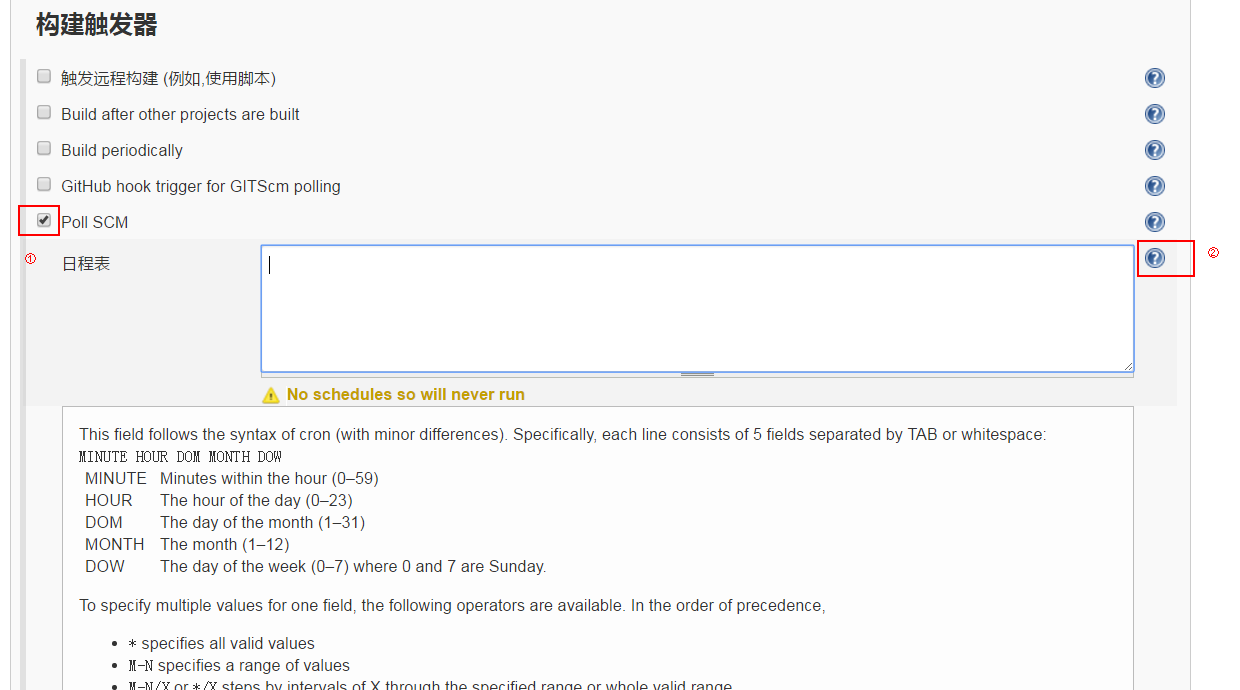
弹出的内容中详细解释了定时构建的用法,并给出了几个例子:
This field follows the syntax of cron (with minor differences). Specifically, each line consists of  fields separated by TAB or whitespace:

MINUTE HOUR DOM MONTH DOW

MINUTE    Minutes within the hour (–)

HOUR    The hour of the day (–)

DOM    The day of the month (–)

MONTH    The month (–)

DOW    The day of the week (–) where  and  are Sunday.

To specify multiple values for one field, the following operators are available. In the order of precedence,

* specifies all valid values

M-N specifies a range of values

M-N/X or */X steps by intervals of X through the specified range or whole valid range

A,B,...,Z enumerates multiple values

To allow periodically scheduled tasks to produce even load on the system, the symbol H (for “hash”) should be used wherever possible. For example, using   * * * for a dozen daily jobs will cause a large spike at midnight. In contrast, using H H * * * would still execute each job once a day, but not all at the same time, better using limited resources.

The H symbol can be used with a range. For example, H H(-) * * * means some time between : AM (midnight) to : AM. You can also use step intervals with H, with or without ranges.

The H symbol can be thought of as a random value over a range, but it actually is a hash of the job name, not a random function, so that the value remains stable for any given project.

Beware that for the day of month field, short cycles such as */ or H/ will not work consistently near the end of most months, due to variable month lengths. For example, */ will run on the 1st, 4th, …31st days of a long month, then again the next day of the next month. Hashes are always chosen in the - range, so H/ will produce a gap between runs of between  and  days at the end of a month. (Longer cycles will also have inconsistent lengths but the effect may be relatively less noticeable.)

Empty lines and lines that start with # will be ignored as comments.

In addition, @yearly, @annually, @monthly, @weekly, @daily, @midnight, and @hourly are supported as convenient aliases. These use the hash system for automatic balancing. For example, @hourly is the same as H * * * * and could mean at any time during the hour. @midnight actually means some time between : AM and : AM.

Examples:

# every fifteen minutes (perhaps at :, :, :, :)

H/ * * * *

# every ten minutes in the first half of every hour (three times, perhaps at :, :, :)

H(-)/ * * * *

# once every two hours at  minutes past the hour starting at : AM and finishing at : PM every weekday.

 -/ * * -

# once in every two hours slot between  AM and  PM every weekday (perhaps at : AM, : PM, : PM, : PM)

H H(-)/ * * -

# once a day on the 1st and 15th of every month except December
3.示例
在22:21新建的项目,希望在22:22触发构建。

Jenkins系列——定时构建的更多相关文章
- 【Jenkins】定时构建语法
跟cron定时任务语法基本类似 一.字段有哪些 每行包含5个字段,用制表符或空格隔开,从左至右依次是: 分 时 天 月 星期 二.每个字段的取值范围 分钟 (0–59) 时 (0–23) 天 (1–3 ...
- Jenkins配置定时构建项目
general: 源码管理: 构建触发器: 构建后操作:
- Jenkins之定时构建
参考文章:https://blog.csdn.net/ZZY1078689276/article/details/77520441 第一个*表示分钟,取值0~59 第二个*表示小时,取值0~23 第三 ...
- Jenkins环境搭建(4)-配置定时构建
每次手动触发job构建,是很麻烦的一件事情,job中可以配置定时构建,今天就来分享下定时构建:构建分为两种:定时构建和轮询SCM. 一.定时构建 Jenkins采用了著名的UNIX任务调度工具CRON ...
- Jenkins 定时构建语法规则
1.Jenkins自由风格任务定时构建 2.语法规则 定时构建语法 * * * * * 第一个*表示分钟,取值0~59 第二个*表示小时,取值0~23 第三个*表示一个月的第几天,取值1~31 第四个 ...
- jenkins持续集成:定时构建语法
构建位置:选择或创建工程_设置_构建触发器 1. 定时构建语法:* * * * * (五颗星,多个时间点,中间用逗号隔开)第一个*表示分钟,取值0~59第二个*表示小时,取值0~23第三个*表示一个月 ...
- git+jenkins持续集成三-定时构建语法
构建位置:选择或创建工程_设置_构建触发器 1. 定时构建语法:* * * * * (五颗星,多个时间点,中间用逗号隔开)第一个*表示分钟,取值0~59第二个*表示小时,取值0~23第三个*表示一个月 ...
- git+jenkins持续集成二-jenkins定时构建语法:定时构建语法
构建位置:选择或创建工程_设置_构建触发器 1. 定时构建语法:* * * * * (五颗星,多个时间点,中间用逗号隔开)第一个*表示分钟,取值0~59第二个*表示小时,取值0~23第三个*表示一个月 ...
- Jenkins系列之-—06 Ant构建
一.Ant 简介&构建环境 Apache Ant 是由 Java 语言开发的工具 构建ant环境: 1). 安装jdk,设置JAVA_HOME ,PATH ,CLASS_PATH 2). 下载 ...
随机推荐
- linux_inode和block
linux里一切皆文件 什么是文件属性? 文件本身带有的信息, 包括:索引节点编号. 文件类型以及权限.硬链接个数(备份作用).所有者.所属组.文件大小.修改月.修改日.时分 151387 -rw-- ...
- Linux指令--grep
原文地址:http://www.cnblogs.com/peida/archive/2012/12/17/2821195.html.感谢作者的无私分享. Linux系统中grep命令是一种强大的文本搜 ...
- linkin大话设计模式--观察者模式
linkin大话设计模式--观察者模式 观察者模式定义了对象间的一对多依赖关系,让一个或者多个观察者观察一个对象主题.当主题对象的状态发生改变的时候,系统能通知所有的依赖于此对象的观察者对象,从而能自 ...
- Centos7搭建zookeeper集群
centos7与之前的版本都不一样,修改主机名在/ect/hostname 和/ect/hosts 这两个文件控制 首先修改/ect/hostname vi /ect/hostname 打开之后的内容 ...
- matlab文件读写处理实例(二)——textread批量读取文件
问题:对文件夹下所有文件进行批量读取,跳过文件头部分,读取每个文件数据部分的7,8,9列,保存到变量并且输出到文件. 数据: 文件夹11m\
- postgres允许别人访问连接配置
- Go笔记-方法
[方法的概念] 在 Go 语言中,结构体就像是类的一种简化形式,那么面向对象程序员可能会问:类的方法在哪里呢?在 Go 中有一个概念,它和方法有着同样的名字,并且大体上意思相同:Go 方法是作 ...
- 《深入理解Java虚拟机》学习笔记(一)
JDK是支持Java程序开发的最小环境集,JRE是支持Java程序运行的标准环境,JRE是JDK的一部分. Java 1.0版本诞生于1995年,其使用的虚拟机是Sun Classisc VM,这款虚 ...
- 洛谷 [P2486] 染色
树剖+线段树维护连续相同区间个数 注意什么时候长度要减一 #include <iostream> #include <cstdio> #include <cstdlib& ...
- 洛谷 [P3384] 树链剖分 模版
支持各种数据结构上树,注意取膜. #include <iostream> #include <cstring> #include <algorithm> #incl ...