
利用NPOI将EXCEL转换成HTML的C#实现
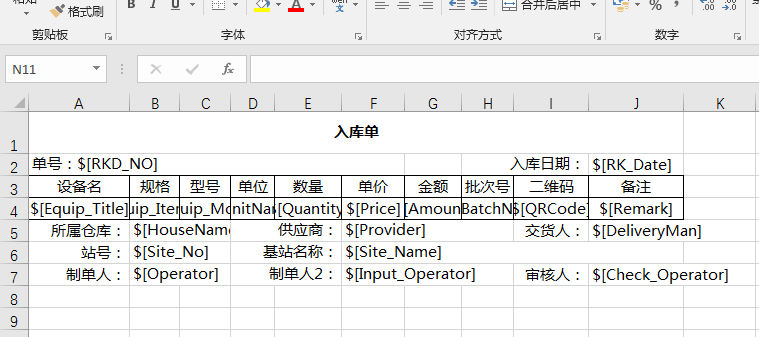
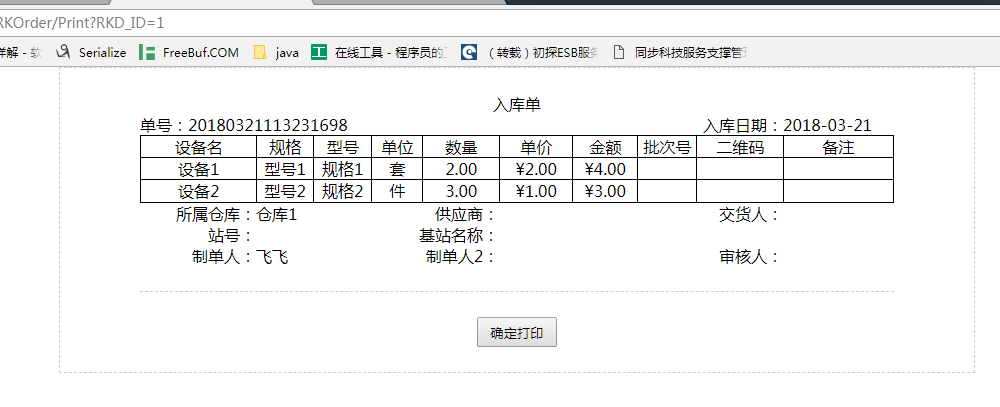
领导说想做一个网页打印功能,而且模板可以自定义,我考虑了三个方案,一是打印插件,二是在线 html 编辑器,三是 excel 模板,领导建议用的是打印插件的形式,我研究了一下,一个是需要下载安装,二个是模板定义其实也相当不方便,所以我想采用后两种,而在线 html 编辑器的话,直接画出来的并不真的是所见即所得,打印效果肯定需要不停的去调整,而直接 html 代码呢,对客户的要求又比较高(不可否认,很多客户都不知道 html 是什么玩意儿),所以最后选择了 excel 形式,搜了一下 npoi 官网,发现一个 java 版的 html 导出,于是辛苦了一下,把它改造成了 c# 的,在此过种中发现Java版本的没有处理合并单元格,且字体相对较大,我对此进行了一点改进,另外发现了两个NPOI的BUG,因为时间关系,也就没有去弄NPOI的源码了,等我有空了再来解决这两个BUG吧, 代码注释不多,需要看注释的直接去看 java版本的即可。
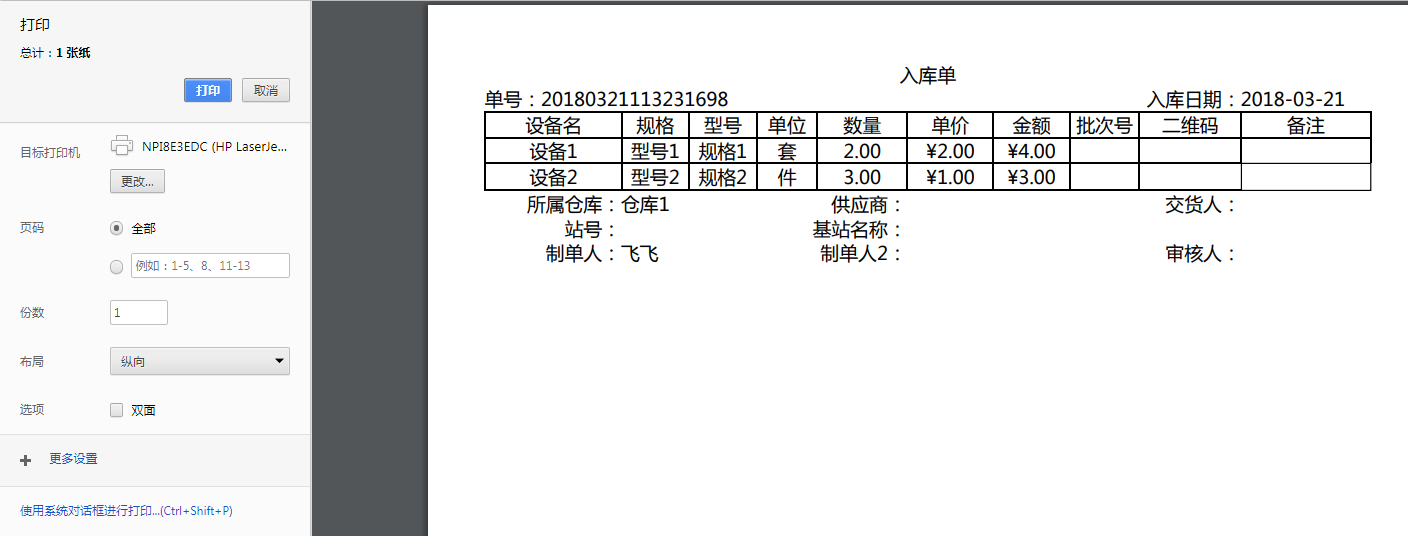
贴上效果图:
using NPOI.HSSF.UserModel;
using NPOI.POIFS.FileSystem;
using NPOI.SS.Format;
using NPOI.SS.UserModel;
using System;
using System.Collections;
using System.Collections.Generic;
using System.IO;
using System.Linq;
using System.Text;
using System.Text.RegularExpressions;
using System.Web; namespace ExcelUtility
{
public class EXCELTOHTML
{
private IWorkbook wb = null; private const String DEFAULTS_CLASS = "excelDefaults";
private const String COL_HEAD_CLASS = "colHeader";
private const String ROW_HEAD_CLASS = "rowHeader"; private const int IDX_TABLE_WIDTH = -2;
private const int IDX_HEADER_COL_WIDTH = -1; private int firstColumn;
private int endColumn; private bool gotBounds; private List<KeyValuePair<HorizontalAlignment, string>> HALIGN = new List<KeyValuePair<HorizontalAlignment, string>>() {
new KeyValuePair<HorizontalAlignment, string>(HorizontalAlignment.Left, "left"),
new KeyValuePair<HorizontalAlignment, string>(HorizontalAlignment.Center, "center"),
new KeyValuePair<HorizontalAlignment, string>(HorizontalAlignment.Right, "right"),
new KeyValuePair<HorizontalAlignment, string>(HorizontalAlignment.Fill, "left"),
new KeyValuePair<HorizontalAlignment, string>(HorizontalAlignment.Justify, "left"),
new KeyValuePair<HorizontalAlignment, string>(HorizontalAlignment.CenterSelection, "center"),
new KeyValuePair<HorizontalAlignment, string>(HorizontalAlignment.General, "left")
}; private List<KeyValuePair<VerticalAlignment, string>> VALIGN = new List<KeyValuePair<VerticalAlignment, string>>() {
new KeyValuePair<VerticalAlignment, string>(VerticalAlignment.Bottom, "bottom"),
new KeyValuePair<VerticalAlignment, string>(VerticalAlignment.Center, "middle"),
new KeyValuePair<VerticalAlignment, string>(VerticalAlignment.Top, "top")
}; private List<KeyValuePair<BorderStyle, string>> BORDER = new List<KeyValuePair<BorderStyle, string>>() {
new KeyValuePair<BorderStyle, string>(BorderStyle.DashDot, "dashed 1pt"),
new KeyValuePair<BorderStyle, string>(BorderStyle.DashDotDot, "dashed 1pt"),
new KeyValuePair<BorderStyle, string>(BorderStyle.Dashed, "dashed 1pt"),
new KeyValuePair<BorderStyle, string>(BorderStyle.Dotted, "dotted 1pt"),
new KeyValuePair<BorderStyle, string>(BorderStyle.Double, "double 3pt"),
new KeyValuePair<BorderStyle, string>(BorderStyle.Hair, "dashed 1px"),
new KeyValuePair<BorderStyle, string>(BorderStyle.Medium, "solid 2pt"),
new KeyValuePair<BorderStyle, string>(BorderStyle.MediumDashDot, "dashed 2pt"),
new KeyValuePair<BorderStyle, string>(BorderStyle.MediumDashDotDot, "dashed 2pt"),
new KeyValuePair<BorderStyle, string>(BorderStyle.MediumDashed, "dashed 2pt"),
new KeyValuePair<BorderStyle, string>(BorderStyle.None, "none"),
new KeyValuePair<BorderStyle, string>(BorderStyle.SlantedDashDot, "dashed 2pt"),
new KeyValuePair<BorderStyle, string>(BorderStyle.Thick, "solid 3pt"),
new KeyValuePair<BorderStyle, string>(BorderStyle.Thin, "solid 1pt")
}; public EXCELTOHTML(IWorkbook wb)
{
this.wb = wb;
} public EXCELTOHTML(string path)
{
using (var inputfs = new FileStream(path, FileMode.Open, FileAccess.Read))
{
NPOIFSFileSystem fs = new NPOIFSFileSystem(inputfs);
this.wb = new HSSFWorkbook(fs.Root, true);
}
} public string ToHtml(int sheetIndex = 0, bool completeHtmls = true, bool needTitle = true)
{
return ToHtml(wb.GetSheetName(sheetIndex), completeHtmls, needTitle);
} public string ToHtml(string sheetName, bool completeHtmls = true, bool needTitle = true)
{
StringBuilder sbRet = new StringBuilder(); if (completeHtmls)
{
sbRet.Append("<?xml version=\"1.0\" encoding=\"iso-8859-1\" ?>\n");
sbRet.Append("<html>\n");
sbRet.Append("<head>\n");
}
sbRet.Append(GetInlineStyle());
if (completeHtmls)
{
sbRet.Append("</head>\n");
sbRet.Append("<body>\n");
}
sbRet.Append(GetSheets(sheetName, needTitle));
if (completeHtmls)
{
sbRet.Append("</body>\n");
sbRet.Append("</html>\n");
} return sbRet.ToString();
} private string GetSheets(string sheetName, bool needTitle)
{
StringBuilder sbRet = new StringBuilder(); ISheet sheet = wb.GetSheet(sheetName);
sbRet.Append(GetSheet(sheet, needTitle)); return sbRet.ToString();
} private string GetSheet(ISheet sheet, bool needTitle)
{
StringBuilder sbRet = new StringBuilder(); List<KeyValuePair<int, int>> widths = computeWidths(sheet);
int tableWidth = widths.Where(o => o.Key == IDX_TABLE_WIDTH).First().Value;
sbRet.Append(string.Format("<table class={0} cellspacing=\"0\" cellpadding=\"0\" style=\"width:{1}px;\">\n", DEFAULTS_CLASS, tableWidth));
sbRet.Append(GetCols(widths, needTitle));
sbRet.Append(GetSheetContent(sheet, needTitle));
sbRet.Append("</table>\n"); return sbRet.ToString();
} private string GetColumnHeads()
{
StringBuilder sbRet = new StringBuilder(); sbRet.Append(string.Format("<thead>\n"));
sbRet.Append(string.Format(" <tr class={0}>\n", COL_HEAD_CLASS));
sbRet.Append(string.Format(" <th class={0}>◊</th>\n", COL_HEAD_CLASS));
//noinspection UnusedDeclaration
for (int i = firstColumn; i < endColumn; i++)
{
StringBuilder colName = new StringBuilder(); int cnum = i;
do
{
colName.Insert(0, (char)('A' + cnum % 26));
cnum /= 26;
} while (cnum > 0); sbRet.Append(string.Format(" <th class={0}>{1}</th>\n", COL_HEAD_CLASS, colName));
}
sbRet.Append(" </tr>\n");
sbRet.Append("</thead>\n"); return sbRet.ToString();
} private string GetSheetContent(ISheet sheet, bool needTitle)
{
StringBuilder sbRet = new StringBuilder(); if (needTitle)
{
sbRet.Append(GetColumnHeads());
} sbRet.Append(string.Format("<tbody>\n"));
IEnumerator rows = sheet.GetRowEnumerator();
while (rows.MoveNext())
{
IRow row = (IRow)rows.Current; sbRet.Append(string.Format(" <tr>\n"));
if (needTitle)
{
sbRet.Append(string.Format(" <td class={0}>{1}</td>\n", ROW_HEAD_CLASS, row.RowNum + 1));
} StringBuilder sbTemp = new StringBuilder();
int mergeCnt = 0;
ICell preCell = null;
ICell cell = null; for (int i = firstColumn; i < endColumn; i++)
{
String content = " ";
String attrs = "";
ICellStyle style = null;
bool isMerge = false; if (i >= row.FirstCellNum && i < row.LastCellNum)
{
cell = row.GetCell(i);
if (cell != null)
{
isMerge = cell.IsMergedCell;
style = cell.CellStyle;
attrs = tagStyle(cell, style);
//Set the value that is rendered for the cell
//also applies the format
MyCellFormat cf = MyCellFormat.GetInstance(style.GetDataFormatString());
CellFormatResult result = cf.Apply(cell);
content = result.Text; //never null
if (string.IsNullOrEmpty(content))
{
content = " ";
}
}
} if (isMerge == true && content == " ")
{
/*
* 因为 NPOI 返回的 cell 没有 mergeCnt 属性,只有一个 IsMergedCell 属性
* 如果有5个单元格,后面四个单元格合并成一个大单元格
* 它返回的其实还是5个单元格,IsMergedCell 分别是: false,true,true,true,true
* 上头这种情况还算好,我们好歹还能猜到后面四个单元格是合并单元格
*
* 但是如果第一个单独,后面四个每两个合并呢?
* TMD返回的还是5个单元格,IsMergedCell 仍然是: false,true,true,true,true
* 所以这里是有问题的,我没法知道后面的四个单元格是四个合并成一个呢,还是两个两个的分别合并
* 这个是没办法的,除非从NPOI的源代码里头去解决这个问题,介于上班呢,要求的是出结果,所以公司是
* 不太会允许我去干这种投入产出比较差的事情的,所以这个问题我采用了一个成本比较低的办法来绕开
*
* 办法就是我们在定义模板的时候,可以通过为每一个合并单元格添加内容来避免。
* 比如说 cell1(内容), cell2,cell3(内容), cell4,cell5(内容)
* 这样的话我就能知道 cell1 IsMergedCell = false 是一个独立的单元格
* cell2, cell3, cell4, cell5 的 IsMergedCell 虽然都是 true, 但是因为 cell4 这个位置有内容了,
* 那我就晓得 cell2 和 cell3 是合并的, cell4 和 cell5 也是合并的。
*
* 当然这里还会有个小小的问题,如果 cell4, cell5 里头是一个会被替换掉的内容,也即 $[字段] 这样的东西
* 如果实际的内容为 null 那么 cell4, cell5 合并单元格的内容也就是 null 了,这又回到了之前的问题了,
* 所以此处要求定义模板的时候 $[内容] 后面加一个空格,这样在生成 html 的时候,其实是不影响打印效果的。
* 也即 “$[] ”注意双引号里头的 “]”后头有个空格
*/
if (mergeCnt == 1 && preCell != null && preCell.IsMergedCell == false)
{
sbTemp.Append(string.Format(" <td class={0} {1}{3}>{2}</td>\n", styleName(style), attrs, content, (isMerge) ? " colspan=\"1\"" : ""));
} else {
mergeCnt++;
}
} else {
sbTemp.Replace("colspan=\"1\"", string.Format("colspan=\"{0}\"", mergeCnt));
mergeCnt = 1;
sbTemp.Append(string.Format(" <td class={0} {1}{3}>{2}</td>\n", styleName(style), attrs, content, (isMerge) ? " colspan=\"1\"" : ""));
}
preCell = cell;
}
sbRet.Append(sbTemp.Replace("colspan=\"1\"", string.Format("colspan=\"{0}\"", mergeCnt)).ToString()); sbRet.Append(string.Format(" </tr>\n"));
}
sbRet.Append(string.Format("</tbody>\n")); return sbRet.ToString();
} private String tagStyle(ICell cell, ICellStyle style)
{
if (style.Alignment == HorizontalAlignment.General)
{
switch (ultimateCellType(cell))
{
case CellType.String:
return "style=\"text-align: left;\"";
case CellType.Boolean:
case CellType.Error:
return "style=\"text-align: center;\"";
case CellType.Numeric:
default:
// "right" is the default
break;
}
}
return "";
} private static CellType ultimateCellType(ICell c)
{
CellType type = c.CellType;
if (type == CellType.Formula)
{
type = c.CachedFormulaResultType;
}
return type;
} private string GetCols(List<KeyValuePair<int, int>> widths, bool needTitle)
{
StringBuilder sbRet = new StringBuilder(); if (needTitle)
{
int headerColWidth = widths.Where(o => o.Key == IDX_HEADER_COL_WIDTH).First().Value;
sbRet.Append(string.Format("<col style=\"width:{0}px\"/>\n", headerColWidth));
}
for (int i = firstColumn; i < endColumn; i++)
{
int colWidth = widths.Where(o => o.Key == i).First().Value;
sbRet.Append(string.Format("<col style=\"width:{0}px;\"/>\n", colWidth));
} return sbRet.ToString();
} private List<KeyValuePair<int, int>> computeWidths(ISheet sheet)
{
List<KeyValuePair<int, int>> ret = new List<KeyValuePair<int, int>>();
int tableWidth = 0; ensureColumnBounds(sheet); // compute width of the header column
int lastRowNum = sheet.LastRowNum;
int headerCharCount = lastRowNum.ToString().Length;
int headerColWidth = widthToPixels((headerCharCount + 1) * 256);
ret.Add(new KeyValuePair<int, int>(IDX_HEADER_COL_WIDTH, headerColWidth));
tableWidth += headerColWidth; for (int i = firstColumn; i < endColumn; i++)
{
int colWidth = widthToPixels(sheet.GetColumnWidth(i));
ret.Add(new KeyValuePair<int, int>(i, colWidth));
tableWidth += colWidth;
} ret.Add(new KeyValuePair<int, int>(IDX_TABLE_WIDTH, tableWidth));
return ret;
} private int widthToPixels(double widthUnits)
{
return (int)(Math.Round(widthUnits * 9 / 256));
} private void ensureColumnBounds(ISheet sheet)
{
if (gotBounds) return; IEnumerator iter = sheet.GetRowEnumerator();
if (iter.MoveNext()) firstColumn = 0;
else firstColumn = int.MaxValue; endColumn = 0;
iter.Reset();
while (iter.MoveNext())
{
IRow row = (IRow)iter.Current;
short firstCell = row.FirstCellNum;
if (firstCell >= 0)
{
firstColumn = Math.Min(firstColumn, firstCell);
endColumn = Math.Max(endColumn, row.LastCellNum);
}
}
gotBounds = true;
} private string GetInlineStyle()
{
StringBuilder sbRet = new StringBuilder(); sbRet.Append("<style type=\"text/css\">\n");
sbRet.Append(GetStyles());
sbRet.Append("</style>\n"); return sbRet.ToString();
} private string GetStyles()
{
StringBuilder sbRet = new StringBuilder(); HashSet<ICellStyle> seen = new HashSet<ICellStyle>();
for (int i = 0; i < wb.NumberOfSheets; i++)
{
ISheet sheet = wb.GetSheetAt(i);
IEnumerator rows = sheet.GetRowEnumerator();
while (rows.MoveNext())
{
IRow row = (IRow)rows.Current;
foreach (ICell cell in row)
{
ICellStyle style = cell.CellStyle;
if (!seen.Contains(style))
{
sbRet.Append(GetStyle(style));
seen.Add(style);
}
}
}
} return sbRet.ToString();
} private string GetStyle(ICellStyle style)
{
StringBuilder sbRet = new StringBuilder(); sbRet.Append(string.Format(".{0} .{1} {{\n", DEFAULTS_CLASS, styleName(style)));
sbRet.Append(styleContents(style));
sbRet.Append("}\n"); return sbRet.ToString();
} private string styleContents(ICellStyle style)
{
StringBuilder sbRet = new StringBuilder(); sbRet.Append(styleOut("text-align", style.Alignment));
sbRet.Append(styleOut("vertical-align", style.VerticalAlignment));
sbRet.Append(fontStyle(style));
sbRet.Append(borderStyles(style));
sbRet.Append(colorStyles(style)); return sbRet.ToString();
} private string colorStyles(ICellStyle style)
{
StringBuilder sbRet = new StringBuilder(); //sbRet.Append("还未实现!"); return sbRet.ToString();
} private string borderStyles(ICellStyle style)
{
StringBuilder sbRet = new StringBuilder(); sbRet.Append(styleOut("border-left", style.BorderLeft));
/*
* NPOI有BUG,合并单元格的 border-right 永远都是 None
* 我们可以通过设置合并单元格后边那个单元格的左边框的解决
* 如果当前合并单元格已经合并到最后一列了,我们就只能再加一列了,为了不影响打印效果
* 这最后加的这一列在设置好左边框后,需要把宽度设置得很小,比如说0.1这样
*/
sbRet.Append(styleOut("border-right", style.BorderRight));
sbRet.Append(styleOut("border-top", style.BorderTop));
sbRet.Append(styleOut("border-bottom", style.BorderBottom)); return sbRet.ToString();
} private string fontStyle(ICellStyle style)
{
StringBuilder sbRet = new StringBuilder(); IFont font = style.GetFont(wb); if (font.Boldweight == 0)
{
sbRet.Append(" font-weight: bold;\n");
}
if (font.IsItalic)
{
sbRet.Append(" font-style: italic;\n");
} double fontheight = font.FontHeight / 10 - 10;
if (fontheight == 9)
{
//fix for stupid ol Windows
fontheight = 10;
}
sbRet.Append(string.Format(" font-size: {0}pt;\n", fontheight)); return sbRet.ToString();
} private string styleOut(string k, HorizontalAlignment p)
{
return k + ":" + HALIGN.Where(o => o.Key == p).First().Value + ";\n";
}
private string styleOut(string k, VerticalAlignment p)
{
return k + ":" + VALIGN.Where(o => o.Key == p).First().Value + ";\n";
}
private string styleOut(string k, BorderStyle p)
{
return k + ":" + BORDER.Where(o => o.Key == p).First().Value + ";\n";
} private string styleName(ICellStyle style)
{
if (style == null)
{
style = wb.GetCellStyleAt((short)0);
}
StringBuilder sb = new StringBuilder();
sb.Append(string.Format("style_{0}", style.Index));
return sb.ToString();
}
}
}
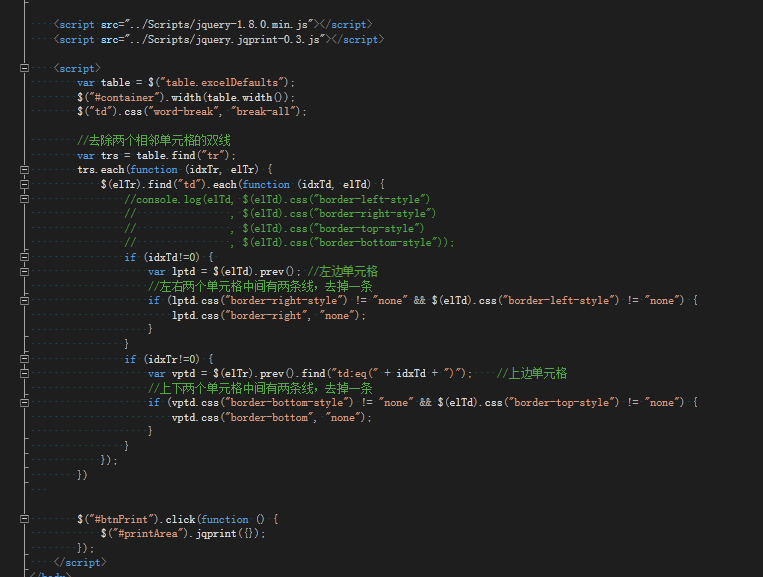
javascript部分:
最后NPOI在处理日期的时候,还有一个BUG
using NPOI.SS.UserModel;

using NPOI.Util;

using System;

using System.Collections.Generic;

using System.Drawing;

using System.Text.RegularExpressions;

using System.Windows.Forms;

using NPOI.SS.Format;

namespace ExcelUtility

{

    /// <summary>

    /// 这个东西是为了解决 NPOI CellFormat 的BUG而存在的。

    /// 它在读取 日期格式 的时候有时候会报错。

    /// </summary>

    public class MyCellFormat

    {

        private CellFormat cellformat = null;

        private MyCellFormat(string format) {

            this.cellformat = CellFormat.GetInstance(format);

        }

        public static MyCellFormat GetInstance(string format) {

            return new MyCellFormat(format);

        }

        public CellFormatResult Apply(ICell cell)

        {

            try

            {

                return cellformat.Apply(cell);

            }

            catch (Exception)

            {

                var formatStr = cell.CellStyle.GetDataFormatString();

                var mc = new Regex(@"(yy|M|d|H|s|ms)").Match(formatStr);

                /*

                 * 目前全部不能正常转换的日期格式都转换成 yyyy - MM - dd 的形式

                 * 比如说:【[$-F800]dddd\,\ mmmm\ dd\,\ yyyy】这个格式

                 * 稍微 google 了下( https://msdn.microsoft.com/en-us/library/dd318693(VS.85).aspx)

                 * 这个字符串 0x0800 表示 [System default locale language]

                 * 因时间关系,只能干完手头的活之后再慢慢研究了。

                 */

                if (mc.Success)

                {

                    return CellFormat.GetInstance("yyyy-MM-dd").Apply(cell);

                }

                else return cellformat.Apply(cell.ToString() + "<!-- This is the bug of NPOI, Maybe you should modify the file which name is \"MyCellFormat.cs\" -->");

            }

        }

        public CellFormatResult Apply(Object v)

        {

            return cellformat.Apply(v);

        }

    }

}
利用NPOI将EXCEL转换成HTML的C#实现的更多相关文章
- C#利用NPOI导出Excel类(简单版)
代码: using System.Data; using System.IO; using NPOI.HSSF.UserModel; using NPOI.SS.UserModel; namespac ...
- ArcGIS中利用ArcMap将地理坐标系转换成投影坐标系(从WKID=4326到WKID=102100)
原文:ArcGIS中利用ArcMap将地理坐标系转换成投影坐标系(从WKID=4326到WKID=102100) 对于非地理专业的开发人员,对与这些生涩的概念,我们不一定都要了解,但是我们要理解,凡是 ...
- Epplus下的一个将Excel转换成List的范型帮助类
因为前一段时间公司做项目的时候,用到了Excel导入和导出,然后自己找了个插件Epplus进行操作,自己将当时的一些代码抽离出来写了一个帮助类. 因为帮助类是在Epplus基础之上写的,项目需要引用E ...
- 在服务端C#如何利用NPOI构建Excel模板
目前本人接触过两种模板导出的方式:(1)C#利用NPOI接口制作Excel模板,在服务端用数据渲染模板(2)在前端利用前人搭建好的框架,利用office编写xml制作模板,在客户端进行数据的渲染,导出 ...
- Java中Office(word/ppt/excel)转换成HTML实现
运行条件:JDK + jacob.jar + jacob.dll 1) 把jacob.dll在 JAVA_HOME\bin\ 和 JAVA_HOME\jre\bin\ 以及C:\WINDOWS\sys ...
- C#利用NPOI操作Excel文件
NPOI作为开源免费的组件,功能强大,可用来读写Excel(兼容xls和xlsx两种版本).Word.PPT文件.可是要让我们记住所有的操作,这便有点困难了,至此,总结一些在开发中常用的针对Excel ...
- C# Excel转换成Json工具(含源码)
可执行版本下载:https://github.com/neil3d/excel2json/releases 完整项目源代码下载:https://github.com/neil3d/excel2json ...
- 把Excel转换成DataTable,Excel2003+
在数据处理的时候,我们会Excel(包含2003.2007.2010等)转换成DataTable,以便进一步操作 1.怎么访问Excel文件呢?我们可以通过OLEDB接口访问,如下: private ...
- 多页Excel转换成PDF时如何保存为单独文件
通过ABBYY PDF Transformer+图文识别软件,使用PDF-XChange打印机将多页Excel工作簿转换成PDF文档(相关文章请参考ABBYY PDF Transformer+从MS ...
随机推荐
- linux HAProxy及Keepalived热备
HAProxy 它是免费,快速且可靠的一种解决方案没,适用于那些负载特大的web站点这些站点通常又需要会话保持或七层处理提供高可用性,负载均衡及基于tcp和http应用的代理 衡量负载均衡器性能的因素 ...
- 修改windows7中文件的权限
1.修改ntkrnlpa.exe的权限 2.鼠标右键,选择"属性" 3.单击"安全"选项,选择"高级" 4.在高级安全设置中,选择" ...
- Java之indexOf()方法
Java之indexOf()方法 1.方法介绍 (1)indexOf(int ch) 返回指定字符在此字符串中第一次出现处的索引 (2)indexOf(String str) 返回指定子字符串在此字符 ...
- Java之split()方法
Java之split()方法 1.方法介绍 (1)public String[] split(String regex) 根据给定正则表达式的匹配拆分此字符串 (2)public String[] s ...
- 挖一挖不常用到而又很实用的重载-Trim
这个我想没有那个开发人员说不知道,但是里面有一个重载,这个不知道有多少开发人员知道! 可以看到,我可以去掉字符串前后的指定字符,只要我在char[]中指定即可,而不是仅仅去掉空格,这次为什么要提它,是 ...
- 创建数据库表默认字段封装SQL
declare @Table_Name varchar(500) declare @strSQL varchar(500) set @Table_Name='UserInfo' --在此处设置要创建的 ...
- JAVA简便解析json文件
JAVA简便解析json文件 首先放上我要解析的json文件: { "resultcode":"200", "reason":"S ...
- Css3关键帧动画
@keyframes设置动画规则,可以理解为一个剧本: 1.name动画的名字必需填写 2.可以使用百分比0%-100%或者from...to...必填内容: 3.需要变化css的样式:必需: ani ...
- java保留小数点后位数以及输出反转数字
//方法一double b = 8.0/3.0; //与C语言不同,此处8.0和8有所区分 String format = String.format("%.2f,b"); //表 ...
- LCT总结(LCT,Splay)
概念.性质简述 LCT(Link-Cut Tree),就是动态树的一种,用来维护一片森林的信息,滋磁的操作可多啦! 动态连边.删边 合并两棵树.分离一棵树(跟上面不是一毛一样吗) 动态维护连通性 维护 ...