
Struts2的数据封装
在很多的实际开发场景中,页面提交请求参数Action ,在Action中接收参数并对接收的数据进行封装。封装到一个JavaBean中,将JavaBean传递给业务层中。Struts2数据封装分为两类:属性驱动,模型驱动。
1.模型驱动
通过实现ModelDriven接口来接收请求参数。实现接口并且重写getModel()方法
Action类代码如下:
 package com.huan.web.action;

 import com.huan.domain.Customer;

 import com.opensymphony.xwork2.ActionSupport;

 import com.opensymphony.xwork2.ModelDriven;

 public class CustomerAction extends ActionSupport implements ModelDriven<Customer>{

     private Customer customer=new Customer();

     public String add(){

        System.out.println(customer);

         return "saveSuccess";

     }

     @Override

     public Customer getModel() {

         return customer;

     }

 }
jsp页面
 <%@ page language="java" contentType="text/html; charset=UTF-8"

     pageEncoding="UTF-8"%>

 <!DOCTYPE html PUBLIC "-//W3C//DTD HTML 4.01 Transitional//EN" "http://www.w3.org/TR/html4/loose.dtd">

 <html>

 <head>

 <meta http-equiv="Content-Type" content="text/html; charset=UTF-8">

 <title>Insert title here</title>

 </head>

 <body>

     <h1>处理请求参数</h1>

     <form action="${pageContext.request.contextPath}/Demo10Action.action" >

         姓名:<input type="text" name="name"><br/>

         年龄:<input type="text" name="age"><br/>

         生日:<input type="text" name="birthday"><br/>

         <input type="submit" value="提交">

     </form>

 </body>

 </html>
struts.xml
 <?xml version="1.0" encoding="UTF-8"?>

 <!DOCTYPE struts PUBLIC

     "-//Apache Software Foundation//DTD Struts Configuration 2.3//EN"

     "http://struts.apache.org/dtds/struts-2.3.dtd">

 <struts>

     <package name="param"  namespace="/" extends="struts-default">

          <action  name="Demo10Action"  class="com.sturts2.day02.c_param.Demo10Action" method="execute">

                  <result name="success" type="dispatcher">/form3.jsp</result>

          </action>

     </package>

 </struts>
2.属性驱动(很少使用)
在Action中定义java数据类型字段并与表单数据对应,利用这些字段进行数据传递
2.1属性驱动之提供属性的set方法(做为了解)
这中方法要在Action中定义属性并提供属性的set方法,当传递数据变多,Action的属性和set方法也随之变多。会让Action变臃肿,不简洁。
form1.jsp页面
 <%@ page language="java" contentType="text/html; charset=UTF-8"

     pageEncoding="UTF-8"%>

 <!DOCTYPE html PUBLIC "-//W3C//DTD HTML 4.01 Transitional//EN" "http://www.w3.org/TR/html4/loose.dtd">

 <html>

 <head>

 <meta http-equiv="Content-Type" content="text/html; charset=UTF-8">

 <title>Insert title here</title>

 </head>

 <body>

     <form action="${pageContext.request.contextPath}/Demo8Action">

         用户名:<input type="text" name="name" /><br>

         年龄:<input type="text" name="age" /><br>

         生日:<input type="text" name="birthday" /><br>

         <input type="submit" value="提交" />

     </form>

 </body>

 </html>
Demo8Action.java 即Action类
 package com.sturts2.day02.c_param;

 import java.util.Date;

 import com.opensymphony.xwork2.ActionSupport;

 public class Demo8Action extends ActionSupport {

     private  String name;

     private  Integer age;

     private  Date   birthday;

     public Demo8Action() {

         super();

         System.out.println("Demo8Action对象创建了");

     }

     public void setName(String name) {

         this.name = name;

     }

     public void setAge(Integer age) {

         this.age = age;

     }

     public void setBirthday(Date birthday) {

         this.birthday = birthday;

     }

     @Override

     public String execute() throws Exception {

         System.out.println("name参数值:"+name+"age参数值:"+age+"birthday参数值"+birthday);

         return SUCCESS;

     }

 }
Struts.xml配置
 <?xml version="1.0" encoding="UTF-8"?>

 <!DOCTYPE struts PUBLIC

     "-//Apache Software Foundation//DTD Struts Configuration 2.3//EN"

     "http://struts.apache.org/dtds/struts-2.3.dtd">

 <struts>

     <package name="param"  namespace="/" extends="struts-default">

          <action  name="Demo8Action"  class="com.sturts2.day02.c_param.Demo8Action" method="execute">

                  <result name="success" type="dispatcher">/form1.jsp</result>

          </action>

     </package>

 </struts>
打开form1.jsp页面
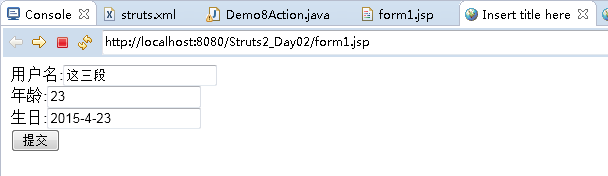
输上数据并提交,控制台显示

浏览器显示: URL不变请求转发到form.jsp页面

2.2页面提供表达式方式
在页面表单上显示表达式:
     <form action="${pageContext.request.contextPath}/Demo9Action">

         用户名:<input type="text" name="user.name" /><br>

         年龄:<input type="text" name="user.age" /><br>

         生日:<input type="text" name="user.birthday" /><br>

         <input type="submit" value="提交" />

     </form>
Action类
 public class Demo9Action extends ActionSupport{

     private User user;

     @Override

     public String execute() throws Exception {

         System.out.println(user);

         return SUCCESS;

     }

     //需要提供get方法

     public User getUser() {

         return user;

     }

     public void setUser(User user) {

         this.user = user;

     }

 }
还需要提供User的实体类:
属性值要和表单上name属性值对应
 public class User {

     private String name;

     private Integer age;

     private Date birthday;

     public String getName() {

         return name;

     }

     public void setName(String name) {

         this.name = name;

     }

     public Integer getAge() {

         return age;

     }

     public void setAge(Integer age) {

         this.age = age;

     }

     public Date getBirthday() {

         return birthday;

     }

     public void setBirthday(Date birthday) {

         this.birthday = birthday;

     }

     @Override

     public String toString() {

         // TODO Auto-generated method stub

         return "User [ name="+name+"\n age="+age+"\n birthday="+birthday+"]";

     }

 }
Struts.xml 的action配置就不做显示
把程序在服务器运行,打开页面填上数据:
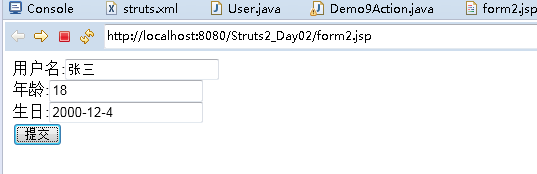
控制台显示
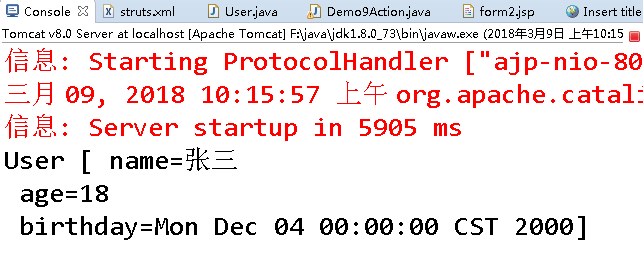
浏览器请求转发到form2.jsp页面

3.Struts2中封装集合类型的数据
在开发中,有时我们需要批量插入用户或者批量插入其他对象。在Action中需要接收多个Action中封装的对象然后传递给业务层。这个时候就需要把表单的信息封装到集合中。一般我们通常使用集合 List或Map
3.1 封装到List集合中
编写页面:
 <form action="${pageContext.request.contextPath}/Demo9Action.action" >

         姓名:<input type="text" name="list[0].name"><br/>

         年龄:<input type="text" name="list[0].age"><br/>

         生日:<input type="text" name="list[0].birthday"><br/>

         姓名:<input type="text" name="list[1].name"><br/>

         年龄:<input type="text" name="list[1].age"><br/>

         生日:<input type="text" name="list[1].birthday"><br/>

         <input type="submit" value="提交">

     </form>
编写Action:
 public class Demo9Action extends ActionSupport{

     private List<User> list;

     @Override

     public String execute() throws Exception {

                 for(User user  :list){

                        System.out.println(user);

                  }

         return SUCCESS;

     }

     public  List<User> getUser() {

         return list;

     }

     public void setUser(List<User> list) {

         this.list = list;

     }
3.2 封装数据到Map集合:
页面:
 <form action="${pageContext.request.contextPath}/Demo10Action.action" >

         姓名:<input type="text" name="map['one'].name"><br/>

         年龄:<input type="text" name="map['one'].age"><br/>

         生日:<input type="text" name="map['one'].birthday"><br/>

         姓名:<input type="text" name="map['two'].name"><br/>

         年龄:<input type="text" name="map['two].age"><br/>

         生日:<input type="text" name="map['two'].birthday"><br/>

         <input type="submit" value="提交">

     </form>
Action类:
 public class Demo10Action extends ActionSupport{

     private Map<String ,User> map;

     @Override

     public String execute() throws Exception {

                 for(Stirng  key  :  map.keySet()){

                        User user=map.get(key);

                        System.out.println(key+"       "+user);

                  }

         return SUCCESS;

     }

     public  Map<String ,User> getMap() {

         return map;

     }

     public void setMap(Map<String ,User> map) {

         this.map = map;

     }
Struts2的数据封装的更多相关文章
- Struts2中数据封装机制
Struts2当中数据封装的三种机制:属性驱动.标签驱动.模型驱动.下面来一一介绍. 一.属性驱动 1.需要提供对应属性的set方法进行数据的封装. 2.表单的哪些属性需要封装数据,那么在对应的Act ...
- 十一 三种Struts2的数据封装方式,封装页面传递的数据
Struts2的数据封装:Struts2是一个web层框架,框架是软件的半成品.提供了数据封装的基本功能. 注:Struts2底层(核心过滤器里面的默认栈里面的拦截器,具体见struts-defaul ...
- Struts2中类数据封装的方式
第一种方式:属性驱动提供对应属性的set方法进行数据的封装.表单的哪些属性需要封装数据,那么在对应的Action类中提供该属性的set方法即可.表单中的数据提交,最终找到Action类中的setXxx ...
- Struts2中数据封装方式
一.通过ActionContext类获取 public class ActionContextDemo extends ActionSupport { @Override public S ...
- Struts2把数据封装到集合中之封装到map中
struts框架封装数据可以封装到集合中也可以封装到map中,该篇博客主要讲解将数据封装到map中. 1. 封装复杂类型的参数(集合类型 Collection .Map接口等) 2. 需求:页面中有可 ...
- Struts2把数据封装到集合中之封装到Collection中
数据封装到集合中,可以封装到集合中,也可以封装到Map中.该篇博客主要讲解数据封装到集合中的封装到Collection中. 1. 封装复杂类型的参数(集合类型 Collection .Map接口等) ...
- Struts2类数据封装
- struts2学习笔记(四)——访问Servlet的API&结果跳转&数据封装
一.Struts2访问Servlet的API 前面已经对Struts2的流程执行完成了,但是如果表单中有参数如何进行接收?又或者我们需要向页面保存一些数据,又要如何完成呢?我们可以通过学习Struts ...
- Struts2之Action接收请求参数和拦截器
技术分析之在Struts2框架中使用Servlet的API 1. 在Action类中也可以获取到Servlet一些常用的API * 需求:提供JSP的表单页面的数据,在Ac ...
随机推荐
- 注册表操作(VC_Win32)
注册表操作(VC_Win32) 数据类型 注册表的数据类型主要有以下四种:显示类型(在编辑器中) 数据类型 说明 REG_SZ 字符串 文本字符串REG_MULTI_SZ 多字符串 ...
- xcode7中使用cocos2d-x3.8的webview控件
在XCode7中使用cocos2d-x 3.3以上版本的WebView控件时,碰到了编译错误 App Transport Security has blocked a cleartext HTTP ( ...
- laravel中实现短信发送验证码
前段时间想实现一个短信验证码的功能,但是卡了很长时间. 首先我用的是阿里云的短信服务业务,其首次接入流程如下: 在阿里云上开通短信服务后需要做的: 1,申请签名 2,申请模板 3,创建Acces ...
- shell脚本实现nfs服务安装配置,共享文件分发
##############################Deploy nfs######################## echo "start deploy nfs-server& ...
- Centos7新功能
Centos7 单用户模式 centos7里不再有0-6启动级别,而是4个target graphical.target 多人模式,支持图形和命令行两种登录,对应之前的3,5级别 mul ...
- 940A Points on the line
传送门 题目大意 给你n和d还有n个数,计算最少删除几个点可以是最大点与最小点之差小于等于d 分析 先对所有点排序,枚举每一个点ai到ai+d中有几个点,答案即n-其中最大的值 代码 #include ...
- 谈谈语音通信中的各种tone
今天谈的这个主题(tone)存在于我们的日常打电话过程中.先举两个场景:1,你拿起固话话筒准备打电话,按电话号码前先从话筒里听到"嗡"的连续音,这叫dial tone(拨号音,表示 ...
- angular+require前端项目架构搭建
app //应用入口 directive //自定义指令 require-main //require的主配置文件 存放公共调用的js service //请求后端数据公有类 controllers ...
- H-ui.admin v2.3后台模版!
一个很好的 后台开发模板 演示地址 http://demo.h-ui.net/H-ui.admin/3.1/index.html 下载地址 http://downs.h-ui.net/h-ui/H-u ...
- Java基础系列--final关键字
原创作品,可以转载,但是请标注出处地址:http://www.cnblogs.com/V1haoge/p/8482909.html 一.概述 final是Java关键字中最常见之一,表示"最 ...