
ssm整合快速入门程序(二)
下面我们配置serivce层到项目中
1.service包中创建ItemsService.java接口,和service.imp包中创建一个service实现类ItemsServiceImpl.java
package cn.my.ssm.serive;

import java.util.List;

import cn.my.ssm.po.Items;

public interface ItemsService {

      List<Items> selectFind(Items items) throws Exception;

}
package cn.my.ssm.service.impl;

import java.util.List;

import org.springframework.beans.factory.annotation.Autowired;

import org.springframework.stereotype.Service;

import cn.my.ssm.mapper.ItemsMapper;

import cn.my.ssm.po.Items;

import cn.my.ssm.serive.ItemsService;

@Service

public class ItemsServiceImpl implements ItemsService {

    @Autowired

    private ItemsMapper itemDao;

    @Override

    public List<Items> selectFind(Items items) throws Exception {

        return itemDao.selectFind(items);

    }

}
2.在spring包中创建一个applicationContext-service.xml文件,为了测试我们暂时会将applicationContext-dao.xml引入到applicationContext-service.xml中
<?xml version="1.0" encoding="UTF-8"?>

<beans xmlns="http://www.springframework.org/schema/beans"

    xmlns:xsi="http://www.w3.org/2001/XMLSchema-instance" xmlns:mvc="http://www.springframework.org/schema/mvc"

    xmlns:context="http://www.springframework.org/schema/context"

    xmlns:aop="http://www.springframework.org/schema/aop" xmlns:tx="http://www.springframework.org/schema/tx"

    xsi:schemaLocation="http://www.springframework.org/schema/beans

        http://www.springframework.org/schema/beans/spring-beans-3.2.xsd

        http://www.springframework.org/schema/mvc

        http://www.springframework.org/schema/mvc/spring-mvc-3.2.xsd

        http://www.springframework.org/schema/context

        http://www.springframework.org/schema/context/spring-context-3.2.xsd

        http://www.springframework.org/schema/aop

        http://www.springframework.org/schema/aop/spring-aop-3.2.xsd

        http://www.springframework.org/schema/tx

        http://www.springframework.org/schema/tx/spring-tx-3.2.xsd ">

        <!-- service层我们使用组件扫描 -->

        <context:component-scan base-package="cn.my.ssm.service.impl"></context:component-scan>

        <!-- 1、配置事物管理器 -->

        <bean id="transactionManager" class="org.springframework.jdbc.datasource.DataSourceTransactionManager">

            <property name="dataSource" ref="dataSource"></property>

        </bean>

        <!-- 2、配置事物管理器驱动 -->

        <tx:annotation-driven transaction-manager="transactionManager"/>

        <import resource="applicationContext-dao.xml"/>

</beans>
下面测试service整合是否成功
    @Test

    public void testService() throws Exception{

        ItemsService userService = (ItemsService) context.getBean("itemsServiceImpl");

        List<Items> list = userService.selectFind(null);

        System.out.println(list);

    }

测试结果

[Items [id=1, name=台式机, price=3000.0, pic=null, createtime=Tue Oct 03 23:22:36 CST 2017, detail=该电脑质量非常好!!!!111], Items [id=2, name=笔记本, price=7000.0, pic=null, createtime=Tue Oct 03 23:23:06 CST 2017, detail=笔记本性能好,质量好!!!!!], Items [id=3, name=背包, price=1200.0, pic=null, createtime=Tue Oct 03 23:23:21 CST 2017, detail=名牌背包,容量大质量好!!!!]]
下面我们就需要整合springmvc了
首先在cn.my.ssm.controller包中创建一个ItemsController.java
package cn.my.ssm.controller;

import java.util.List;

import org.springframework.beans.factory.annotation.Autowired;

import org.springframework.stereotype.Controller;

import org.springframework.web.bind.annotation.RequestMapping;

import org.springframework.web.servlet.ModelAndView;

import cn.my.ssm.po.Items;

import cn.my.ssm.serive.ItemsService;

@Controller

@RequestMapping("/Items")

public class ItemsController {

    @Autowired

    private ItemsService itemsService;

    @RequestMapping("/queryItems")

    public ModelAndView ItemsList() throws Exception{

        ModelAndView mav = new ModelAndView();

        List<Items> itemsList = itemsService.selectFind(null);

        mav.addObject("itemsList", itemsList);

        mav.setViewName("items/itemsList");

        return mav;

    }

}
spring包中创建一个springmvc.xml文件
<?xml version="1.0" encoding="UTF-8"?>

<beans xmlns="http://www.springframework.org/schema/beans"

    xmlns:xsi="http://www.w3.org/2001/XMLSchema-instance" xmlns:p="http://www.springframework.org/schema/p"

    xmlns:context="http://www.springframework.org/schema/context"

    xmlns:mvc="http://www.springframework.org/schema/mvc"

    xsi:schemaLocation="http://www.springframework.org/schema/beans http://www.springframework.org/schema/beans/spring-beans-4.0.xsd

        http://www.springframework.org/schema/mvc http://www.springframework.org/schema/mvc/spring-mvc-4.0.xsd

        http://www.springframework.org/schema/context http://www.springframework.org/schema/context/spring-context-4.0.xsd">

       <!--  扫描组件 -->

        <context:component-scan base-package="cn.my.ssm.controller"></context:component-scan>

       <!--  配置静态资源解析器 -->

       <mvc:resources location="/js/" mapping="/js/**"/>

        <!-- 配置映射器和适配器 -->

        <mvc:annotation-driven></mvc:annotation-driven>

</beans>
创建一个jsp文件itemsList.jsp
<%@ page language="java" contentType="text/html; charset=UTF-8"

    pageEncoding="UTF-8"%>

<%@ taglib uri="http://java.sun.com/jsp/jstl/core" prefix="c" %>

<%@ taglib uri="http://java.sun.com/jsp/jstl/fmt"  prefix="fmt"%>

<!DOCTYPE html PUBLIC "-//W3C//DTD HTML 4.01 Transitional//EN" "http://www.w3.org/TR/html4/loose.dtd">

<html>

<head>

<meta http-equiv="Content-Type" content="text/html; charset=UTF-8">

<title>查询商品列表</title>

</head>

<body>

<form action="${pageContext.request.contextPath }/item/queryItem.action" method="post">

查询条件:

<table width="100%" border=1>

<tr>

<td><input type="submit" value="查询"/></td>

</tr>

</table>

商品列表:

<table width="100%" border=1>

<tr>

    <td>商品名称</td>

    <td>商品价格</td>

    <td>生产日期</td>

    <td>商品描述</td>

    <td>操作</td>

</tr>

<c:forEach items="${itemsList }" var="item">

<tr>

    <td>${item.name }</td>

    <td>${item.price }</td>

    <td><fmt:formatDate value="${item.createtime}" pattern="yyyy-MM-dd HH:mm:ss"/></td>

    <td>${item.detail }</td>

    <td><a href="${pageContext.request.contextPath }/items/editItems.action?id=${item.id}">修改</a></td>

</tr>

</c:forEach>

</table>

</form>

</body>

</html>
现在基本配置都完成了,还差最后一个web.xml里面配置了。
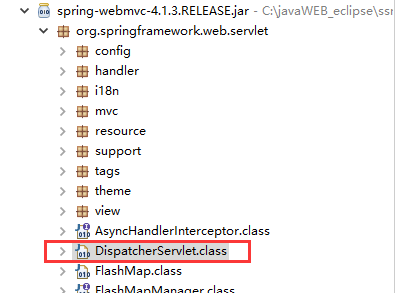
springmvc有一个前端控制器(必须要配置)和三大组件,基本上都不需要自己开发,自己开发的只有handler(controller)和视图渲染这块(jsp)
<?xml version="1.0" encoding="UTF-8"?>

<web-app xmlns:xsi="http://www.w3.org/2001/XMLSchema-instance" xmlns="http://java.sun.com/xml/ns/javaee" xsi:schemaLocation="http://java.sun.com/xml/ns/javaee http://java.sun.com/xml/ns/javaee/web-app_2_5.xsd" id="WebApp_ID" version="2.5">

  <display-name>ssm-002</display-name>

  <welcome-file-list>

    <welcome-file>index.html</welcome-file>

    <welcome-file>index.htm</welcome-file>

    <welcome-file>index.jsp</welcome-file>

    <welcome-file>default.html</welcome-file>

    <welcome-file>default.htm</welcome-file>

    <welcome-file>default.jsp</welcome-file>

  </welcome-file-list>

  <!-- 加载spring容器 -->

  <context-param>

      <param-name>contextConfigLocation</param-name>

      <param-value>/WEB-INF/classes/spring/applicationContext-*.xml</param-value>

  </context-param>

  <!-- 配置监听器 -->

  <listener>

      <listener-class>org.springframework.web.context.ContextLoaderListener</listener-class>

  </listener>

  <!-- 前端控制器 -->

  <servlet>

      <servlet-name>springmvc</servlet-name>

      <servlet-class>org.springframework.web.servlet.DispatcherServlet</servlet-class>

      <init-param>

          <param-name>contextConfigLocation</param-name>

          <param-value>classpath:spring/springmvc.xml</param-value>

      </init-param>

  </servlet>

  <!-- 拦截器 -->

  <servlet-mapping>

      <servlet-name>springmvc</servlet-name>

      <url-pattern>*.action</url-pattern>

  </servlet-mapping>

</web-app>
记住要去掉applicationContext-service.xml中引入的dao.xml文件
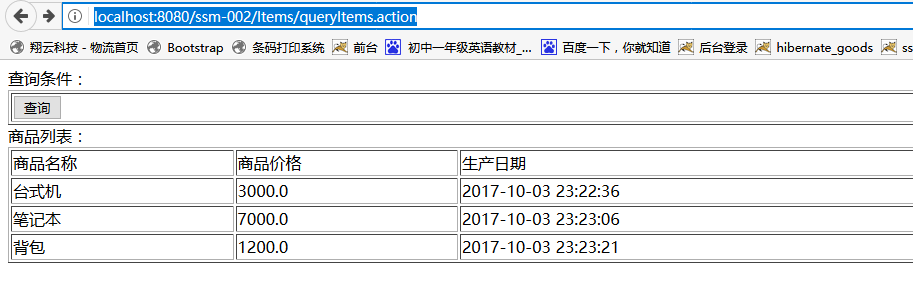
然后启动tomcat,输入地址http://localhost:8080/工程名/Items/queryItems.action,因为我只配置了.action为后缀的
运行结果
顺便提一下@RequestMapping
RequestMapping是一个用来处理请求地址映射的注解,可用于类或方法上。用于类上,表示类中的所有响应请求的方法都是以该地址作为父路径。
RequestMapping注解有六个属性value, method, consumes,produces,params,headers
value: 指定请求的实际地址,指定的地址可以是URI Template 模式(后面将会说明);
method: 指定请求的method类型, GET、POST、PUT、DELETE等;
consumes: 指定处理请求的提交内容类型(Content-Type),例如application/json, text/html;
produces: 指定返回的内容类型,仅当request请求头中的(Accept)类型中包含该指定类型才返回;
params: 指定request中必须包含某些参数值是,才让该方法处理。
headers: 指定request中必须包含某些指定的header值,才能让该方法处理请求。
如果大家有疑问的可以加群号581591235或者留言,咱们一起讨论。或者加微信群,

ssm整合快速入门程序(二)的更多相关文章
- ssm整合快速入门程序(一)
整合基础说明 spring 是一个开放源代码的设计层面框架,他解决的是业务逻辑层和其他各层的松耦合问题,因此它将面向接口的编程思想贯穿整个系统应用.Spring是于2003 年兴起的一个轻量级的Jav ...
- ssm整合快速入门程序(三)之Data类型转换器
今天就写写springmvc配置Data类型转换器 首先在创建一个转换器的包cn.my.ssm.controller.converter,创建一个CustomDateConverter类实现Conve ...
- Vue.js+vue-element搭建属于自己的后台管理模板:Vue.js快速入门(二)
Vue.js+vue-element搭建属于自己的后台管理模板:Vue.js快速入门(二) 前言 上篇文章对Vue.js有了初步理解,接下来我们把Vue.js基础语法快速的过一遍,先混个脸熟留个印象就 ...
- IDEA工具下Mybaties框架快速入门程序
本篇文章介绍在IDEA工具下mybatis快速入门程序分为以下五步 1 添加依赖包 2 编写pojo对象 3 编写映射文件 4 编写核心配置文件 5 测试框架 详细如下 建立Mod ...
- JS快速入门(二)
目录 JS快速入门(二) 结构图 BOM window对象 open() window子对象 location对象 history对象(了解) navigator 对象 screen对象 BOM 定时 ...
- MySQL快速入门(二)
目录 MySQL快速入门(二) 约束条件 自增 自增的特性 主键 外键 级联更新/删除 表与表之间的关系 外键约束 操作表方法 查询关键字 练习数据 select··from where 筛选 gro ...
- ssm框架整合快速入门
写在前面: 公司一直都是使用ssh框架(Struts2,Spring,Hibernate)来开发,但是现在外面的公司大多数都是使用的ssm框架,所以也有必要多学习一下外面的新技术.这里就快速搭建一个小 ...
- SuperSocket快速入门(二):启动程序以及相关的配置
如何快速启动第一个程序 既然是快速入门,所以,对于太深奥的知识点将不做讲解,会在后续的高级应用章节中,会对SS进行拆解.所有的实例90%都是来自SS的实例,外加本人的注释进行讲解. 一般应用而言,你只 ...
- Spring Boot 2 快速教程:WebFlux 快速入门(二)
摘要: 原创出处 https://www.bysocket.com 「公众号:泥瓦匠BYSocket 」欢迎关注和转载,保留摘要,谢谢! 02:WebFlux 快速入门实践 文章工程: JDK 1.8 ...
随机推荐
- springIOC、AOP的一些注解
springIOC.AOP的一些注解(使用这些注解之前要导入spring框架的一些依赖): 1.注入IOC容器 @Compontent:使用注解的方式添加到ioc容器需要在配置文件 ...
- 携程Apollo(阿波罗)配置中心在.NET Core项目快速集成
.NET Core的支持文档大体上可以参考文档.Net客户端使用指南:https://github.com/ctripcorp/apollo/wiki/.Net%E5%AE%A2%E6%88%B7%E ...
- mysql数据库外部无法访问
有以下两种情况: 1.mysql未分配访问权限 格式:grant 权限 on 数据库名.表名 用户@登录主机 identified by "用户密码"; grant select, ...
- java-redis集合数据操作示例(三)
redis系列博文,redis连接管理类的代码请跳转查看<java-redis字符类数据操作示例(一)>. 一.集合类型缓存测试类 public class SetTest { /** * ...
- 对于文件File类型中的目录分隔符
当我们在使用File f=new File(path); 对于这个path来说是一个很痛苦的事情,在不同的系统上面的分隔符号是不一样的 在windows下面的话是一个"\"而在un ...
- nyoj585 取石子(六) Nimm博弈
此题数据十分极限,需要优化,否则会超时.关于此题的不足:明明说的每堆石子数不超过100,我开一个105大小的数组想用哈希居然Runtime Error!! 后来看见有人说需要优化输入: void in ...
- MongoDB,子查询
//1.从sub(订单明细)对订单号分组,查询最多子订单的单号一条数据,重命名orderNo字段为num//2.根据这个sub.num(从结果集里获取第一条结果),查询main(主档表) db.mai ...
- mac的一些小技巧
切换到超级管理员: sudo -s: 让你很快的全屏之间进行切换!很方便!很实用! command+tab 今天的感觉到公司的每一个人员,对于mac的系统的使用都是非常的熟悉的,我还什么都不会. 我得 ...
- Java 多线程入门
进程与线程 在学习Java多线程之前,先简单复习一下进程与线程的知识. 进程:进程是系统进行资源分配和调度的基本单位,可以将进程理解为一个正在执行的程序,比如一款游戏. 线程:线程是程序执行的最小单位 ...
- CEPH RGW 设置 user default_placement为ssd-placement,优化100KB-200KB小文件性能,使用户创建的bucket对象放置到 SSD设备的Pool上。
sudo radosgw-admin metadata get user:tuanzi > user.md.json vi user.md.json #to add ssd-placement ...