
搭建dnsmasq服务器,局域网内部解析
系统:centos6.5
公司内部需求一台dns server,解析内部域名(该域名不需要在公网上解析)
安装了"bind bind-utils"包,配置里设置转发到外部电信dns,dhcp服务设置分发dns服务为该服务器。然后解析内部很通畅,但是到外部(如百度,163,新浪)等网站很慢。
不知道是不是配置有问题,找不出。
所以就使用dnsmasq试试。
下面是安装操作步骤
===================
1,yum 安装
|
1
|
yum install dnsmasq -y |
或者源码安装
|
1
2
3
|
cd /tmp && wget http://www.thekelleys.org.uk/dnsmasq/dnsmasq-2.71.tar.gztar -zxvf dnsmasq-2.71.tar.gz && cd dnsmasq-2.71make install |
|
1
2
|
cp dnsmasq.conf.example /etc/dnsmasq.confmkdir -p /etc/dnsmasq.d #这个目录备用 |
2,dnsmasq配置
|
1
2
3
4
5
6
|
#主要有三个文件:#/etc/dnsmasq.conf#/etc/dnsmasq.d/resolv.dnsmasq.conf#/etc/dnsmasq.d/dnsmasq.hosts #第一个是系统默认必须的,后面两个可以自行建立,放置的路径也可以根据自己需要定义。 |
|
1
2
3
4
5
6
7
8
9
10
11
12
13
14
15
16
17
18
|
vi /etc/dnsmasq.conf#ITGeeker每次开启都提示错误,目的是让dnsmasq读取目录内所有配置文件#conf-dir=/etc/dnsmasq.d#让dnsmasq读取你设定的resolv-file#no-resolvresolv-file=/etc/dnsmasq.d/resolv.dnsmasq.confno-pollstrict-order#不读取系统hosts,读取你设定的no-hostsaddn-hosts=/etc/dnsmasq.d/dnsmasq.hosts#dnsmasq日志设置log-querieslog-facility=/var/log/dnsmasq.log#dnsmasq缓存设置cache-size=1024#单设置127只为本机使用,加入本机IP为内部全网使用listen-address=127.0.0.1,10.19.21.249 |
#在/etc/dnsmasq.d目录下新建2个文件
|
1
2
3
4
5
6
7
8
9
|
vi /etc/dnsmasq.d/resolv.dnsmasq.conf#nameserver 127.0.0.1 不应该添加nameserver 202.96.209.5nameserver 202.96.209.133nameserver 223.5.5.5nameserver 223.6.6.6nameserver 114.114.114.114nameserver 8.8.4.4#nameserver 8.8.8.8 |
|
1
2
|
vi /etc/dnsmasq.d/dnsmasq.hosts10.19.21.249 aop.baim.com |
3,启动服务
|
1
2
3
4
5
6
7
|
/etc/init.d/dnsmasq startchkconfig dnsmasq on#如果是源码编译安装的启动: /usr/local/sbin/dnsmasq验证:netstat -tunlp|grep 53关闭:killall -KILL dnsmasq重启: pkill -9 dnsmasp && /usr/local/sbin/dnsmasq -h |
|
1
2
3
4
5
6
7
8
9
10
11
12
13
14
15
16
17
18
19
20
21
22
23
24
25
26
27
28
29
30
31
32
33
34
35
36
37
38
39
40
41
42
43
44
45
46
47
48
49
50
51
52
53
54
55
56
57
58
59
60
61
62
63
64
65
66
67
68
69
70
71
72
73
74
|
#服务启动脚本vi /etc/init.d/dnsmasq#!/bin/sh## Startup script for the <span class='wp_keywordlink_affiliate'><a href="http://itgeeker.net/tag/dns/" title="View all posts in DNS" target="_blank">DNS</a></span> caching server## chkconfig: - 49 50# description: This script starts your DNS caching server# processname: dnsmasq# pidfile: /var/run/dnsmasq# Source function library.. /etc/rc.d/init.d/functions# Source networking configuration.. /etc/sysconfig/network# Check that networking is up.[ ${NETWORKING} = "no" ] && exit 0dnsmasq=/usr/local/sbin/dnsmasq[ -f $dnsmasq ] || exit 0RETVAL=0# See how we were called.case "$1" instart)if [ $UID -ne 0 ] ; thenecho "User has insufficient privilege."exit 4fiecho -n "Starting dnsmasq: "daemon $dnsmasq $OPTIONSRETVAL=$?echo[ $RETVAL -eq 0 ] && touch /var/lock/subsys/dnsmasq;;stop)if test "x`pidof dnsmasq`" != x; thenecho -n "Shutting down dnsmasq: "killproc dnsmasqfiRETVAL=$?echo[ $RETVAL -eq 0 ] && rm -f /var/lock/subsys/dnsmasq /var/run/dnsmasq.pid;;status)status dnsmasqRETVAL=$?;;reload)echo -n "Reloading dnsmasq: "killproc dnsmasq -HUPRETVAL=$?echo;;force-reload)# new configuration takes effect only after restart$0 stop$0 startRETVAL=$?;;restart)$0 stop$0 startRETVAL=$?;;condrestart)if test "x`/sbin/pidof dnsmasq`" != x; then$0 stop$0 startRETVAL=$?fi;;*)echo "Usage: $0 {start|stop|restart|reload|condrestart|status}"exit 2esacexit $RETVAL |
|
1
2
3
4
5
6
|
#如果你是本地编辑上传的,提示找不到文件记得set ff=unix#再赋予执行的权限chmod +x /etc/init.d/dnsmasq/etc/init.d/dnsmasq startchkconfig dnsmasq on |
注:完成后需要在DHCP服务端设置DNS服务器地址,然后客户端会自动获取到该DNS地址。需要重客户端本地网络。
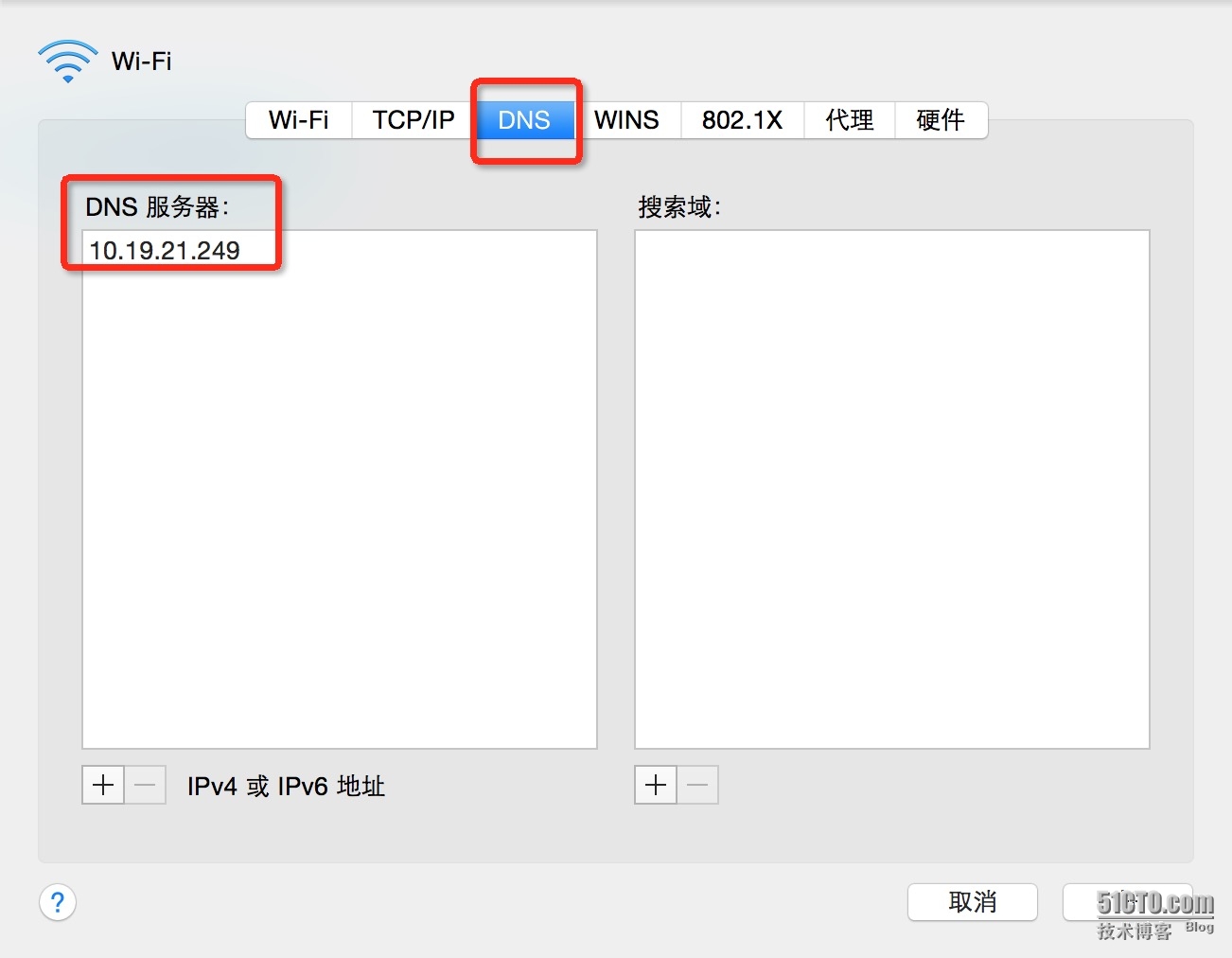
查看本地dns,是否能够获取地址。
然后访问域名,是否能够解析。
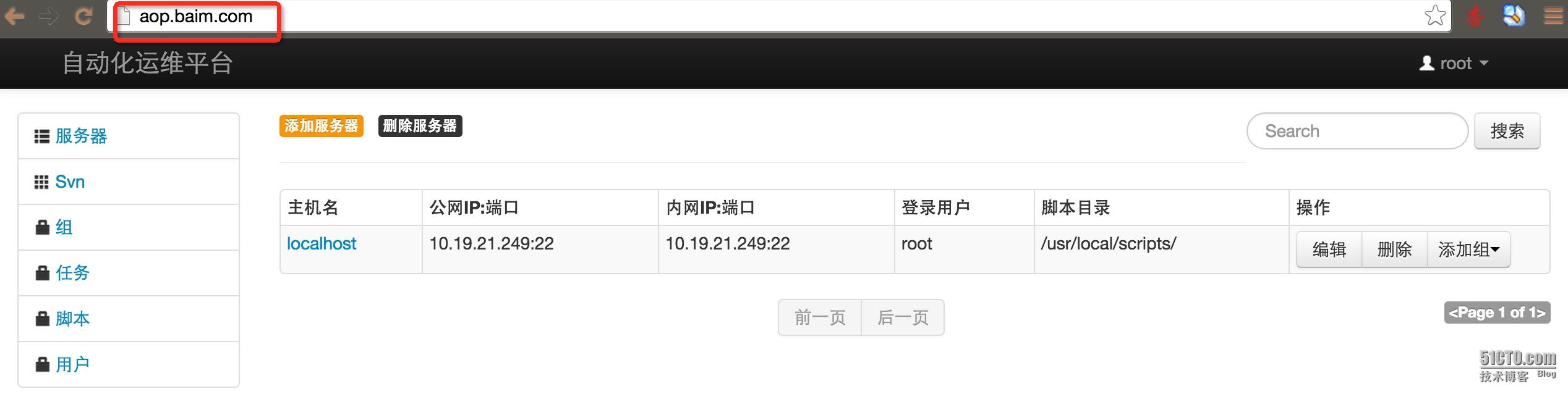
本文出自 “charlie_cen” 博客,请务必保留此出处http://charlie928.blog.51cto.com/3741218/1671914
参考文章:http://charlie928.blog.51cto.com/3741218/1671914
搭建dnsmasq服务器,局域网内部解析的更多相关文章
- 本地搭建SVN服务器 局域网
http://blog.csdn.net/sunbaigui/article/details/8466310
- 不搭建git服务器对git仓库进行局域网内共享多人合作开发项目
有时候在一个临时局域网内没有搭建git服务器,但是又想多人开发一个项目,此时只要每个人电脑安装有git客户端,参考一下方法即可尝试建一个本地化的远程仓库进行多人开发工作. 远程仓库通常只是一个裸仓库( ...
- [转]实用教程:搭建FTP服务器以实现局域网飞速传输文件
原文地址:https://www.ithome.com/html/win10/304059.htm 相信很多人都面临过这样的问题:一个局域网下有很多设备,我们想在这些设备之间互传文件,有些文件非常大, ...
- Python一秒搭建ftp服务器,帮助你在局域网共享文件【华为云技术分享】
版权声明:本文为博主原创文章,遵循CC 4.0 BY-SA版权协议,转载请附上原文出处链接和本声明. 本文链接:https://blog.csdn.net/devcloud/article/detai ...
- Python一秒搭建ftp服务器,帮助你在局域网共享文件
"老板 来碗面" "要啥面?" "内牛满面.." 最近项目上的事情弄得人心累,本来是帮着兄弟项目写套入口代码,搞着搞着就被拉着入坑了.搞开发 ...
- 搭建Minisipserve服务器实现局域网内IOS客户端idoubs的通信
idoubs是IOS设备开发的第一款全功能并开放源码的3GPP IMS客户端,它同时专为IOS平台开发设计的voIP测试版客户端,以doubango为框架,能实现当前最先进的多媒体功能,主要功能有:语 ...
- Windows Server 2003搭建邮件服务器
Windows Server 2003搭建邮件服务器 由于Windows Server 2003默认是没有安装我们搭建邮件服务器所需要的POP3和SMTP服务的,因此需要我们自己来安装.方法如下: 1 ...
- 自己家里搭建NAS服务器有什么好方案?
转自:https://www.zhihu.com/question/21359049 作者:陈二发链接:https://www.zhihu.com/question/21359049/answer/6 ...
- 绕过校园网的共享限制 win10搭建VPN服务器实现--从入门到放弃
一.开篇立论= =.. 上次说到博主在电脑上搭建了代理服务器来绕过天翼客户端的共享限制,然而经过实际测试还不够完美,所以本着生命不息,折腾不止的精神,我又开始研究搭建vpn服务器= =... (上次的 ...
随机推荐
- [SinGuLaRiTy] NOIP模拟题 by liu_runda
[SinGuLaRiTy-1046] Copyright (c) SinGuLaRiTy 2017. All Rights Reserved. 题目名称 兔子 被子 蚊子 源程序文件名 rabbit. ...
- Git-远程仓库的使用
Git修改远程仓库地址 1.修改命令 git remote set-url origin [url] 例如:$ git remote set-url origin gitlab@gitlab.chum ...
- confirm显示数组中的内容时,总是带一个逗号分隔的解决方法
问题的关键 就是在给confirm显示之前,将数组转换成字符串,并以每个数组的元素为一个字符串,加上一个换行回车符即可: 代码中的背景色 为关键的点 <script type="tex ...
- sersync+rsync同步
(一)目标服务器(rsync):10.60.50.192 1.安装rsync yum -y install rsync 2.创建rsyncd.conf配置文件 vi /etc/rsyncd.conf ...
- python3 第四章 - 输入与输出
1.输出 用print()在括号中加上字符串,就可以向屏幕上输出指定的文字. print('hello, world') 输入以上代码,执行后输出: hello, world 事实上,任何基本类型都可 ...
- Windows核心编程&内存管理
1. 每个进程都有自己的虚拟地址空间,对于32位机器而言,这个地址空间的大小为4GB(2^32 / 1024^3),这个虚拟地址空间只不过是一个内存地址空间, 为了能够正常读/写数据,我们还需要把物理 ...
- 【转】IGS相关
目 前,全球260多个lGS跟踪站中,我国占20多个,分布在武汉.拉萨.乌鲁木齐.昆明.上海等地,全球IGS网的GPS数据,由单台接收机交换 (RINEX)格式生成的日观测和导航数据文件组成,其存储方 ...
- ulua c#调用lua中模拟的类成员函数
项目使用ulua,我神烦这个东西.lua单纯在lua环境使用还好,一旦要跟外界交互,各种月经不调就来了.要记住贼多的细节,你才能稍微处理好.一个破栈,pop来push去,位置一会在-1,一会在-3,2 ...
- 【Java入门提高篇】Day13 Java中的反射机制
前一段时间一直忙,所以没什么时间写博客,拖了这么久,也该更新更新了.最近看到各种知识付费的推出,感觉是好事,也是坏事,好事是对知识沉淀的认可与推动,坏事是感觉很多人忙于把自己的知识变现,相对的在沉淀上 ...
- Python CRM项目七
仿照Django Admin实现对readonly的字段进行设置 功能点: 1.页面不可进行更改 2.如果改变html代码中的值,则需要进行后端的数据库数据校验 3.可以对某些字段进行自定制校验规则 ...