
nginx模块,模块的配置使用
nginx模块
官方模块(默认支持的)
第三方模块
1. --with-http_stub_status_module nginx的客户端状态
配置
syntax: sub_status;
default:-
Context:server,location
location /mystatus{
stub_status;
}
http://192.168.1.251/mystatus
Active connections: 2
server accepts handled requests
134 134 291
Reading: 0 Writing: 1 Waiting: 1 (空的连接的数量,无读写等待)
第一个数字:nginx处理的接收的握手的总的次数
处理的连接数
总的请求数
正常握手和连接数相等表示请求未丢失
location /mystatus{
stub_status;
}
location = /status{
stub_status;
}
/string 开头即可 /string122..均可匹配到
= /string
必须是 /string才能访问到 当然/string?a也是可以的
2. --with-http_random_index_module 目录中随机选择一个文件(非目录,非.开头的隐藏文件)访问
random_index_module
Syntax: random_index on|off;
Default:random_index off;
Context:location
location /random {
root /usr/share/nginx/html;
random_index on;
}
[root@localhost110 random]# pwd

/usr/share/nginx/html/random

[root@localhost110 random]# ls -al

总用量

drwxr-xr-x.  root root  -- :: .

drwxr-xr-x.  root root  -- :: ..

-rw-r--r--.  root root  -- :: .html

-rw-r--r--.  root root  -- :: .html

-rw-r--r--.  root root  -- :: .html

-rw-r--r--.  root root  -- :: ..html

drwxr-xr-x.  root root  -- :: a (里有a.html)

-rw-r--r--.  root root  -- :: a.php
随机文件的选择在1.html,2.html,3.html和a.php之间
3. --with-http_sub_module HTTP内容替换
http_sub_module
Syntax: sub_filter string replacement;
Default:-
Context:http,server,location
Syntax: sub_filter_last_modified on|off;
Default:sub_filter_last_modified off;
Context:http,server,location
Syntax: sub_filter_once on|off;
Default:sub_filter_once on;
Context:http,server,location
类似正则的贪婪匹配
location / {
root /usr/share/nginx/html;
index index.html index.htm;
sub_filter 'php' 'PHP';
sub_filter 'js' 'javascript';
sub_filter_once off;
}
submodule.html
php js php Python
java Php JS
被替换成
PHP javascript PHP Python java PHP javascript
发现不区分大小写
不支持正则,可使用 第三方模块 ngx_http_substitutions_filter_module 来实现
nginx请求限制
连接频率限制:limit_conn_module
请求频率限制:limit_req_module
http协议的连接与请求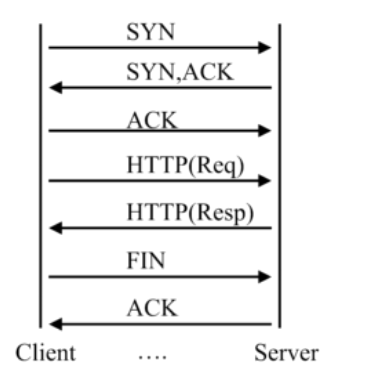
一个连接可发起多个请求
协议版本与请求的关系
|
HTTP协议版本 |
连接关系 |
|
1.0 |
TCP不能复用 |
|
1.1 |
顺序性TCP复用 |
|
2.0 |
多路复用TCP复用 |
HTTP请求建立在一次TCP连接基础上
一次TCP请求至少产生一次HTTP请求
连接限制语法
Syntax:limit_conn_zone key zone=name:size;
default:-
Context:httpSyntax:limit_conn zone number;
Default:-
Context:http ,server,location请求限制
Syntax:limit_req_zone key zone=name:size rate=rate;
Default:-
Context:httpSyntax:limit_req zone=name [burst=number] [nodelay];
Default:-
Context:http,server,location
测试时使用ab
ab -n 总请求数 -c 并发数 -t 多少时间内 url
ab -n 500 -c 200 http://192.168.1.251/1.html
Concurrency Level:

Time taken for tests:   0.466 seconds

Complete requests:

Failed requests:

Write errors:

Total transferred:       bytes

HTML transferred:        bytes

Requests per second:    1072.16 [#/sec] (mean)

Time per request:       186.539 [ms] (mean)

Time per request:       0.933 [ms] (mean, across all concurrent requests)

Transfer rate:          150.73 [Kbytes/sec] received

配置请求限制后

server外层,http里

limit_req_zone $binary_remote_addr zone=req_zone:1m rate=1r/s;

server {

    listen       ;

    server_name  localhost;

    access_log  /var/log/nginx/host.access.log  main;

    root   /usr/share/nginx/html;

    location / {

        root   /usr/share/nginx/html;

        index  index.html index.htm;

        limit_req zone=req_zone;

    }

}
req_zone表示开辟的空间名,1m表示大小 rate=1r/s 表示1s 1个请求
Concurrency Level:

Time taken for tests:   0.137 seconds

Complete requests:

Failed requests:

   (Connect: , Receive: , Length: , Exceptions: )

Write errors:

Non-2xx responses:

Total transferred:       bytes

HTML transferred:        bytes

Requests per second:    3661.72 [#/sec] (mean)

Time per request:       54.619 [ms] (mean)

Time per request:       0.273 [ms] (mean, across all concurrent requests)

Transfer rate:          1666.92 [Kbytes/sec] received

ab -n  -c  http://192.168.1.251/1.html

Concurrency Level:

Time taken for tests:   0.002 seconds

Complete requests:

Failed requests:

   (Connect: , Receive: , Length: , Exceptions: )

Write errors:

Non-2xx responses:

Total transferred:       bytes

HTML transferred:        bytes

Requests per second:    3180.66 [#/sec] (mean)

Time per request:       0.629 [ms] (mean)

Time per request:       0.314 [ms] (mean, across all concurrent requests)

Transfer rate:          1272.26 [Kbytes/sec] received

只有1个成功

请求日志

192.168.1.251 - - [/Oct/::: +] "GET /1.html HTTP/1.0"   "-" "ApacheBench/2.3" "-"

192.168.1.251 - - [/Oct/::: +] "GET /1.html HTTP/1.0"   "-" "ApacheBench/2.3" "-"

192.168.1.251 - - [/Oct/::: +] "GET /1.html HTTP/1.0"   "-" "ApacheBench/2.3" "-"

192.168.1.251 - - [/Oct/::: +] "GET /1.html HTTP/1.0"   "-" "ApacheBench/2.3" "-"

192.168.1.251 - - [/Oct/::: +] "GET /1.html HTTP/1.0"   "-" "ApacheBench/2.3" "-"

错误日志

// :: [error] #: * limiting requests, excess: 1.000 by zone "req_zone", client: 192.168.1.251, server: localhost, request: "GET /1.html HTTP/1.0", host: "192.168.1.251"

// :: [error] #: * limiting requests, excess: 0.999 by zone "req_zone", client: 192.168.1.251, server: localhost, request: "GET /1.html HTTP/1.0", host: "192.168.1.251"

// :: [error] #: * limiting requests, excess: 0.999 by zone "req_zone", client: 192.168.1.251, server: localhost, request: "GET /1.html HTTP/1.0", host: "192.168.1.251"

// :: [error] #: * limiting requests, excess: 0.999 by zone "req_zone", client: 192.168.1.251, server: localhost, request: "GET /1.html HTTP/1.0", host: "192.168.1.251"

如果上面配置改成

limit_req zone=req_zone burst= nodelay;

ab -n  -c  http://192.168.1.251/1.html

Concurrency Level:

Time taken for tests:   0.001 seconds

Complete requests:

Failed requests:

   (Connect: , Receive: , Length: , Exceptions: )

Write errors:

Non-2xx responses:

Total transferred:       bytes

HTML transferred:        bytes

Requests per second:    6720.43 [#/sec] (mean)

Time per request:       0.298 [ms] (mean)

Time per request:       0.149 [ms] (mean, across all concurrent requests)

Transfer rate:          2118.51 [Kbytes/sec] received
brust表示2个时信任的,给予了2个信任的令牌
对于连接的限制

limit_conn one  ,限制客户端并发连接数量为1

http里

limit_conn_zone $binary_remote_addr zone=conn_zone:1m;

server {

    listen       ;

    server_name  localhost;

    access_log  /var/log/nginx/host.access.log  main;

    root   /usr/share/nginx/html;

    location / {

        root   /usr/share/nginx/html;

        index  index.html index.htm;

        limit_conn conn_zone ;

    }

    ...

}

查看当前tcp连接数

netstat -n | awk '/^tcp/ {++S[$NF]} END {for(a in S) print a, S[a]}'
4. http_access_module(基于ip的访问控制 )
Syntax:allow address |CIDR|unix:|all;

Default:-

Context:http,server,location,limit_except

CIDR 基于网段

Unix:socket方式

all:所有的

Syntax: deny address |CIDR|unix:|all;

Default:-

Context:http,server,location,limit_except
一般allow和deny成对出现
location /admin{

                deny 10.88.1.83;

                allow all;

                index index.html;

 }

 除了10.88.1.,均可访问

 location /admin1{

                allow 10.88.1.0/;

                allow 10.88.2.0/;

                deny all;

                index index.html;

  }

只允许10.88.1./,10.88.2.0/24的网段访问,可配置多个allow
http_access_module局限性
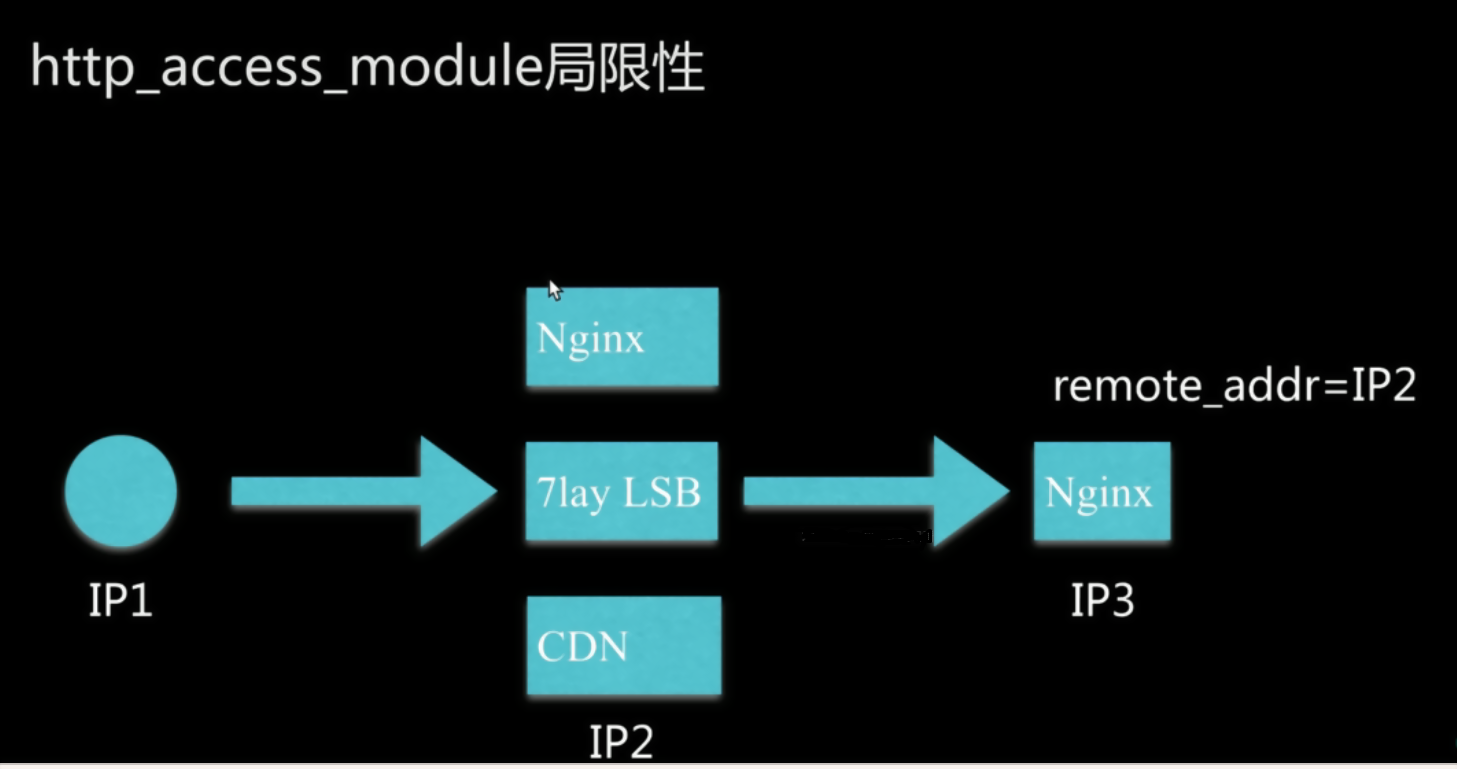
一般的解决方案
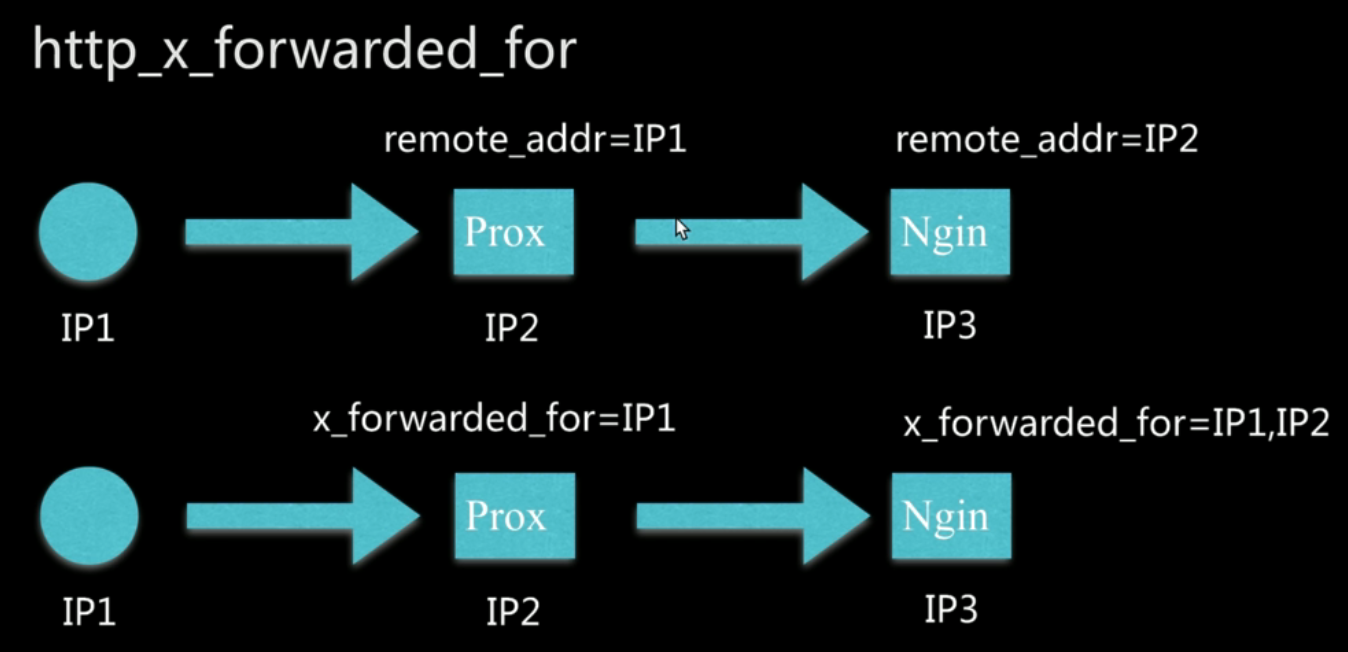
1.采用别的http头信息代替remote_addr,如HTTP_X_FORWARD_FOR
X-Forward-For是协议要求,不一定所有的cdn厂商或者代理厂商都会加上,而且可以被客户端修改
http_x_forwarded_for=client ip,proxy(1),proxy(2) ip,....
2.结合geo模块操作
3.通过http自定义变量传递
在访问下一端时通过自定义变量设置http头,把上一级的remote_addr携带到下一端
nginx模块,模块的配置使用的更多相关文章
- Nginx缓存配置以及nginx ngx_cache_purge模块的使用
web缓存位于内容源Web服务器和客户端之间,当用户访问一个URL时,Web缓存服务器会去后端Web源服务器取回要输出的内容,然后,当下一个请求到来时,如果访问的是相同的URL,Web缓存服务器直接输 ...
- Nginx中location模块的详细配置(含示例)
题记 此前在配置Nginx location模块的时候玩出了一些bug,折腾了一段时间.后来网上也查阅了相关的资料,看着也比较混乱.周末有空想着好好整理一下location模块的配置,结合自己的亲手实 ...
- 基于Nginx dyups模块的站点动态上下线并实现简单服务治理
简介 今天主要讨论一下,对于分布式服务,站点如何平滑的上下线问题. 分布式服务 在分布式服务下,我们会用nginx做负载均衡, 业务站点访问某服务站点的时候, 统一走nginx, 然后nginx根据一 ...
- Nginx 切片模块、断点续传
熟悉 CDN 行业主流技术的朋友应该都比较清楚,虽然 Nginx 近几年发展的如日中天,但是基本上没有直接使用它自带的 proxy_cache 模块来做缓存的,原因有很多,例如下面几个: 不支持多盘 ...
- nginx事件模块分析(一)
nginx ngx_events_module模块分析 ngx_events_module模块是核心模块之一,它是其它所有事件模块的代理模块.nginx在启动时只与events模块打交道,而由even ...
- mac下Nginx+lua模块编译安装
Nginx的nb之处就不说了,lua也是一个小巧的脚本语言,由标准C编写而成,几乎可以运行在所有的平台上,也非常强大,其他特性请自行度娘.nginx_lua_module是由淘宝的工程师清无(王晓哲) ...
- NGINX(五)模块
nginx模块分为以下几类: NGX_CORE_MODULE //核心模块 NGX_HTTP_MODULE //HTTP处理模块 NGX_EVENT_MODULE //事件处理模块 NGX_MAIL_ ...
- nginx自定义模块编写-实时统计模块--转载
原文:http://www.vimer.cn/2012/05/nginx%E8%87%AA%E5%AE%9A%E4%B9%89%E6%A8%A1%E5%9D%97%E7%BC%96%E5%86%99- ...
- nginx -- handler模块(100%)
handler模块简介 相信大家在看了前一章的模块概述以后,都对nginx的模块有了一个基本的认识.基本上作为第三方开发者最可能开发的就是三种类型的模块,即handler,filter和load-ba ...
- Nginx Http模块开发
关于Nginx Http模块开发的文章非常少,只有Emiler的那篇关于Http模块的文章,但是那篇文章里面,并没有说到事件型的模块如何进行开发.而且文章里面提到的内容实在是让人有点意犹未尽.因此,对 ...
随机推荐
- 图数据库orientDB(1-1)SQL基本操作
SQL基本操作 1.新增VerTex CREATE VERTEX V SET name="user01",sex="M",age="25"; ...
- maven常见问题处理(3-2)maven打包时跳过测试的几个方法
运行mvn install时跳过Test方法一:<project> [...] <build> <plugins> <plugin> <group ...
- maven入门(7)maven项目(组件)的坐标
1.为什么要定义Maven坐标 在我们开发Maven项目的时候,需要为其定义适当的坐标,这是Maven强制要求的.在这个基础上,其他Maven项目才能应用该项目生成的构件. 2.Maven坐 ...
- ssh整合之一spring的单独运行环境
这是本人第一次写博客,不足之处,还希望各位园友指出,在此先谢谢各位了! 先说我们的这三大框架,即struts,spring,hibernate,我们要进行整合的话,第一步是先单独搭建我们的Spring ...
- Python第三方库的安装方法总结
源码安装 很多第三方库都是开源的,几乎都可以在github 或者 pypi上找到源码.找到源码格式大概都是 zip . tar.zip. tar.bz2格式的压缩包.解压这些包,进入解压好的文件夹,通 ...
- java集合 源码解析 学习手册
学习路线: http://www.cnblogs.com/skywang12345/ 总结 1 总体框架 2 Collection架构 3 ArrayList详细介绍(源码解析)和使用示例 4 fai ...
- JavaScript中内存使用规则--堆和栈
堆和栈都是运行时内存中分配的一个数据区,因此也被称为堆区和栈区,但二者存储的数据类型和处理速度不同.堆(heap)用于复杂数据类型(引用类型)分配空间,例如数组对象.object对象:它是运行时动态分 ...
- Java - Spring MVC 实现跨域资源 CORS 请求
拦截器设置响应头 这种方式原理就是利用拦截器在方法执行前,我们增加请求的响应头,用来支持跨域请求.这种方案是可行的,大部分都是采用这种方案.我当时也是打算采用这种方案,直到我发现原来 Spring 框 ...
- 将一个javaWeb应用跑在Docker里
安装docker,本实例使用的是CentOS 7,其他系统的安装请自行百度. 安装:yum -y install docker 启动:service docker start docker的一些基本命 ...
- hue集成hive访问报database is locked
这个问题这应该是hue默认的SQLite数据库出现错误,你可以使用mysql postgresql等来替换 hue默认使用sqlite作为元数据库,不推荐在生产环境中使用.会经常出现database ...