
nginx模块,模块的配置使用
nginx模块
官方模块(默认支持的)
第三方模块
1. --with-http_stub_status_module nginx的客户端状态
配置
syntax: sub_status;
default:-
Context:server,location
location /mystatus{
stub_status;
}
http://192.168.1.251/mystatus
Active connections: 2
server accepts handled requests
134 134 291
Reading: 0 Writing: 1 Waiting: 1 (空的连接的数量,无读写等待)
第一个数字:nginx处理的接收的握手的总的次数
处理的连接数
总的请求数
正常握手和连接数相等表示请求未丢失
location /mystatus{
stub_status;
}
location = /status{
stub_status;
}
/string 开头即可 /string122..均可匹配到
= /string
必须是 /string才能访问到 当然/string?a也是可以的
2. --with-http_random_index_module 目录中随机选择一个文件(非目录,非.开头的隐藏文件)访问
random_index_module
Syntax: random_index on|off;
Default:random_index off;
Context:location
location /random {
root /usr/share/nginx/html;
random_index on;
}
[root@localhost110 random]# pwd

/usr/share/nginx/html/random

[root@localhost110 random]# ls -al

总用量

drwxr-xr-x.  root root  -- :: .

drwxr-xr-x.  root root  -- :: ..

-rw-r--r--.  root root  -- :: .html

-rw-r--r--.  root root  -- :: .html

-rw-r--r--.  root root  -- :: .html

-rw-r--r--.  root root  -- :: ..html

drwxr-xr-x.  root root  -- :: a (里有a.html)

-rw-r--r--.  root root  -- :: a.php
随机文件的选择在1.html,2.html,3.html和a.php之间
3. --with-http_sub_module HTTP内容替换
http_sub_module
Syntax: sub_filter string replacement;
Default:-
Context:http,server,location
Syntax: sub_filter_last_modified on|off;
Default:sub_filter_last_modified off;
Context:http,server,location
Syntax: sub_filter_once on|off;
Default:sub_filter_once on;
Context:http,server,location
类似正则的贪婪匹配
location / {
root /usr/share/nginx/html;
index index.html index.htm;
sub_filter 'php' 'PHP';
sub_filter 'js' 'javascript';
sub_filter_once off;
}
submodule.html
php js php Python
java Php JS
被替换成
PHP javascript PHP Python java PHP javascript
发现不区分大小写
不支持正则,可使用 第三方模块 ngx_http_substitutions_filter_module 来实现
nginx请求限制
连接频率限制:limit_conn_module
请求频率限制:limit_req_module
http协议的连接与请求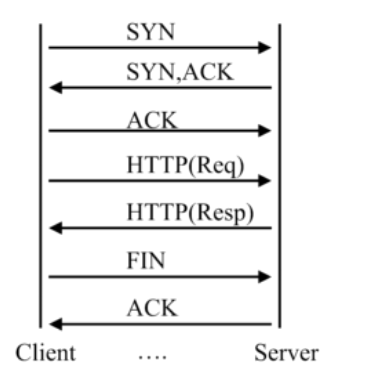
一个连接可发起多个请求
协议版本与请求的关系
|
HTTP协议版本 |
连接关系 |
|
1.0 |
TCP不能复用 |
|
1.1 |
顺序性TCP复用 |
|
2.0 |
多路复用TCP复用 |
HTTP请求建立在一次TCP连接基础上
一次TCP请求至少产生一次HTTP请求
连接限制语法
Syntax:limit_conn_zone key zone=name:size;
default:-
Context:httpSyntax:limit_conn zone number;
Default:-
Context:http ,server,location请求限制
Syntax:limit_req_zone key zone=name:size rate=rate;
Default:-
Context:httpSyntax:limit_req zone=name [burst=number] [nodelay];
Default:-
Context:http,server,location
测试时使用ab
ab -n 总请求数 -c 并发数 -t 多少时间内 url
ab -n 500 -c 200 http://192.168.1.251/1.html
Concurrency Level:

Time taken for tests:   0.466 seconds

Complete requests:

Failed requests:

Write errors:

Total transferred:       bytes

HTML transferred:        bytes

Requests per second:    1072.16 [#/sec] (mean)

Time per request:       186.539 [ms] (mean)

Time per request:       0.933 [ms] (mean, across all concurrent requests)

Transfer rate:          150.73 [Kbytes/sec] received

配置请求限制后

server外层,http里

limit_req_zone $binary_remote_addr zone=req_zone:1m rate=1r/s;

server {

    listen       ;

    server_name  localhost;

    access_log  /var/log/nginx/host.access.log  main;

    root   /usr/share/nginx/html;

    location / {

        root   /usr/share/nginx/html;

        index  index.html index.htm;

        limit_req zone=req_zone;

    }

}
req_zone表示开辟的空间名,1m表示大小 rate=1r/s 表示1s 1个请求
Concurrency Level:

Time taken for tests:   0.137 seconds

Complete requests:

Failed requests:

   (Connect: , Receive: , Length: , Exceptions: )

Write errors:

Non-2xx responses:

Total transferred:       bytes

HTML transferred:        bytes

Requests per second:    3661.72 [#/sec] (mean)

Time per request:       54.619 [ms] (mean)

Time per request:       0.273 [ms] (mean, across all concurrent requests)

Transfer rate:          1666.92 [Kbytes/sec] received

ab -n  -c  http://192.168.1.251/1.html

Concurrency Level:

Time taken for tests:   0.002 seconds

Complete requests:

Failed requests:

   (Connect: , Receive: , Length: , Exceptions: )

Write errors:

Non-2xx responses:

Total transferred:       bytes

HTML transferred:        bytes

Requests per second:    3180.66 [#/sec] (mean)

Time per request:       0.629 [ms] (mean)

Time per request:       0.314 [ms] (mean, across all concurrent requests)

Transfer rate:          1272.26 [Kbytes/sec] received

只有1个成功

请求日志

192.168.1.251 - - [/Oct/::: +] "GET /1.html HTTP/1.0"   "-" "ApacheBench/2.3" "-"

192.168.1.251 - - [/Oct/::: +] "GET /1.html HTTP/1.0"   "-" "ApacheBench/2.3" "-"

192.168.1.251 - - [/Oct/::: +] "GET /1.html HTTP/1.0"   "-" "ApacheBench/2.3" "-"

192.168.1.251 - - [/Oct/::: +] "GET /1.html HTTP/1.0"   "-" "ApacheBench/2.3" "-"

192.168.1.251 - - [/Oct/::: +] "GET /1.html HTTP/1.0"   "-" "ApacheBench/2.3" "-"

错误日志

// :: [error] #: * limiting requests, excess: 1.000 by zone "req_zone", client: 192.168.1.251, server: localhost, request: "GET /1.html HTTP/1.0", host: "192.168.1.251"

// :: [error] #: * limiting requests, excess: 0.999 by zone "req_zone", client: 192.168.1.251, server: localhost, request: "GET /1.html HTTP/1.0", host: "192.168.1.251"

// :: [error] #: * limiting requests, excess: 0.999 by zone "req_zone", client: 192.168.1.251, server: localhost, request: "GET /1.html HTTP/1.0", host: "192.168.1.251"

// :: [error] #: * limiting requests, excess: 0.999 by zone "req_zone", client: 192.168.1.251, server: localhost, request: "GET /1.html HTTP/1.0", host: "192.168.1.251"

如果上面配置改成

limit_req zone=req_zone burst= nodelay;

ab -n  -c  http://192.168.1.251/1.html

Concurrency Level:

Time taken for tests:   0.001 seconds

Complete requests:

Failed requests:

   (Connect: , Receive: , Length: , Exceptions: )

Write errors:

Non-2xx responses:

Total transferred:       bytes

HTML transferred:        bytes

Requests per second:    6720.43 [#/sec] (mean)

Time per request:       0.298 [ms] (mean)

Time per request:       0.149 [ms] (mean, across all concurrent requests)

Transfer rate:          2118.51 [Kbytes/sec] received
brust表示2个时信任的,给予了2个信任的令牌
对于连接的限制

limit_conn one  ,限制客户端并发连接数量为1

http里

limit_conn_zone $binary_remote_addr zone=conn_zone:1m;

server {

    listen       ;

    server_name  localhost;

    access_log  /var/log/nginx/host.access.log  main;

    root   /usr/share/nginx/html;

    location / {

        root   /usr/share/nginx/html;

        index  index.html index.htm;

        limit_conn conn_zone ;

    }

    ...

}

查看当前tcp连接数

netstat -n | awk '/^tcp/ {++S[$NF]} END {for(a in S) print a, S[a]}'
4. http_access_module(基于ip的访问控制 )
Syntax:allow address |CIDR|unix:|all;

Default:-

Context:http,server,location,limit_except

CIDR 基于网段

Unix:socket方式

all:所有的

Syntax: deny address |CIDR|unix:|all;

Default:-

Context:http,server,location,limit_except
一般allow和deny成对出现
location /admin{

                deny 10.88.1.83;

                allow all;

                index index.html;

 }

 除了10.88.1.,均可访问

 location /admin1{

                allow 10.88.1.0/;

                allow 10.88.2.0/;

                deny all;

                index index.html;

  }

只允许10.88.1./,10.88.2.0/24的网段访问,可配置多个allow
http_access_module局限性
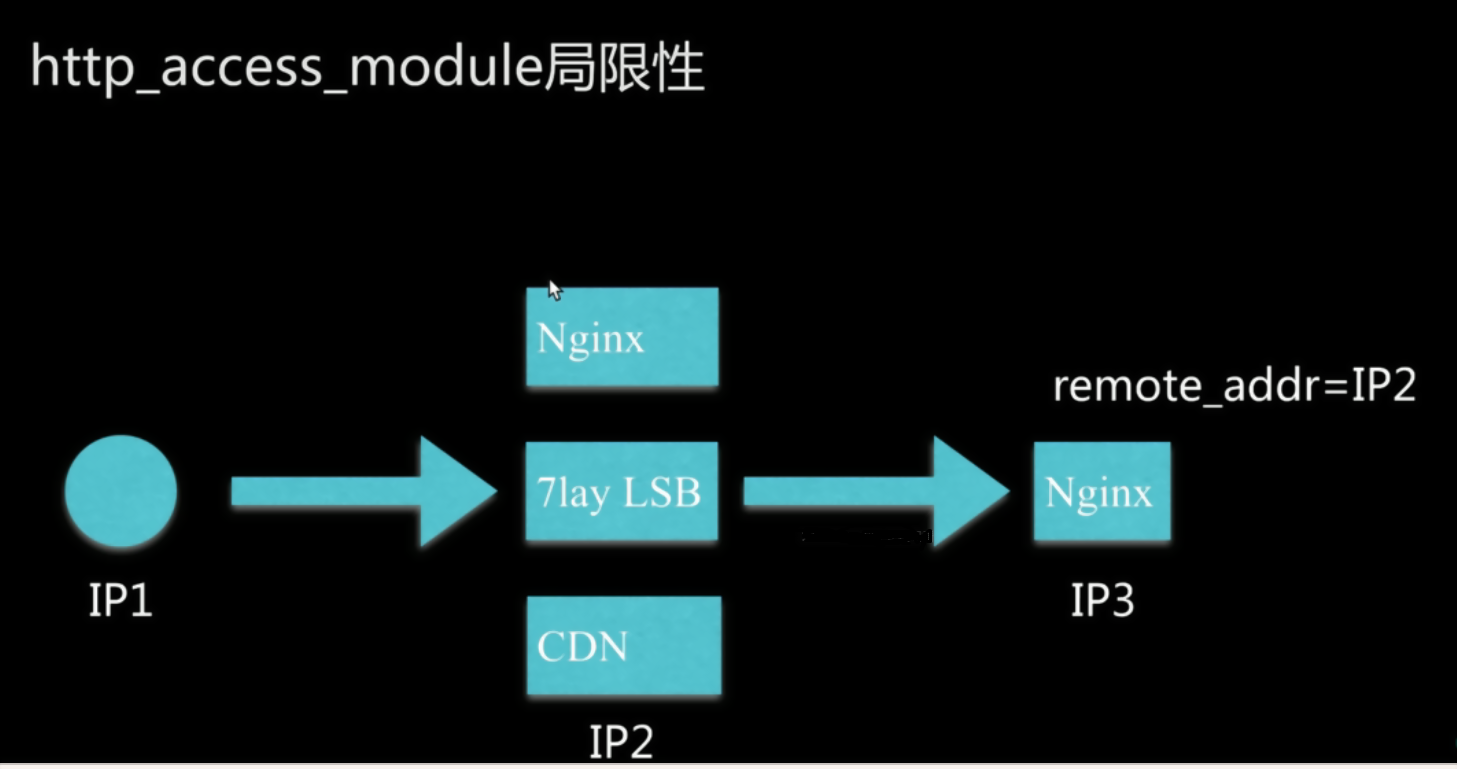
一般的解决方案
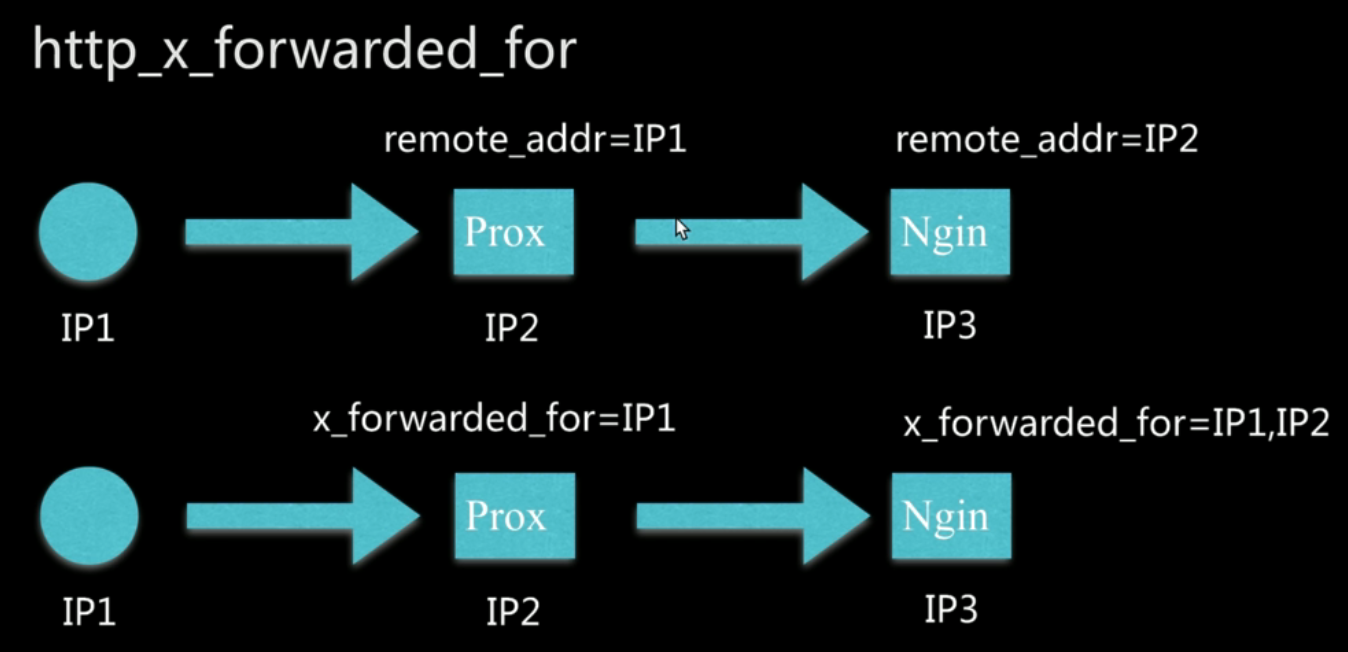
1.采用别的http头信息代替remote_addr,如HTTP_X_FORWARD_FOR
X-Forward-For是协议要求,不一定所有的cdn厂商或者代理厂商都会加上,而且可以被客户端修改
http_x_forwarded_for=client ip,proxy(1),proxy(2) ip,....
2.结合geo模块操作
3.通过http自定义变量传递
在访问下一端时通过自定义变量设置http头,把上一级的remote_addr携带到下一端
nginx模块,模块的配置使用的更多相关文章
- Nginx缓存配置以及nginx ngx_cache_purge模块的使用
web缓存位于内容源Web服务器和客户端之间,当用户访问一个URL时,Web缓存服务器会去后端Web源服务器取回要输出的内容,然后,当下一个请求到来时,如果访问的是相同的URL,Web缓存服务器直接输 ...
- Nginx中location模块的详细配置(含示例)
题记 此前在配置Nginx location模块的时候玩出了一些bug,折腾了一段时间.后来网上也查阅了相关的资料,看着也比较混乱.周末有空想着好好整理一下location模块的配置,结合自己的亲手实 ...
- 基于Nginx dyups模块的站点动态上下线并实现简单服务治理
简介 今天主要讨论一下,对于分布式服务,站点如何平滑的上下线问题. 分布式服务 在分布式服务下,我们会用nginx做负载均衡, 业务站点访问某服务站点的时候, 统一走nginx, 然后nginx根据一 ...
- Nginx 切片模块、断点续传
熟悉 CDN 行业主流技术的朋友应该都比较清楚,虽然 Nginx 近几年发展的如日中天,但是基本上没有直接使用它自带的 proxy_cache 模块来做缓存的,原因有很多,例如下面几个: 不支持多盘 ...
- nginx事件模块分析(一)
nginx ngx_events_module模块分析 ngx_events_module模块是核心模块之一,它是其它所有事件模块的代理模块.nginx在启动时只与events模块打交道,而由even ...
- mac下Nginx+lua模块编译安装
Nginx的nb之处就不说了,lua也是一个小巧的脚本语言,由标准C编写而成,几乎可以运行在所有的平台上,也非常强大,其他特性请自行度娘.nginx_lua_module是由淘宝的工程师清无(王晓哲) ...
- NGINX(五)模块
nginx模块分为以下几类: NGX_CORE_MODULE //核心模块 NGX_HTTP_MODULE //HTTP处理模块 NGX_EVENT_MODULE //事件处理模块 NGX_MAIL_ ...
- nginx自定义模块编写-实时统计模块--转载
原文:http://www.vimer.cn/2012/05/nginx%E8%87%AA%E5%AE%9A%E4%B9%89%E6%A8%A1%E5%9D%97%E7%BC%96%E5%86%99- ...
- nginx -- handler模块(100%)
handler模块简介 相信大家在看了前一章的模块概述以后,都对nginx的模块有了一个基本的认识.基本上作为第三方开发者最可能开发的就是三种类型的模块,即handler,filter和load-ba ...
- Nginx Http模块开发
关于Nginx Http模块开发的文章非常少,只有Emiler的那篇关于Http模块的文章,但是那篇文章里面,并没有说到事件型的模块如何进行开发.而且文章里面提到的内容实在是让人有点意犹未尽.因此,对 ...
随机推荐
- Angular 学习笔记 (路由外传 - RouteReuseStrategy)
refer : https://github.com/angular/angular/issues/10929 https://stackoverflow.com/questions/41280471 ...
- C++中构造函数的初始化列表(const、引用&变量初始化)
1. 构造函数执行分为两个阶段: a.初始化阶段(初始化) 初始化阶段具体指的是用构造函数初始化列表方式来初始化类中的数据成员. ClassXX:val(a),key(b){}; b.普通计算阶段(赋 ...
- R语言学习 第九篇:plyr包
在数据分析中,整理数据的本质可以归纳为:对数据进行分割(Split),然后应用(Apply)某些处理函数,最后将结果重新组合(Combine)成所需的格式返回,简单描述为:Split - Apply ...
- python实现归并排序,归并排序的详细分析。
学习归并排序的过程是十分痛苦的.它并不常用,看起来时间复杂度好像是几种排序中最低的,比快排的时间复杂度还要低,但是它的执行速度不是最快的.很多朋友不理解时间复杂度低为什么运行速度不一定快,这个不清楚的 ...
- Cookie、Session登陆验证相关介绍和用法
一.Cookie和Session 首先.HTTP协议是无状态的:所谓的无状态是指每次的请求都是独立的,它的执行情况和结果与前面的请求和之后的请求都无直接关系,它不会受前面的请求响应直接影响,也不会直接 ...
- JEECG中的模糊查询
以一个使用代码生成器创建的通讯录(maillist)为例: @RequestMapping(params = "datagrid") public void datagrid(Ma ...
- 那些年,曾踩过的Spark坑
1.报错18/01/25 14:56:58 ERROR executor.CoarseGrainedExecutorBackend: Driver 127.0.0.1:37159 disassocia ...
- BST讲解
BST 第一步,什么是BST,所谓BST就是满足一种特定性质的二叉树,这个性质一般情况是当前节点的权值比他的左子树的所有点的权值大,比他的右子树的所有点的权值小,满足这样性质的二叉树就称为BST,下面 ...
- [HAOI2007]分割矩阵
题目描述 将一个a*b的数字矩阵进行如下分割:将原矩阵沿某一条直线分割成两个矩阵,再将生成的两个矩阵继续如此分割(当然也可以只分割其中的一个),这样分割了(n-1)次后,原矩阵被分割成了n个矩阵.(每 ...
- Codeforces 429E Points and Segments
Description 题面 题目大意:有 \(n\) 个区间 \([L_i,R_i]\) ,你要给每一个区间染红蓝,使得每一个位置被红色染过的次数与被蓝色染过的次数差的绝对值不大于\(1\) Sol ...