
PHPList 安装

邮件发送开源软件 PHPList 安装介绍
1:安装基本信息
官网地址

地址:https://www.phplist.com/

其他:https://www.d-ip.jp/phplist/

官网手册

https://www.phplist.org/manual/books/phplist-manual/page/installing-phplist-manually

下载URL

地址1:http://www.d-ip.jp/download/images/phplist-3.0.8_ja_dip_20140927.tar.gz

地址2:www.phplist.com/download
| OS |
Linux Windows(XP / Vista / 7 / Server2003 / Server2008) |
| WEB server | Apache2.x 以上 |
| DB | MySQL5.x 以上 |
| PHP | 5.x 以上(mbstring 必须) |


系统环境需求列表:

phpList system requirements

MySQL or MariaDB

Apache Note: phpList optionally uses Apache environment variables

PHP 5.3.3 or later with the following PHP extensions:

pcre

imap

Core

date

hash

SPL

filter

openssl

mbstring

session

curl

xml

iconv

json

gettext

SimpleXML

mysqli

mysql

GD (required by CKEditor Plugin only)
PHP Env
注意:

确认 session.save_path 是否设置正确,web账户是否有权限保存。

如果设置不正确会导致系统登录后跳出等问题。

一般情况下需要确认 php.ini 配置文件,

[Session]

session.save_handler = files

session.save_path = "/tmp"

如果是php-fpm则需要确认 /etc/php-fpm.d/www.conf 中

php_value[session.save_handler] = files

php_value[session.save_path] = /tmp

更改配置后注意需要重启相关的服务!
httpd 或 php-fpm
2 安装流程简介
- Download & Unzip phpList
- Upload to your server using FTP
- Create a database
- Add the database details to the config.php file
- Configure using web interface.
2.1 下载解压后把lists子目录移动到web指定目录下
# tar zxvf phplist-3.0.8_ja_dip_20140927.tar
# mv phplist-3.0.8_ja_dip/public_html/public_html/lists /data/webroot/phplist
2.2 访问WEBURL地址会提示数据库信息未提供
http://xxx.com/phplist/lists/admin/
Cannot connect to database, Sql server is not running.
Please check your configuration or contact the administrator.
2.3 创建数据库和用户
2.4 编辑配置文件
# vi /data/webroot/phplist/lists/config/confg.php
# 1 数据库配置内容:

what is your Mysql database server hostname

$database_host = "localhost";

what is the name of the database we are using

$database_name = "phplistdb";

what user has access to this database

$database_user = "phplist";

and what is the password to login to control the database

$database_password = 'phplist';

# 2 注意下面第三方邮件服务器地址为空,注意屏蔽或设置:

### define("PHPMAILERHOST",'');

# 3 默认 TEST 1 不会发任何邮件,需要改成 0

define ("TEST",1);

# 4 在最后添加SMTP发件信息 office365 例子如下

# 注意加密端口可能是465 ssl 根据邮件供应商信息填写

define('PHPMAILERHOST', 'smtp.office365.com');

$phpmailer_smtpuser = 'user@company.com';

$phpmailer_smtppassword = 'user_password';

define("PHPMAILERPORT",'587');

define("PHPMAILER_SECURE",'tls');

#  阿里云邮箱例子

define("PHPMAILERHOST",'smtp.qiye.aliyun.com');

$phpmailer_smtpuser = 'user@company.com';

$phpmailer_smtppassword = 'user_password';

define("PHPMAILERPORT",'465');

define("PHPMAILER_SECURE",'ssl');
Config

注意: 数据库配置后再次访问如仅显示logo,请确认php模块以及是否重启了web / php-fpm服务
注意: 加密发送的时候系统可能要确认根证书
根证书查看命令:php -r "print_r(openssl_get_cert_locations());"

[default_cert_file] => /etc/pki/tls/cert.pem

Array

(

[default_cert_file] => /etc/pki/tls/cert.pem

[default_cert_file_env] => SSL_CERT_FILE

[default_cert_dir] => /etc/pki/tls/certs

[default_cert_dir_env] => SSL_CERT_DIR

[default_private_dir] => /etc/pki/tls/private

[default_default_cert_area] => /etc/pki/tls

[ini_cafile] =>

[ini_capath] =>

)

如果没有需要下载根证书后放在指定路径 /etc/pki/tls/cert.pem

根证书下载地址:https://curl.haxx.se/ca/cacert.pem
5.4 web界面初始化
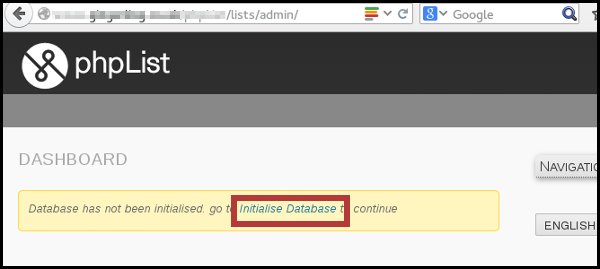
choose Initialize database under the Config option
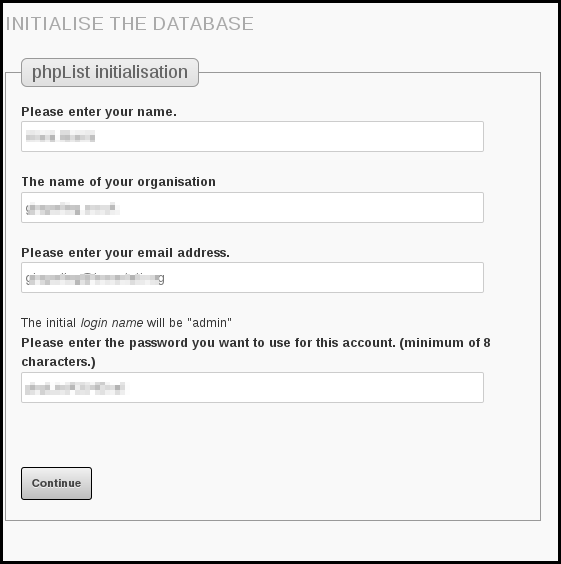
Click Initialise Database and fill out the form.
注意:这边的email地址必须和config配置文件中的地址相同,不同的话发不了邮件
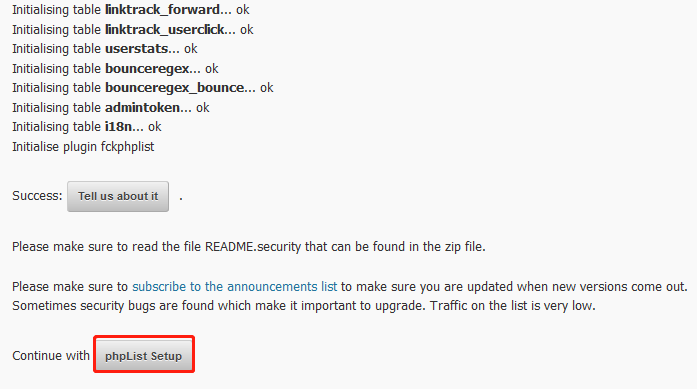
Finally click to continue with phpList seutp.
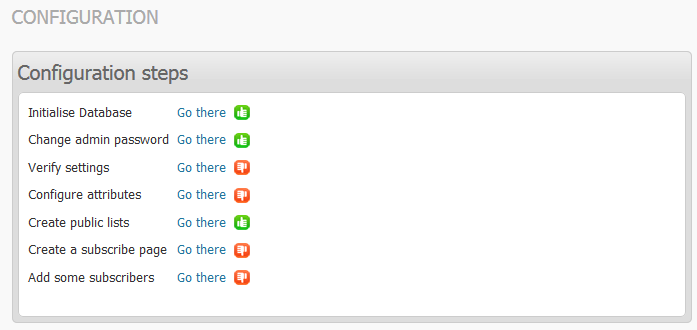
You have now finished installation, and the next step is configuration.
PHPList 安装的更多相关文章
- docker——容器安装tomcat
写在前面: 继续docker的学习,学习了docker的基本常用命令之后,我在docker上安装jdk,tomcat两个基本的java web工具,这里对操作流程记录一下. 软件准备: 1.jdk-7 ...
- 网络原因导致 npm 软件包 node-sass / gulp-sass 安装失败的处理办法
如果你正在构建一个基于 gulp 的前端自动化开发环境,那么极有可能会用到 gulp-sass ,由于网络原因你可能会安装失败,因为安装过程中部分细节会到亚马逊云服务器上获取文件.本文主要讨论在不变更 ...
- Sublime Text3安装JsHint
介绍 Sublime Text3使用jshint依赖Nodejs,SublimeLinter和Sublimelinter-jshint. NodeJs的安装省略. 安装SublimeLinter Su ...
- Fabio 安装和简单使用
Fabio(Go 语言):https://github.com/eBay/fabio Fabio 是一个快速.现代.zero-conf 负载均衡 HTTP(S) 路由器,用于部署 Consul 管理的 ...
- gentoo 安装
加载完光驱后 1进行ping命令查看网络是否通畅 2设置硬盘的标识为GPT(主要用于64位且启动模式为UEFI,还有一个是MBR,主要用于32位且启动模式为bois) parted -a optima ...
- Linux平台 Oracle 10gR2(10.2.0.5)RAC安装 Part3:db安装和升级
Linux平台 Oracle 10gR2(10.2.0.5)RAC安装 Part3:db安装和升级 环境:OEL 5.7 + Oracle 10.2.0.5 RAC 5.安装Database软件 5. ...
- Linux平台 Oracle 10gR2(10.2.0.5)RAC安装 Part1:准备工作
Linux平台 Oracle 10gR2(10.2.0.5)RAC安装 Part1:准备工作 环境:OEL 5.7 + Oracle 10.2.0.5 RAC 1.实施前准备工作 1.1 服务器安装操 ...
- 【原】nodejs全局安装和本地安装的区别
来微信支付有2年多了,从2年前的互联网模式转变为O2O模式,主要的场景是跟线下的商户去打交道,不像以往的互联网模式,有产品经理提需求,我们帮忙去解决问题. 转型后是这样的,团队成员更多需要去寻找业务的 ...
- tLinux 2.2下安装Mono 4.8
Tlinux2.2发行版基于CentOS 7.2.1511研发而成,内核版本与Tlinux2.0发行版保持完全一致,更加稳定,并保持对Tlinux2.0的完全兼容.Mono 4版本要求CentOS 7 ...
随机推荐
- [CTF]当铺密码
[CTF]当铺密码 --------------------- 作者:adversity` 来源:CSDN 原文:https://blog.csdn.net/qq_40836553/articl ...
- JAVA的安装
1.从JAVA官网 下载 注意选择自己需要的版本 2.百度云盘 链接:https://pan.baidu.com/s/1deOFGN1xB0mgz6s2mTRXdA 提取码:ke97 安装JAVA J ...
- pandas(10):数据增删改
目录 一.对索引进行操作 1 操作索引值df.rename() 二.指定数据替换.修改df.replace() 三.特殊值--缺失值处理 四.新增行列 1 直接赋值添加新列 2 df.assign() ...
- JVM什么叫安全检测点
[deerhang] 在JVM的垃圾回收阶段,GC线程首先要进行对象的可达性分析.为了避免多线程对可达性分析的影响引出了安全点检测的概念 当GC线程进行GC前,需要等待其他线程进入安全点.例如JVM调 ...
- SQL注入:Sqlmap初体验
目录 sqlmap 安装 查看帮助文档 中文文档 直连数据库 服务型数据库(mysql) 文件型数据库(sqlite) 初级实战 1. 扫描注入点 2. 根据注入点查到全部数据库 --dbs 3. 根 ...
- Java安全之FastJson JdbcRowSetImpl 链分析
Java安全之FastJson JdbcRowSetImpl 链分析 0x00 前言 续上文的Fastjson TemplatesImpl链分析,接着来学习JdbcRowSetImpl 利用链,Jdb ...
- QFNU 10-02 19 training
B - Yet Another Crosses Problem 题意:找如果使图中某一行某一列全部变成黑色,至少需要把多少个白方格变成黑方格 思路:直接找就可以,注意存储的时候要记得进行分开存储,存储 ...
- golang:运算符总结
算术运算符 运算符 示例 结果 + 10 + 5 15 - 10 - 5 5 * (除数不能为0) 10 * 5 50 / 10 / 5 2 % (除数不能为0) 10 % 3 1 ++ a = 0; ...
- 选择“保留window设置、个人文件及应用”或者“升级安装windows并保留文件设置和应用程序”的 处理干净以后用ghost备份
个人经验 第一次装好以后 把所有常用软件什么的 还有系统的更新全部装好 删去乱七八糟的临时文件啊什么的 处理干净以后用ghost备份下次需要重装直接从ghost镜像恢复 然后更新软件 打补丁 再备份 ...
- 007.Ansible变量Fact,魔法变量和lookup生成变量
一 fact变量 1.1 fact简介 ansible有一个模块叫setup,用于获取远程主机的相关信息,并可以将这些信息作为变量在playbook里进行调用.而setup模块获取这些信息的方法就是 ...