
bash初始化文件详解
目录
本文的环境: Ubuntu 18.04 Server + Bash 4.4.20
bash启动时会执行一系列脚本, 具体要执行哪些启动文件, 这和bash的类型有关: 是否为交互式(interactive)的shell, 是否为登录式(login)的shell
1. 交互式(interactive)shell/非交互式(non-interactive)shell
1.1 如何启动一个交互式shell/非交互式shell
- 日常使用ssh登录的shell是交互式shell
- 图形化界面下打开的terminal也是交互式shell
- 通过
bash script.sh或./script.sh执行脚本时, 会创建一个子shell来执行此脚本, 此时的shell为非交互式的 - 通过ssh远程执行命令的为非交互式
1.2 如何判断是否为交互式shell
$-会输出set设置的一些选项, 输出结果结果中的i表示interactive(但实际上不能通过set设置是否为交互式)
case "$-" in

  *i*) echo 'This shell is interactive' ;;

  *) echo 'This shell is not interactive' ;;

esac
$ echo $-

himBHs

$ cat script.sh

echo "$-"

$ bash script.sh

hB
在非交互式shell不会设置PS1, 所以通过PS1是否有值判断也是可行的
if [ -z "$PS1" ]; then

  echo 'This shell is not interactive'

else

  echo 'This shell is interactive'

fi
2. 登录式(login)shell/非登录式(non-login)shell
2.1 如何启动一个登录式shell/非登录式shell
通过bash --login或su -l命令启动的为登录式shell
通过ssh连接的为登录式shell
通过bash命令启动的为非登录式shell
通过ssh远程执行命令的为非登录式shell
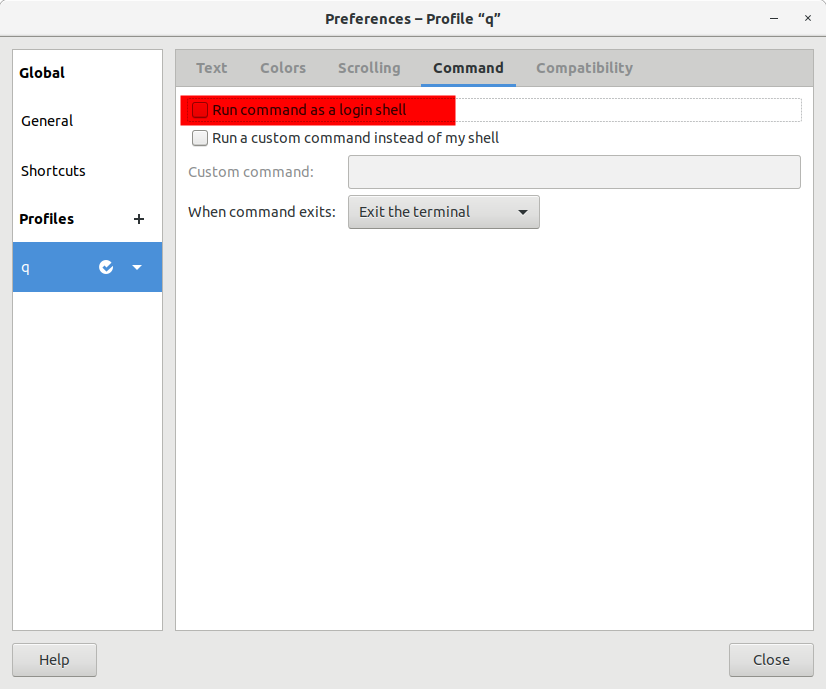
图形化界面下启动的"terminal"默认为非登录式的, 但是可以更改为登录式shell
2.2 如何判断是否为登录式shell
可通过shopt命令来查看是否为登录式shell, 也可以通过此命令来转换登录式/非登录式shell
$ shopt login_shell

login_shell    off
3. 启动文件
了解了什么是交互式/登录式shell之后, 我们来看下这2*2种情况下shell的初始化文件
3.1 测试方法
涉及到的文件主要有: /etc/profile, /etc/bash.bashrc, ~/.profile, ~/.bashrc, ~/.bash_logout
准备两个用户, 因为需要切换用户
将echo "$(date '+%H:%M:%S:%N') $(whoami) /etc/profile" >>/home/ba/log添加到上述五个文件的第一行(后三个文件第二个用户也要修改)
由于涉及到.bash_logout文件, 此文件是在退出bash的时候才执行, 如果只连接一次服务器, 推出后再登录看日志, 会把第二次登录的结果也带到日志中, 不太严谨
所以应该开两个窗口连上服务器, 第一个窗口执行tail -f /home/ba/log观察日志, 第二个窗口可以随意登录推出和执行命令
3.2 交互登录(interactive login) shell
交互登录式shell初始化的文件为:
- /etc/profile
- ~/.bash_profile, ~/.bash_login, and ~/.profile 这三个文件只会执行其中一个, 找到其中一个别的就不执行了, 优先级从前往后递减
- ~/.bash_logout
通过ssh的方式登录即可得到交互登录式shell
$ ssh ba@......

$ logout

# log

### /etc/profile文件中有 . /etc/bash.bashrc 的语句, 所以/etc/bash.bashrc也被执行了

### 同样, ~/.profile中也有 . ~/.bashrc 的语句

### 注意: 不同的发行版, 不同的shell, 默认情况下对于/etc/bash.bashrc可能会存在差异, 有些bash是通过~/.bashrc来执行 . /etc/bash.bashrc

13:35:47:304181923 ba /etc/profile

13:35:47:309532807 ba /etc/bash.bashrc

13:35:47:353487400 ba ~/.profile

13:35:47:358734199 ba ~/.bashrc

13:36:14:812344118 ba ~/.bash_logout
再来验证~/.bash_profile, ~/.bash_login, and ~/.profile这三个文件的优先级
$ ssh ba@......

$ vim .bash_profile

$ cat .bash_profile

echo "$(date '+%H:%M:%S:%N') $(whoami) ~/.bash_profile" >>/home/ba/log

$ logout

# log

### ~/.profile连带着~/.bashrc都没有了, 取而代之的是~/.bash_profile

13:53:07:178921031 ba /etc/profile

13:53:07:183184595 ba /etc/bash.bashrc

13:53:07:211623026 ba ~/.bash_profile

13:53:12:253835053 ba ~/.bash_logout
执行完成之后, 我删除了~/.bash_profile, 后续章节都不涉及~/.bash_profile
3.3 交互非登录(interactive non-login) shell
交互非登录式shell初始化的文件为:
- /etc/bash.bashrc
- ~/.bashrc
通过su命令切换用户即可得到交互非登录式shell
$ ssh ba@......

$ su root

$ echo $-

himBHs

$ shopt login_shell

login_shell     off

# log

14:04:53:515775025 root /etc/bash.bashrc

14:04:53:522999498 root ~/.bashrc
通过su切换用户后, 按下Tab键发现自动补全用不了, 是因为/etc/profile中有以下一段, 而自动补全与/etc/profile.d中的脚本有关, 将以下内容移动到/etc/bash.bashrc或~/.bashrc, 即可保证交互式shell可以完成自动补全
if [ -d /etc/profile.d ]; then

  for i in /etc/profile.d/*.sh; do

    if [ -r $i ]; then

      . $i

    fi

  done

  unset i

fi
3.4 非交互非登录(non-interactive non-login) shell
非交互非登录式shell初始化的文件为:
- 查找
$BASH_ENV变量并执行, 就像if [ -n "$BASH_ENV" ]; then . "$BASH_ENV"; fi一样
bash xxx.sh所创建用来执行脚本的子shell为非登录非交互式shell
$ ssh ba@......

$ cat script.sh

echo "$-"

echo "$BASH_ENV"

shopt login_shell

$ bash script.sh

hB

login_shell    	off

# log 无输出
设置$BASH_ENV变量
$ export BASH_ENV='~/.bashrc'

$ bash script.sh

hB

~/.bashrc

login_shell    	off

# log

13:57:00:355294304 ba ~/.bashrc
3.5 非交互登录(non-interactive login) shell
非交互登录式shell初始化的文件为:
- /etc/profile
- ~/.bash_profile, ~/.bash_login, and ~/.profile
- ~/.bash_logout
- 查找
$BASH_ENV变量并执行, 就像if [ -n "$BASH_ENV" ]; then . "$BASH_ENV"; fi一样
在bash xxx.sh的基础上加上--login选项可得到登录非交互式shell
$ ssh ba@......

$ bash --login script.sh

hB

login_shell    	on

# log

13:59:14:886387539 ba /etc/profile

13:59:14:894341293 ba ~/.profile

13:59:14:897853694 ba ~/.bashrc
虽然此处也是登录式shell, 为何没有/etc/bash.bashrc? 因为在/etc/profile中有如下一段, 只有在交互式shell才执行/etc/bash.bashrc
if [ "${PS1-}" ]; then

  ...

  . /etc/bash.bashrc

fi
再验证下$BASH_ENV. 注意, .bashrc输出了两次, 一次是.profile调用, 一次是$BASH_ENV的作用
$ export BASH_ENV='~/.bashrc'

$ bash --login script.sh

hB

~/.bashrc

login_shell    	on

# log

14:03:35:455306977 ba /etc/profile

14:03:35:461542280 ba ~/.profile

14:03:35:465203982 ba ~/.bashrc

14:03:35:469716368 ba ~/.bashrc
4. 参考
bash初始化文件详解的更多相关文章
- 【转】linux中inittab文件详解
原文网址:http://www.2cto.com/os/201108/98426.html linux中inittab文件详解 init的进程号是1(ps -aux | less),从这一点就能看出, ...
- web.xml文件详解
web.xml文件详解 Table of Contents 1 listener. filter.servlet 加载顺序 2 web.xml文件详解 3 相应元素配置 1 listener. f ...
- jni.h头文件详解二
作者:左少华 博客:http://blog.csdn.net/shaohuazuo/article/details/42932813 转载请注明出处:http://blog.csdn.net/shao ...
- Linux - CentOS6.5服务器搭建与初始化配置详解(上)
1.新建一个虚拟机 选择典型 单机下一步 p.MsoNormal,li.MsoNormal,div.MsoNormal { margin: 0cm 0cm 0.0001pt; text-align: ...
- 【转】 jni.h头文件详解(二)
原文网址:http://blog.csdn.net/shaohuazuo/article/details/42932813 作者:左少华 博客:http://blog.csdn.net/shaohua ...
- Linux - CentOS6.5服务器搭建与初始化配置详解(下)
传送带:Linux - CentOS6.5服务器搭建与初始化配置详解(上) 继续接着上面的安装,安装完后会出现下面界面 点击reboot重启 重启后可以看到下面的tty终端界面 因为这就是最小化安装 ...
- PE文件详解(六)
这篇文章转载自小甲鱼的PE文件详解系列原文传送门 之前简单提了一下节表和数据目录表,那么他们有什么区别? 其实这些东西都是人为规定的,一个数据在文件中或者在内存中的位置基本是固定的,通过数据目录表进行 ...
- PE文件详解(三)
本文转自小甲鱼的PE文件详解系列传送门 PE文件到内存的映射 在执行一个PE文件的时候,windows 并不在一开始就将整个文件读入内存的,二十采用与内存映射文件类似的机制. 也就是说,windows ...
- /etc/inittab文件详解
/etc/inittab由/sbin/init程序解析调用,用于系统初始化,/sbin/init可参考源码busybox中init.c的实现方式. 原址如下: http://leejia.blog.5 ...
随机推荐
- 扒一扒@Retryable注解,很优雅,有点意思!
你好呀,我是歪歪. 前几天我 Review 代码的时候发现项目里面有一坨逻辑写的非常的不好,一眼望去简直就是丑陋之极. 我都不知道为什么会有这样的代码存在项目里面,于是我看了一眼提交记录准备叫对应的同 ...
- java 报错: MalformedURLException: unknow protocol: f
问题: java 使用 URL 读取文件解读报错 MalformedURLException 1.使用 URL对象解析文件报错MalformedURLException: unknow protoco ...
- 《剑指offer》面试题32 - I. 从上到下打印二叉树
问题描述 从上到下打印出二叉树的每个节点,同一层的节点按照从左到右的顺序打印. 例如: 给定二叉树: [3,9,20,null,null,15,7], 3 / \ 9 20 / \ 15 7 返回 ...
- 从容器镜像的选择-alpine 说起
在 容器崛起之前,Alpine 还是个无名之辈,可能是因为大家并不是很关心操作系统本身的大小,毕竟大家只关心业务数据和文档,程序.库文件和系统本身的大小通常可以忽略不计. 容器技术席卷整个软件产业之后 ...
- CTFSHOW-SSRF篇
之前就想着写一下 ctfshow 的 wp, 但由于时间问题,一直没有机会, 其实是懒≥.≤ 这次趁着寒假刷几篇ctfshow的文章 那,开始吧. web351 存在一个flag.php页面,访问会返 ...
- nginx 和uwsgi的区别与作用
在介绍nginx和uwsgi的区别和作用之前我们先介绍一下几个概念 1.WSGI WSGI的全称是Web Server Gateway Interface(Web服务器网关接口),它不是服务器.pyt ...
- python封装函数到模块
导入整个模块: import 模块名 导入特定函数: from module_name import function_name 通过逗号可以分割函数名,如果需要导入多个则 from a import ...
- Vue3源码分析之 Ref 与 ReactiveEffect
Vue3中的响应式实现原理 完整 js版本简易源码 在最底部 ref 与 reactive 是Vue3中的两个定义响应式对象的API,其中reactive是通过 Proxy 来实现的,它返回对象的响应 ...
- ApacheCN 机器学习译文集 20211111 更新
台湾大学林轩田机器学习笔记 机器学习基石 1 -- The Learning Problem 2 -- Learning to Answer Yes/No 3 -- Types of Learning ...
- [NOI2020]命运
显然直接计数是不好计的,只能从 \(dp\) 这个角度来下手. 首先用最原始最直接的方法,直接在 \(dp\) 的过程中满足题目的要求. 既然问题给在一棵树上,那么必然和树脱不了关系,因此我们应该从树 ...