
pip3 install beautifulsoup4 出现错误 There was a problem confirming the ssl certificate
chenhuimingdeMacBook-Pro:groceryList Mch$
sudo pip3 install beautifulsoup4
The directory '/Users/Mch/Library/Caches/pip/http' or its parent directory is not owned by the current user and the cache has been disabled. Please check the permissions and owner of that directory. If executing pip with sudo, you may want sudo's -H flag.
The directory '/Users/Mch/Library/Caches/pip' or its parent directory is not owned by the current user and caching wheels has been disabled. check the permissions and owner of that directory. If executing pip with sudo, you may want sudo's -H flag.
Collecting beautifulsoup4
Could not fetch URL https://pypi.python.org/simple/beautifulsoup4/: There was a problem confirming the ssl certificate: [SSL: TLSV1_ALERT_PROTOCOL_VERSION] tlsv1 alert protocol version (_ssl.c:590) - skipping
Could not find a version that satisfies the requirement beautifulsoup4 (from versions: )
No matching distribution found for beautifulsoup4
Solution:
* reinstall python?
brew reinstall python
==> Reinstalling python

==> Installing dependencies for python: gdbm

==> Installing python dependency: gdbm

==> Downloading https://homebrew.bintray.com/bottles/gdbm-1.17.el_capitan.bottle.tar.gz

######################################################################## 100.0%

==> Pouring gdbm-1.17.el_capitan.bottle.tar.gz

  /usr/local/Cellar/gdbm/1.17: 20 files, 586.2KB

==> Installing python

==> Downloading https://homebrew.bintray.com/bottles/python-3.7.0.el_capitan.bottle.1.tar.gz

######################################################################## 100.0%

==> Pouring python-3.7.0.el_capitan.bottle.1.tar.gz

==> /usr/local/Cellar/python/3.7.0/bin/python3 -s setup.py --no-user-cfg install --force --verbose --install-scripts=/usr/local/Cellar/p

==> /usr/local/Cellar/python/3.7.0/bin/python3 -s setup.py --no-user-cfg install --force --verbose --install-scripts=/usr/local/Cellar/p

==> /usr/local/Cellar/python/3.7.0/bin/python3 -s setup.py --no-user-cfg install --force --verbose --install-scripts=/usr/local/Cellar/p

==> Caveats

Python has been installed as

  /usr/local/bin/python3

Unversioned symlinks `python`, `python-config`, `pip` etc. pointing to

`python3`, `python3-config`, `pip3` etc., respectively, have been installed into

  /usr/local/opt/python/libexec/bin

If you need Homebrew's Python 2.7 run

  brew install python@2

Pip, setuptools, and wheel have been installed. To update them run

  pip3 install --upgrade pip setuptools wheel

You can install Python packages with

  pip3 install <package>

They will install into the site-package directory

  /usr/local/lib/python3.7/site-packages

See: https://docs.brew.sh/Homebrew-and-Python

==> Summary

  /usr/local/Cellar/python/3.7.0: 4,787 files, 102MB

==> Caveats

==> python

Python has been installed as

  /usr/local/bin/python3

Unversioned symlinks `python`, `python-config`, `pip` etc. pointing to

`python3`, `python3-config`, `pip3` etc., respectively, have been installed into

  /usr/local/opt/python/libexec/bin

If you need Homebrew's Python 2.7 run

  brew install python@2

Pip, setuptools, and wheel have been installed. To update them run

  pip3 install --upgrade pip setuptools wheel

You can install Python packages with

  pip3 install <package>

They will install into the site-package directory

  /usr/local/lib/python3.7/site-packages

See: https://docs.brew.sh/Homebrew-and-Python
ouput
* install pip3
brew install pip3
Error: No available formula with the name "pip3"
==> Searching for a previously deleted formula (in the last month)...
Error: No previously deleted formula found.
==> Searching for similarly named formulae...
Error: No similarly named formulae found.
==> Searching taps...
==> Searching taps on GitHub...
Warning: Error searching on GitHub: GitHub
The GitHub credentials in the macOS keychain may be invalid.
Clear them with:
printf "protocol=https\nhost=github.com\n" | git credential-osxkeychain erase
Or create a personal access token:
https://github.com/settings/tokens/new?scopes=gist,public_repo&description=Homebrew
and then set the token as: export HOMEBREW_GITHUB_API_TOKEN="your_new_token"
Error: No formulae found in taps.
* Clear The GitHub credentials in the macOS keychain
printf "protocol=https\nhost=github.com\n" | git credential-osxkeychain erase
* create a personal access token
https://github.com/settings/tokens/new?scopes=gist,public_repo&description=Homebrew
Generate token
.btn { position: relative; display: inline-block; padding: 6px 12px; font-size: 14px; font-weight: 600; line-height: 20px; white-space: nowrap; vertical-align: middle; cursor: pointer; -webkit-user-select: none; -moz-user-select: none; -ms-user-select: none; user-select: none; background-repeat: repeat-x; background-position: -1px -1px; background-size: 110% 110%; border: 1px solid rgba(27, 31, 35, 0.2); border-radius: 0.25em; -webkit-appearance: none; -moz-appearance: none; appearance: none }
.btn-primary { color: rgba(255, 255, 255, 1); background-color: rgba(40, 167, 69, 1); background-image: linear-gradient(-180deg, rgba(52, 208, 88, 1) 0, rgba(40, 167, 69, 1) 90%) }
* Click Button "Generate token"
https://github.com/settings/tokens
把这个40位的token粘贴出来
* emacs ~/.bash_profile
echo 'export HOMEBREW_GITHUB_API_TOKEN="your_token"' >> ~/.bash_profile

. !$
* 再试安装beautifulsoup4
pip3 install beautifulsoup4
Collecting beautifulsoup4
Downloading https://files.pythonhosted.org/packages/fe/62/720094d06cb5a92cd4b3aa3a7c678c0bb157526a95c4025d15316d594c4b/beautifulsoup4-4.6.1-py3-none-any.whl (89kB)
100% |████████████████████████████████| 92kB 180kB/s
Installing collected packages: beautifulsoup4
Successfully installed beautifulsoup4-4.6.1
* upgrade pip
sudo curl https://bootstrap.pypa.io/get-pip.py | python3
Could not install packages due to an EnvironmentError: [Errno 13] Permission denied: '/usr/local/bin/pip'
Consider using the `--user` option or check the permissions.
sudo chown -hR `whoami`:staff /usr/local/bin/
output:
  % Total    % Received % Xferd  Average Speed   Time    Time     Time  Current

                                 Dload  Upload   Total   Spent    Left  Speed

100 1604k  100 1604k    0     0   443k      0  0:00:03  0:00:03 --:--:--  445k

Collecting pip

  Using cached https://files.pythonhosted.org/packages/5f/25/e52d3f31441505a5f3af41213346e5b6c221c9e086a166f3703d2ddaf940/pip-18.0-py2.py3-none-any.whl

Installing collected packages: pip

  Found existing installation: pip 18.0

    Uninstalling pip-18.0:

      Successfully uninstalled pip-18.0

Successfully installed pip-18.0
* 在引用bs4 “frombs4 import BeautifulSoup”时还会报错“ModuleNotFoundError: Nomodule named 'bs4'.” 未找到名为bs4的模块,这时需要在Pycharm上安装bs4模块来解决
按Cmd(win) + , (windows图标键 和 逗号 一起按)或者点 Pycharm => Preferences
windows下 File => settings
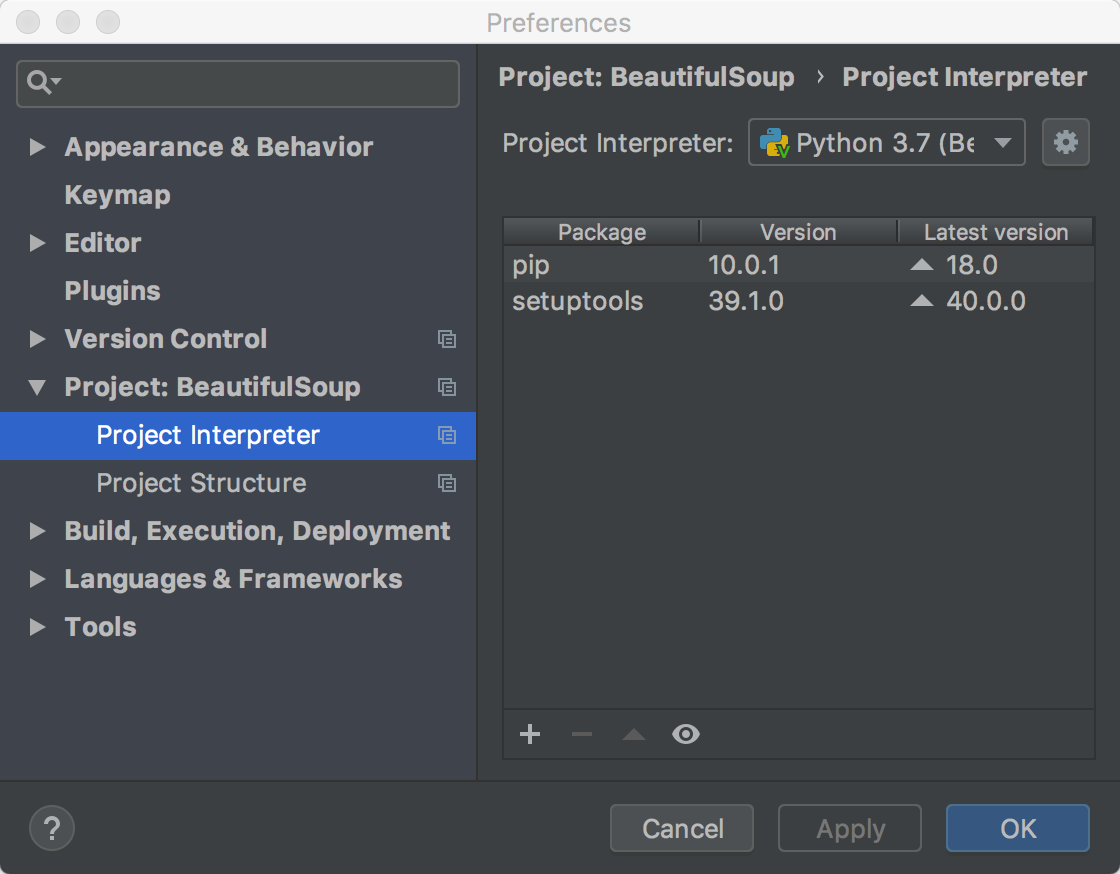
* 点击 右边框 左下角 + install
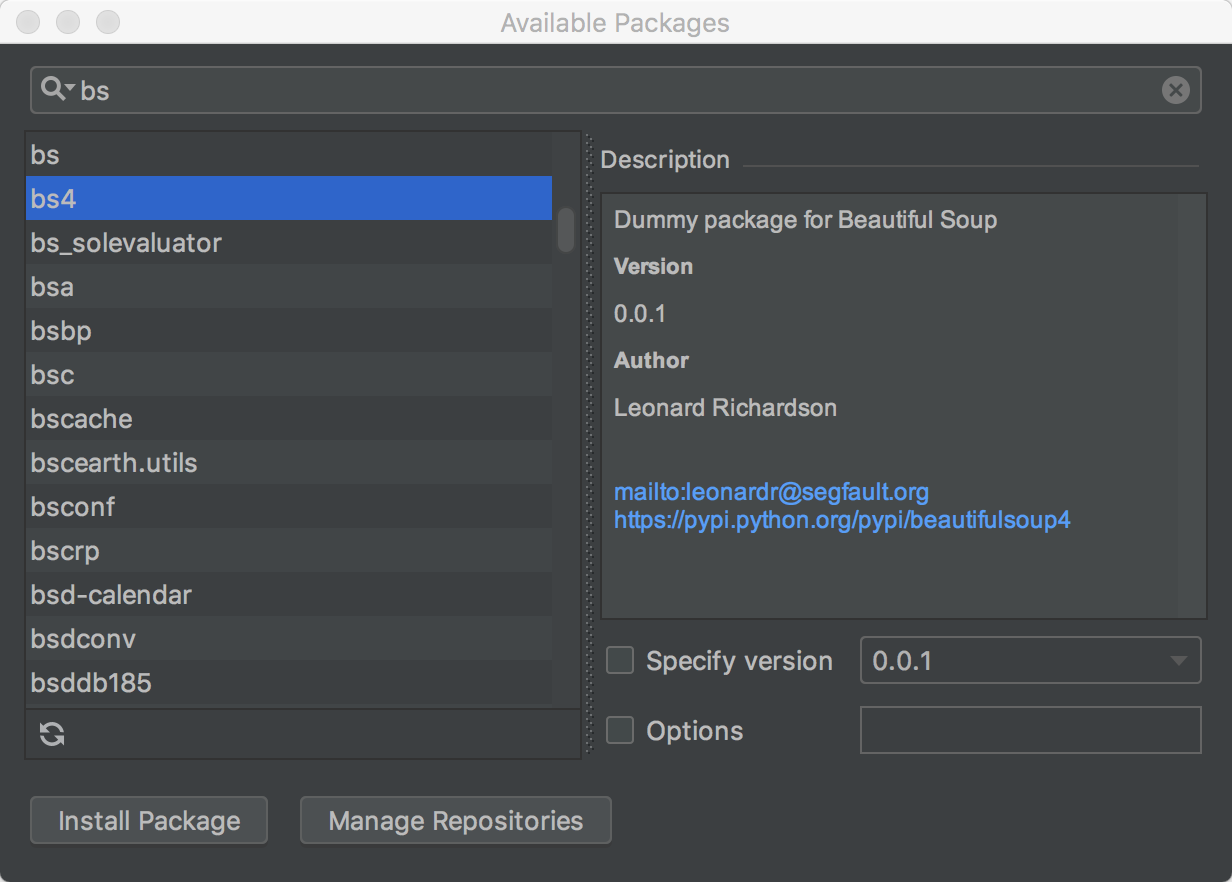
bs 再点击 "Install Package"
这行代码不报错了
from bs4 import BeautifulSoup
* 创建python文件
#-*- coding: UTF-8 -*-

#!/usr/local/bin/python3

from urllib.request import urlopen

from bs4 import BeautifulSoup

html = urlopen("http://pythonscraping.com/pages/page1.html")

bsObj = BeautifulSoup(html.read())

print(bsObj.h1)
Run:
/Users/Mch/PycharmProjects/BeautifulSoup/venv/bin/python

/Users/Mch/PycharmProjects/BeautifulSoup/index.py

/Users/Mch/PycharmProjects/BeautifulSoup/index.py:8:

UserWarning: No parser was explicitly specified,

so I'm using the best available HTML parser for this system ("html.parser").

This usually isn't a problem, but if you run this code on another system,

or in a different virtual environment,

it may use a different parser and behave differently.

The code that caused this warning is on line 8 of the file

/Users/Mch/PycharmProjects/BeautifulSoup/index.py.

To get rid of this warning,

pass the additional argument 'features="html.parser"' to the BeautifulSoup constructor.

 bsObj = BeautifulSoup(html.read())

<h1>An Interesting Title</h1>

Process finished with exit code 0
* 这里有一个警告️第8行出错
根据提示
To get rid of this warning,pass the additional argument 'features="html.parser"' to the BeautifulSoup constructor.
找到这个构造函数在文件/Users/Mch/PycharmProjects/BeautifulSoup/venv/lib/python3.7/site-packages/bs4/__init__.py
    def __init__(self, markup="", features=None, builder=None,

                 parse_only=None, from_encoding=None, exclude_encodings=None,

                 **kwargs):
因此在第8行添加参数 'html.parser'
bsObj = BeautifulSoup(html.read(), 'html.parser')
再运行:
/Users/Mch/PycharmProjects/BeautifulSoup/venv/bin/python /Users/Mch/PycharmProjects/BeautifulSoup/index.py
<h1>An Interesting Title</h1>
Process finished with exit code 0
warning没有了
* try ... except... else
#-*- coding: UTF-8 -*-

#!/usr/local/bin/python

from urllib.request import urlopen

from bs4 import BeautifulSoup

from urllib.request import HTTPError

# import socket

# socket.setdefaulttimeout(3)

try:

    # html = urlopen("http://pythonscraping.com/pages/page1.html", None, 3)

    # 设置超时时间为3s

    html = urlopen("http://nosuchurl", None, 3)

except HTTPError as e:

    print(e)

else:

    bsObj = BeautifulSoup(html.read(), 'html.parser')

    print(bsObj.body.div)
* 可靠的网络连接
#-*- coding: UTF-8 -*-

#!/usr/local/bin/python

from urllib.request import urlopen

from urllib.request import HTTPError, URLError

from bs4 import BeautifulSoup

def getTitle(url):

    try:

        html = urlopen(url, None, 3)

    except(HTTPError, URLError) as e:

        return None

    try:

        bsObj = BeautifulSoup(html.read(), "html.parser")

        title = bsObj.body.h1

    except AttributeError as e:

        return None

    return title

title = getTitle("http://www.pythonscraping.com/pages/page1.html")

if title == None:

    print("Title could not be found")

else:

    print(title)
Run:
python3 ./index.py
<h1>An Interesting Title</h1>
* python库下载
https://www.lfd.uci.edu/~gohlke/pythonlibs/
pip3 install beautifulsoup4 出现错误 There was a problem confirming the ssl certificate的更多相关文章
- pip3 install jupyter出现错误
问题描述 出现如下错误: Command "/Users/wang/.pyenv/versions/3.3.1/bin/python3.3 -u -c "import setupt ...
- PySpider 框架爬虫错误 HTTP 599: SSL certificate problem: unable to get local issuer certificate解决方案
首先pyspider all启动pyspider的所有服务,然后访问http://localhost:5000创建一个爬虫任务:taobaomm,点开任务链接编辑http://localhost:50 ...
- python3安装pandas执行pip3 install pandas命令后卡住不动的问题及安装scipy、sklearn库的numpy.distutils.system_info.NotFoundError: no lapack/blas resources found问题
一直尝试在python3中安装pandas等一系列软件,但每次执行pip3 install pandas后就卡住不动了,一直停在那,开始以为是pip命令的版本不对,还执行过 python -m pip ...
- Mac中 pip3 install mysqlclient 报错
主要错误提示如下: ld: library not found for -lssl clang: error: linker command failed with exit code 1 (use ...
- Ubuntu 18.04 + pip3 install virtualenvwrapper 找不到virtualenvwrapper.sh
Reference Ubuntu 18.04 只自带python3.6.5, 因此不想装python2了, 但通过apt install 装virtualenvwrapper时发现必须得装python ...
- 安装tomcat出现failed to install tomcat8 service错误及解决方法
failed to install tomcat8 service 如下图所示: 一.安装tomcat出现failed to install tomcat6 service错误及解决方法(转载 ...
- ubuntu,装完PYTHON3 pip3 install 报错
ubuntu,装完PYTHON3 pip3 install 报错CalledProcessError: Command 'lsb_release -a' returned non-zero exit ...
- mac系统 pip3 install scrapy 失败 No local packages or working download links found for incremental>=16.10.1
使用pip3 install scrapy命令之后,会出现如下问题: Collecting scrapy Downloading Scrapy-1.4.0-py2.py3-none-any.whl ( ...
- pip3 install mysqlclient 报错 “/bin/sh: 1: mysql_config: not found”的解决方法
执行 sudo apt-get install libmysqlclient-dev, 然后执行 pip3 install mysqlclient 成功.
随机推荐
- STM32—中断详解(配合按键中断代码,代码亲测)
在STM32中执行中断主要分三部分: 1.配置NVIC_Config()函数 2.配置EXTI_Config()函数 3.编写中断服务函数 (注:本文章所用代码为中断按键代码,实现了按键进入中断从而控 ...
- Blazor Server 应用程序中进行 HTTP 请求
翻译自 Waqas Anwar 2021年5月4日的文章 <Making HTTP Requests in Blazor Server Apps> [1] Blazor Server 应用 ...
- 原来一条select语句在MySQL是这样执行的《死磕MySQL系列 一》
前言 看到蒋老师的第一篇文章后就收货颇丰,真是句句戳中痛点. 令我记忆最深的就是为什么知道了一个个技术点,却还是用不好 ?不管是蒋老师所说的Redis还是本系列要展开学习的MySQL. 这是一个值得思 ...
- 【力扣leetcode】-787. K站中转内最便宜的航班
题目描述: 有 n 个城市通过一些航班连接.给你一个数组 flights ,其中 flights[i] = [fromi, toi, pricei] ,表示该航班都从城市 fromi 开始,以价格 p ...
- noip21
所以分差到底要不要取绝对值啊 T1 3分钟出暴力,十分钟码好,然后样例过不去... 好吧,我是sb,求中位数之前是要排序的. 直接冲暴力,50pts. \(w=3\) 的点,开个桶记录一下又有20pt ...
- Docker创建Docker-Registry客户端docker-registry-frontend
docker-compose.yml version: '3.1' services: frontend: image: konradkleine/docker-registry-frontend:v ...
- springboot分页插件的使用
在springboot工程下的pom.xml中添加依赖 <!--分页 pagehelper --> <dependency> <groupId>com.github ...
- Java File常见用法
一.构造方法 File(File parent, String child) 从父抽象路径名和子路径名字符串创建新的 File实例. File(String pathname) 通过将给定的路径名字符 ...
- AAC简介
AAC共有9种规格,以适应不同的场合的需要: MPEG-2 AAC LC 低复杂度规格(Low Complexity)--比较简单,没有增益控制,但提高了编码效率,在中等码率的编码效率以及音质方面,都 ...
- 数据库存储图片相对路径使用问题,配置tomcat的server.xml文件
我想从前端读取路径的时候,必须输入相对路径+根路径,但是我数据库中存的相对路径 接下来讲解如何通过相对路径获得照片 首先我们需要在tomcat的server.xml文件中更改属性,eslipse可以直 ...