
Vue(27)vue-codemirror实现在线代码编译器
前言
如果我们想在Web端实现在线代码编译的效果,那么需要使用组件vue-codemirror,他是将CodeMirror进行了再次封装
- 支持代码高亮
- 62种主题颜色,例如monokai等等
- 支持json, sql, javascript,css,xml, html,yaml, markdown, python编辑模式,默认为 json
- 支持快速搜索
- 支持自动补全提示
- 支持自动匹配括号
环境准备
npm install jshint

npm install jsonlint

npm install script-loader

npm install vue-codemirror
封装组件
我们可以在项目中的components中将vue-codemirror进行再次封装
<template>

  <codemirror

    ref="myCm"

    v-model="editorValue"

    :options="cmOptions"

    @changes="onCmCodeChanges"

    @blur="onCmBlur"

    @keydown.native="onKeyDown"

    @mousedown.native="onMouseDown"

    @paste.native="OnPaste"

  >

  </codemirror>

</template>

<script>

import { codemirror } from "vue-codemirror";

import 'codemirror/keymap/sublime'

import "codemirror/mode/javascript/javascript.js";

import "codemirror/mode/xml/xml.js";

import "codemirror/mode/htmlmixed/htmlmixed.js";

import "codemirror/mode/css/css.js";

import "codemirror/mode/yaml/yaml.js";

import "codemirror/mode/sql/sql.js";

import "codemirror/mode/python/python.js";

import "codemirror/mode/markdown/markdown.js";

import "codemirror/addon/hint/show-hint.css";

import "codemirror/addon/hint/show-hint.js";

import "codemirror/addon/hint/javascript-hint.js";

import "codemirror/addon/hint/xml-hint.js";

import "codemirror/addon/hint/css-hint.js";

import "codemirror/addon/hint/html-hint.js";

import "codemirror/addon/hint/sql-hint.js";

import "codemirror/addon/hint/anyword-hint.js";

import "codemirror/addon/lint/lint.css";

import "codemirror/addon/lint/lint.js";

import "codemirror/addon/lint/json-lint";

import 'codemirror/addon/selection/active-line'

import "codemirror/addon/hint/show-hint.js";

import "codemirror/addon/hint/anyword-hint.js";

require("script-loader!jsonlint");

import "codemirror/addon/lint/javascript-lint.js";

import "codemirror/addon/fold/foldcode.js";

import "codemirror/addon/fold/foldgutter.js";

import "codemirror/addon/fold/foldgutter.css";

import "codemirror/addon/fold/brace-fold.js";

import "codemirror/addon/fold/xml-fold.js";

import "codemirror/addon/fold/comment-fold.js";

import "codemirror/addon/fold/markdown-fold.js";

import "codemirror/addon/fold/indent-fold.js";

import "codemirror/addon/edit/closebrackets.js";

import "codemirror/addon/edit/closetag.js";

import "codemirror/addon/edit/matchtags.js";

import "codemirror/addon/edit/matchbrackets.js";

import "codemirror/addon/selection/active-line.js";

import "codemirror/addon/search/jump-to-line.js";

import "codemirror/addon/dialog/dialog.js";

import "codemirror/addon/dialog/dialog.css";

import "codemirror/addon/search/searchcursor.js";

import "codemirror/addon/search/search.js";

import "codemirror/addon/display/autorefresh.js";

import "codemirror/addon/selection/mark-selection.js";

import "codemirror/addon/search/match-highlighter.js";

export default {

  name: "index",

  components: {codemirror},

  props: ["cmTheme", "cmMode", "cmIndentUnit", "autoFormatJson"],

  data() {

    return {

      editorValue: '{}',

      cmOptions: {

        theme: !this.cmTheme || this.cmTheme === "default" ? "default" : this.cmTheme,  // 主题

        mode: !this.cmMode || this.cmMode === "default" ? "application/json" : this.cmMode,  // 代码格式

        tabSize: 4,  // tab的空格个数

        indentUnit: !this.cmIndentUnit ? 2 : this.cmIndentUnit,  // 一个块(编辑语言中的含义)应缩进多少个空格

        autocorrect: true,  // 自动更正

        spellcheck: true,  // 拼写检查

        lint: true,  // 检查格式

        lineNumbers: true,  //是否显示行数

        lineWrapping: true, //是否自动换行

        styleActiveLine: true,  //line选择是是否高亮

        keyMap: 'sublime',  // sublime编辑器效果

        matchBrackets: true,  //括号匹配

        autoCloseBrackets: true,  // 在键入时将自动关闭括号和引号

        matchTags: { bothTags: true },  // 将突出显示光标周围的标签

        foldGutter: true,  // 可将对象折叠,与下面的gutters一起使用

        gutters: [

          "CodeMirror-lint-markers",

          "CodeMirror-linenumbers",

          "CodeMirror-foldgutter"

        ],

        highlightSelectionMatches: {

          minChars: 2,

          style: "matchhighlight",

          showToken: true

        },

      },

      enableAutoFormatJson: this.autoFormatJson == null ? true : this.autoFormatJson,  // json编辑模式下,输入框失去焦点时是否自动格式化,true 开启, false 关闭

    }

  },

  created() {

    try {

      if (!this.editorValue) {

        this.cmOptions.lint = false;

        return;

      }

      if (this.cmOptions.mode === "application/json") {

        if (!this.enableAutoFormatJson) {

          return;

        }

        this.editorValue = this.formatStrInJson(this.editorValue);

      }

    } catch (e) {

      console.log("初始化codemirror出错:" + e);

    }

  },

  methods: {

    resetLint() {

      if (!this.$refs.myCm.codemirror.getValue()) {

        this.$nextTick(() => {

          this.$refs.myCm.codemirror.setOption("lint", false);

        });

        return;

      }

      this.$refs.myCm.codemirror.setOption("lint", false);

      this.$nextTick(() => {

        this.$refs.myCm.codemirror.setOption("lint", true);

      });

    },

    // 格式化字符串为json格式字符串

    formatStrInJson(strValue) {

      return JSON.stringify(

        JSON.parse(strValue),

        null,

        this.cmIndentUnit

      );

    },

    onCmCodeChanges(cm, changes) {

      this.editorValue = cm.getValue();

      this.resetLint();

    },

    // 失去焦点时处理函数

    onCmBlur(cm, event) {

      try {

        let editorValue = cm.getValue();

        if (this.cmOptions.mode === "application/json" && editorValue) {

          if (!this.enableAutoFormatJson) {

            return;

          }

          this.editorValue = this.formatStrInJson(editorValue);

        }

      } catch (e) {

        // 啥也不做

      }

    },

    // 按下键盘事件处理函数

    onKeyDown(event) {

      const keyCode = event.keyCode || event.which || event.charCode;

      const keyCombination =

          event.ctrlKey || event.altKey || event.metaKey;

      if (!keyCombination && keyCode > 64 && keyCode < 123) {

        this.$refs.myCm.codemirror.showHint({ completeSingle: false });

      }

    },

    // 按下鼠标时事件处理函数

    onMouseDown(event) {

      this.$refs.myCm.codemirror.closeHint();

    },

    // 黏贴事件处理函数

    OnPaste(event) {

      if (this.cmOptions.mode === "application/json") {

        try {

          this.editorValue = this.formatStrInJson(this.editorValue);

        } catch (e) {

          // 啥都不做

        }

      }

    },

  }

}

</script>

<style scoped>

</style>
此组件默认配置了json编译器,cmOptions中是代码编译器的配置项,需要额外的功能也可以去看官方文档配置
接下来看展示效果
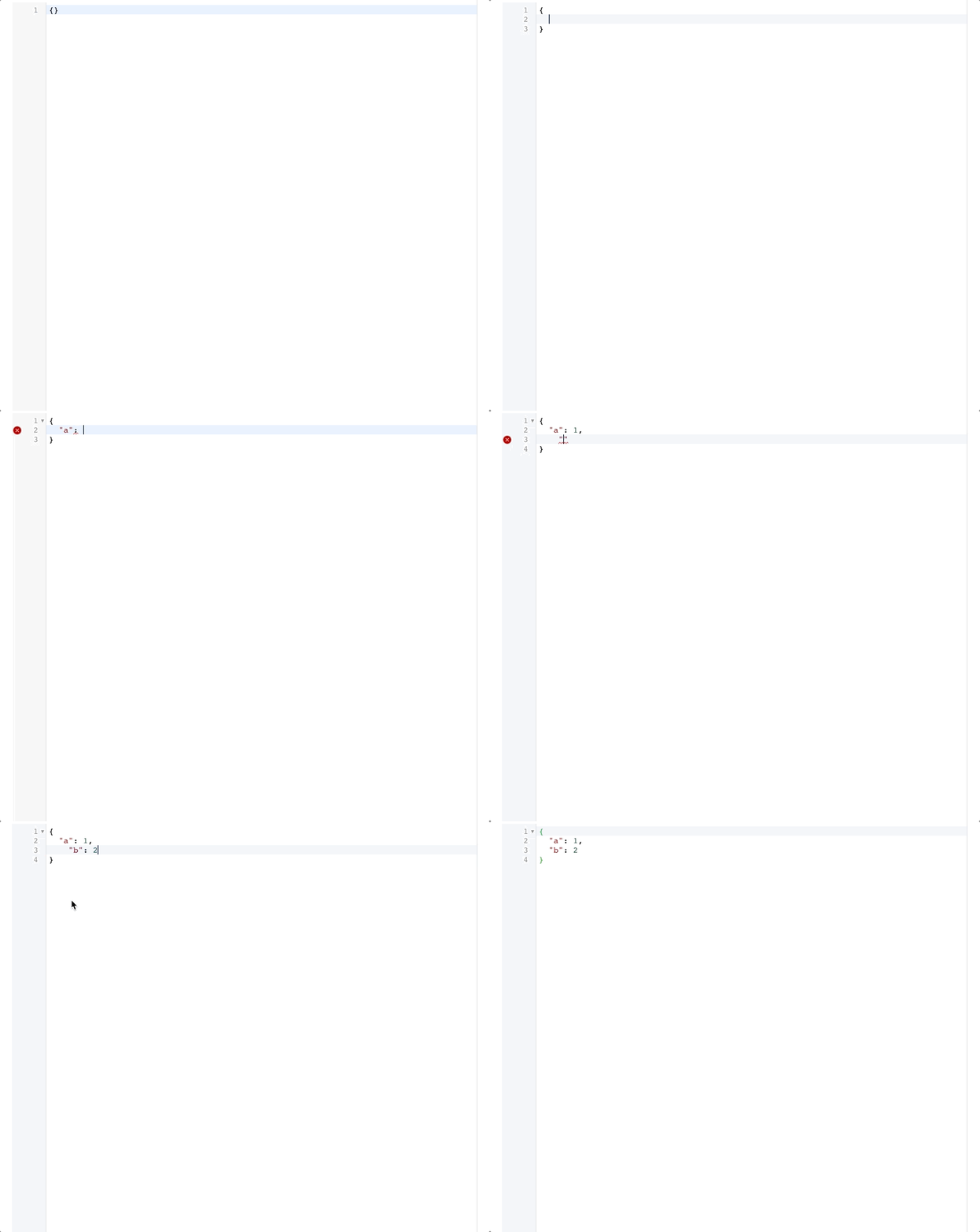
可以看到我们输入了json格式的字符串,即使格式不正确,会给我们错误提示,并且也会给我们自动格式化
python编译器
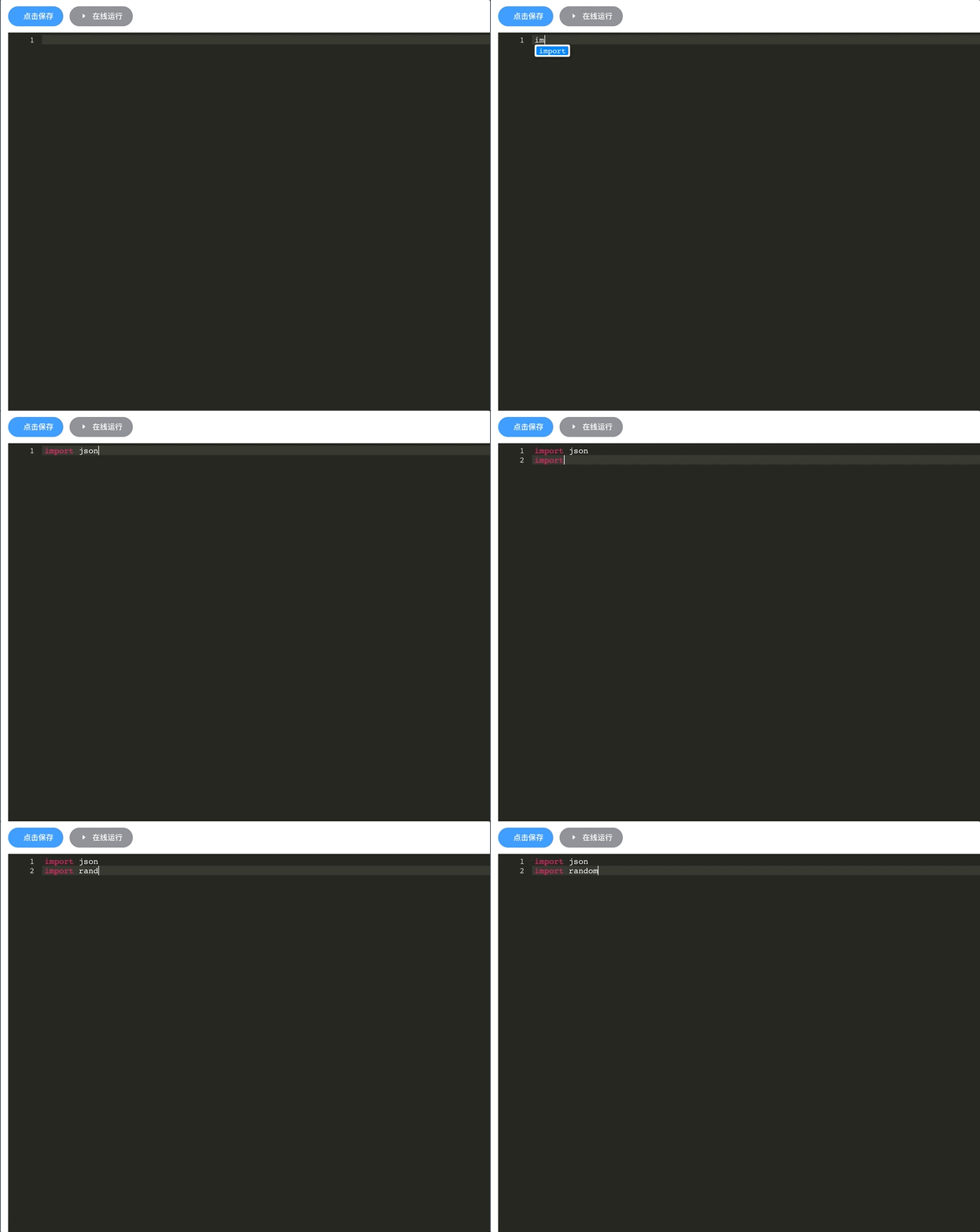
我们封装的组件默认是json编译器,如果我们想使用其他语言,也很简单,只需要导入其他语言的mode
<template>

  <div>

    <el-button type="primary" icon="el-icon-circle-check-outline" @click="handleConfirm" round>

      点击保存

    </el-button>

    <el-button icon="el-icon-caret-right" type="info" @click="handleRunCode" round>

      在线运行

    </el-button>

  <code-editor

    :cmTheme="cmTheme"

    :cmMode="cmMode"

  >

  </code-editor>

  </div>

</template>

<script>

import codeEditor from '@/components/CodeEditor/index'

import 'codemirror/theme/monokai.css'  // 导入monokai主题

import 'codemirror/mode/python/python.js'  // 导入python

export default {

  name: "index",

  components: {

    codeEditor

  },

  data() {

    return {

      cmTheme: "monokai",

      cmMode: "python",

    }

  },

  methods: {

    handleConfirm() {},

    handleRunCode() {}

  }

}

</script>

<style>

.CodeMirror {

  position: relative;

  height: 100vh;

  overflow: hidden;

  margin-top: 10px;

}

</style>

<style lang="scss" scoped>

</style>
效果如下
Vue(27)vue-codemirror实现在线代码编译器的更多相关文章
- 在Vue中使用CodeMirror 格式显示错误 行数错乱 & 代码隐藏
项目需要在线展示和编辑Json文件,所以需要找一个代码编辑器,因为我们的项目直接使用的 vueAdmin-template 这个模板 json编辑器也是直接从 vue-element-admin 项目 ...
- 在vue项目中使用codemirror插件实现代码编辑器功能(代码高亮显示及自动提示
在vue项目中使用codemirror插件实现代码编辑器功能(代码高亮显示及自动提示) 1.使用npm安装依赖 npm install --save codemirror; 2.在页面中放入如下代码 ...
- Vue源码解析-调试环境-代码目录和运行构建
目录 前言 1 代码结构 1.1 octotree插件 1.2 vue工程项目目录 1.3 主要代码目录src compiler core platforms server sfc shared 2 ...
- Vue 源码解读(8)—— 编译器 之 解析(上)
特殊说明 由于文章篇幅限制,所以将 Vue 源码解读(8)-- 编译器 之 解析 拆成了上下两篇,所以在阅读本篇文章时请同时打开 Vue 源码解读(8)-- 编译器 之 解析(下)一起阅读. 前言 V ...
- Vue 源码解读(8)—— 编译器 之 解析(下)
特殊说明 由于文章篇幅限制,所以将 Vue 源码解读(8)-- 编译器 之 解析 拆成了两篇文章,本篇是对 Vue 源码解读(8)-- 编译器 之 解析(上) 的一个补充,所以在阅读时请同时打开 Vu ...
- Vue 源码解读(9)—— 编译器 之 优化
前言 上一篇文章 Vue 源码解读(8)-- 编译器 之 解析 详细详解了编译器的第一部分,如何将 html 模版字符串编译成 AST.今天带来编译器的第二部分,优化 AST,也是大家常说的静态标记. ...
- Vue 源码解读(10)—— 编译器 之 生成渲染函数
前言 这篇文章是 Vue 编译器的最后一部分,前两部分分别是:Vue 源码解读(8)-- 编译器 之 解析.Vue 源码解读(9)-- 编译器 之 优化. 从 HTML 模版字符串开始,解析所有标签以 ...
- Js的在线代码编辑器:CodeMirror
github地址:https://github.com/codemirror/CodeMirror/tree/master/demo 里面包含需要的js.css文件以及大量的示例 官网:https:/ ...
- 前端vue实现pdf文件的在线预览
3.前端vue实现pdf文件的在线预览 我是通过 <iframe> 标签就可以满足我工作的 pdf预览需求 如果<iframe> 无法满足需求 , 可以使用pdf.js这个插件 ...
随机推荐
- 20. VIM命令操作技巧
V可视化选中当前行,根据光标可多行 ctrl+v 可视化块 v可视化根据光标 行间移动 快速增删改查 d 0 删除当前位置到行首 d $ 删除当前位置到行尾 d t (" ] ) )符号 ...
- Dos窗口下中文乱码问题
最近用Datax工具进行数据同步时,在DOS窗口下出现了中文乱码问题,导致一些错误只能到Log中查看,在网上找了一些方法,记录使用成功的方法. Dos命令:chcp 通过cmd进入Dos命令窗口,执行 ...
- LR中的快捷建
Ctrl+F 弹出搜索对话框 CTRL+F8 弹出view tree 界面 (寻找关联) 觉得不错的可关注微信公众号在手机上观看,让你用手机边玩边看
- Linux系统信息查看命令(ZZ)
http://hi.baidu.com/thinkdifferent/blog/item/22f4a80161630e011d958384.html转自一个baidu师兄的博客,很好的一个总结,推荐下 ...
- myBatis批量添加实例
<!-- 批量添加中转地数据 --> <insert id="addBatch" parameterType="com.isoftstone. ...
- Java虚拟机(JVM)以及跨平台原理
相信大家已经了解到Java具有跨平台的特性,可以"一次编译,到处运行",在Windows下编写的程序,无需任何修改就可以在Linux下运行,这是C和C++很难做到的. 那么,跨平台 ...
- 2.9 go mod 之本地仓库搭建
wikihttps://github.com/golang/go/wiki/Modules#how-to-prepare-for-a-release参考https://blog.csdn.net/be ...
- Mysql中replace与replace into的用法讲解
Mysql replace与replace into都是经常会用到的功能:replace其实是做了一次update操作,而不是先delete再insert:而replace into其实与insert ...
- 【Java 基础】java 创建对象时重写方法
TransactionLock mockLock = new TransactionLock() { public boolean lock(String id) { return true; } p ...
- XML名命空间
XML的名命空间就类似于java的包,命名空间定义:xmlns:***="URI",默认命名空间定义:xmlns="URI" 引号中的URl内容用来唯一标识命名 ...