
commandBinding 的命令
<Window x:Class="WpfApplication1.Window29"
xmlns="http://schemas.microsoft.com/winfx/2006/xaml/presentation"
xmlns:x="http://schemas.microsoft.com/winfx/2006/xaml"
Title="Window29" Height="278" Width="398">
<Grid>
<Grid.RowDefinitions>
<RowDefinition Height="24" />
<RowDefinition Height="4" />
<RowDefinition Height="24" />
<RowDefinition Height="4" />
<RowDefinition Height="24" />
<RowDefinition Height="4" />
<RowDefinition Height="*" />
</Grid.RowDefinitions>
<!--命令和命令参数-->
<TextBlock HorizontalAlignment="Left" Name="textBlock1" Text="Name:" VerticalAlignment="Center" Grid.Row="0"/>
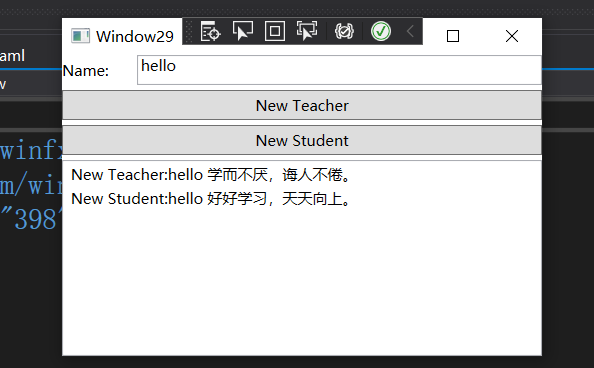
<TextBox x:Name="txtName" Margin="60,0,0,0" Grid.Row="0"></TextBox>
<Button Content="New Teacher" Grid.Row="2" Command="New" CommandParameter="Teacher"></Button>
<Button Content="New Student" Grid.Row="4" Command="New" CommandParameter="Student"></Button>
<ListBox Grid.Row="6" x:Name="lbInfos">
</ListBox>
</Grid>
<!--为窗体添加CommandBinding-->
<Window.CommandBindings>
<CommandBinding Command="New" CanExecute="CommandBinding_CanExecute" Executed="CommandBinding_Executed">
</CommandBinding>
</Window.CommandBindings>
</Window>
----------------------------------------------------------------------------------------------------------------------------------------
public partial class Window29 : Window
{
public Window29()
{
InitializeComponent();
}
private void CommandBinding_CanExecute(object sender, CanExecuteRoutedEventArgs e)
{
if (string.IsNullOrEmpty(txtName.Text))
{
e.CanExecute = false;
}
else
{
e.CanExecute = true;
}
//路由终止,提高系统性能
e.Handled = true;
}
private void CommandBinding_Executed(object sender, ExecutedRoutedEventArgs e)
{
if (e.Parameter.ToString() == "Student")
{
this.lbInfos.Items.Add(string.Format("New Student:{0} 好好学习,天天向上。",txtName.Text));
}
else if(e.Parameter.ToString()=="Teacher")
{
this.lbInfos.Items.Add(string.Format("New Teacher:{0} 学而不厌,诲人不倦。", txtName.Text));
}
//路由终止,提高系统性能
e.Handled = true;
}
}
commandBinding 的命令的更多相关文章
- WPF 通过CommandBinding捕获命令
RoutedCommand与业务逻辑无关,业务逻辑是通过CommandBinding来实现 using System; using System.Collections.Generic;using S ...
- WPF学习之深入浅出话命令
WPF为我们准备了完善的命令系统,你可能会问:"有了路由事件为什么还需要命令系统呢?".事件的作用是发布.传播一些消息,消息传达到了接收者,事件的指令也就算完成了,至于如何响应事件 ...
- WPF命令
WPF的命令是经常使用的,在MVVM中,RelayCommand更是用得非常多,但是命令的本质究竟是什么,有了事件为什么还要命令,命令与事件的区别是什么呢?MVVM里面是如何包装命令的呢?命令为什么能 ...
- WPF Demo19 命令、UC
命令系统的基本元素和关系WPF命令系统的组成要素:A.命令(command):WPF命令实际上就是实习了ICommand接口的类.平时使用最多的就是RoutedCommand类.B.命令源(comma ...
- WPF中的命令与命令绑定(二)
原文:WPF中的命令与命令绑定(二) WPF中的命令与命令绑定(二) 周银辉在WPF中,命令(Commandi ...
- WPF中的命令与命令绑定(一)
原文:WPF中的命令与命令绑定(一) WPF中的命令与命令绑定(一) 周银辉说到用户输入,可能我们更多地会联想到 ...
- WPF命令绑定 自定义命令
WPF的命令系统是wpf中新增加的内容,在以往的winfom中并没有.为什么要增加命令这一块内容.在winform里面的没有命令只使用事件的话也可以实现程序员希望实现的功能.这个问题在很多文章中都提到 ...
- 命令——WPF学习之深入浅出
WPF学习之深入浅出话命令 WPF为我们准备了完善的命令系统,你可能会问:“有了路由事件为什么还需要命令系统呢?”.事件的作用是发布.传播一些消息,消息传达到了接收者,事件的指令也就算完成了,至于 ...
- WPF 使用附加属性增加控件属性
使用附加属性增加控件属性,使得这个附加属性在使用的时候没有局限性,可以在任何的控件中使用它来增加所需要的属性,使得控件的属性使用起来非常灵活 一.自定义附加属性 using System; using ...
随机推荐
- PXE高效批量网络装机
PXE高效批量网络装机 一.PXE概述 1)PXE (Preboot eXcution Environment) ...
- 家庭账本开发day06
编写查询页面,学习layUI的动态表格使用,绑定数据源, table.render({ elem: '#currentTableId', url: '../ ...
- SpringBoot自动装配-自定义Start
SpringBoot自动装配 在没有使用SpringBoot之前,使用ssm时配置redis需要在XML中配置端口号,地址,账号密码,连接池等等,而使用了SpringBoot后只需要在applicat ...
- python基础之操作数据库(pymysql)操作
import pymysqlimport datetime#安装 pip install pymysql"""1.连接本地数据库2.建立游标3.创建表4.插入表数据.查询 ...
- 查看JVM默认参数及微调JVM启动参数
目录 查看某个JVM进程堆内存信息 微调JVM启动参数 查看JVM的一些默认参数 参考廖雪峰老师的这篇 JVM调优的正确姿势: https://www.liaoxuefeng.com/article/ ...
- Ory Kratos 用户认证
Ory Kratos 为用户认证与管理系统.本文将动手实现浏览器(React+AntD)的完整流程,实际了解下它的 API . 代码: https://github.com/ikuokuo/start ...
- windows下python -m pip install --upgrade pip升级后报错的解决方法
前言: 笔者装某库的时候提示需要升级pip版本,就python -m pip install --upgrade pip默认升级了,结果升级之后只要输入pip就有报错(如下图),网上百度了很多解决方法 ...
- Python 数值中的下划线是怎么回事?
花下猫语:Python 中下划线的用法令人叹为观止,相信你已在各种文章或教程中见识过了.在 2016 年的 3.6 版本之后,Python 还引入了一种新的语法,使得下划线也可以出现在数值中.这篇翻译 ...
- jsp-->js-->jsp之间的关系
jsp和js通过form.submit();发送request请求createdIdSave.jsp 在CreatedIdSave.jsp中进行BL的增删改查操作,在jsp中将值保存到页面的scrip ...
- flight.Archives001 / CSS Selectors选择器
Title/CSS选择器 序 : 这是flight.Archives 梦开始的地方, 作者我熬夜肝出来了这篇文章... 保证这是最简洁高效的 CSS Selectors 教程 Note : 暂时没有能 ...