
kube-router代替kube-proxy+calico
使用kubeadm安装kubernetes,并使用kube-router代替kube-proxy+calico网络。
即:kube-router providing service proxy, firewall and pod networking.
版本:kubernetes v1.20.0
安装kubernetes集群
升级linux系统内核,关闭swap,关闭防火墙,调整内核参数等自己做。
主要安装命令
yum install kubectl-1.20.0-0.x86_64 kubeadm-1.20.0-0.x86_64 kubelet-1.20.0-0.x86_64
kubeadm init --kubernetes-version=1.20.0 --apiserver-advertise-address=192.168.100.80 --image-repository registry.aliyuncs.com/google_containers --pod-network-cidr=10.244.0.0/16
[root@k8s-master ~]# kubeadm init --kubernetes-version=1.20.0 --apiserver-advertise-address=192.168.100.80 --image-repository registry.aliyuncs.com/google_containers  --pod-network-cidr=10.244.0.0/16

[init] Using Kubernetes version: v1.20.0

[preflight] Running pre-flight checks

	[WARNING IsDockerSystemdCheck]: detected "cgroupfs" as the Docker cgroup driver. The recommended driver is "systemd". Please follow the guide at https://kubernetes.io/docs/setup/cri/

	[WARNING Hostname]: hostname "k8s-master" could not be reached

	[WARNING Hostname]: hostname "k8s-master": lookup k8s-master on 192.168.100.96:53: no such host

[preflight] Pulling images required for setting up a Kubernetes cluster

[preflight] This might take a minute or two, depending on the speed of your internet connection

[preflight] You can also perform this action in beforehand using 'kubeadm config images pull'

[certs] Using certificateDir folder "/etc/kubernetes/pki"

[certs] Generating "ca" certificate and key

[certs] Generating "apiserver" certificate and key

[certs] apiserver serving cert is signed for DNS names [k8s-master kubernetes kubernetes.default kubernetes.default.svc kubernetes.default.svc.cluster.local] and IPs [10.96.0.1 192.168.100.80]

[certs] Generating "apiserver-kubelet-client" certificate and key

[certs] Generating "front-proxy-ca" certificate and key

[certs] Generating "front-proxy-client" certificate and key

[certs] Generating "etcd/ca" certificate and key

[certs] Generating "etcd/server" certificate and key

[certs] etcd/server serving cert is signed for DNS names [k8s-master localhost] and IPs [192.168.100.80 127.0.0.1 ::1]

[certs] Generating "etcd/peer" certificate and key

[certs] etcd/peer serving cert is signed for DNS names [k8s-master localhost] and IPs [192.168.100.80 127.0.0.1 ::1]

[certs] Generating "etcd/healthcheck-client" certificate and key

[certs] Generating "apiserver-etcd-client" certificate and key

[certs] Generating "sa" key and public key

[kubeconfig] Using kubeconfig folder "/etc/kubernetes"

[kubeconfig] Writing "admin.conf" kubeconfig file

[kubeconfig] Writing "kubelet.conf" kubeconfig file

[kubeconfig] Writing "controller-manager.conf" kubeconfig file

[kubeconfig] Writing "scheduler.conf" kubeconfig file

[kubelet-start] Writing kubelet environment file with flags to file "/var/lib/kubelet/kubeadm-flags.env"

[kubelet-start] Writing kubelet configuration to file "/var/lib/kubelet/config.yaml"

[kubelet-start] Starting the kubelet

[control-plane] Using manifest folder "/etc/kubernetes/manifests"

[control-plane] Creating static Pod manifest for "kube-apiserver"

[control-plane] Creating static Pod manifest for "kube-controller-manager"

[control-plane] Creating static Pod manifest for "kube-scheduler"

[etcd] Creating static Pod manifest for local etcd in "/etc/kubernetes/manifests"

[wait-control-plane] Waiting for the kubelet to boot up the control plane as static Pods from directory "/etc/kubernetes/manifests". This can take up to 4m0s

[apiclient] All control plane components are healthy after 13.002683 seconds

[upload-config] Storing the configuration used in ConfigMap "kubeadm-config" in the "kube-system" Namespace

[kubelet] Creating a ConfigMap "kubelet-config-1.20" in namespace kube-system with the configuration for the kubelets in the cluster

[upload-certs] Skipping phase. Please see --upload-certs

[mark-control-plane] Marking the node k8s-master as control-plane by adding the labels "node-role.kubernetes.io/master=''" and "node-role.kubernetes.io/control-plane='' (deprecated)"

[mark-control-plane] Marking the node k8s-master as control-plane by adding the taints [node-role.kubernetes.io/master:NoSchedule]

[bootstrap-token] Using token: 68mv1r.5ljn91n2yms71dth

[bootstrap-token] Configuring bootstrap tokens, cluster-info ConfigMap, RBAC Roles

[bootstrap-token] configured RBAC rules to allow Node Bootstrap tokens to get nodes

[bootstrap-token] configured RBAC rules to allow Node Bootstrap tokens to post CSRs in order for nodes to get long term certificate credentials

[bootstrap-token] configured RBAC rules to allow the csrapprover controller automatically approve CSRs from a Node Bootstrap Token

[bootstrap-token] configured RBAC rules to allow certificate rotation for all node client certificates in the cluster

[bootstrap-token] Creating the "cluster-info" ConfigMap in the "kube-public" namespace

[kubelet-finalize] Updating "/etc/kubernetes/kubelet.conf" to point to a rotatable kubelet client certificate and key

[addons] Applied essential addon: CoreDNS

[addons] Applied essential addon: kube-proxy

Your Kubernetes control-plane has initialized successfully!

To start using your cluster, you need to run the following as a regular user:

  mkdir -p $HOME/.kube

  sudo cp -i /etc/kubernetes/admin.conf $HOME/.kube/config

  sudo chown $(id -u):$(id -g) $HOME/.kube/config

Alternatively, if you are the root user, you can run:

  export KUBECONFIG=/etc/kubernetes/admin.conf

You should now deploy a pod network to the cluster.

Run "kubectl apply -f [podnetwork].yaml" with one of the options listed at:

  https://kubernetes.io/docs/concepts/cluster-administration/addons/

Then you can join any number of worker nodes by running the following on each as root:

kubeadm join 192.168.100.80:6443 --token 68mv1r.5ljn91n2yms71dth \

    --discovery-token-ca-cert-hash sha256:2a29deaa942a7eacb055f608caa686d9c59cb34abb0365b32c22d959b2327dc8

[root@k8s-master ~]# rm -rf .kube/

[root@k8s-master ~]#   mkdir -p $HOME/.kube

[root@k8s-master ~]#   sudo cp -i /etc/kubernetes/admin.conf $HOME/.kube/config

[root@k8s-master ~]#   sudo chown $(id -u):$(id -g) $HOME/.kube/config

[root@k8s-master ~]# kubectl get node
安装完成后

安装网络
源文件地址:https://github.com/cloudnativelabs/kube-router/blob/master/daemonset/kubeadm-kuberouter.yaml
kubectl apply -f kubeadm-kuberouter.yaml


安装服务测试
kubectl run nginx --image=nginx --expose --port=80 --image-pull-policy='IfNotPresent'
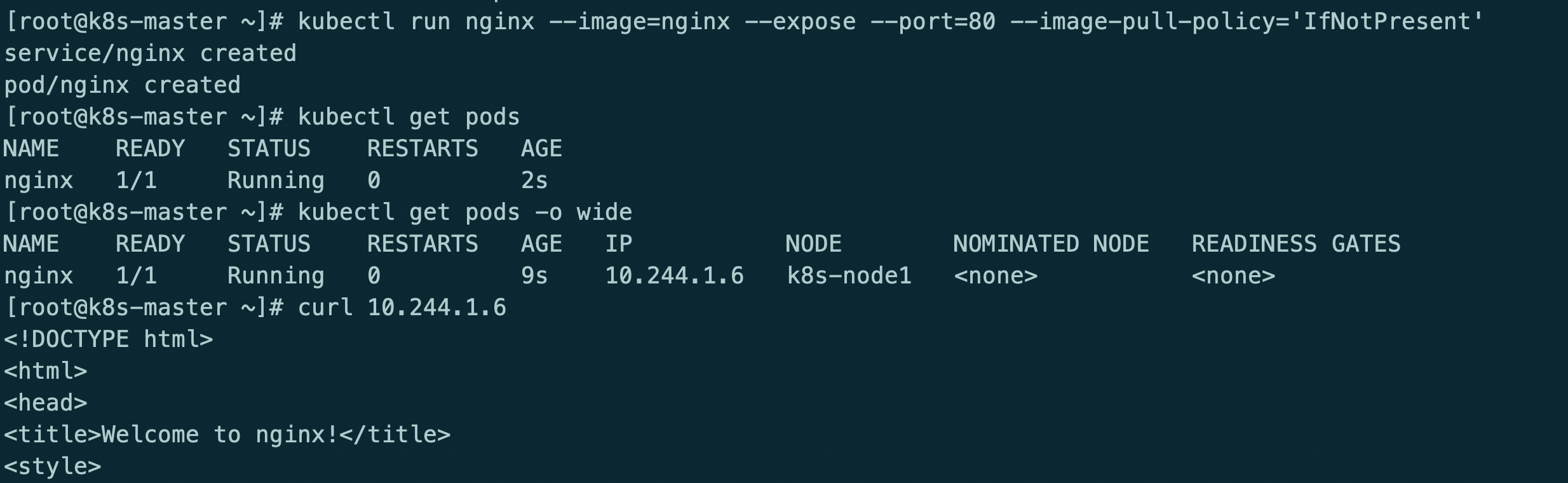
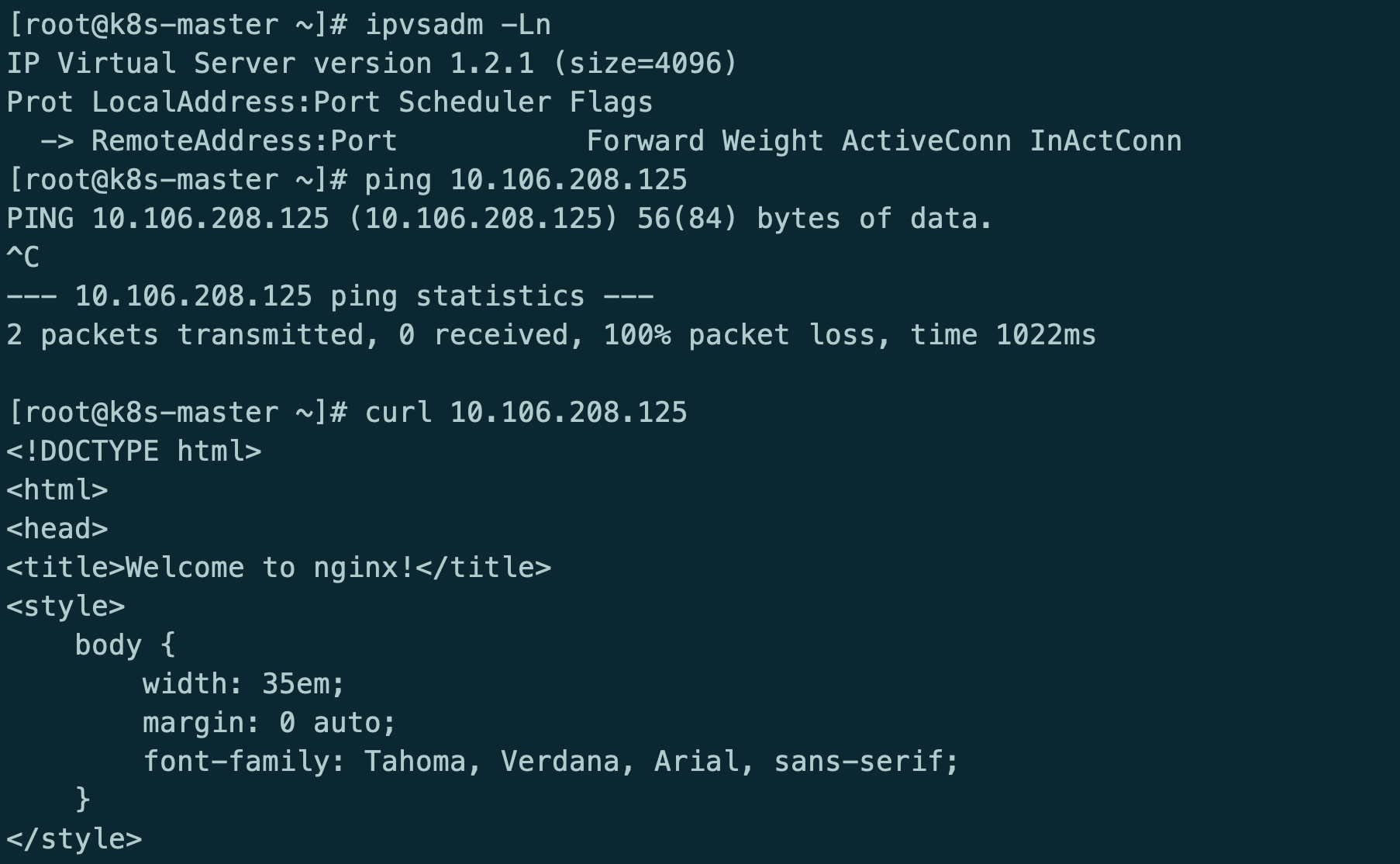
此时kube-router只提供网络功能,kube-proxy提供的service和防火墙策略
kube-router providing service proxy, firewall and pod networking.
参考地址:https://github.com/cloudnativelabs/kube-router/blob/master/docs/kubeadm.md
kubectl delete -f kubeadm-kuberouter.yaml
kubectl apply -f kubeadm-kuberouter-all-features.yaml
kubectl -n kube-system delete ds kube-proxy
docker run --privileged -v /lib/modules:/lib/modules --net=host registry.aliyuncs.com/google_containers/kube-proxy:v1.20.0 kube-proxy --cleanup
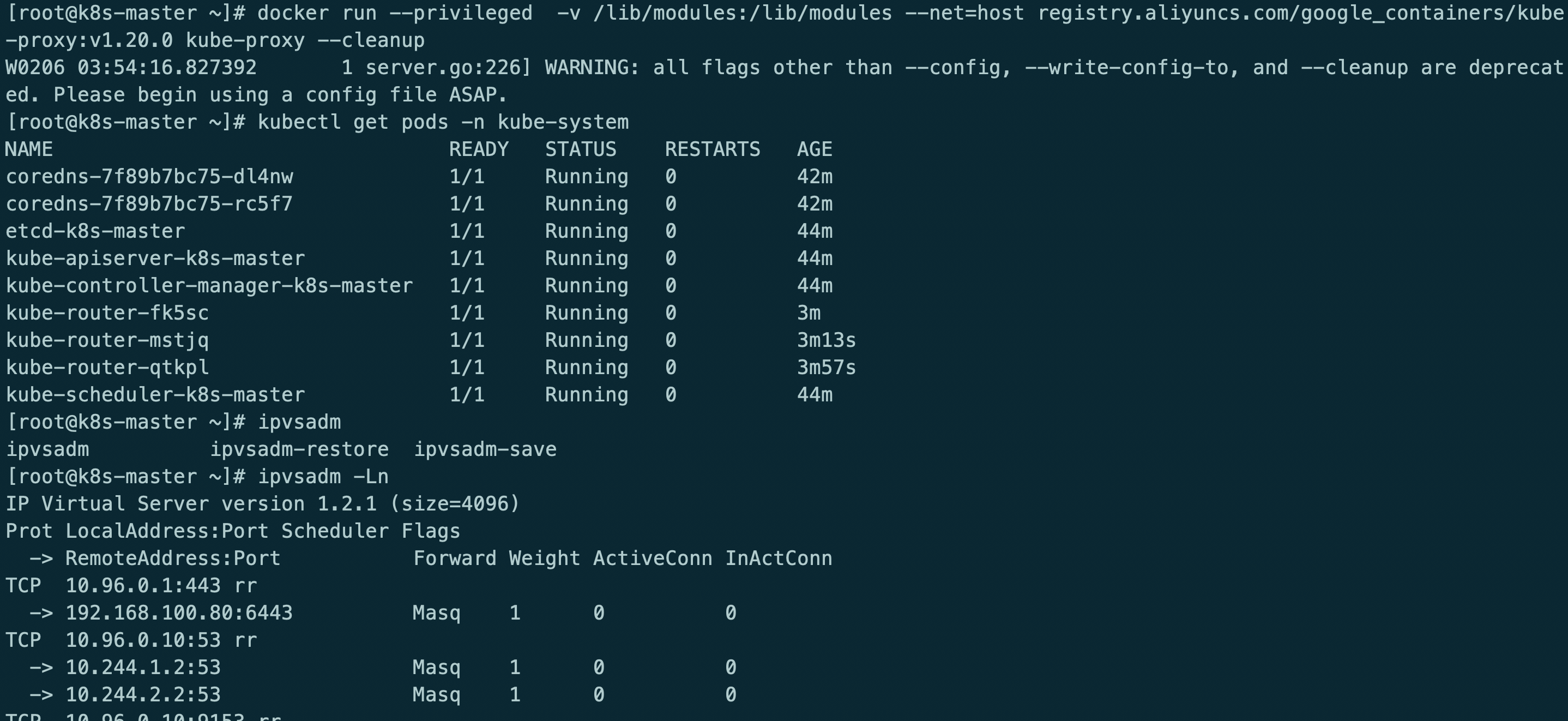
kube-router模式使用ipvs rr策略
最后在重启服务器
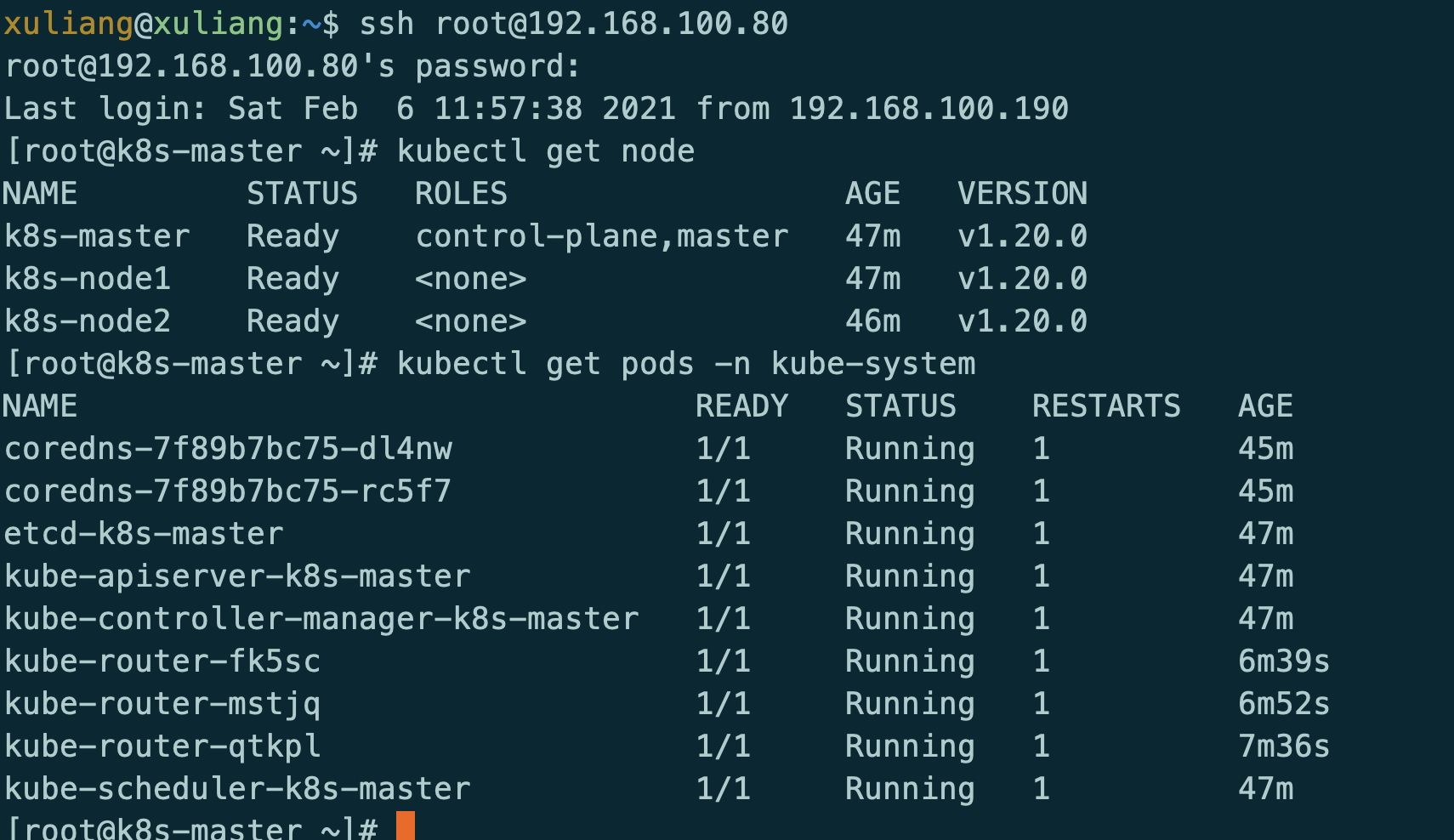
测试服务
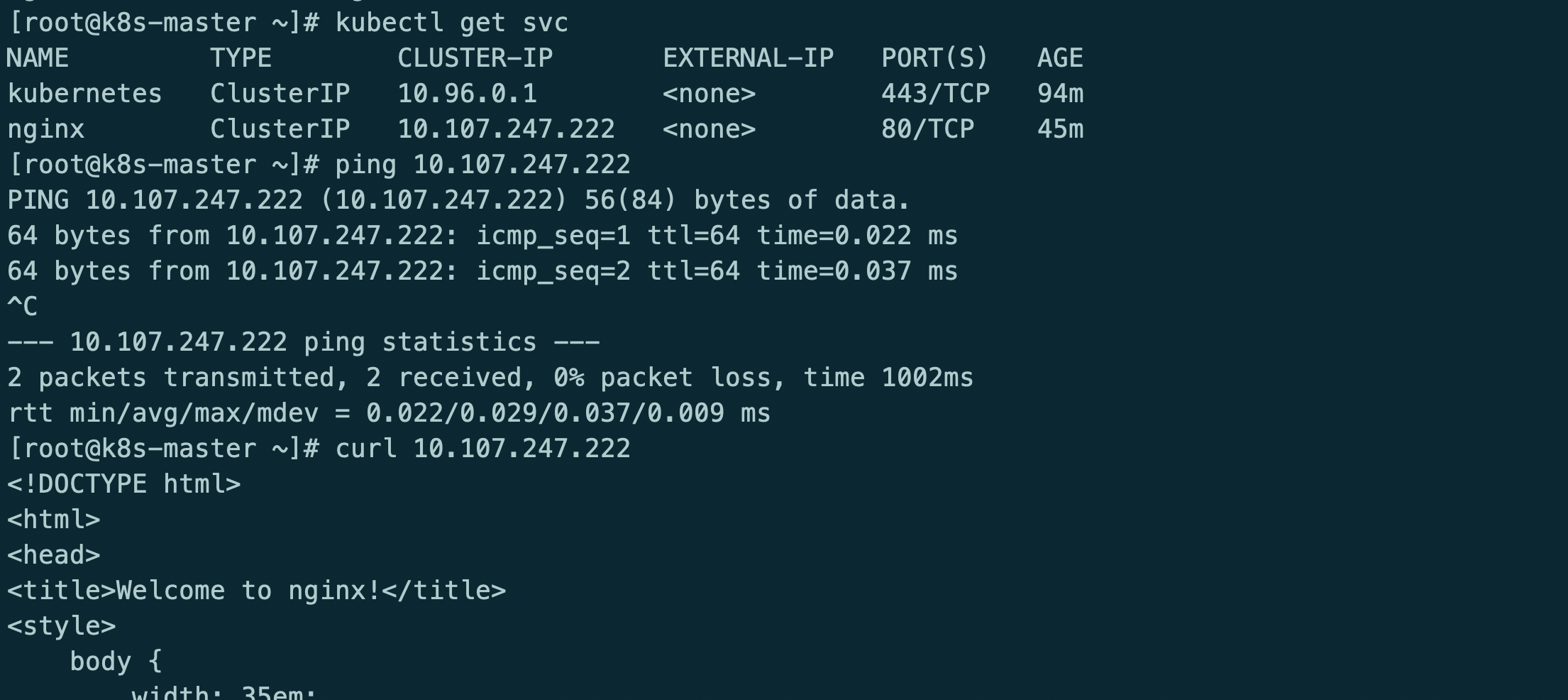
格式化集群
kubectl drain k8s-master --delete-local-data --force --ignore-daemonsets
kubectl drain k8s-node1 --delete-local-data --force --ignore-daemonsets
kubectl drain k8s-node2 --delete-local-data --force --ignore-daemonsets
kubectl delete node k8s-master
rm -rf /etc/cni/net.d/10-kuberouter.conflist
kubeadm reset
iptables -F && iptables -t nat -F && iptables -t mangle -F && iptables -X
ipvsadm -C
reboot
kube-router代替kube-proxy+calico的更多相关文章
- 《kubernetes + .net core 》dev ops部分
目录 1.kubernetes 预备知识 1.1 集群资源 1.1.1 role 1.1.2 namespace 1.1.3 node 1.1.4 persistent volume 1.1.5 st ...
- k8s集群部署(2)
一.利用ansible部署kubernetes准备阶段 1.集群介绍 基于二进制方式部署k8s集群和利用ansible-playbook实现自动化:二进制方式部署有助于理解系统各组件的交互原理和熟悉组 ...
- k8s1.20环境搭建部署(二进制版本)
1.前提知识 1.1 生产环境部署K8s集群的两种方式 kubeadm Kubeadm是一个K8s部署工具,提供kubeadm init和kubeadm join,用于快速部署Kubernetes集群 ...
- kubernetes入门之skydns
部署kubernetes dns服务 kubernetes可以为pod提供dns内部域名解析服务.其主要作用是为pod提供可以直接通过service的名字解析为对应service的ip的功能. 部署k ...
- CNCF CloudNative Landscape
cncf landscape CNCF Cloud Native Interactive Landscape 1. App Definition and Development 1. Database ...
- kubectl version报did you specify the right host or port
现象: [root@localhost shell]# kubectl version Client Version: version.Info{Major:", GitVersion:&q ...
- centos7.5单机yum安装kubernetes
1.系统配置 centos7.5 docker 1.13.1 centos7下安装docker 2.关闭防火墙,selinux,swapoff systemctl disable firewalld ...
- 二进制方式部署Kubernetes 1.6.0集群(开启TLS)
本节内容: Kubernetes简介 环境信息 创建TLS加密通信的证书和密钥 下载和配置 kubectl(kubecontrol) 命令行工具 创建 kubeconfig 文件 创建高可用 etcd ...
- kubernetes 集群安全配置
版本:v1.10.0-alpha.3 openssl genrsa -out ca.key 2048 openssl req -x509 -new -nodes -key ca.key -subj & ...
- kubernetes1.5.2集群部署过程--安全模式
使用https安全模式部署kubernetes集群,能保证集群通讯安全.有效限制非授权用户访问.但部署比非安全模式复杂的多. 本文为etcd.kubernetes集群中各个组件配置证书认证,所有组件通 ...
随机推荐
- Spring注解@PropertySource加载配置文件和SpringBoot注解@Value、@ConfigurationProperties进行属性映射
SpringBoot的配置文件 位置:resources目录下 配置文件的作用: (1).SpringBoot是基于约定的,所以很多配置都有默认值,但如果想使用自己的配置替换默认配置的话,就可以使用a ...
- Same Origin Policy 浏览器同源策略详解
同源策略 Same Origin Policy 日常开发中最常与网络打交道,那关于浏览器的同源策略和跨域相关的知识是该整理一下了. 首先需要明确的是,同源策略是浏览器的安全策略,由于存在这个策略,我们 ...
- 报错: You are using pip version 10.0.1, however version 18.0 is available.
报错: You are using pip version 10.0.1, however version 18.0 is available. You should consider upgradi ...
- Django的ORM封装接口详细
[前言]Django的orm操作本质上会根据对接的数据库引擎,翻译成对应的sql语句:所有使用Django开发的项目无需关心程序底层使用的是MySQL.Oracle.sqlite....,如果数据库迁 ...
- 【转】理解Serverless
理解Serverless No silver bullet. - The Mythical Man-Month 许多年前,我们开发的软件还是C/S(客户端/服务器)和MVC(模型-试图-控制器)的形式 ...
- 巧用 -webkit-box-reflect 倒影实现各类动效
在很久之前的一篇文章,有讲到 -webkit-box-reflect 这个属性 -- 从倒影说起,谈谈 CSS 继承 inherit -webkit-box-reflect 是一个非常有意思的属性,它 ...
- 基于4H-SIC的先进集成电路用n型LDMOS晶体管
基于4H-SIC的先进集成电路用n型LDMOS晶体管 摘要: 通过对具有不同的设计方式的具有减小的表面电场的横向4H-SIC-N型-横向扩散金属氧化物半导体(LDMOS)晶体管进行测量和模拟,得到了得 ...
- 人脸识别分析小Demo
人脸识别分析 调用 腾讯AI人脸识别接口 测试应用 纯py文件测试照片 # -*- coding: utf-8 -*- import json from tencentcloud.common imp ...
- 辨析js遍历对象与数组的方法
1 遍历对象的方法? (1) for-in(也可遍历数组,但效率较低,一般用来遍历对象) 示例: // 生成一个原型上有属性并且有可枚举属性与不可枚举属性的对象 const data = Ob ...
- 【python+selenium的web自动化】- Selenium WebDriver原理及安装
简单介绍 selenium selenium是一个用于测试web网页的自动化测试工具,它直接运行在浏览器中,模拟用户的操作.