
如何确定Ubuntu下是否对某个CVE打了补丁
前些日子在月赛中,拿到了一台Ubuntu14.04的服务器,但并不是root权限,需要提权。我Google了一下,找到了CVE-2015-1318,CVE-2015-1328,CVE-2015-1338这些可以用来提权的CVE和POC。当我用CVE-2015-1328来提权时,并没有成功,我当时就想知道我这台服务器到底打没打上这个CVE的补丁呢?
后来,我在网上查了下,稍微琢磨了下,就有了这个方法,可能不一定是最方便最好用的。我在Google直接搜索CVE-2015-1328,找到了如下这个链接:
http://people.canonical.com/~ubuntu-security/cve/2015/CVE-2015-1328.html 我在里面看到了受影响的package以及修复信息。截了一部分的图:
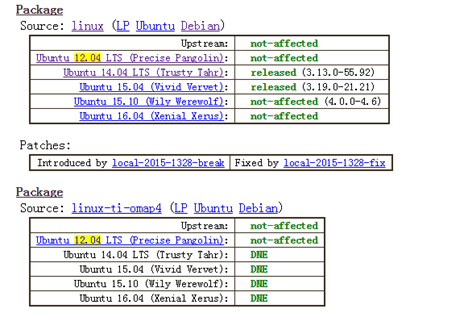
我们可以看到是受影响的是Linux的内核。所以执行dpkg –l |grep linux 就可以找到Linux内核的package的名字。在我的Ubuntu 12.02上,截下部分图:

紧接着,使用apt-get changelog linux-image-3.2.0-97-generic就可以看到当前内核版本的changelog,然后直接在里面搜索CVE-2015-1328就可以知道是否打上了补丁。如果打上了补丁,那么这个提权的POC就不能起作用了。其他的CVE也可以利用这种方法来确定是否打上了补丁。
最后来解释几个Linux下的名词:
Upstream kernel:
来自www.kernel.org的kernel, 我们称为upstream kernel,这个Linux kernel由Linus Torvalds领导下的Linux Kernel Organization来维护。我们用的Ubuntu,CentOS等都是Linux的发行版(distribution),这些Linux distribution对由Linux Kernel Organization维护的内核做了些修改,这些内核并不是直接从www.kernel.org得到的内核,称从www.kernel.org 得到的内核为这些发行版内核的Upstream kernel。
我在StackOverflow上也找到了一个比较通俗的介绍。
Using Ubuntu as an example.
Ubuntu is a distribution which packs a lot of software together, small and large. There are graphic drivers, the X server, and Gnome, among others. Ubuntu itself is not developing those software. Ubuntu is "just" packing the software together, making sure that the individual components work together. All that software which Ubuntu is packing together are called upstream from Ubuntu's point of view.
In the process of combining all that software together bugs might pop up. The bug might be in one of the software components, for example gnome, or it might be in the very special way Ubuntu is doing things. After all, a distribution is a distribution because it does some things in it's own very special way.
If the bug is caused by the way Ubuntu is doing things, then Ubuntu will have to fix that bug for itself. If the bug is in fact in one of the software components, for example Gnome, then Ubuntu will have to patch Gnome. When Ubuntu sends the patch back to Gnome, so others can also benefit from the patch, then Ubuntu is sending that patch upstream.
If Ubuntu decides to not send that patch upstream, or the upstream project rejects the patch (but Ubuntu decides to still keep the patch), then Ubuntu has technically forked the project.
The opposite of upstream would be downstream, Ubuntu is downstream from Gnome. I do not hear/read that term used often.
Ubuntu Changelog:
Ubuntu的Changelog记录了软件包随版本的变化。Changelog也有一定的格式,可以从下面的这个链接了解到。
http://packaging.ubuntu.com/html/debian-dir-overview.html
如何确定Ubuntu下是否对某个CVE打了补丁的更多相关文章
- 在Ubuntu下搭建ASP.NET 5开发环境
在Ubuntu下搭建ASP.NET 5开发环境 0x00 写在前面的废话 年底这段时间实在太忙了,各种事情都凑在这个时候,没时间去学习自己感兴趣的东西,所以博客也好就没写了.最近工作上有个小功能要做成 ...
- 在Ubuntu下搭建Spark群集
在前一篇文章中,我们已经搭建好了Hadoop的群集,接下来,我们就是需要基于这个Hadoop群集,搭建Spark的群集.由于前面已经做了大量的工作,所以接下来搭建Spark会简单很多. 首先打开三个虚 ...
- Ubuntu下开启php调试模式,显示报错信息
在Ubuntu下php的缺省设置是不显示错误信息的,如果程序出错会显示“无法处理此请求的错误提示”,这在开发环境下非常不方便. 其实我们只要编辑下apache的配置文件就好 1.我的apache 配置 ...
- 在Ubuntu下安装ovs-dpdk
在Ubuntu下安装ovs-dpdk 参考资料:https://software.intel.com/zh-cn/articles/using-open-vswitch-with-dpdk-on-ub ...
- Ubuntu 下安装QT
Ubuntu 下安装QT 本文使用的环境 QT Library: qt-everywhere-opensource-src-4.7.4.tar.gz QT Creator: qt-creator-li ...
- Torch7在Ubuntu下的安装与配置
Torch7的本系列教程的主要目的是介绍Torch的入门使用.今天首先分享一下Torch7的安装.(在Ubuntu14.04安装torch7) 为什么选择Torch Torch的目标是在建立科学算法的 ...
- Ubuntu 下ibus拼音输入法启用 (ubuntu 16.04
Ubuntu 下ibus拼音输入法启用 我安装的是英文版的ubuntu 16.04,打开只带英文,并没有中文. 设置输入法为iBus 从system settings 进入language suppo ...
- Ubuntu下git的安装与使用
Ubuntu下git的安装与使用 Ubuntu下git的安装与使用与Windows下的大致相同,只不过个人感觉在Ubuntu下使用git更方便. 首先,确认你的系统是否已安装git,可以通过git指令 ...
- 在ubuntu下安装google chrome
由于手上有两台电脑,再加上我那个选择困难症加上纠结劲.所以果断把其中一台电脑只装linux系统,另一台电脑只装windows了.免得我老纠结!于是linux便选择了ubuntu. 由于浏览器一直用的是 ...
随机推荐
- Beauty of Array(思维)
Beauty of Array Time Limit: 2 Seconds Memory Limit: 65536 KB Edward has an array A with N integ ...
- 心急的C小加(两种解法)
心急的C小加 时间限制:1000 ms | 内存限制:65535 KB 难度:4 描述 C小加有一些木棒,它们的长度和质量都已经知道,需要一个机器处理这些木棒,机器开启的时候需要耗费一个单位的 ...
- Android设备定制为永不锁屏
Android系统的锁屏时间存放在Setting数据库中,字段为Settings.System.SCREEN_OFF_TIMEOUT.查看 DatabaseHelper.java文件可以找到: fra ...
- php接口数据加密、解密、验证签名代码实例
php接口数据加密.解密.验证签名 代码非常easy,这里就不多废话了,直接奉上代码 <?php /** * 数据加密.解密.验证签名 * @edit http://www.lai18.com ...
- zabbix windows angent安装:
zabbix windows angent安装:1.下载zabbix agent for windows客户端,直接解压到C盘下.C:\zabbix 的目录015/04/21 11:16 <DI ...
- 【web开发--js学习】functionName 如果是一个属性值,函数将不会被调用
<html> <head> <meta http-equiv="Content-Type" Content="text/html; char ...
- dojo.hasClass/dojo.addClass/dojo.removeClass/dojo.toggleClass/dojo.repalceClass
dojo.hasClass(/*DomNode*/node or DomIdstring,/*String*/classString)//如果节点中有特定的类,那么返回ture,否则返回false d ...
- JQ 动态添加节点
<!DOCTYPE html PUBLIC "-//W3C//DTD XHTML 1.0 Transitional//EN" "http://www.w3.org/ ...
- Stack的三种含义(转载--阮一峰)
作者: 阮一峰 学习编程的时候,经常会看到stack这个词,它的中文名字叫做"栈". 理解这个概念,对于理解程序的运行至关重要.容易混淆的是,这个词其实有三种含义,适用于不同的场合 ...
- CodeForces 698A - Vacations (Codeforces Round #363 (Div. 2))
要么去体育馆,要么去比赛,要么闲在家里 给出每一天体育馆和比赛的有无情况,要求连续两天不能去同一个地方 问最少闲几天 DP方程很容易看出 dp(第i天能去的地方) = min(dp(第i-1天的三种情 ...