
windows环境下安装mysql5.7.20
配置my.ini文件
[client]

port=3306

default-character-set=utf8

[mysqld]

# 设置为自己MYSQL的安装目录

basedir=D:\Program Files\MySQL\MySQL Server 5.7-3306

# 设置为MYSQL的数据目录

datadir=D:\Program Files\MySQL\MySQL Server 5.7-3306\data

#设置3306端口

port=3306

# 服务端使用的字符集默认为8比特编码的latin1字符集

character_set_server=utf8

# 创建新表时将使用的默认存储引擎

default-storage-engine=INNODB

sql_mode=NO_ENGINE_SUBSTITUTION,STRICT_TRANS_TABLES

#开启查询缓存

explicit_defaults_for_timestamp=true

skip-grant-tables
在dos命令下进入mysql的bin目录 ,执行
mysqld --install mysqld_3306 (重命名服务名是为了方便多实例安装)
mysqld --initialize
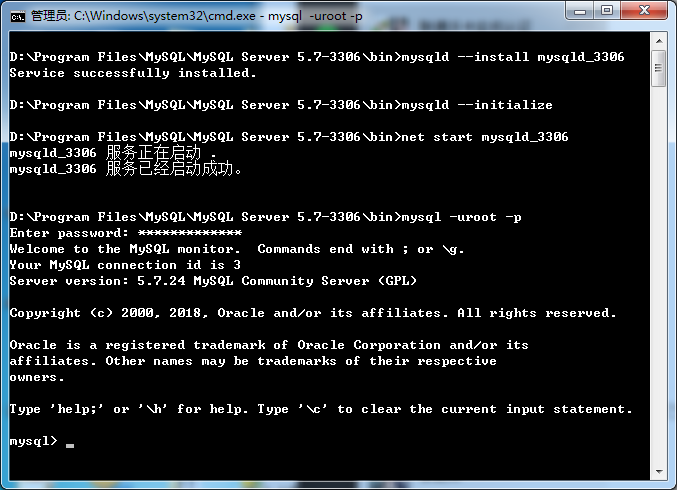
密码在后缀名为err的文件中
--02T12::.832824Z  [Warning] 'NO_ZERO_DATE', 'NO_ZERO_IN_DATE' and 'ERROR_FOR_DIVISION_BY_ZERO' sql modes should be used with strict mode. They will be merged with strict mode in a future release.

--02T12::.832824Z  [Warning] 'NO_AUTO_CREATE_USER' sql mode was not set.

--02T12::.782828Z  [Warning] InnoDB: New log files created, LSN=

--02T12::.344429Z  [Warning] InnoDB: Creating foreign key constraint system tables.

--02T12::.531629Z  [Warning] No existing UUID has been found, so we assume that this is the first time that this server has been started. Generating a new UUID: 40ec5e78-cd7f-11e9-be0a-7c7a911e77d7.

--02T12::.578429Z  [Warning] Gtid table is not ready to be used. Table 'mysql.gtid_executed' cannot be opened.

--02T12::.609629Z  [Note] A temporary password is generated for root@localhost: xgylo1yich+V

--02T12::.978088Z  [Warning] 'NO_ZERO_DATE', 'NO_ZERO_IN_DATE' and 'ERROR_FOR_DIVISION_BY_ZERO' sql modes should be used with strict mode. They will be merged with strict mode in a future release.

--02T12::.978088Z  [Warning] 'NO_AUTO_CREATE_USER' sql mode was not set.

--02T12::.978088Z  [Note] --secure-file-priv is set to NULL. Operations related to importing and exporting data are disabled

--02T12::.978088Z  [Note] mysqld_3306 (mysqld 5.7.) starting as process  ...

--02T12::.993688Z  [Note] InnoDB: Mutexes and rw_locks use Windows interlocked functions

--02T12::.993688Z  [Note] InnoDB: Uses event mutexes

--02T12::.993688Z  [Note] InnoDB: _mm_lfence() and _mm_sfence() are used for memory barrier

--02T12::.993688Z  [Note] InnoDB: Compressed tables use zlib 1.2.

--02T12::.993688Z  [Note] InnoDB: Number of pools:

--02T12::.993688Z  [Note] InnoDB: Not using CPU crc32 instructions

--02T12::.993688Z  [Note] InnoDB: Initializing buffer pool, total size = 128M, instances = , chunk size = 128M

--02T
mysql 8.0.15 安装步骤有点差异 初始化使用
mysqld --initialize --console
密码会在控制台打印出来
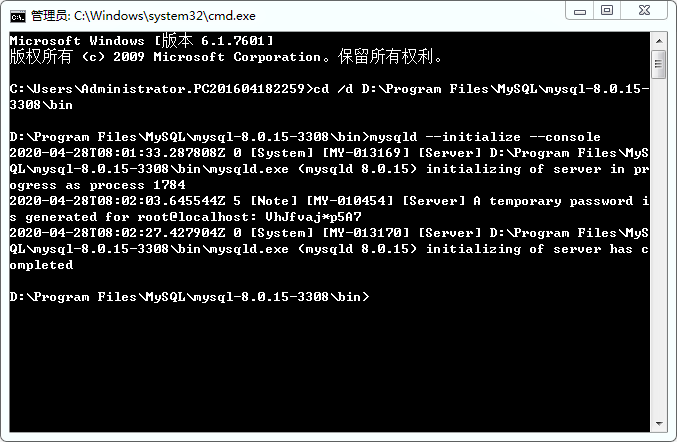
首次登录需要修改密码,不然使用navicat会提示密码过期

ALTER USER 'root'@'localhost' IDENTIFIED WITH mysql_native_password BY 'root';
windows环境下安装mysql5.7.20的更多相关文章
- 在 windows 环境下安装 redislive
这是一篇在 windows 环境下安装 redislive 的教程! 项目地址:https://github.com/nkrode/RedisLive 配置文档:http://www.nkrode.c ...
- Windows环境下安装PHPUnit
Windows环境下安装PHPUnit,在此整理一下,以便大家参考. 本人测试安装环境:Windows7(win32) + Apache(2.2.13) + PHP(5.3.6) 1. 以管理员 ...
- [转]windows10 64位环境下安装mysql5.7.17
今天以zip模式在windows10 64位环境下安装mysql5.7,到最后一步提示mysql服务无法启动. 安装步骤如下: 1.配置环境变量 我的电脑->属性->高级->环境变量 ...
- Nginx——在Windows环境下安装
下载 Nginx是开源软件,用户可以访问 http://nginx.org/ 网站获取源码包或Windows二进制文件下载.其中1.13.x版本为开发版本,1.12.0版本为稳定版本.开发版本分支会较 ...
- 在windows环境下安装redis和phpredis的扩展
在windows环境下安装redis和phpredis的扩展 1.首先配置php: 需要在windows的集成环境中找到php的扩展文件夹,ext,然后在网上寻找自己的php对应的.dll文件 比如说 ...
- windows环境下安装yaf框架
windows环境下安装yaf框架 在windows下安装yaf框架 准备工作: php环境(过程略,wamp,xampp,phpstudy都行,php版本大于5.3) git工具(需要从github ...
- ElasticHD Windows环境下安装
ElasticHD Linux环境下安装教程 ElasticHD windows环境下安装教程 习惯了T-SQL 查询,Elasticsearch的DSL查询语法简直就是反人类呀,一 ...
- RabbitMQ,Windows环境下安装搭建
切入正题:RabbitMQ的Windows环境下安装搭建 一.首先安装otp_win64_20.1.exe,,, 二.然后安装,rabbitmq-server-3.6.12.exe, 安装完成后,在服 ...
- 如何在Windows环境下安装Linux系统虚拟机
如何在Windows环境下安装Linux系统虚拟机 本篇经验写给想要入门学习C语言的小白们.Windows系统因为使用窗口图形化,操作简单,功能多样,所以我们在Windows环境下可以做到很多,但想要 ...
随机推荐
- 阿里云OSS设置跨域访问 H5的时候
OSS 提供 HTML5 协议中的跨域资源共享 CORS 设置,帮助您实现跨域访问.当 OSS 收到一个跨域请求(或者 OPTIONS 请求)时,会读取存储空间对应的 CORS 规则,然后进行相应的权 ...
- openssl制作证书全过程 + 部分修改
一:生成CA证书 目前不使用第三方权威机构的CA来认证,自己充当CA的角色. 先决条件:从openssl官网下载www.openssl.org 安装open ...
- CORS跨域带来的preflight request
CORS跨域带来的preflight request https://blog.csdn.net/baidu_35407267/article/details/79043515 HTTPS://blo ...
- BicycleGAN: Toward Multimodal Image-to-Image Translation - 1 - 论文学习,成对数据
Abstract 许多图像到图像的翻译问题是有歧义的,因为一个输入图像可能对应多个可能的输出.在这项工作中,我们的目标是在一个条件生成模型设置中建立可能的输出分布.将模糊度提取到一个低维潜在向量中,在 ...
- java多线程(六)线程控制类
1. 多线程控制类 为了保证多线程的三个特性,Java引入了很多线程控制机制,下面介绍其中常用的几种: l ThreadLocal l 原子类 l Lock类 l Volatile关键字 ...
- 使用 jpype 库实现 Python 调用 java 的 jar 包中的功能
一.what's the JPype JPype 是一个能够让 python 代码方便地调用 Java 代码的工具.在某些时候 java 的能力更强,我们可以用 java 写一个模块的功能然后用 Py ...
- jQuery TE
jQuery TE http://jqueryte.com/about ABOUT jQuery TE is a jQuery plugin. It is a lightweight (19.5 KB ...
- C#使用cmd运行命令并返回控制台输出信息
public static string RunCmd(string cmd){ cmd = cmd.Trim().TrimEnd('&') + "&exit";/ ...
- json_encode不自动转义斜杠“/”的方法
默认的情况之下使用 json_encode 对数组进行 json 格式的转换时候会自动的将数据中含有斜杠的字符串进行转义,如图 两种解决办法 其一,正则替换: $a = str_replace(& ...
- SQL Server 从Excel导入到数据库操作遇到的科学计数法问题
问题描述 今天在做从Excel导入数据到SQL Server 中将数据更新到表中,可惜就这一个简单的操作中出现了一点小插曲,就在我根据Excel中的编号关联表编号以此更新姓名字段时出现转换错误问题.如 ...