
freeradius client 和jradius安装编译
freeradius client
radtest只是用来调试的,radclient功能更强大。用法如下:
From the man page we can see that radclient gives us much more power as compared to radtest. The following command can be used as an equivalent to the radtest command used at the start of this chapter:
$> echo "User-Name=alice,User-Password=passme" | radclient 127.0.0.1 auth testing123
radclient的格式: Usage: radclient [options] server[:port] <command> [<secret>]
<command> 类型: One of auth, acct, status, coa, or disconnect.
如果不是调试模式的话,只会返回code码。
The response from radclient returns a code number and does not clearly indicate a pass or fail for an Access-Request. This is where you need to know the RADIUS packet codes as discussed in Chapter 1.
Here is the response of an Access-Accept packet (Code 2 成功):
Received response ID 32, code 2, length = 40 Framed-IP-Address = 192.168.1.65

Reply-Message = "Hello, alice"
Here is the response of an Access-Reject packet:(code 3 鉴权失败)
Received response ID 59, code 3, length = 34

Reply-Message = "Hello, alice"
jradius安装/编译/使用
当然还是优先参考官方文档:http://coova.github.io/JRadius/FreeRADIUS/
wget ftp://ftp.freeradius.org/pub/freeradius/freeradius-server-2.1.1.tar.bz2

bzcat freeradius-server-2.1.1.tar.bz2 | tar xf -

cd freeradius-server-2.1.1

echo rlm_jradius >> src/modules/stable
./configure
make
make install
就是在解压后编译前,在 src/modules/stable文件添加一行rlm_jradius ,然后再编译就有freeradius对jradius的支持模块了。
修改freeradius的配置
etc/raddb/radiusd.conf 配置文件中添加下面的部分
modules {

   ...

   # configure the rlm_jradius module

   jradius {

      name      = "example"             # The "Requester" name (a single

                                        # JRadius server can have

                                        # multiple "applications")

      primary   = "localhost"           # Uses default port 1814

      secondary = "192.168.0.1"         # Fail-over server

      tertiary  = "192.168.0.1:8002"    # Fail-over server on port 8002

      timeout   = 1                     # Connect Timeout

      onfail    = NOOP                  # What to do if no JRadius

                                        # Server is found. Options are:

                                        # FAIL (default), OK, REJECT, NOOP

      keepalive = yes                   # Keep connections to JRadius pooled

      connections = 8                   # Number of pooled JRadius connections

  }

}
在sites-available/default配置文件中,各个模块添加jradius关键字
authorize {

   ...

   jradius

}

post-auth {

   ...

   jradius

   Post-Auth-Type REJECT {             # Use this to also process failures -

       jradius                         # AccessReject replies

   }                                   # from the post-auth handler.

}

preacct {

   ...

   jradius

}

accounting {

   ...

   jradius

}
以上步骤freeradius部分已经配置好了。之后编译安装jradius
编译安装jradius
官方给的步骤
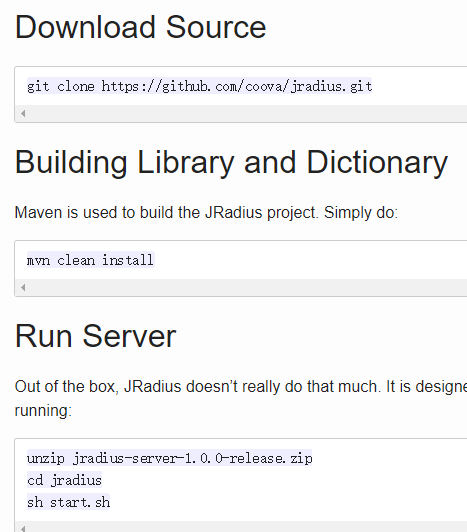
官方是先编译后解压,应该是先下载源码解压后在根目录用maven编译
mvn clean install
编译成功后,在 jradius/server/scripts 下有start.sh文件但是无法启动,找不到类,vim start.sh打开
(cd `dirname $0`; classpath=".:./lib"

for jar in ./lib/*.jar; do

  classpath="$classpath:$jar"

done

CLASSPATH="$classpath" java net.jradius.StartSpring)
由于当前目录没有lib文件夹,找不到类,我直接修改脚本,
(cd `dirname $0`; classpath=".:./lib"

for jar in /data/jradius/server/target/lib/*.jar; do

  classpath="$classpath:$jar"

done

CLASSPATH="$classpath" java net.jradius.StartSpring)
/data/jradius 是我的jradius安装目录,这样还不行,报错缺少配置文件,再把 jradius/server/config下的所以配置文件copy到start.sh的目录下,再次./start.sh启动就可以成功了。
接下来用java代码测试,测试代码可以参考:
public class JradiusTest {

    public static void main(String[] args) throws Exception {

        if(args.length!=4) {

            System.out.println("<host><secret><username><password>");

            System.exit(2);

        }

         InetAddress host = InetAddress.getByName(args[0]);

         boolean aa=new JradiusTest().isRadius(host, 1812, 1813, "pap",args[2] , args[3], args[1], "110.110.110.110", 3, 3000);

         System.out.println("鉴权结果:"+aa);

    }

    /**

     *

     * @param host

     *            The address for the radius server test.

     * @param authport

     *            Radius authentication port

     * @param acctport

     *            Radius accounting port - required by jradius

     *            but not explicitly checked

     * @param authType

     *            authentication type - pap or chap

     * @param user

     *            user for Radius authentication

     * @param password

     *            password for Radius authentication

     * @param secret

     *            Radius shared secret

     * @param timeout

     *            Timeout in milliseconds

     * @param retry

     *          Number of times to retry

     *

     * @param nasid

     *            NAS Identifier to use

     *

     * @return True if server, false if not.

     */

    @SuppressWarnings("unused")

    private boolean isRadius(final InetAddress host, final int authport, final int acctport, final String authType,

            final String user, final String password, final String secret, final String nasid, final int retry, final int timeout) {

        boolean isRadiusServer = false;

        AttributeFactory.loadAttributeDictionary("net.jradius.dictionary.AttributeDictionaryImpl");

        try {

//            final RadiusClient rc = new RadiusClient(host, secret, authport, acctport, convertTimeoutToSeconds(timeout));

            final RadiusClient rc = new RadiusClient(host, secret, authport, acctport, timeout);

            final AttributeList attributes = new AttributeList();

            attributes.add(new Attr_UserName(user));

            attributes.add(new Attr_NASIdentifier(nasid));

            attributes.add(new Attr_UserPassword(password));

            final AccessRequest accessRequest = new AccessRequest(rc, attributes);

            final RadiusAuthenticator auth;

            if (authType.equalsIgnoreCase("chap")) {

                auth = new CHAPAuthenticator();

            } else if (authType.equalsIgnoreCase("pap")) {

                auth = new PAPAuthenticator();

            } else if (authType.equalsIgnoreCase("mschapv1")) {

                auth = new MSCHAPv1Authenticator();

            } else if (authType.equalsIgnoreCase("mschapv2")) {

                auth = new MSCHAPv2Authenticator();

            } else if (authType.equalsIgnoreCase("eapmd5")) {

                auth = new EAPMD5Authenticator();

            } else if (authType.equalsIgnoreCase("eapmschapv2")) {

                auth = new EAPMSCHAPv2Authenticator();

            } else {

//                LogUtils.warnf(this, "Unknown authenticator type '%s'", authType);

                return isRadiusServer;

            }

            RadiusPacket reply = rc.authenticate(accessRequest, auth, retry);

            isRadiusServer = reply instanceof AccessAccept;

//            LogUtils.debugf(this, "Discovered RADIUS service on %s", host.getCanonicalHostName());

        } catch (final Throwable e) {

//            LogUtils.debugf(this, e, "Error while attempting to discover RADIUS service on %s", host.getCanonicalHostName());

            isRadiusServer = false;

        }

        return isRadiusServer;

    }

}
更多jradius客户端使用代码参考
github的example
和programcreek的example
https://www.programcreek.com/java-api-examples/index.php?api=net.jradius.client.RadiusClient
other :
我用上面代码去鉴权的时候,鉴权可以成功,但是jradius的服务端会报错
net.jradius.server.KeepAliveListener.run(): shutting down tcp socket listener

java.nio.BufferUnderflowException

    at java.nio.Buffer.nextGetIndex(Buffer.java:498)

    at java.nio.HeapByteBuffer.getInt(HeapByteBuffer.java:355)

    at net.jradius.packet.Format.getUnsignedInt(Format.java:389)

    at net.jradius.freeradius.FreeRadiusListener.parseRequest(FreeRadiusListener.java:98)

    at net.jradius.server.ListenerRequest.getEventFromListener(ListenerRequest.java:78)

    at net.jradius.server.TCPListenerRequest.accept(TCPListenerRequest.java:72)

    at net.jradius.server.KeepAliveListener.run(KeepAliveListener.java:61)
而且freeradius的debug日志中看到,账号密码鉴权是成功的,但是rlm_jradius 发送数据的时候失败了。
测试代码中打印出reply.getCode() ,为2,说明鉴权是成功的,我不知道请求包缺少了必要的数据还是我配置文件没有弄对,导致数据包在FreeRadiusListener.parseRequest解析时报错。
研究后发现 上面的报错是应为ByteBuffer的limit小于实际的数据长度导致的,我以为是jradius本身的一个小bug,就注释掉FreeradiusListener.java 中96行的代码,重新编译运行,发现这个错虽然没了,但是又直接抛出了102行的异常。
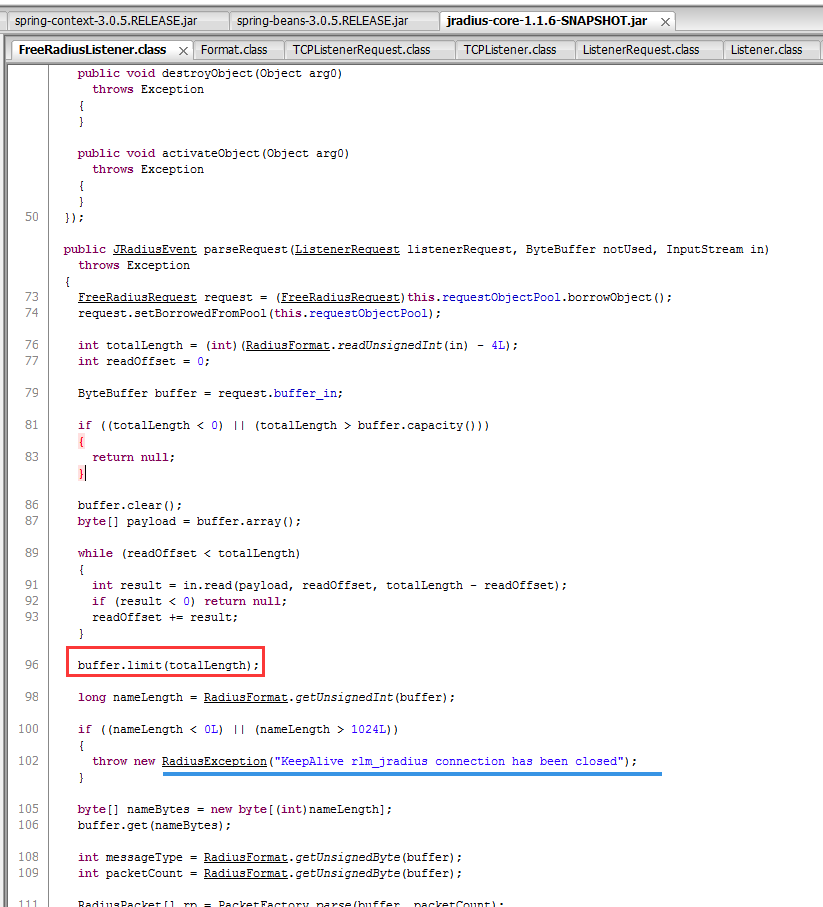
这个异常没有解决,没想明白。
参考:http://blog.csdn.net/lzz957748332/article/category/6017279
freeradius client 和jradius安装编译的更多相关文章
- 比特币Bitcoin源代码安装编译
body{ font: 16px/1.5em 微软雅黑,arial,verdana,helvetica,sans-serif; } 比特币 (货币符号: ฿;英文名:Bitcoin;英文 ...
- linux centos安装编译phantomjs 2.0的方法
phantomjs 2.0最新版的官方不提供编译好的文件下载,只能自己编译,有教程但是过于简单,特别是服务器上要安装N多的支持.折腾到现在终于装好了并且能正常运行了,截图mark一下: linux c ...
- linux_安装_安装编译phantomjs 2.0的方法_转
项目中要对数据公式webkit渲染,phantmjs 2.0的效果好比1.9好不少. 安装过程中 坑比较多. 转载文章: phantomjs 2.0最新版的官方不提供编译好的文件下载,只能自己编译,有 ...
- wxWidgets的安装编译、相关配置、问题分析处理
wxWidgets的安装编译.相关配置.问题分析处理 一.介绍部分 (win7 下的 GUI 效果图见 本篇文章的最后部分截图2张) wxWidgets是一个开源的跨平台的C++构架库(framewo ...
- FFmpeg在Linux下安装编译过程
转载请把头部出处链接和尾部二维码一起转载,本文出自:http://blog.csdn.net/hejjunlin/article/details/52402759 今天介绍下FFmpeg在Linux下 ...
- openblas下载安装编译
编译好的库: https://github.com/JuliaLinearAlgebra/OpenBLASBuilder/releases 源码编译 下载:https://github.com/xia ...
- Linux上安装编译工具链
在Linux上安装编译工具链,安装它会依赖dpkg-dev,g++,libc6-dev,make等,所以安装之后这些依赖的工具也都会被安装.ubuntu软件库中这么描述 Informational l ...
- plsql oracle client没有正确安装(plsql连接远程数据库)
plsql oracle client没有正确安装(plsql连接远程数据库) CreateTime--2018年4月23日16:55:11 Author:Marydon 1.情景再现 2.问题解 ...
- (0.2.6)Mysql安装——编译安装
(0.2.6)Mysql安装——编译安装 待完善
随机推荐
- Mybatis设置主键自增
<insert id="insertArea" useGeneratedKeys="true" keyProperty="areaId" ...
- 通过JS下载 or 唤起App
判断唤起app的连接是否在WeChat中打开 let isWeiXin = navigator.userAgent.toLowerCase().indexOf('micromessenger') != ...
- mybatis 报Invalid bound statement(not found) 和 Property 'mapperLocations' was not specified or not matching resources found
排除问题的步骤: 1.首先检查mapper文件和mapper接口的文件名是否相等. 2.pom.xml是否把xml排除了,这样写就会src/main/java下所有的Mybatis的xml文件都删除, ...
- Turbo码基本框架
1. 基本原理 1.1 定义 1.2 分量码设计 2. 编码方法 2.1 交织器的设计 2.2 分量编码器 2.3 删余矩阵及复用 3. 译码方法和算法 3.1 迭代译码 3.2 MAP类算法 3.3 ...
- 二、hexo+github搭建个人博客的简单使用
使用hexo+github搭建一个可以外网访问的个人博客,此文用于记录博客初级的使用方法. 新建-编写-生成-部署文章的全过程 1.使用cmd完成 打开命令提示符[win+r输入cmd] 切换到自己本 ...
- MP3文件信息修改
MP3文件信息 参考链接:https://www.jianshu.com/p/e368517ec7b9 总结: ID3V1在MP3文件后面;ID3V2在MP3文件前面;现在有些文件是V1的,有些文件是 ...
- ActiveMQ使用Zookeeper+LevelDb配置Master/Slave集群
前言: 本文介绍的AMQ集群是Master-Slave模式的,官网介绍三种方案: (1)基于共享文件系统的,(2)基于JDBC,(3)基于可复制的LevelDB. 关于三种方式的对比网上已经有很多,本 ...
- MySQL job/定时任务/event 学习
参考文章: https://blog.csdn.net/qq_21108311/article/details/82589850 https://blog.csdn.net/qq_27238185/a ...
- leetcode求峰值,js实现
原题: 最开始是照着提示的思路进行,中规中矩,用时64ms /** * @param {number[]} nums * @return {number} */var findPeakElement ...
- docker部署angular和asp.net core组成的前后端分离项目
最近使用docker对项目进行了改进,把步骤记录一下,顺便说明一下项目的结构. 项目是前后端分离的项目,后端使用asp.net core 2.2,采用ddd+cqrs架构的分层思想,前端使用的是ang ...