
swoole实验版聊天室
“swoole实验版聊天室”是依据一堂swoole培训课内容改编的,结合了bootstrap前端框架、redis数据库、jquery框架等实现基本功能,只是体现了swoole的应用,并不是为了专门写个聊天室。
本程序开发环境:
1.ubuntu16.04.1
2.PHP Version 7.2.21
3.swoole Version 4.4.3
4.Redis Version 4.0.2
安装步骤(略)。
效果如下:
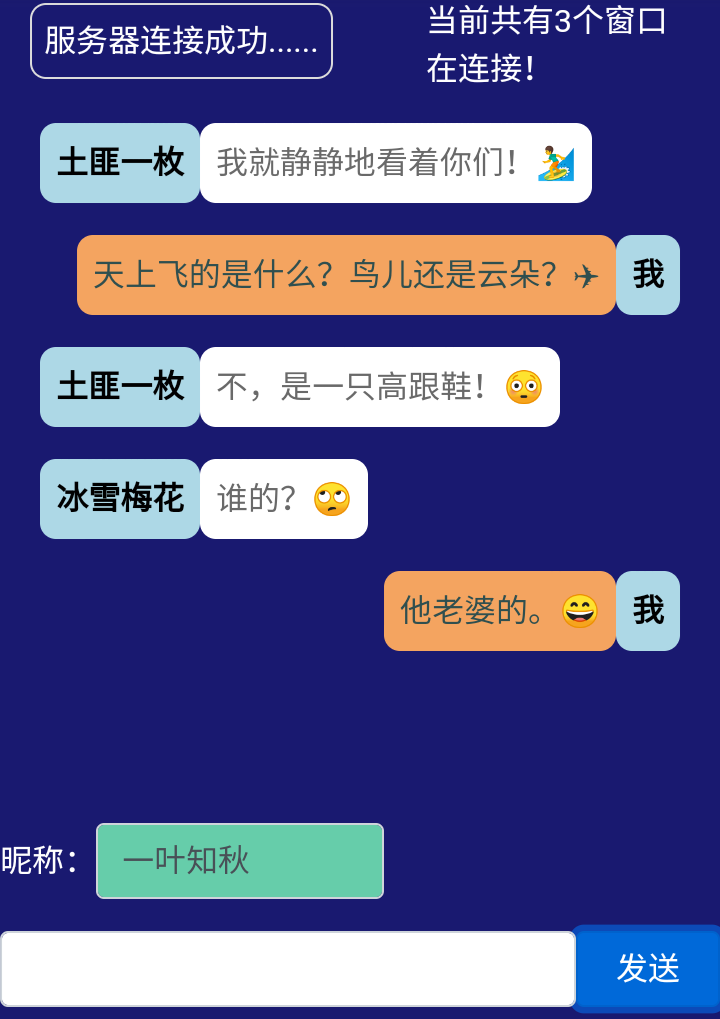
代码如下:
index.php文件
<!DOCTYPE html>
<html>
<head>
<title>swoole实验版聊天室</title>
<meta charset="utf-8">
<meta name="viewport" content="width=device-width, initial-scale=1">
<meta http-equiv="cache-control" content="no-cache">
<link rel="stylesheet" href="https://cdn.staticfile.org/twitter-bootstrap/4.1.0/css/bootstrap.min.css">
<script src="https://cdn.staticfile.org/jquery/3.2.1/jquery.min.js"></script>
<script src="https://cdn.staticfile.org/popper.js/1.12.5/umd/popper.min.js"></script>
<script src="https://cdn.staticfile.org/twitter-bootstrap/4.1.0/js/bootstrap.min.js"></script>
<link rel="stylesheet" href="https://cdn.staticfile.org/font-awesome/4.7.0/css/font-awesome.css"> <style>
body{background-color: #191970;}
@media screen and (min-width: 992px) {
div{display: none}
body {background: #fff}
body:before {
content: "不支持此设备浏览!";
position: absolute;
left: 10px;
top: 30px
}
} @media screen and (min-width: 768px) and (max-width: 991px) {
div{display: none}
body {background: #fff}
body:before {
content: "不支持此设备浏览!";
position: absolute;
left: 10px;
top: 30px
}
} @media screen and (min-width: 576px) and (max-width: 767px) {
#result{
width: 100%;
height: 300px;
overflow-y: scroll;
margin: 0px;
padding: 5px;
}
#is-open{
display: inline-block;
border: solid 1px #dcdcdc;
padding: 6px;
margin: 6px 0px;
border-radius: 8px;
color: #fff;
}
.ms {
display:inline-block;
width:80%
}
.msl {
display:inline-block;
width:40%;
background-color: #66cdaa
}
.btn {
display:inline-block;
float: right;
width:20%
}
.mess{
color: #00fa9a;
text-align: right
}
.mess-1{
display: inline-block;
word-wrap:break-word;
word-break:break-all;
color: #2f4f4f;
background-color:#f4a460;
padding: 8px;
border-radius: 8px;
text-align: left
}
.mess-1-1, .mess-2-2 {
display: inline-block;
color: #000;
font-weight: bold;
background-color: #add8e6;
}
.mess-1-1{
padding: 8px;
border-radius: 8px
}
.mess-2-2{
padding: 8px;
border-radius: 8px
}
.mess-2{
display: inline-block;
word-wrap:break-word;
word-break:break-all;
color: #696969;
background-color:#fff;
padding: 8px;
border-radius: 8px
}
.tot{
display: inline-block;
width: 40%;
word-wrap:break-word;
word-break:break-all;
color: #fff;
float: right;
margin-top: 3px;
}
.bottom-box{
position: fixed;
left: 0px;
bottom: 0px;
width:100%;
background-color: #191970;
padding-top: 10px
}
} @media screen and (min-width: 300px) and (max-width: 575px) {
#result{
width: 100%;
height: 300px;
overflow-y: scroll;
margin: 0px;
padding: 5px;
}
#is-open{
display: inline-block;
border: solid 1px #dcdcdc;
padding: 6px;
margin: 6px 0px;
border-radius: 8px;
color: #fff;
}
.ms {
display:inline-block;
width:80%
}
.msl {
display:inline-block;
width:40%;
background-color: #66cdaa
}
.btn {
display:inline-block;
float: right;
width:20%
}
.mess{
color: #00fa9a;
text-align: right
}
.mess-1{
display: inline-block;
word-wrap:break-word;
word-break:break-all;
color: #2f4f4f;
background-color:#f4a460;
padding: 8px;
border-radius: 8px;
text-align: left
}
.mess-1-1, .mess-2-2 {
display: inline-block;
color: #000;
font-weight: bold;
background-color: #add8e6;
}
.mess-1-1{
padding: 8px;
border-radius: 8px
}
.mess-2-2{
padding: 8px;
border-radius: 8px
}
.mess-2{
display: inline-block;
word-wrap:break-word;
word-break:break-all;
color: #696969;
background-color:#fff;
padding: 8px;
border-radius: 8px
}
.tot{
display: inline-block;
width: 40%;
word-wrap:break-word;
word-break:break-all;
color: #fff;
float: right;
margin-top: 3px;
}
.bottom-box{
position: fixed;
left: 0px;
bottom: 0px;
width:100%;
background-color: #191970;
padding-top: 10px
}
}
</style> </head>
<body>
<div class="container">
<span id="is-open">服务器正在连接......</span>
<span class="tot">当前共有<span id="total">0</span>个窗口在连接!</span>
<p id="result"></p> <form>
<div class = "bottom-box">
<p><span style="color: #fff">昵称:</span><input type="text" id="username" class="form-control msl"/></p>
<p>
<input id="message" class="form-control ms">
<button id="btn" type="button" class="btn btn-primary">发送</button>
</p>
</div>
</form> </div> <script>
$(document).ready(function(){ var timeOut;
var arrResult = []; // 设置cookie函数
function setCookie(cname,cvalue,exdays){
var d = new Date();
d.setTime(d.getTime()+(exdays*24*60*60*1000));
var expires = "expires="+d.toGMTString();
document.cookie = cname + "=" + cvalue + "; " + expires;
} // 取出cookie数据函数
function getCookie(cname){
var name = cname + "=";
var ca = document.cookie.split(';');
for(var i=0; i<ca.length; i++) {
var c = ca[i].trim();
if (c.indexOf(name)==0) return c.substring(name.length,c.length);
}
return "";
} /* 刷新页面时从取出数据初始化页面 */ // 初始化插入昵称
var usrName = (getCookie("userName") != null)?getCookie("userName"):"";
$("#username").val(usrName); setTimeout(function(){
// 初始化滚动消息到最新
$("#result").scrollTop(result.scrollHeight);
},500); // 刷新页面时从redis数据库取出数据初始化页面
$.post("./ajax.php",{},function(ajaxData){
var m = JSON.parse(ajaxData);
for(key in m){
arrResult.push(m[key]);
}
$("#result").html(arrResult.join(''));
}); /* 初始化数据结束 */ /* websocket通信 */
var ws = new WebSocket("ws://47.94.224.241:9503"); ws.onopen=function(){
$("#is-open").html('服务器连接成功......');
clearInterval(timeOut);
} ws.onmessage=function(res){
var data=JSON.parse(res.data);
if(data.userId){
window.userId = data.userId;
} if(data.total){
$("#total").html(data.total);
return false;
} if( data.cookieUsrName == getCookie("userName") ) {
arrResult.push('<p class="mess"><span class="mess-1">' + data.message + '</span><span class="mess-1-1">我</span></p>');
}else{
arrResult.push('<p><span class="mess-2-2">' + data.username + '</span><span class="mess-2">' + data.message + '</span></p>');
} // while()里的49要与ajax.php里的lpush方法里的参数49要统一
while ( arrResult.length > 49) {
arrResult.shift();
} // 显示在界面上
var val = arrResult.join("");
$("#result").html(val); $("#result").scrollTop(result.scrollHeight);
} ws.onclose=function(){
$("#is-open").html('');
$("#is-open").html('服务器已断开......'); // 断开连接刷新页面
timeOut = setInterval(function(){
location.replace(location.href);
}, 1000);
} btn.onclick=function(){
if($("#username").val() == '' || $("#message").val() == '') { // 打开模态框
$('#myModal').modal('show');
}else{ /*
* 组装数据,数据是在js里组装的,swoole服务器只是转发了一下数据并存入redis数据库
*
* 判断“我”的方法:
* 1. 一种是判断fromuserid,可以判断到具体窗口,一个浏览器打开3个窗口就是3个不同的“我”;
* 2. 另一种是判断cookie或session里存储的用户名,即cookieUsrName键,一个浏览器认
* 为是一个用户,这里是用昵称代替了。
*/
var data={ fromuserid: window.userId, username: username.value, message: message.value, cookieUsrName: getCookie("userName") } ; //对象转JSON字符串发送到服务器
ws.send( JSON.stringify(data) );
message.value='';
}
} username.onkeyup = function() {
//昵称存入cookie
setCookie("userName", $("#username").val(), 7);
}
});
</script> <!-- 模态框 -->
<div class="modal fade" id="myModal">
<div class="modal-dialog">
<div class="modal-content"> <!-- 模态框头部 -->
<div class="modal-header">
<h4 class="modal-title">
<i class="fa fa-exclamation-circle fa-lg" style="color: red"></i>
错误提示:
</h4>
<button type="button" class="close" data-dismiss="modal">×</button>
</div> <!-- 模态框主体 -->
<div class="modal-body">
“昵称”和“消息”内容都不允许为空,请重新输入!
</div> <!-- 模态框底部 -->
<div class="modal-footer">
<button type="button" class="btn btn-secondary" data-dismiss="modal">关闭</button>
</div> </div>
</div>
</div> </body>
</html>
swooleServer.php
<?php

$ws = new swoole_websocket_server("0.0.0.0", 9503, SWOOLE_PROCESS);

$ws->set(array(

    'reactor_num' => 2, //reactor thread num

    'worker_num' => 4,    //worker process num

    'backlog' => 128,   //listen backlog

    'max_conn' => 10000,

    'max_request' => 50,

    'dispatch_mode' => 1,

    'daemonize' => 1

));

$ws->on('open', function ($ws, $request) {

    $tot = count($ws->connections);

    $ws->push($request->fd, json_encode(['userId' => $request->fd, 'total' => $tot]));

});

$ws->on('message', function ($ws, $frame) {

    // 每个用户发送的消息向所有用户转发

    foreach($ws->connections as $value) {

        $ws->push($value, $frame->data);

    }

    // 向redis数据库写入数据,数据类型“列表”

    $redis = new Redis();

    $redis->connect('127.0.0.1', 6379);

    $redis->lpush("messages", $frame->data);

    // 超过100条数据开始删除旧数据

    while($redis->llen("messages") > 100) {

       $redis->rpop("messages");

    }

});

$ws->on('close', function ($ws, $fd) {

    $i = 0;

    foreach($ws->connections as $v) {

        if($v == $fd) {

            unset($ws->connections[$i]);

        }

        $i++;

    }

});

$ws->start();

?>
ajax.php
<?php

    $redis = new Redis();

    $redis->connect('127.0.0.1', 6379);

    $arrList = $redis->lrange("messages", 0, 20);

    $arrValue = [];

    while(count($arrList) > 0){

        $v = array_pop($arrList);

        $arrVal = json_decode($v, true);

        if($arrVal['cookieUsrName'] == $_COOKIE['userName']) {

            array_push($arrValue, '<p class="mess"><span class="mess-1">' . $arrVal['message'] . '</span><span class="mess-1-1">我</span></p>');

        }else{

            array_push($arrValue, '<p><span class="mess-2-2">' . $arrVal['username'] . '</span><span class="mess-2">' . $arrVal['message'] . '</span></p>');

        }

    }

    echo json_encode($arrValue);

?>
可以通过下面的页面查看redis数据库里的内容,不用去服务器端查看效果。
showRedis.php
<?php

    //连接本地的 Redis 服务

   $redis = new Redis();

   $redis->connect('127.0.0.1', 6379);

   // 获取存储的数据并输出

   $arList = $redis->lrange("messages", 0 ,100);


   echo '当前显示内容->' . json_decode($arList[0], true)["username"] . ":“" . json_decode($arList[0], true)["message"] . "”";

   echo "<pre>";

   print_r($arList);

   echo "</pre>";?>
swoole实验版聊天室的更多相关文章
- Swoole实现h5版聊天室笔记
声明:该聊天室目前只有一对多,一对一的聊天功能,另外,因为没有使用到mysql,所以还存在比较多的缺陷地方,但知道原理就差不多了,这里主要分享下swoole简易的聊天室制作思路. 开发环境:cento ...
- angular版聊天室|仿微信界面IM聊天|NG2+Node聊天实例
一.项目介绍 运用angular+angular-cli+angular-router+ngrx/store+rxjs+webpack+node+wcPop等技术实现开发的仿微信angular版聊天室 ...
- 如何利用WebSocket实现网页版聊天室
花了将近一周的时间终于完成了利用WebSocket完成网页版聊天室这个小demo,期间还走过了一段"看似弯曲"的道路,但是我想其实也不算是弯路吧,因为你走过的路必将留下你的足迹.这 ...
- 基于WebSocket实现网页版聊天室
WebSocket ,HTML5 开始提供的一种在单个 TCP 连接上进行全双工通讯的协议,其使用简单,应用场景也广泛,不同开发语言都用种类繁多的实现,仅Java体系中,Tomcat,Jetty,Sp ...
- golang简易版聊天室
功能需求: 创建一个聊天室,实现群聊和单聊的功能,直接输入为群聊,@某人后输入为单聊 效果图: 群聊: 单聊: 服务端: package main import ( "fmt" ...
- WinForm版聊天室复习Socket通信
聊天室:服务器端-------------客户端 最终演示展示图: 一. 服务器端 对服务端为了让主窗体后台不处理具体业务逻辑,因此对服务端进行了封装,专门用来处理某个客户端通信的过程. 而由于通信管 ...
- 利用html 5 websocket做个山寨版web聊天室(手写C#服务器)
在之前的博客中提到过看到html5 的websocket后很感兴趣,终于可以摆脱长轮询(websocket之前的实现方式可以看看Developer Works上的一篇文章,有简单提到,同时也说了web ...
- MyChatRoom——C#自制聊天室
一个用C#编写的基于Socket的Windows版聊天室,包括服务端和客户端.当服务端启动服务后,客户端可以连接到服务端,给服务端发送数据,服务端可以接收数据:服务端可以给客户端发送数据,客户端接收: ...
- 简单的聊天室代码php+swoole
php swoole+websocket 客户端代码 <!DOCTYPE html> <html> <head> <title></title&g ...
随机推荐
- keywordAsVar.php
<?php //keywordAsVar.php #keywordAsVar.php $True="我是变量True"; echo($True); echo("&l ...
- Big Data Landscape 2018
https://mattturck.com/bigdata2018/
- 分布式任务平台XXL_JOB
目录 1.源码下载地址 2.文档地址 3.源码结构 4.初始化数据库 5.配置调度中心 ①.修改调度中心配置文件 ②.部署调度中心 ③.访问调度中心管理界面 6.创建执行器项目 ①.添加maven依赖 ...
- HttpClient学习研究---第二章:连接管理
第二章.Connection management连接管理2.1. 2.1.Connection persistence连接持久性The process of establishing a conne ...
- [React] Handle React Suspense Errors with an Error Boundary
Error Boundaries are the way you handle errors with React, and Suspense embraces this completely. Le ...
- 如何使用Microsoft的驱动程序验证程序解释无法分析的崩溃转储文件
这篇文章解释了如何使用驱动程序验证工具来分析崩溃转储文件. 使用Microsoft驱动程序验证工具 如果您曾经使用Windows的调试工具来分析崩溃转储,那么毫无疑问,您已经使用WinDbg打开了一个 ...
- luogu P3799 妖梦拼木棒
二次联通门 : luogu P3799 妖梦拼木棒 /* luogu P3799 妖梦拼木棒 用一个桶存下所有的木棒 美剧两根短的木棒长度 后随便乘一乘就 好了.. */ #include <a ...
- luogu P3327 [SDOI2015]约数个数和 莫比乌斯反演
题面 我的做法基于以下两个公式: \[[n=1]=\sum_{d|n}\mu(d)\] \[\sigma_0(i*j)=\sum_{x|i}\sum_{y|j}[gcd(x,y)=1]\] 其中\(\ ...
- nginx if配置说明
格式:if (条件判断) { 具体的rewrite规则 } 条件举例: 条件判断语句由Nginx内置变量.逻辑判断符号和目标字符串三部分组成. 其中,内置变量是Nginx固定的非自定义的变量,如,$r ...
- 颜色空间模型(HSV\LAB\RGB\CMYK)
通过Photoshop的拾色器,我们知道表征颜色的模型的不止一种,本文将系统并且详细讨论这四种模型(HSV.LAB.RGB和CMYK)之间的联系以及应用.本文部分章节整合了多位优秀博主的博客(链接见本 ...