
ADO.NET 七(一个例子)
通过一个完整的实例实现课程信息管理功能的操作,包括查询、修改、删除课程信息等操作。
1) 创建课程信息表
create table StuCourse

(

    id int primary key identity(1,1),

    name varchar(20),

    credit numeric(3,1),

    remark varchar(50)

);
INSERT INTO StuCourse (name,credit,remark) VALUES ('English',3.00,'Good Good Study');
INSERT INTO StuCourse (name,credit,remark) VALUES ('Math',2.56,'Good Good Study, Day');
INSERT INTO StuCourse (name,credit,remark) VALUES ('Chinese',4.04,'Good Good Study, Day Day');
INSERT INTO StuCourse (name,credit,remark) VALUES ('English1',3.00,'Good Good Study');
INSERT INTO StuCourse (name,credit,remark) VALUES ('Math1',2.56,'Good Good Study, Day');
INSERT INTO StuCourse (name,credit,remark) VALUES ('Chinese1',4.04,'Good Good Study, Day Day');
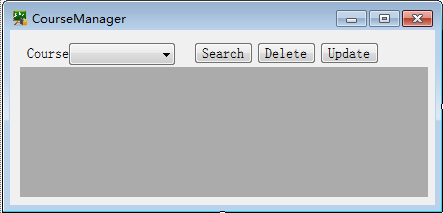
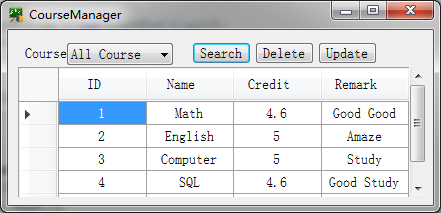
2) 课程信息管理界面的设计
DataGridView 控件用于显示课程信息,并提供了根据课程名称查找课程信息、修改以及删除的功能,另外提供增加课程功能(暂无)。
3) 具体代码
实体类:
/// <summary>
/// 课程实体类(实际应创建一实体类的项目,里面可能有多个实体类)
/// </summary>
public class Entities
{
/// <summary>
/// 编号(数据库中的自增主键)
/// </summary>
public int ID { get; set; }
/// <summary>
/// 课程名称
/// </summary>
public string Name { get; set; }
/// <summary>
/// 课程学分
/// </summary>
public float Credit { get; set; }
/// <summary>
/// 备注
/// </summary>
public string Remark { get; set; }
}
业务层数据层:
/// <summary>
/// 课程相关处理类(实际应将业务逻辑层BLL与数据库层DAL分开,各自创建一个项目)
/// </summary>
public class CourseInfo
{
static string conString = "Data Source=.;Initial Catalog=TestDB;Integrated Security=True;";
/// <summary>
/// 返回所有课程信息
/// </summary>
/// <returns> List<Entities></returns>
public static List<Entities> GetAllCourseInfo()
{
SqlDataReader reader = null;
try
{
List<Entities> entities = new List<Entities>();
string sqlStr = "SELECT * FROM StuCourse";
using (SqlConnection con = new SqlConnection(conString))
{
con.Open();
SqlCommand cmd = new SqlCommand(sqlStr, con);
reader = cmd.ExecuteReader();
while (reader.Read())
{
int id = reader["id"] == DBNull.Value ? -1 : Convert.ToInt32(reader["id"]);
string name = reader["name"] == DBNull.Value ? "" : reader["name"].ToString();
float credit = reader["credit"] == DBNull.Value ? 0f : Convert.ToSingle(reader["credit"]);
string remark = reader["remark"] == DBNull.Value ? "" : reader["remark"].ToString();
Entities entity = new Entities()
{
ID = id,
Name = name,
Credit = credit,
Remark = remark
};
entities.Add(entity);
}
}
return entities;
}
catch (Exception)
{
//打印log
throw;
}
finally
{
if (reader != null)
{
reader.Close();
}
}
}
/// <summary>
/// 返回查找的课程信息,模糊查询
/// </summary>
/// <param name="courseName"></param>
/// <returns>List<Entities></returns>
public static List<Entities> GetTheCourseInfo(string courseName)
{
SqlDataReader reader = null;
try
{
string sqlStr = "";
List <Entities> entities = new List<Entities>();
if (courseName == "All Course")
sqlStr = $"SELECT * FROM StuCourse";
else
sqlStr = $"SELECT * FROM StuCourse WHERE name like '%{courseName}%'";
using (SqlConnection con = new SqlConnection(conString))
{
con.Open();
SqlCommand cmd = new SqlCommand(sqlStr, con);
reader = cmd.ExecuteReader();
while (reader.Read())
{
int id = reader["id"] == DBNull.Value ? -1 : Convert.ToInt32(reader["id"]);
string name = reader["name"] == DBNull.Value ? "" : reader["name"].ToString();
float credit = reader["credit"] == DBNull.Value ? 0f : Convert.ToSingle(reader["credit"]);
string remark = reader["remark"] == DBNull.Value ? "" : reader["remark"].ToString();
Entities entity = new Entities()
{
ID = id,
Name = name,
Credit = credit,
Remark = remark
};
entities.Add(entity);
}
}
return entities;
}
catch (Exception)
{
//打印log
throw;
}
finally
{
if (reader != null)
{
reader.Close();
}
}
}
/// <summary>
/// 删除
/// </summary>
/// <param name="courseID"></param>
/// <returns>int</returns>
public static int DeleteTheCourseInfo(int courseID)
{
try
{
int res = -1;
List<Entities> entities = new List<Entities>();
string sqlStr = $"DELETE FROM StuCourse WHERE id = {courseID}";
using (SqlConnection con = new SqlConnection(conString))
{
con.Open();
SqlCommand cmd = new SqlCommand(sqlStr, con);
res = cmd.ExecuteNonQuery();
}
return res;
}
catch (Exception)
{
//打印log
throw;
}
}
/// <summary>
/// 更新
/// </summary>
/// <param name="entity"></param>
/// <returns>int</returns>
public static int UpdateTheCourseInfo(Entities entity)
{
try
{
int res = -1;
string sqlStr = $@"UPDATE StuCourse SET name = N'{entity.Name}',
credit = {entity.Credit}, remark = N'{entity.Remark}' WHERE id = {entity.ID}";
using (SqlConnection con = new SqlConnection(conString))
{
con.Open();
SqlCommand cmd = new SqlCommand(sqlStr, con);
res = cmd.ExecuteNonQuery();
}
return res;
}
catch (Exception)
{
//打印log
throw;
}
}
/// <summary>
/// 增加
/// </summary>
/// <param name="entity"></param>
/// <returns>int</returns>
public static int AddTheCourseInfo(Entities entity)
{
try
{
int res = -1;
string sqlStr = $@"INSERT INTO StuCourse (name,credit,remark) VALUES
('{entity.Name}', {entity.Credit}, '{entity.Remark}')";
using (SqlConnection con = new SqlConnection(conString))
{
con.Open();
SqlCommand cmd = new SqlCommand(sqlStr, con);
res = cmd.ExecuteNonQuery();
}
return res;
}
catch (Exception)
{
//打印log
throw;
}
}
}
界面代码:
public partial class Form1 : Form
{
public Form1()
{
InitializeComponent();
}
private void Form1_Load(object sender, EventArgs e)
{
Init();
}
private void Init()
{
List<Entities> allCourseInfo = CourseInfo.GetAllCourseInfo();
dgvCourseInfo.DataSource = allCourseInfo;
cbCourseName.Items.Add("All Course");
for (int i = 0; i < allCourseInfo.Count; i++)
{
cbCourseName.Items.Add(allCourseInfo[i].Name);
}
if (cbCourseName.Items.Count > 0)
{
cbCourseName.SelectedIndex = 0;
}
//dgvCourseInfo.SelectionMode = DataGridViewSelectionMode.FullRowSelect;
//dgvCourseInfo.Columns[0].HeaderText = "id";
//dgvCourseInfo.Columns[1].HeaderText = "名称";
}
//private void cbCourseName_SelectedIndexChanged(object sender, EventArgs e)
//{
// if (!string.IsNullOrWhiteSpace(cbCourseName.SelectedItem.ToString()))
// {
// btnSearch_Click(sender, e);
// }
//}
//查询
private void btnSearch_Click(object sender, EventArgs e)
{
List<Entities> theCourseInfo = CourseInfo.GetTheCourseInfo(cbCourseName.SelectedItem.ToString().Trim());
if (theCourseInfo.Count > 0)
{
dgvCourseInfo.DataSource = null;
dgvCourseInfo.DataSource = theCourseInfo;
MessageBox.Show(theCourseInfo.Count.ToString() + "条数据", "Tips", MessageBoxButtons.OK, MessageBoxIcon.Information);
}
else
{
dgvCourseInfo.DataSource = null;
MessageBox.Show("No Data","Tips", MessageBoxButtons.OK,MessageBoxIcon.Information);
}
}
//删除
private void btnDelete_Click(object sender, EventArgs e)
{
if (dgvCourseInfo.DataSource == null)
{
MessageBox.Show("Search first", "Tips", MessageBoxButtons.OK, MessageBoxIcon.Information);
return;
}
dgvCourseInfo.MultiSelect = false;
DataGridViewSelectedRowCollection src = dgvCourseInfo.SelectedRows;
if (src.Count == 0)
{
MessageBox.Show("Choose first", "Tips", MessageBoxButtons.OK, MessageBoxIcon.Information);
return;
}
int id = Convert.ToInt32(src[0].Cells[0].Value);
int res = CourseInfo.DeleteTheCourseInfo(id);
if (res > 0)
{
List<Entities> allCourseInfo = CourseInfo.GetAllCourseInfo();
dgvCourseInfo.DataSource = allCourseInfo;
}
else
{
MessageBox.Show("Delete failed", "Tips", MessageBoxButtons.OK, MessageBoxIcon.Information);
return;
}
}
//更新
private void btnUpdate_Click(object sender, EventArgs e)
{
if (dgvCourseInfo.DataSource == null)
{
MessageBox.Show("Search first", "Tips", MessageBoxButtons.OK, MessageBoxIcon.Information);
return;
}
dgvCourseInfo.MultiSelect = false;
DataGridViewSelectedRowCollection src = dgvCourseInfo.SelectedRows;
if (src.Count == 0)
{
MessageBox.Show("Choose first", "Tips", MessageBoxButtons.OK, MessageBoxIcon.Information);
return;
}
int id = Convert.ToInt32(src[0].Cells[0].Value);
string name = src[0].Cells[1].Value.ToString();
float credit = Convert.ToSingle(src[0].Cells[2].Value);
string remark = src[0].Cells[3].Value.ToString();
int res = CourseInfo.UpdateTheCourseInfo(new Entities() {
ID=id,
Name=name,
Credit=credit,
Remark=remark
});
if (res > 0)
{
List<Entities> allCourseInfo = CourseInfo.GetAllCourseInfo();
dgvCourseInfo.DataSource = allCourseInfo;
}
else
{
MessageBox.Show("Update failed", "Tips", MessageBoxButtons.OK, MessageBoxIcon.Information);
return;
}
}
}
不合理的地方有待改进。
参考:http://c.biancheng.net/view/3040.html
ADO.NET 七(一个例子)的更多相关文章
- 用thinkphp写的一个例子:抓取网站的内容并且保存到本地
我需要写这么一个例子,到电子课本网下载一本电子书. 电子课本网的电子书,是把书的每一页当成一个图片,然后一本书就是有很多张图片,我需要批量的进行下载图片操作. 下面是代码部分: public func ...
- 《The art of software testing》的一个例子
这几天一直在看一本书,<The art of software testing>,里面有一个例子挺有感触地,写出来和大家分享一下: [问题] 从输入对话框中读取三个整数值,这三个整数值代表 ...
- spring笔记--使用springAPI以及自定义类 实现AOP的一个例子
Spring的另一个重要思想是AOP,面向切面的编程,它提供了一种机制,可以在执行业务前后执行另外的代码,Servlet中的Filter就是一种AOP思想的体现,下面通过一个例子来感受一下. 假设我们 ...
- ReCap 360 photo照片建模技术的又一个例子
这是我做的又一个利用Autodesk ReCap 360 照片建模技术做的一个例子.你可以下载模型自己把玩,或者下载原始照片自己试一试. 拍摄工具: 小米手机 照片数量:约120张 后期处理工具: p ...
- 从一个例子中体会React的基本面
[起初的准备工作] npm init npm install --save react react-dom npm install --save-dev html-webpack-plugin web ...
- Erlang 程序引发共享内存 bug 的一个例子
虽然 Erlang 的广告说得非常好,functional.share-nothing.消息传递,blah blah 的,好像用 Erlang 写并发程序就高枕无忧了,但是由于 Erlang 信奉高度 ...
- 对Jena的简单理解和一个例子
本文简单介绍Jena(Jena 2.4),使用Protégé 3.1(不是最新版本)创建一个简单的生物(Creature)本体,然后参照Jena文档中的一个例子对本体进行简单的处理,输出本体中的Cla ...
- 使用flume的一个例子
新项目中需要使用到hadoop和vertica,使用flume把数据加载到hadoop中,我做了一个例子, 即监控一个sharefolder,如果里面有文件,则会文件load到hadoop. 开启Fl ...
- php部分--面向对象三大特性-封装(另加连续调用的一个例子)、继承(重写、重载的例子)、多态;
一.封装性: 目的:为了使类更加安全. 做法:1设置私有成员 2在类中建方法,访问私有成员 3在方法里边加控制(if) 私有成员访问的两种方法: 方法一:set(可写) get(可读)做方法(可读可写 ...
- Spark小课堂Week7 从Spark中一个例子看面向对象设计
Spark小课堂Week7 从Spark中一个例子看面向对象设计 今天我们讨论了个问题,来设计一个Spark中的常用功能. 功能描述:数据源是一切处理的源头,这次要实现下加载数据源的方法load() ...
随机推荐
- 拉格朗日插值法(c++)【转载】
摘自<c++和面向对象数值计算>,代码简洁明快,采用模板函数,通用性增强,对其中代码稍加改动 #include<iostream> #include <vector> ...
- DIV块中 元素垂直居中
1 DIV块中 元素垂直居中 作者:知乎用户链接:https://www.zhihu.com/question/20543196/answer/99429177来源:知乎著作权归作者所有.商业转载请联 ...
- 【软工实践】Alpha冲刺(6/6)
链接部分 队名:女生都队 组长博客: 博客链接 作业博客:博客链接 小组内容 恩泽(组长) 过去两天完成了哪些任务 描述 tomcat的学习与实现 服务器后端部署,API接口的beta版实现 后端代码 ...
- Protobuf多协议
上一篇只有Person的message,如果多了一个message,如Dog,这样就会有问题. 解决方法: 定义多协议 一.定义proto文件 syntax = "proto2"; ...
- 爬虫中BeautifulSoup4解析器
CSS 选择器:BeautifulSoup4 和 lxml 一样,Beautiful Soup 也是一个HTML/XML的解析器,主要的功能也是如何解析和提取 HTML/XML 数据. lxml 只会 ...
- boost中g++ 链接undefined reference to `boost::system::generic_category()问题
编译错误如下: g++ -std=c++11 tcp_session.cpp tcp_server.cpp test.cpp -o test -pthread/tmp/ccv4rZkD.o: In ...
- LeetCode_437. Path Sum III
437. Path Sum III Easy You are given a binary tree in which each node contains an integer value. Fin ...
- Java 8 stream 经典示例
package org.study2.java8.stream; import org.junit.Test; import java.util.*; import java.util.stream. ...
- node.js使用markdown-it批量转md内容为html
代码如下: var fs = require('fs'); var MarkdownIt = require('markdown-it'), md = new MarkdownIt(); /* pag ...
- [LeetCode] 235. Lowest Common Ancestor of a Binary Search Tree 二叉搜索树的最近公共祖先
Given a binary search tree (BST), find the lowest common ancestor (LCA) of two given nodes in the BS ...