
ansible 模块 roles
setup
作用,用来查看用看内部的详细信息
ansible_all_ipv4_addresses # ipv4的所有地址

ansible_all_ipv6_addresses # ipv6的所有地址

ansible_date_time # 获取到控制节点时间

ansible_default_ipv4 # 默认的ipv4地址

ansible_distribution # 系统

ansible_distribution_major_version # 系统的大版本

ansible_distribution_version # 系统的版本号

ansible_domain #系统所在的域

ansible_env #系统的环境变量

ansible_hostname #系统的主机名

ansible_fqdn #系统的全名

ansible_machine #系统的架构

ansible_memory_mb #系统的内存信息

ansible_os_family # 系统的家族

ansible_pkg_mgr # 系统的包管理工具

ansible_processor_cores #系统的cpu的核数(每颗)

ansible_processor_count #系统cpu的颗数

ansible_processor_vcpus #系统cpu的总个数=cpu的颗数*CPU的核数

ansible_python # 系统上的python

ansible cache -m setup -a 'filter=*processor*' # 用来搜索
条件判断
作用:不同的系统
不同的版本
不同的环境
不同的用户
标准:
- hosts: db

  remote_user: root

  tasks:

  - name: createfile

    copy: content="大弦嘈嘈如急雨" dest=/tmp/a.txt

    when: a==""

  - name: cratefile

    copy: content="小弦切切如私语" dest=/tmp/a.txt

    when: a==""
在执行时,需要传参进行判断
ansible-playbook -e 'a=="3""' p1.yml
Ubuntu 安装包的方式是apt-get
tags
标准:
- hosts: web

  tasks:

  - name: installnginx

    yum: name=nginx

  - name: copyfile

    copy: src=/etc/nginx/nginx.conf dest=/etc/nginx/nginx.conf

    tags: copyfile

  - name: start

    service: name=nginx state=started

#使用tags作用是在多个任务中只选择一个执行,在执行的下面输入 tags=name
执行
ansible-playbook -t copyfile p7.yml

#使用 - t name 进行执行
循环 with_item
一次性创建多个
- hosts: web

  tasks:

  - name: crateuser

    user: name={{item}}

    with_items:

    - alex20

    - alex21

    - alex22
- hosts: web

  tasks:

  - name: crateuser

    user: name={{item}}

    with_items:

    - alex30

    - alex31

    - alex32

  - name: crategroup

    group: name={{item}}

    with_items:

    - wulaoshi20

    - wulaoshi21

    - wulaoshi22
#都可以用{{item}}为参数传递
嵌套循环
- hosts: web

  tasks:

  - name: crategroup

    group: name={{item}}

    with_items:

    - wulaoshi30

    - wulaoshi31

    - wulaoshi32

  - name: createuser

    user: name={{item.name}} group={{item.group}}

    with_items:

    - {'name':alex40,'group':wulaoshi30}

    - {'name':alex41,'group':wulaoshi31}

    - {'name':alex42,'group':wulaoshi32}

#通过进行字典的创建来完成嵌套
template:
copy和tamplate的区别
copy模块不替代参数
template模块替代参数
绝对路径
- hosts: web

  tasks:

  - name: installredis

    yum: name=redis

  - name: copyfile

    template: src=/etc/redis.conf dest=/etc/redis.conf
#使用绝对路径写

  - name: start

    service: name=redis state=started

  配置文件: bind {{ ansible_default_ipv4.address }}
相对路径
- hosts: web

  tasks:

  - name: installredis

    yum: name=redis

  - name: copyfile

    template: src=redis.conf dest=/etc/redis.conf

  - name: start

    service: name=redis state=started
- hosts: web
  tasks:
  - name: installredis
    yum: name=redis
  - name: copyfile
    template: src=redis.conf dest=/etc/redis.conf
  - name: start
    service: name=redis state=started
ps:写相对路径: 在当前目录下新建一个templates目录,然后把文件放在templates目录里面 将文件cp到templates
handlers
作用:修改配置文件,在触发时生效
- hosts: web

  tasks:

  - name: installredis

    yum: name=redis

  - name: copyfile

    template: src=redis.conf dest=/etc/redis.conf

    tags: copyfile

    notify: restart

  - name: start

    service: name=redis state=started

  handlers:

  - name: restart

    service: name=redis state=restarted
回顾 playbook

传参

条件判断 when

循环 with_items  item

嵌套循环  字典  通过点来取值

标签  tags  -t 来传递标签

模板  template

handlers   不会执行, notify
roles
目录清晰
可以互相调用
使用:
在/root 下新建文件夹
mkdir roles
roles文件夹里面是要创建的每一个角色,每一个角色一个文件夹
mkdir web

mkdir acahe

mkdir db
每一个角色里面都有tasks(必须的),templates,files,handlers,vars目录
-pv mkdir {tasks(必须的),templates,files,handlers,vars}

递归创建文件夹
在每一个目录下,都要创建main.yml文件,通过import_tasks来调用,tasks下的main.yml
- import_tasks: copyfile.yml

- import_tasks: install.yml

- import_tasks: start.yml

- import_tasks: roles/db/tasks/createuser.yml
tasks目录下的任务
copyfile.yml
- name: copyfile

  template: src=redis.conf.j2 dest=/etc/redis.conf

  tags: copyfile

  notify: restart
install.yml
- name: install

  yum: name=redis

~
start.yml
- name: start

  service: name=redis state=started
其中templates文件夹中的文件可以通过相对路径来调用
在 templates 文件夹下为相对路径template 录入文件
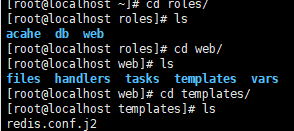
cp /etc/redis/redis.conf /redis.conf.j2
将文件名改为jinjia2 格式
在这些步骤完成后,就差启动了 ,创建 roles 文件夹下同级目录 ,web.yml
- hosts: web

  remote_user: root

  roles:

  - web
ansible-playbook --syntax-check web.yml

ansible-playbook -t copyfile web.yml
如何调用roles ?
进入roles 文件夹
假设roles 下的db 使用web 的文件夹
进入 db 文件夹下,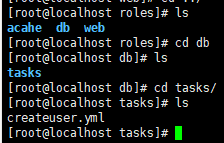
创建文件 createuser.yml
- name: createuser

  user: name=alex888
由于是借助web 文件下的roles,所以到 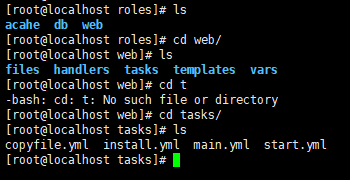
在main.yml写入
- import_tasks: copyfile.yml

- import_tasks: install.yml

- import_tasks: start.yml

- import_tasks: roles/db/tasks/createuser.yml  #这个借助要使用绝对路径
最后启动web.yml就好了
ansible 模块 roles的更多相关文章
- Ansible之roles模块--lnmp分布式部署
Ansible之roles模块--lnmp分布式部署 目录 Ansible之roles模块--lnmp分布式部署 1. role模块的作用 2. roles的目录结构 3. roles内个目录含义解释 ...
- Ansible的roles标准化与Jenkins持续集成(三)
Ansible的roles标准化与Jenkins持续集成(三) 链接:https://pan.baidu.com/s/1A3Iq3gGkGS27L_Gt37_I0g 提取码:ncy2 复制这段内容后打 ...
- Ansible:roles初始化系统
简介 本文介绍ansible的roles,通过roles来实现系统的初始化,其相当于将ansible的playbook拆分.本文通过Jenkins,传参,调用playbook来初始化系统. Githu ...
- ansible模块
ansible模块: 模块(Modules),类似于 "任务插件"("task plugins")或"库插件"("library ...
- ansible笔记(3):ansible模块的基本使用
ansible笔记():ansible模块的基本使用 在前文的基础上,我们已经知道,当我们使用ansible完成实际任务时,需要依靠ansible的各个模块,比如,我们想要去ping某主机,则需要使用 ...
- 第4天:Ansible模块
Ansible对远程服务器的实际操作实际是通过模块完成的,其工作原理如下: 1)将模块拷贝到远程服务器 2)执行模块定义的操做,完成对服务器的修改 3)在远程服务器中删除模块 需要说明的是,Ansib ...
- ansible模块command、shell、raw、script
简介 环境: ansible端: ip:192.168.100.129 hostname:node1.lansgg.com client端: ip:192.168.100.131 hostname:v ...
- win10的pycharm中安装ansible模块过程
前面的安装报错信息 ansible模块安装报错:Could not install packages due to an OSError: [Errno 2] No such file or dire ...
- ansible基础-roles
一 简介 注:本文demo使用ansible2.7稳定版 在我看来,role是task文件.变量文件.handlers文件的集合体,这个集合体的显著特点是:可移植性和可重复执行性. 实践中,通常我们以 ...
随机推荐
- CF1225A Forgetting Things
CF1225A Forgetting Things 洛谷评测传送门 题目描述 Kolya is very absent-minded. Today his math teacher asked him ...
- ES6 Set求两个数组的并集、交集、差集;以及对数组去重
并集: const arr1 = [1, 2, 3, 2, 5]; const arr2 = [1, 4, 6, 8, 3]; // 将两个数组合并 const concatArr = [...arr ...
- ASP.NET开发实战——(九)ASP.NET MVC 与数据库之ORM
之前的文章中介绍了如何在ASP.NET中通过ADO.NET操作SQL Server和My SQL数据库,数据库的操作是通过SQL语句的执行来完成的,在ASP.NET中还有一个简便的方式来使用数据库,那 ...
- 小测试整理(含T1 T2)
这次测试规模较小,前两题也较水,但需要整理 T1(Jelly的男♂难题1): 从一个点出发,以四连通的方式扩散,可以走#,不能走o,走过的格子每单位时间会增加1点高度,问扩散完整间屋子需要的时间,以及 ...
- 【转】java MessageDigest类的作用 :提供信息摘要 算法( MD5 或 SHA 等)的功能
一.结构和概述: java.lang.Object java.security.MessageDigestSpi java.security.MessageDigest 声明:public abstr ...
- NOIP 2011 提高组初赛错题简析
Preface 好久没做初赛题了,据说今年的审核会更加严苛,作为一名去年未PY时只有\(92\)分的蒟蒻,我今年看来是\(90\)分都莫得了 然而今年也没怎么看重初赛,结果现在才来做,翻车到了\(84 ...
- 利用数据库视图实现WEB查询敏感信息接口动态脱敏
前言: 利用数据库视图,实现web接口查询敏感信息时动态脱敏. 具体目标:某接口为用户信息查询接口,返回敏感用户信息(id,姓名.手机号[敏感].身份证号[敏感]),如果web用户为管理员角色,则查询 ...
- (十八)golang--defer关键字
在函数中,程序员经常需要创建资源(比如,数据库连接,文件句柄,锁等),为了在函数执行完毕后,及时释放资源,go设计者提供defer(延时机制) 用defer申明的语句不会立即执行,而是被存入到defe ...
- TensorFlow函数: tf.stop_gradient
停止梯度计算. 在图形中执行时,此操作按原样输出其输入张量. 在构建计算梯度的操作时,这个操作会阻止将其输入的共享考虑在内.通常情况下,梯度生成器将操作添加到图形中,通过递归查找有助于其计算的输入来计 ...
- Redis缓存穿透,缓存击穿,缓存雪崩,热点Key
导读 使用Redis难免会遇到Redis缓存穿透,缓存击穿,缓存雪崩,热点Key的问题.有些同学可能只是会用Redis来存取,基本都是用项目里封装的工具类来操作.但是作为开发,我们使用Redis时可能 ...