
Android UI: LinearLayout中layout_weight 属性的使用规则
首先来查看android sdk文档,有这么一段话
LinearLayout also supports assigning a weight to individual children with the android:layout_weight attribute. This attribute assigns an "importance" value to a view in terms of how much space is should occupy on the screen. A larger weight value allows it to expand to fill any remaining space in the parent view. Child views can specify a weight value, and then any remaining space in the view group is assigned to children in the proportion of their declared weight. Default weight is zero.
我们从文档中可以看出LinearLayout中子控件可以使用layout_weight 属性来分配所占的“权重”,但是实际使用的过程中,经常会出错,会让人感到疑惑,下面是自己总结的一些经验:
以水平(垂直方向类似)LinearLayout为例:

<LinearLayout

    android:layout_width="match_parent"

    android:layout_height="wrap_content"

    android:layout_marginLeft="16dp"

    android:layout_marginRight="16dp" >

<Button

    android:id="@+id/crime_date"

    android:layout_width="wrap_content"

    android:layout_height="wrap_content"

    android:layout_weight="1" />

<CheckBox

    android:id="@+id/crime_solved"

    android:layout_width="wrap_content"

    android:layout_height="wrap_content"

    android:layout_weight="1"

    android:text="@string/crime_solved_label" />

</LinearLayout>
LinearLayout是个水平线性布局,会根据每个子成员layout_width和layout_weight来决定应该给他们分配多少空间, 遵循以下规则:
- 首先根据layout_width的值来初步指定空间,因为layout_width都是wrap_content, 那布局管理器会分别给两个子控件足够的空间来用于水平方向的拉伸,结果就是下面图片:
- 然后,因为水平方向上仍然有足够的空间,那么布局管理器就会将这个多余的控件按照layout_weight的值进行分配。上面的例子中是1:1,那么会将多余控件按照1:1的比例分配,那效果就变成了:
-
- 如果想给两个控件设置为宽度相同,Android推荐的做法是将两个控件的属性这么设置:layout_width=0dp, layout_weight=1
- 如果一个控件没提供layout_weight,那么android会默认其为0
- 由于不同的程序员有不同的写代码的惯例,android允许layout_weight的值是小数或整数,分配比例就是各自(layout_weight值)/(各自的layout_weight相加的值),这条规则成立的前提是LinearLayout没有设置android:weightSum来限制总和。


来再看一个经常让人误解的例子:
<?xml version="1.0" encoding="utf-8"?>

<LinearLayout xmlns:android="http://schemas.android.com/apk/res/android"

    android:orientation="horizontal"

    android:layout_width="match_parent"

    android:layout_height="match_parent">

    <TextView

        android:layout_height="wrap_content"

        android:text="small"

        android:textColor="#02F"

        android:layout_width="wrap_content"

        android:layout_weight="1" />

    <TextView

        android:layout_height="wrap_content"

        android:textColor="#F20"

        android:text="A very very long text that needs to wrap.A very very long"

        android:layout_width="wrap_content"

        android:layout_weight="1" />

</LinearLayout>
它的效果是这样:
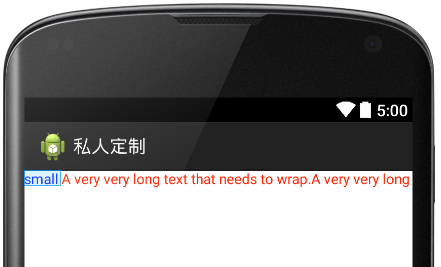
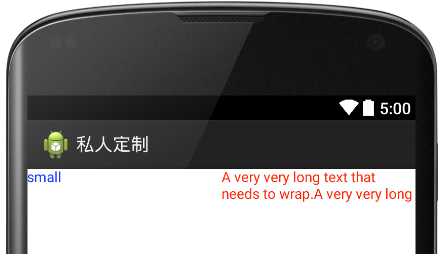
它并没有按照weight去1:1的分配空间比例,这是因为布局管理器按照第一条规则满足了layout_width=’wrap_content’,这种情况下,如果确实想按照1:1的空间来分配,就只能设置layout_width=’0dp”, 这样做的效果就是这样:
欢迎斧正
Android UI: LinearLayout中layout_weight 属性的使用规则的更多相关文章
- shape和selector是Android UI设计中经常用到的
shape和selector是Android UI设计中经常用到的,比如我们要自定义一个圆角Button,点击Button有些效果的变化,就要用到shape和selector.可以这样说,shape和 ...
- Appium 在 Android UI 测试中的应用
原文地址:https://blog.coding.net/blog/Appium-Android-UI Android 测试工具与 Appium 简介 Appium 是一个 C/S 架构的,支持 An ...
- background,position,绝对定位中位置属性的定位规则,cursor
backgorund背景 background-color:red; 背景颜色 background-image:url(路径);背景图片 background-repeat:no-repeat;不重 ...
- Android的LinearLayout中的权重android:layout_weight
当前EditText和Button部件只是适应了他们各自内容的大小,如下图所示: 这样设置对按钮来说很合适,但是对于文本框来说就不太好了,因为用户可能输入更长的文本内容.因此如果能够占满整个屏幕宽度会 ...
- Android 布局学习之——LinearLayout的layout_weight属性
一直对layout_weight属性感到比较困惑,今天学习一下,来深入了解layout_weight属性和它的用法. 定义 首先,看看Android官方文档是怎么说的,毕竟人家才是权威 ...
- android 给LinearLayout中添加一定数量的控件,并让着一定数量的控件从右到左移动,每隔若干秒停顿一下,最后一个view链接第一个view,然后继续移动循环往复,形成一个死循环简单动画效果
主类:IndexAnimationLinearLayout.java package com.yw.sortlistview; import java.util.ArrayList; import j ...
- Android的LinearLayout中orientation默认值为什么是HORIZONTAL
在一个偶然(闲着无聊)的过程中,突然非常好奇为什么LinearLayout在不指定排列方向为垂直(VERTICAL)时就得是水平方向(HORIZONTAL)排列的.产生这个疑问的时候脑子里蹦出来的第一 ...
- Android LinearLayout中weight属性的意义与使用方式
layout_weight 分割父级容器的比例
- Android 自定义view中的属性,命名空间,以及tools标签
昨日看到有人在知乎上问这3个琐碎的小知识点,今天索性就整理了一下,其实这些知识点并不难,但是很多开发者平时很少注意到这些, 导致的后果就是开发的时候 经常会被ide报错,开发效率很低,或者看开源代码的 ...
随机推荐
- UILabel和UIButton添加下划线
关于UILabel和UIButton有的时候需要添加下划线,一般有两种方式通过默认的 NSMutableAttributedString设置,第二种就是在drawRect中画一条下划线,本文就简单的选 ...
- BFS+PRIM
转载请注明出处:優YoU http://user.qzone.qq.com/289065406/blog/1299324104 在一个y行 x列的迷宫中,有可行走的通路空格' ',不可行走的墙'#', ...
- js锚点
锚点,在地址栏http://localhost:8000/Demo1/js锚点.html#a 跳转到指定位置可以是 <a>标签的name 也可以是标签的id. 曾经看到有锚点的页面,但 ...
- 简单实现人工智能:百度aip+tuling123
目录结构: app.py # -*- coding: utf-8 -*- # __author: ward # data: 2018/12/21 # @File: app from flask imp ...
- 洛谷 P4317 花神的数论题 || bzoj3209
https://www.lydsy.com/JudgeOnline/problem.php?id=3209 https://www.luogu.org/problemnew/show/P4317 设c ...
- 洛谷 P3400 仓鼠窝
卡常 #pragma GCC optimize(2) #include<cstdio> #include<algorithm> #include<cstring> ...
- 1-9方法的重写(override)
什么是重写? 重写,也叫做覆盖,当父类中的方法无法满足子类需求时,子类可以将父类的方法进行重写编写来满足需求.比如孩子继承了父亲的房子,可以将房子重新装修. 方法重写的条件: 两个类必须是继承关系 必 ...
- java中stringBuilder的用法
java中stringBuilder的用法 String对象是不可改变的.每次使用 System.String类中的方法之一时,都要在内存中创建一个新的字符串对象,这就需要为该新对象分配新的空间.在需 ...
- 用NPOI从DataTable到Excel,向Excel模板填充数据
DataTable---->Excel,填充数据 private IWorkbook workbook = null; private ISheet sheet = null; private ...
- PHP的加密方式
1. MD5加密 string md5 ( string $str [, bool $raw_output = false ] ) 参数 str -- 原始字符串. raw_output -- ...