
storm 集群配置
配置storm集群的过程中出现写问题,记录下来
1.storm是通过zookeeper管理的,先要安装zookeeper,从zk官网上下来,我这里下下来的的3.4.9,下载后移动到/usr/local,并解压。
tar -zxvf zookeeper-3.4.9.tar.gz
2.进入conf目录,复制zoo_sample.cfg且改名未zoo.cfg,修改zoo.cfg配置文件
cp zoo_sample.cfg /usr/local/zookeeper-3.4.9/conf/zoo.cfg
打开gedit zoo.cfg,配置:
# The number of milliseconds of each tick
tickTime=2000
# The number of ticks that the initial
# synchronization phase can take
initLimit=10
# The number of ticks that can pass between
# sending a request and getting an acknowledgement
syncLimit=5
# the directory where the snapshot is stored.
# do not use /tmp for storage, /tmp here is just
# example sakes.
dataDir=/tmp/zookeeper
dataLogDir=/tmp/zookeeperlogs
# the port at which the clients will connect
clientPort=2181
# the maximum number of client connections.
# increase this if you need to handle more clients
#maxClientCnxns=60
#
# Be sure to read the maintenance section of the
# administrator guide before turning on autopurge.
#
# http://zookeeper.apache.org/doc/current/zookeeperAdmin.html#sc_maintenance
#
# The number of snapshots to retain in dataDir
#autopurge.snapRetainCount=3
# Purge task interval in hours
# Set to "0" to disable auto purge feature
#autopurge.purgeInterval=1
server.1=192.168.154.129:2888:3888
server.2=192.168.154.133:2888:3888
server.3=192.168.154.132:2888:3888
注意红色部分,这个dataDir 下需要建立 myid,每个myid 的目录要和 dataDir 指定的目录相同,且每个机器的myid 不同,myid的值范围是1-255.
vi myid
3. server.myid=ip:port1:port2,ip 可以是本地的ip,如果在/etc/hosts 配置,也可以用该hosts的配置来制定,port1是默认指定端口,port2备用端口。
之后配置环境变量,vim /etc/profile,将其添加到环境变量中
export ZOOKEEPER_HOME=/usr/local/zookeeper-3.4.9
配置后发送到 另外的两台机器,
scp -r /usr/local/zookeeper-3.4.9 root@192.168.154.133:/usr/local (注意文件要加-r)
输入密码后即可,和上面类似配置zoo.cfg, vi myid ,修改环境变量,创建zookeeper的日志目录。
4.启动 zk
bin/zkServer.sh start ,用jps查看 是否成功,看到有quorumPeerMain显示成功
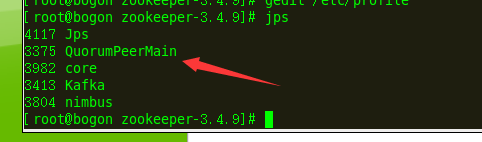
用bin/zkCli.sh -server 192.168.154.132:2181 测试是否可以链接到另外两台。
5.安装storm
从官网下载storm,我下载的0.9.6,非最新版本,下载后解压到 /usr/local/storm目录下
tar -zxvf apache-storm-0.9.6.tar.gz
6.进入conf目录下,修改storm.yaml
# Licensed to the Apache Software Foundation (ASF) under one
# or more contributor license agreements. See the NOTICE file
# distributed with this work for additional information
# regarding copyright ownership. The ASF licenses this file
# to you under the Apache License, Version 2.0 (the
# "License"); you may not use this file except in compliance
# with the License. You may obtain a copy of the License at
#
# http://www.apache.org/licenses/LICENSE-2.0
#
# Unless required by applicable law or agreed to in writing, software
# distributed under the License is distributed on an "AS IS" BASIS,
# WITHOUT WARRANTIES OR CONDITIONS OF ANY KIND, either express or implied.
# See the License for the specific language governing permissions and
# limitations under the License.
########### These MUST be filled in for a storm configuration
storm.zookeeper.servers:
- "192.168.154.129"
- "192.168.154.132"
- "192.168.154.133"
storm.zookeeper.port: 2181
# - "server1"
# - "server2"
#
nimbus.host: "192.168.154.129"
#
#
# ##### These may optionally be filled in:
#
## List of custom serializations
# topology.kryo.register:
# - org.mycompany.MyType
# - org.mycompany.MyType2: org.mycompany.MyType2Serializer
#
## List of custom kryo decorators
# topology.kryo.decorators:
# - org.mycompany.MyDecorator
#
## Locations of the drpc servers
# drpc.servers:
# - "server1"
# - "server2"
storm.local.dir: "/tmp/storm"
supervisor.slots.ports:
-6700
-6701
-6702
-6703
## Metrics Consumers
# topology.metrics.consumer.register:
# - class: "backtype.storm.metric.LoggingMetricsConsumer"
# parallelism.hint: 1
# - class: "org.mycompany.MyMetricsConsumer"
# parallelism.hint: 1
# argument:
# - endpoint: "metrics-collector.mycompany.org"
注意 上面的红色部分,前面要加上空格,要不会报expected '<document start>', but found BlockMappingStart
in 'reader', line 46, column 1:
supervisor.slots.ports:
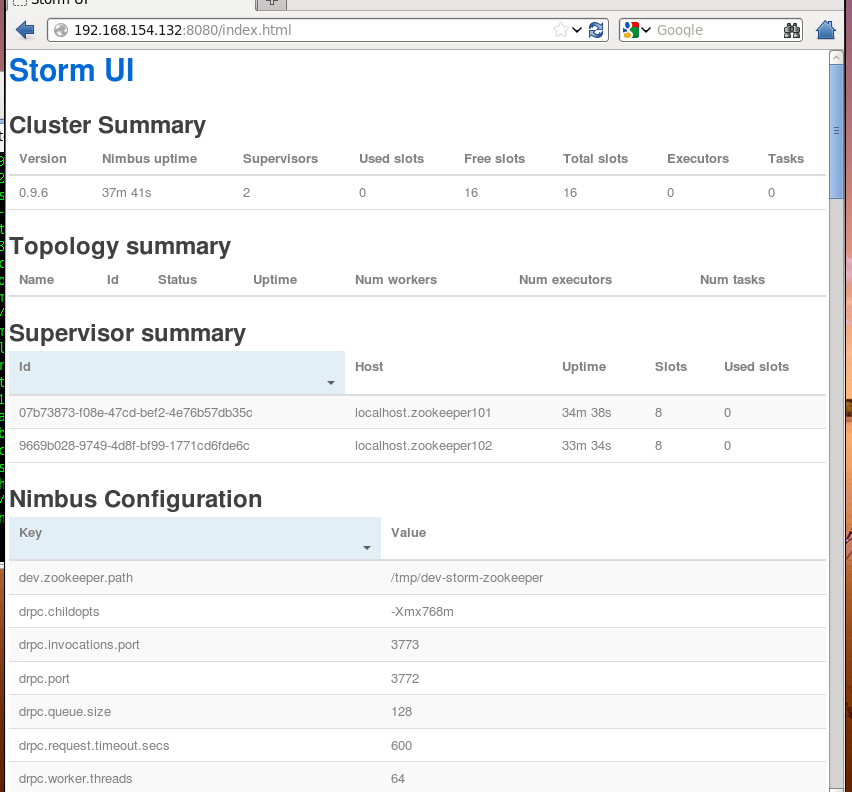
我就是这个问题折腾了好久,,经试验原来是这几个配置名称前需要加空格。即:
storm 集群配置的更多相关文章
- storm集群配置以及java编写拓扑例子
storm集群配置 安装 修改配置文件 使用java编写拓扑 storm集群配置 storm配置相当简单 安装 tar -zxvf apache-storm-1.2.2.tar.gz rm apach ...
- 流量监控系统---storm集群配置
1.集群部署的基本流程 集群部署的流程:下载安装包.解压安装包.修改配置文件.分发安装包.启动集群 注意: 所有的集群上都需要配置hosts vi /etc/hosts 192.168.223.20 ...
- storm集群配置
环境:centos6.4软件:jzmq-master-----java与c++通讯的桥梁,有了它,就可以使用zeromp了storm-0.8.2zeromq-2.1.7-----号称史上最牛逼的消息队 ...
- 通过 IDE 向 Storm 集群远程提交 topology
转载: http://weyo.me/pages/techs/storm-topology-remote-submission/ http://www.javaworld.com/article/20 ...
- storm集群部署和配置过程详解
先整体介绍一下搭建storm集群的步骤: 设置zookeeper集群 安装依赖到所有nimbus和worker节点 下载并解压storm发布版本到所有nimbus和worker节点 配置storm ...
- Storm集群的安装配置
Storm集群的安装分为以下几步: 1.首先保证Zookeeper集群服务的正常运行以及必要组件的正确安装 2.释放压缩包 3.修改storm.yaml添加集群配置信息 4.使用storm脚本启动相应 ...
- Storm 集群安装配置
本文详细介绍了 Storm 集群的安装配置方法.如果需要在 AWS 上安装 Storm,你应该看一下 storm-deploy 项目.storm-deploy 可以自动完成 E2 上 Storm 集群 ...
- Storm 系列(三)Storm 集群部署和配置
Storm 系列(二)Storm 集群部署和配置 本章中主要介绍了 Storm 的部署过程以及相关的配置信息.通过本章内容,帮助读者从零开始搭建一个 Storm 集群. 一.Storm 的依赖组件 1 ...
- Storm: 集群安装和配置
前期准备:3台服务器: 192.168.8.94 192.168.8.95 192.168.8.96 去storm官网下载响应版本的软件包:http://storm.apache.org/downl ...
随机推荐
- ibatis order by 防止sql注入
(1) 排序控制 select TABLE_NAME, TABLESPACE_NAME from user_tables order by TABLE_NAME $ordertype$ Where t ...
- 配置linux服务器的一些操作
本次课程实验,我们选择的是ubuntu 14.04操作系统,不像使用RDP连接windows服务器那样可以直观的看到远程端的图形界面,只能通过Xshell以命令行进行操作,那么就来说说配置远程linu ...
- c++单例模式为什么不在析构函数中释放静态的单例对象(转)
需要清楚一下几点: 1.单例中的 new 的对象需要delete释放. 2.delete释放对象的时候才会调用对象的析构函数. 3.如果在析构函数里调用delete,那么程序结束时,根本进 ...
- 2019年台积电进军AR芯片,将用于下一代iPhone
近日,有报道表示台积电10nm 芯片可怜的收益率可能会对 2017 年多款高端移动设备的推出产生较大的影响,其中自然包括下一代 iPhone 和 iPad 机型.不过,台积电正式驳斥了这一说法,表明1 ...
- test imetro
haha hahah2 hahah3 hahah4 text int main() { cout << "helloworld" << endl; } pi ...
- postman 断言解析
最近在学习postman官方文档, 顺势翻译出来,以供学习! postman断言是JavaScript语言编写的,在postman客户端指定区域编写即可. 断言会在请求返回之后,运行,并根据断言的pa ...
- postman发送带cookie的http请求
1:需求:测试接口的访问权限,对于某些接口A可以访问,B不能访问. 2:问题:对于get请求很简单,登录之后,直接使用浏览器访问就可以: 对于post请求的怎么测试呢?前提是需要登录态,才能访问接口. ...
- arm,iptables: No chain/target/match by that name.
最近由于项目需要,需要打开防火墙功能. 公司有 arm linux 3.0x86 linux 3.2x86 linux 2.4 的三个嵌入式.都需要打开防火墙功能. 执行“whereis iptabl ...
- tab22
<!DOCTYPE html PUBLIC "-//W3C//DTD XHTML 1.0 Transitional//EN" "http://www.w3.org/ ...
- JDBC的连接和操作
package Test; import java.sql.*; public class Test21 { public static void main(String[] args) { Conn ...