
MD5接口解密操作_接口签名校验
很多HTTP接口在传参时,需要先对接口的参数进行数据签名加密
如以下POST接口
http://localhost:8080/pinter/com/userInfo
参数为
{"phoneNum":"123434","optCode":"testfan","timestamp":"1211212","sign":"fdsfdsaafsasfas"}
其中,sign字段是按照特定算法进行加密后的数据
本接口的签名算法为
sign=Md5(phoneNum+ optCode+ timestamp)
签名过程中涉及到的C语言函数
字符串拼接
char str[50];
strcat(str,"testfan");
保存当前时间戳:web_save_timestamp_param("tStamp", LAST );
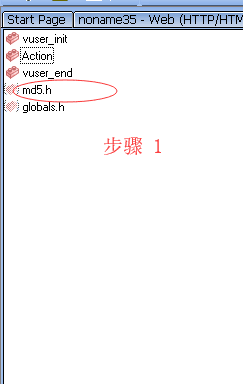
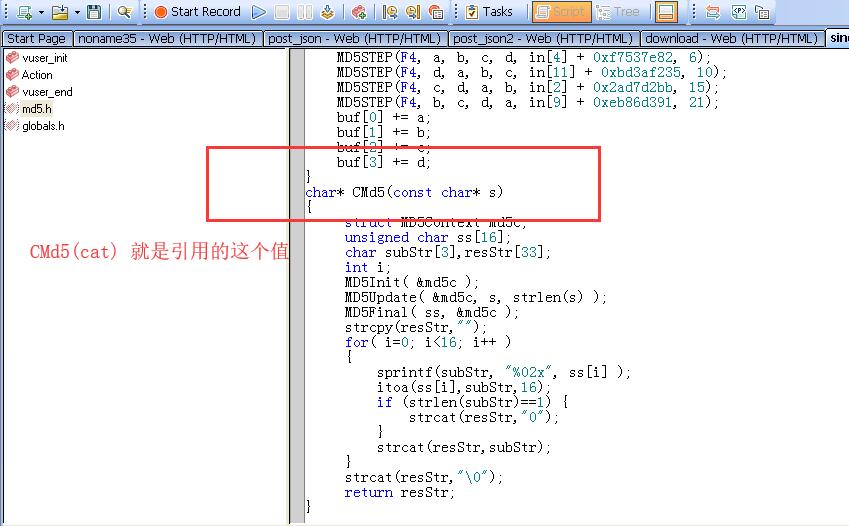
注意 引入 md5.h 文件进行算法解密
 Action()

 {

 //定义 字符串类型

     char cat[];

     web_reg_find("Search=Body",

         "SaveCount=find_cnt",

         "Text=code\":\"0\"",

         LAST);

     web_save_timestamp_param("tStamp", LAST );

 //拼接 在一起

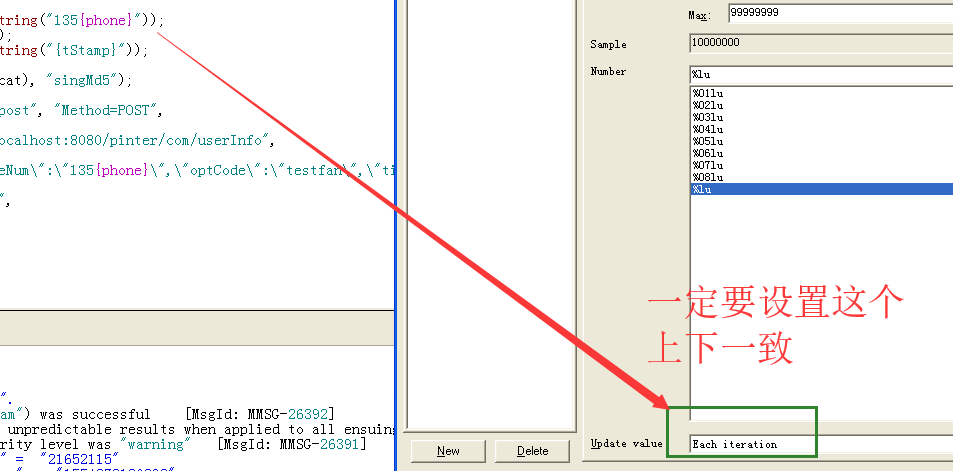
     strcat(cat, lr_eval_string("135{phoneNum}"));

     strcat(cat, "testfan");

     strcat(cat, lr_eval_string("{tStamp}"));

 //CMd5 是调用的 MD5.h 这个文件中的 函数进行md5 解码的

     lr_save_string(CMd5(cat), "singMd5");

     lr_output_message("==============================%s",CMd5(cat));

     web_add_header("Content-type", "application/json");

     lr_start_transaction("singmd5");

     web_custom_request("post", "Method=POST",

         "URL=http://localhost:8080/pinter/com/userInfo",

         "Body={\"phoneNum\":\"135{phoneNum}\",\"optCode\":\"testfan\",\"timestamp\":\"{tStamp}\",\"sign\":\"{singMd5}\"}",

         "TargetFrame=",

         LAST );

     if(atoi(lr_eval_string("{find_cnt}")) >  ){

         lr_end_transaction("singmd5", LR_PASS);

     }else{

         lr_end_transaction("singmd5", LR_FAIL);

     }

     return ;

 }
运行日志如下:
Virtual User Script started at : -- ::
Starting action vuser_init.
Web Turbo Replay of LoadRunner 11.0. for WINXP; build (Aug ::) [MsgId: MMSG-]
Run Mode: HTML [MsgId: MMSG-]
Run-Time Settings file: "C:\test_huzhenyu\Script\singn\\default.cfg" [MsgId: MMSG-]
Ending action vuser_init.
Running Vuser...
Starting iteration .
Starting action Action.
Action.c(): Registering web_reg_find was successful [MsgId: MMSG-]
Action.c(): Notify: Saving Parameter "tStamp = 1552736236160".
Action.c(): web_save_timestamp_param("web_save_timestamp_param") was successful [MsgId: MMSG-]
Action.c(): Notify: Parameter Substitution: parameter "phoneNum" = ""
Action.c(): Notify: Parameter Substitution: parameter "tStamp" = ""
Action.c(): Notify: Saving Parameter "singMd5 = b7f1b1f74de61497d65fd0027b8166fc".
Action.c(): ==============================b7f1b1f74de61497d65fd0027b8166fc
Action.c(): Warning -: The header being added may cause unpredictable results when applied to all ensuing URLs. It is added anyway [MsgId: MWAR-]
Action.c(): web_add_header("Content-type") highest severity level was "warning" [MsgId: MMSG-]
Action.c(): Notify: Transaction "singmd5" started.
Action.c(): Notify: Parameter Substitution: parameter "phoneNum" = ""
Action.c(): Notify: Parameter Substitution: parameter "tStamp" = ""
Action.c(): Notify: Parameter Substitution: parameter "singMd5" = "b7f1b1f74de61497d65fd0027b8166fc"
Action.c(): t=1018ms: -byte response headers for "http://localhost:8080/pinter/com/userInfo" (RelFrameId=, Internal ID=)
Action.c(): HTTP/1.1 \r\n
Action.c(): Content-Type: application/json;charset=UTF-\r\n
Action.c(): Transfer-Encoding: chunked\r\n
Action.c(): Date: Sat, Mar :: GMT\r\n
Action.c(): \r\n
Action.c(): t=1061ms: -byte chunked response overhead for "http://localhost:8080/pinter/com/userInfo" (RelFrameId=, Internal ID=)
Action.c(): 12a\r\n
Action.c(): t=1068ms: -byte chunked response overhead for "http://localhost:8080/pinter/com/userInfo" (RelFrameId=, Internal ID=)
Action.c(): \r\n
Action.c(): t=1077ms: -byte chunked response body for "http://localhost:8080/pinter/com/userInfo" (RelFrameId=, Internal ID=)
Action.c(): {"code":"","message":"success","data":{"id":,"userName":"鎬ц兘娴嬭瘯","password":nul
Action.c(): l,"age":,"gender":,"phoneNum":"","email":"beihe@testfan.com","address":"鍖椾
Action.c(): 含甯傛槍骞冲尯绉戞槦瑗胯矾106鍙烽櫌锛堝浗椋庣編鍞愯姳鍥患鍚堟ゼ锛\x893鍙锋ゼ1111","creat
Action.c(): eTime":null,"updateTime":null}}
Action.c(): HTML parsing not performed for Content-Type "application/json" ("ParseHtmlContentType" Run-Time Setting is "TEXT"). URL="http://localhost:8080/pinter/com/userInfo" [MsgId: MMSG-]
Action.c(): t=1122ms: -byte chunked response overhead for "http://localhost:8080/pinter/com/userInfo" (RelFrameId=, Internal ID=)
Action.c(): \r\n
Action.c(): \r\n
Action.c(): Registered web_reg_find successful for "Text=code":""" (count=1) [MsgId: MMSG-26364]
Action.c(): Notify: Saving Parameter "find_cnt = 1".
Action.c(): web_custom_request("post") was successful, body bytes, header bytes, chunking overhead bytes [MsgId: MMSG-]
Action.c(): Notify: Parameter Substitution: parameter "find_cnt" = ""
Action.c(): Notify: Transaction "singmd5" ended with "Pass" status (Duration: 0.7485 Wasted Time: 0.4988).
Ending action Action.
Ending iteration .
Ending Vuser...
Starting action vuser_end.
Ending action vuser_end.
Vuser Terminated.

MD5接口解密操作_接口签名校验的更多相关文章
- 接口鉴权之sign签名校验与JWT验证
需求描述: 项目里的几个Webapi接口需要进行鉴权,同接口可被小程序或网页调用,小程序里没有用户登录的概念,网页里有用户登录的概念,对于调用方来源是小程序的情况下进行放权,其他情况下需要有身份验证. ...
- Java修炼——接口详解_接口的特征_使用接口的意义
接口中可以包含的内容: 抽象法和非抽象方法(jdk1.8,必须使用default的关键字),属性(public static final)常量. 接口和类的关系 1.(继承了接口)类必须去实现接口中的 ...
- MD5进行解密操作
package com.dyy.test; import java.security.MessageDigest; public class TestMD5Util { /*** * MD5加码 生成 ...
- JMeter接口测试-接口签名校验
前言 很多HTTP接口在传参时,需要先对接口的参数进行数据签名加密 如pinter项目的中的签名接口 http://localhost:8080/pinter/com/userInfo 参数为: {& ...
- API接口签名校验(C#版)
我们在提供API服务的时候,为了防止数据传输过程被篡改,通常的做法是对传输的内容进行摘要签名,把签名串同参数一起请求API,API服务接收到请求后以同样的方式生成签名串,然后进行对比,如果签名串不一致 ...
- 多测师讲解自动化测试 _接口面试题(001)_高级讲师肖sir
1.为什么要做接口测试(必要性)1.可以发现很多在页面上操作发现不了的bug2.检查系统的异常处理能力3.检查系统的安全性.稳定性4.前端随便变,接口测好了,后端不用变5.可以测试并发情况,一个账号, ...
- C#_接口与抽象类
.Net提供了接口,这个不同于Class或者Struct的类型定义.接口有些情况,看似和抽象类一样,因此有些人认为在.Net可以完全用接口来替换抽象类.其实不然,接口和抽象类各有长处和缺陷,因此往往在 ...
- java-继承进阶_抽象类_接口
概要图 一, 继承的进阶 1.1,成员变量 重点明确原理. 特殊情况: 子父类中定义了一模一样的成员变量. 都存在于子类对象中. 如何在子类中直接访问同名的父类中的变量呢? 通过关键字 super来完 ...
- 【linux草鞋应用编程系列】_1_ 开篇_系统调用IO接口与标准IO接口
最近学习linux系统下的应用编程,参考书籍是那本称为神书的<Unix环境高级编程>,个人感觉神书不是写给草鞋看的,而是 写给大神看的,如果没有一定的基础那么看这本书可能会感到有些头重脚轻 ...
随机推荐
- Many-to-many relationships in EF Core 2.0 – Part 4: A more general abstraction
In the last few posts we saw how to hide use of the join entity from two entities with a many-to-man ...
- etcd部署说明
etcd是一个K/V分布式存储,每个节点都保存完成的一份数据.有点类似redis.但是etcd不是数据库. 1.先说废话.之所以会用etcd,并不是实际项目需要,而是前面自己写的上传的DBCacheS ...
- .net core运行环境搭建 linux + windows
---------------------------------------linux------------------------------------------------- 一.添加do ...
- ConfigurationManager.AppSettings方法
一 配置文件概述: 应用程序配置文件是标准的 XML 文件,XML 标记和属性是区分大小写的.它是可以按需要更改的,开发人员可以使用配置文件来更改设置,而不必重编译应用程序.配置文件的根节点是conf ...
- 常用Sql server 自定义函数
/****** 对象: UserDefinedFunction [dbo].[fun_get_LowerFirst] 脚本日期: 08/04/2012 13:03:56 ******/ IF EXIS ...
- linux系统基础之---文件系统(基于centos7.4 1708)
- MySQL数据库 : 函数和存储过程
CONCAT 可以把多个字符串连在一起,如把 doc_id 和 title这两个字段的查询结果组合成一个字符串:SELECT CONCAT(doc_id,title) FROM simhash; CO ...
- python应用:爬虫框架Scrapy系统学习第一篇——xpath详解
HTML的三大概念:标签.元素以及属性 标签:尖括号中的文本 例:<head>……</head> 标签通常成对出现 元素:标签中的所有内容 元素中可包 ...
- python学习——模块和包
在之前常用模块中我们已经初步了解了模块的导入,今天来说学习一下模块和包.我们可以把模块理解成每一个python文件.而包就是多个能解决一类问题的python文件全部放在一起.OK
- 第8天 Java基础语法
第8天 Java基础语法 今日内容介绍 Eclipse开发工具 超市库存管理系统 Eclipse开发工具 Eclipse是功能强大Java集成开发工具.它可以极大地提升我们的开发效率.可以自动编译,检 ...