
springboot jpa操作redis
SpringBoot使用Redis缓存
(1)pom.xml引入jar包,如下:
        <dependency>

            <groupId>org.springframework.boot</groupId>

            <artifactId>spring-boot-starter-data-redis</artifactId>

        </dependency>
(2)修改项目启动类,增加注解@EnableCaching,开启缓存功能,如下:

package springboot;

import org.springframework.boot.SpringApplication;

import org.springframework.boot.autoconfigure.SpringBootApplication;

import org.springframework.cache.annotation.EnableCaching;

import org.springframework.scheduling.annotation.EnableScheduling;

@SpringBootApplication

@EnableScheduling

@EnableCaching

public class SpringbootApplication{

    public static void main(String[] args) {

        SpringApplication.run(SpringbootApplication.class, args);

    }

}
(3)application.properties中配置Redis连接信息,如下:
# Redis数据库索引(默认为0)

spring.redis.database=0

# Redis服务器地址

spring.redis.host=172.31.19.222

# Redis服务器连接端口

spring.redis.port=6379

# Redis服务器连接密码(默认为空)

spring.redis.password=

# 连接池最大连接数(使用负值表示没有限制)

spring.redis.pool.max-active=8

# 连接池最大阻塞等待时间(使用负值表示没有限制)

spring.redis.pool.max-wait=-1

# 连接池中的最大空闲连接

spring.redis.pool.max-idle=8

# 连接池中的最小空闲连接

spring.redis.pool.min-idle=0

# 连接超时时间(毫秒)

spring.redis.timeout=0
(4)新建Redis缓存配置类RedisConfig,如下:
package springboot.config;

import org.springframework.beans.factory.annotation.Value;

import org.springframework.cache.CacheManager;

import org.springframework.cache.annotation.CachingConfigurerSupport;

import org.springframework.cache.annotation.EnableCaching;

import org.springframework.context.annotation.Bean;

import org.springframework.context.annotation.Configuration;

import org.springframework.data.redis.cache.RedisCacheManager;

import org.springframework.data.redis.connection.RedisConnectionFactory;

import org.springframework.data.redis.core.RedisTemplate;

import org.springframework.data.redis.core.StringRedisTemplate;

import org.springframework.data.redis.serializer.Jackson2JsonRedisSerializer;

import com.fasterxml.jackson.annotation.JsonAutoDetect;

import com.fasterxml.jackson.annotation.PropertyAccessor;

import com.fasterxml.jackson.databind.ObjectMapper;

/**

 * Redis缓存配置类

 * @author szekinwin

 *

 */

@Configuration

@EnableCaching

public class RedisConfig extends CachingConfigurerSupport{

    @Value("${spring.redis.host}")

    private String host;

    @Value("${spring.redis.port}")

    private int port;

    @Value("${spring.redis.timeout}")

    private int timeout;

    //自定义缓存key生成策略

//    @Bean

//    public KeyGenerator keyGenerator() {

//        return new KeyGenerator(){

//            @Override

//            public Object generate(Object target, java.lang.reflect.Method method, Object... params) {

//                StringBuffer sb = new StringBuffer();

//                sb.append(target.getClass().getName());

//                sb.append(method.getName());

//                for(Object obj:params){

//                    sb.append(obj.toString());

//                }

//                return sb.toString();

//            }

//        };

//    }

    //缓存管理器

    @Bean

    public CacheManager cacheManager(@SuppressWarnings("rawtypes") RedisTemplate redisTemplate) {

        RedisCacheManager cacheManager = new RedisCacheManager(redisTemplate);

        //设置缓存过期时间

        cacheManager.setDefaultExpiration(10000);

        return cacheManager;

    }

    @Bean

    public RedisTemplate<String, String> redisTemplate(RedisConnectionFactory factory){

        StringRedisTemplate template = new StringRedisTemplate(factory);

        setSerializer(template);//设置序列化工具

        template.afterPropertiesSet();

        return template;

    }

     private void setSerializer(StringRedisTemplate template){

            @SuppressWarnings({ "rawtypes", "unchecked" })

            Jackson2JsonRedisSerializer jackson2JsonRedisSerializer = new Jackson2JsonRedisSerializer(Object.class);

            ObjectMapper om = new ObjectMapper();

            om.setVisibility(PropertyAccessor.ALL, JsonAutoDetect.Visibility.ANY);

            om.enableDefaultTyping(ObjectMapper.DefaultTyping.NON_FINAL);

            jackson2JsonRedisSerializer.setObjectMapper(om);

            template.setValueSerializer(jackson2JsonRedisSerializer);

     }

}
(5)新建UserMapper,如下:
package springboot.dao;

import org.apache.ibatis.annotations.Delete;

import org.apache.ibatis.annotations.Insert;

import org.apache.ibatis.annotations.Mapper;

import org.apache.ibatis.annotations.Param;

import org.apache.ibatis.annotations.Select;

import org.apache.ibatis.annotations.Update;

import org.springframework.cache.annotation.CacheConfig;

import org.springframework.cache.annotation.CacheEvict;

import org.springframework.cache.annotation.CachePut;

import org.springframework.cache.annotation.Cacheable;

import springboot.domain.User;

@Mapper

@CacheConfig(cacheNames = "users")

public interface UserMapper {

    @Insert("insert into user(name,age) values(#{name},#{age})")

    int addUser(@Param("name")String name,@Param("age")String age);

    @Select("select * from user where id =#{id}")

    @Cacheable(key ="#p0")

    User findById(@Param("id") String id);

    @CachePut(key = "#p0")

    @Update("update user set name=#{name} where id=#{id}")

    void updataById(@Param("id")String id,@Param("name")String name);

    //如果指定为 true,则方法调用后将立即清空所有缓存

    @CacheEvict(key ="#p0",allEntries=true)

    @Delete("delete from user where id=#{id}")

    void deleteById(@Param("id")String id);

}
@Cacheable将查询结果缓存到redis中,(key="#p0")指定传入的第一个参数作为redis的key。
@CachePut,指定key,将更新的结果同步到redis中
@CacheEvict,指定key,删除缓存数据,allEntries=true,方法调用后将立即清除缓存
(6)service层与controller层跟上一篇整合一样,启动redis服务器,redis服务器的安装与启动可以参考之前的博客,地址如下:
http://www.cnblogs.com/gdpuzxs/p/6623171.html
(7)配置log4j日志信息,如下:
## LOG4J配置

log4j.rootCategory=DEBUG,stdout

## 控制台输出

log4j.appender.stdout=org.apache.log4j.ConsoleAppender

log4j.appender.stdout.layout=org.apache.log4j.PatternLayout

log4j.appender.stdout.layout.ConversionPattern=%d{yyyy-MM-dd HH:mm:ss,SSS} %5p %c{1}:%L - %m%n
(8)验证redis缓存
首先我们向user表总插入一条数据,数据库显示如下:

现在,我们查询一下user表中id=24的数据,观擦控制台输出的信息,如下:
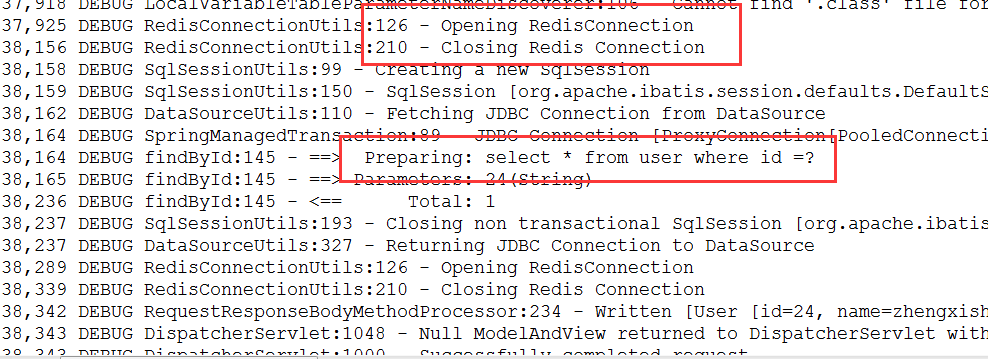
通过控制台输出信息我们可以知道,这次执行了数据库查询,并开启了Redis缓存查询结果。接下来我们再次查询user表中id=24的数据,观察控制台,如下:

通过控制台输出信息我们可以知道,这次并没有执行数据库查询,而是从Redis缓存中查询,并返回查询结果。我们查看redis中的信息,如下:

方法finduser方法使用了注解@Cacheable(key="#p0"),即将id作为redis中的key值。当我们更新数据的时候,应该使用@CachePut(key="#p0")进行缓存数据的更新,否则将查询到脏数据。
springboot jpa操作redis的更多相关文章
- IDEA SpringBoot+JPA+MySql+Redis+RabbitMQ 秒杀系统
先放上github地址:spike-system,可以直接下载完整项目运行测试 SpringBoot+JPA+MySql+Redis+RabbitMQ 秒杀系统 技术栈:SpringBoot, MyS ...
- springboot+jpa+mysql+redis+swagger整合步骤
springboot+jpa+MySQL+swagger框架搭建好之上再整合redis: 在电脑上先安装redis: 一.在pom.xml中引入redis 二.在application.yml里配置r ...
- SpringBoot+Jpa+SpringSecurity+Redis+Vue的前后端分离开源系统
项目简介: eladmin基于 Spring Boot 2.1.0 . Jpa. Spring Security.redis.Vue的前后端分离的后台管理系统,项目采用分模块开发方式, 权限控制采用 ...
- springboot 如何操作redis
1.首先应该引入 依赖 <dependency> <groupId>org.springframework.boot</groupId> <artifactI ...
- springboot+JPA 整合redis
1.导入redis依赖: <dependency> <groupId>org.springframework.boot</groupId> <artifact ...
- 【原】无脑操作:IDEA + maven + Shiro + SpringBoot + JPA + Thymeleaf实现基础授权权限
上一篇<[原]无脑操作:IDEA + maven + Shiro + SpringBoot + JPA + Thymeleaf实现基础认证权限>介绍了实现Shiro的基础认证.本篇谈谈实现 ...
- 【原】无脑操作:IDEA + maven + Shiro + SpringBoot + JPA + Thymeleaf实现基础认证权限
开发环境搭建参见<[原]无脑操作:IDEA + maven + SpringBoot + JPA + Thymeleaf实现CRUD及分页> 需求: ① 除了登录页面,在地址栏直接访问其他 ...
- springboot之使用redistemplate优雅地操作redis
概述 本文内容主要 关于spring-redis 关于redis的key设计 redis的基本数据结构 介绍redis与springboot的整合 sringboot中的redistemplate的使 ...
- redis(Springboot中封装整合redis,java程序如何操作redis的5种基本数据类型)
平常测试redis操作命令,可能用的是cmd窗口 操作redis,记录一下 java程序操作reids, 操作redis的方法 可以用Jedis ,在springboot 提供了两种 方法操作 Red ...
随机推荐
- android开发者您还在为模拟器犯愁吗?神级android模拟器---Genymotion一个更快、接近完美的模拟器……
摘要:Android系统非常特别,App须要进行模拟化測试.即使这样仍然有解决的办法---虚拟化技术. 之前的模拟器比方eclipse自带的是非常慢的一种,并且模拟器的版本号并非最新的.开机.能够说差 ...
- 八.安装Nginx
http://blog.csdn.net/grhlove123/article/details/47834673
- BZOJ2820:YY的GCD(莫比乌斯反演)
Description 神犇YY虐完数论后给傻×kAc出了一题给定N, M,求1<=x<=N, 1<=y<=M且gcd(x, y)为质数的(x, y)有多少对kAc这种 傻×必 ...
- 说说application/x-www-form-urlencoded和application/json的区别
今天一位同事在于微信小程序开发人员那边在对接测试的时候,遇到了一个错误,安卓那边是以application/json作为请求体类型,而Java这边仍向往常那样没有多么大的变化,但是就是前台传输的数据为 ...
- git终端操作
1.提交 git add . git commit -m "test" git push origini master 2.分支 创建feature_x分支,并切换到feature ...
- 安装mysql的时候提示1045错误的解决方法
在安装mysql的时候提示1045错误,如图所示: 这种情况一般是之前卸载msyql的时候没有清理完一些文件之类的,导致给你提示存在安全问题,因此,只需要找到mysql一些系统的配置文件,并且将他们删 ...
- OC变量命名禁忌
OC变量命名禁忌 1.在NSString类不能定义变量名为description, 每个类都有 - (NSString *)description{} 这样一个get方法. 2.不能将变量的名称定义为 ...
- 阿贾克斯(AJAX)
AJAX :Asynchronous JavaScript and XML 异步的javascript 和xml 优点 : 在不重新加载整个页面的情况下,可以与服务器交换数据并更新部分数据 不需要 ...
- C#的常用类
BitConverter类:用于将源类型转换成字节数组,或者将字节数组转换成目标类型.在解决不同设备之间产生的大小端问题时,经常使用. Convert类:用于基本数据类型(包括Boolean/Byte ...
- Notes 20180306 : 变量与常量
1.1 变量与常量 我们在开发中会经常听到常量和变量,那么常量和变量指的又是什么呢?顾名思义,在程序执行过程中,其值不能被改变的量称为常量,其值能被改变的量称为变量.变量与常量的命名都必须使用合法的标 ...