
确认框,confirm工具封装
用bootstrap封装了个确认框工具
效果如下
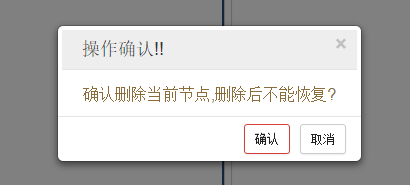
代码如下:
/**
* 以模态窗做确认框的函数,title为标题栏内容,body为消息体,yesFun为点击确认按钮后执行的函数,执行后会执行关闭并删除该模态窗的函数
* 该模态窗只有模态窗
* @param:title:提示标题
* @param:body:提示内容
* @param:yesFun:点击确定后将执行的js函数
*/
function modalInit(title, body, yesFun) {
var modal = "<div class='modal fade simple-modal' tabindex='-1' role='dialog' aria-hidden='true'"
+ "style='position:fixed;z-index:3000;max-width:325px;margin-left:auto;margin-right:auto;top:30%'>"
+ "<div class='modal-dialog' style='width:auto'>"
+ "<div class='modal-content' style='width:auto'>"
+ "<div class='modal-header' style='padding:5px 10px;margin:4px;background-color:#eeeeee;width:auto'>"
+ "<button type='button' class='close' data-dismiss='modal' aria-hidden='true' onclick='closeSimpleModal()'>×</button>"
+ "<h4 class='modal-title' style='padding:2px 10px;'>" + title + "</h4>"
+ "</div>"
+ "<div class='modal-body text-warning text-center' style='padding:10px;font-size:16px;width:auto'>" + body + "</div>"
+ "<div class='modal-footer' style='padding:5px 10px;width:auto'>"
+ "<button type='button' class='btn btn-danger btn-sm' onclick='" + yesFun + ";closeSimpleModal()' style='margin:2px 5px'>确认</button>"
+ "<button type='button' class='btn btn-default btn-sm' data-dismiss='modal' onclick='closeSimpleModal()' style='margin:2px 5px'>取消</button>"
+ "</div></div></div>";
if ($('body').find('.simple-modal').length == 0) { //body中并没有任何没有被关掉的simple的模态窗
$('body').append(modal);
}
$('.simple-modal').modal('show'); //展示模态窗
$('body').unbind('click.mo')
setTimeout(function() {
$('body').bind('click.mo', function() {
$('.simple-modal').modal('hide');
$('.modal-backdrop').remove();
})
}, 200)
}
/**
* 点击取消或遮罩时候将执行的关闭确认框函数
*/
function closeSimpleModal() {
$('.simple-modal').remove();
$('.modal-backdrop').remove();
}
调用举例:
/**

     * 展示详细中的删除user按钮点击函数

     */

    function removeUser() {

        var id = $('#user-detail-id').html();

        modalInit('操作确认!!', "确认删除当前用户?", "removeUserSubmit(" + id + ")");//调用确认框

    }

    /**

     * 删除user按提交函数,确认框中点击确认后删除的提交的函数

     */

    function removeUserSubmit(id) {

        if (id != null && id != '' && typeof id != 'undefined') {

            $.ajax({

                type : 'POST',

                url : local + "user/removeUserById.do",

                data : {

                    id : id

                },

                async : true,

                success : function(resultMap) {

                    if (resultMap.status == "success") { //成功则显示详细

                        $('#bottom-page-in').load(local + 'one/user/user-index.html');

                        $('#body #menu-jump-page').hide(300);

                        //lyhFloatTip("删除成功...正在刷新...");

                    } else {

                        //topTipModal("操作提示:", "<span class='text-warning'>" + resultMap.message + "</span>", 12000);

                        return null;

                    }

                },

                error : function(resultMap) {

                    console.error(resultMap);

                }

            });

        } else {

            //topTipModal("操作提示:", "<span class='text-warning'>删除操作传入的id有问题,请重试</span>", 12000);

        }

    }
以上
确认框,confirm工具封装的更多相关文章
- js确认框confirm()用法实例详解
先为大家介绍javascript确认框的三种使用方法,具体内容如下 第一种方法:挺好用的,确认以后才能打开下载地址页面.原理也比较清晰.主要用于删除单条信息确认. ? 1 2 3 4 5 6 7 8 ...
- 15 JavaScript弹窗(警告框alert、确认框confirm、提示框Promt)
警告框:window.alert().通常用于确认用户可以得到某些信息 <body> <script type="text/javascript" charset ...
- element 确认框 confirm 的写法
this.confirm('内容', '标题', { confirmButtonText: '确定', cancelButtonText: '取消', type: 'success', callbac ...
- JQueryUI确认框 confirm
$(function(){ $('#AlertMsg').dialog({ autoOpen: false, width: 300, modal: true, position: 'center', ...
- [转]js中confirm实现执行操作前弹出确认框的方法
原文地址:http://www.jb51.net/article/56986.htm 本文实例讲述了js中confirm实现执行操作前弹出确认框的方法.分享给大家供大家参考.具体实现方法如下: 现在在 ...
- Android 学习笔记之AndBase框架学习(二) 使用封装好的进度框,Toast框,弹出框,确认框...
PS:渐渐明白,在实验室呆三年都不如在企业呆一年... 学习内容: 1.使用AbActivity内部封装的方法实现进度框,Toast框,弹出框,确认框... AndBase中AbActivity封 ...
- Vue使用Promise自定义confirm确认框组件
使用Promise模拟浏览器确认框,可自定义标题,内容,按钮文字和类型 参数名 类型 说明 title String 标题 content String 内容 yesBtnText String 确认 ...
- ABP的确认框
使用之前,是需要添加对abp.sweet-alert.js的引用,否则就无法正常使用. 确认框 abp.message.info('some info message', 'some optional ...
- WPF 提示框、确认框、确认输入框
1.提示框 分为提示.异常.失败.成功几种类型 方法: /// <summary> /// 弹出提示 /// 标题:提示 /// </summary> /// <para ...
随机推荐
- HTML总结摘要
一 概述 1.什么是HTML? HyperText Markup Language,超文本标记语言,客户端技术的技术,负责页面展示. 2.HTML的特点 标签不区分大小写. 3.请求地址 HTML是客 ...
- js实现数组内数据的上移和下移
var swapItems = function(arr, index1, index2){ arr[index1] = arr.splice(index2,1,arr[index1])[0] ret ...
- 1-2 Sass安装(windows版)
在 Windows 平台下安装 Ruby 需要先有 Ruby 安装包,大家可以到 Ruby 的官网(http://rubyinstaller.org/downloads)下载对应需要的 Ruby 版本 ...
- [算法练习]Two Sum
题目说明: Given an array of integers, return indices of the two numbers such that they add up to a speci ...
- J2EE项目工具集(转)
1.支持重构,TDD, Debug J2EE应用和Flying Error提示的IDE a.重构:即使团队用的最多的只是Rename,Move,Extract Method等有限几个最基本的功能,但J ...
- libgdx for eclipse开发环境搭建
1.安装jdk1.7以上 2.下载libgdx1.2.0 下载地址:https://libgdx.badlogicgames.com/releases 3.下载项目创建工具(老版本的) 下载地址:ht ...
- Linux Firefox Adobe Flash Player 安装和更新
1.下载 Firefox Adobe Flash Player 使用Linux上的火狐浏览器访问如下的下载网址: https://get.adobe.com/flashplayer/ 选择下载 &qu ...
- 证书制作 z
一.WCF中的安全方式 说到安全就会涉及到认证,消息一致性和机密性,WCF的安全方式分为两种,即传输安全和消息安全. 传输安全和消息安全的区别:传输安全提供点对点的安全: 比如 A 提供服务,B和C直 ...
- oracle客户端plsql安装
1.确认版本 自己的操作系统版本(32位还是64位),oracle instant client(oracle客户端版本)和plsql版本 我自己的版本是:oracle客户端版本 64位,plsql ...
- 设计模式:仲裁者(Mediator)模式
设计模式:仲裁者(Mediator)模式 一.前言 Mediator模式又称为仲裁者模式或者中介者模式,所起的作用是仲裁和中介,帮助其它类之间进行交流.在仲裁者模式之中,我们要明确两个概念,那 ...