
玩玩nmap
---恢复内容开始---
[root@miyan ~]# nmap -v

Starting Nmap 7.12 ( https://nmap.org ) at 2016-04-04 15:34 CST

Read data files from: /usr/bin/../share/nmap

WARNING: No targets were specified, so  hosts scanned.

Nmap done:  IP addresses ( hosts up) scanned in 0.07 seconds

           Raw packets sent:  (0B) | Rcvd:  (0B)
nmap用于探查网络、执行安全扫描、网络核查并且在远程机器上找出开放端口。它可以扫描在线的主机、操作系统、包过滤器和远程主机上的开放端口。
nmap命令格式:
Usage: nmap [Scan Type(s)] [Options] {target specification}
1.使用主机名扫描:
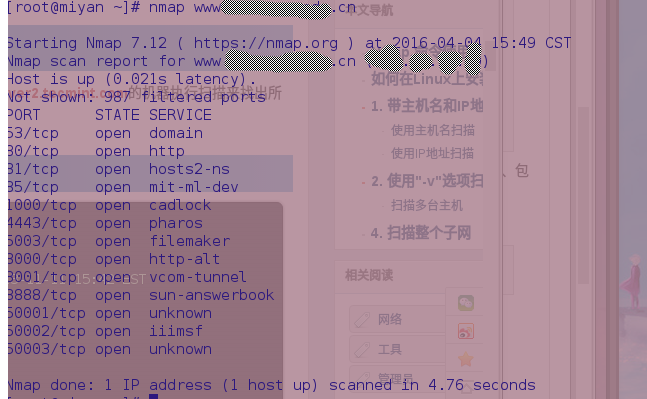
2.使用IP扫描

2.使用-v选项可以给出更详细信息
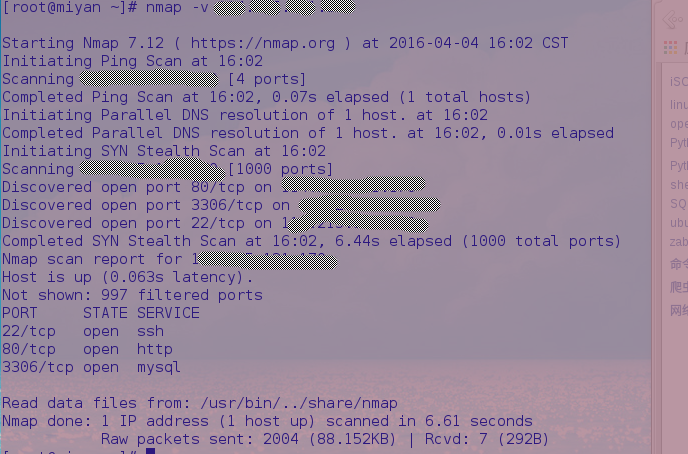
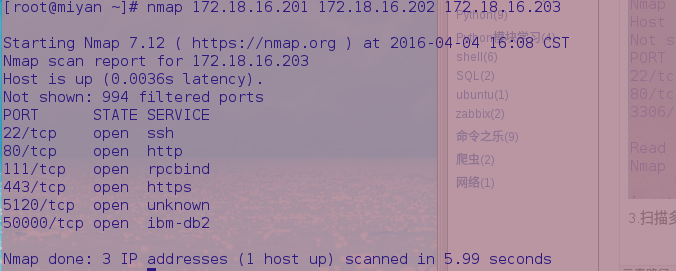
3.扫描多台主机。nmap后面写上多个IP地址或者主机名
4.使用通配符来使nmap扫描整个子网或者IP段
[root@miyan ~]# nmap 172.18..*
耗时太久
5.使用IP地址的最后一段扫描多台主机
[root@miyan ~]# nmap 172.18.16.201,,

Starting Nmap 7.12 ( https://nmap.org ) at 2016-04-04 16:26 CST

Nmap scan report for 172.18.16.203

Host is up (.012s latency).

Not shown:  filtered ports

PORT      STATE SERVICE

/tcp    open  ssh

/tcp    open  http

/tcp   open  rpcbind

/tcp   open  https

/tcp  open  unknown

/tcp open  ibm-db2

Nmap done:  IP addresses ( host up) scanned in 6.20 seconds
6.从文件中扫描主机列表
将主机名或者IP写到一个文件中,可以直接让nmap读取并执行扫描。
[root@miyan ~]# cat test.txt

172.18.16.201

172.18.16.202

172.18.16.203
执行扫描,使用-iL参数
[root@miyan ~]# nmap -iL test.txt

Starting Nmap 7.12 ( https://nmap.org ) at 2016-04-04 16:43 CST

Nmap scan report for 172.18.16.203

Host is up (.015s latency).

Not shown:  filtered ports

PORT      STATE SERVICE

/tcp    open  ssh

/tcp    open  http

/tcp   open  rpcbind

/tcp   open  https

/tcp  open  unknown

/tcp open  ibm-db2

Nmap done:  IP addresses ( host up) scanned in 6.08 seconds
7.扫描一个IP段
[root@miyan ~]# nmap 172.18.16.200-

Starting Nmap 7.12 ( https://nmap.org ) at 2016-04-04 16:46 CST

Nmap scan report for 172.18.16.203

Host is up (.084s latency).

Not shown:  filtered ports

PORT      STATE SERVICE

/tcp    open  ssh

/tcp    open  http

/tcp   open  rpcbind

/tcp   open  https

/tcp  open  unknown

/tcp open  ibm-db2

Nmap scan report for 172.18.16.205

Host is up (.074s latency).

Not shown:  filtered ports

PORT     STATE SERVICE

/tcp   open  http

/tcp open  mysql

/tcp open  ms-wbt-server

Nmap scan report for 172.18.16.209

Host is up (.041s latency).

Not shown:  filtered ports

PORT      STATE SERVICE

/tcp   open  msrpc

/tcp   open  netbios-ssn

/tcp   open  microsoft-ds

/tcp  open  ms-wbt-server

/tcp open  snet-sensor-mgmt

Nmap scan report for 172.18.16.214

Host is up (.052s latency).

Not shown:  filtered ports

PORT      STATE SERVICE

/tcp   open  msrpc

/tcp   open  netbios-ssn

/tcp   open  microsoft-ds

/tcp  open  icslap

/tcp  open  ms-wbt-server

/tcp  open  wsdapi

/tcp open  unknown

Nmap scan report for 172.18.16.218

Host is up (.0043s latency).

All  scanned ports on 172.18.16.218 are filtered

Nmap done:  IP addresses ( hosts up) scanned in 31.94 seconds
8.排除部分主机
[root@miyan ~]# nmap 172.18.16.200- --exclude 172.18.16.205

Starting Nmap 7.12 ( https://nmap.org ) at 2016-04-04 17:12 CST

Nmap scan report for 172.18.16.203

Host is up (.025s latency).

Not shown:  filtered ports

PORT      STATE SERVICE

/tcp    open  ssh

/tcp    open  http

/tcp   open  rpcbind

/tcp   open  https

/tcp  open  unknown

/tcp open  ibm-db2

Nmap scan report for 172.18.16.209

Host is up (.015s latency).

Not shown:  filtered ports

PORT      STATE SERVICE

/tcp   open  msrpc

/tcp   open  netbios-ssn

/tcp   open  microsoft-ds

/tcp  open  ms-wbt-server

/tcp open  snet-sensor-mgmt

Nmap done:  IP addresses ( hosts up) scanned in 16.57 seconds
9.扫描系统信息
[root@miyan ~]# nmap -A 172.18.16.203

Starting Nmap 7.12 ( https://nmap.org ) at 2016-04-04 17:14 CST

Nmap scan report for 172.18.16.203

Host is up (.0024s latency).

Not shown:  filtered ports

PORT      STATE SERVICE  VERSION

/tcp    open  ssh      OpenSSH 3.8.1p1 Debian .sarge. (protocol 2.0)

| ssh-hostkey:

|_   c7:ef::9a:6e:2e:f6::::d6:cd:db:ef:b2: (RSA)

/tcp    open  http     GoAhead WebServer

/tcp   open  rpcbind   (RPC #)

| rpcinfo:

|   program version   port/proto  service

|                 /tcp  rpcbind

|_                /udp  rpcbind

/tcp   open  ssl/http GoAhead WebServer

| ssl-cert: Subject: commonName=AMI/organizationName=American Megatrends Inc./stateOrProvinceName=Georgia/countryName=US

| Not valid before: --08T22::

|_Not valid after:  --07T22::

/tcp  open  ipmi-usb IPMI USB redirection

/tcp open  upnp     SuperMicro IPMI UPnP

Warning: OSScan results may be unreliable because we could not find at least  open and  closed port

Device type: general purpose

Running: Linux 2.6.X

OS CPE: cpe:/o:linux:linux_kernel:2.6

OS details: Linux 2.6. - 2.6. (likely embedded)

Network Distance:  hops

Service Info: OS: Linux; Device: remote management; CPE: cpe:/o:linux:linux_kernel, cpe:/o:supermicro:intelligent_platform_management_firmware

TRACEROUTE (using port /tcp)

HOP RTT     ADDRESS

   4.04 ms 192.168.1.1

   4.02 ms 172.18.16.203

OS and Service detection performed. Please report any incorrect results at https://nmap.org/submit/ .

Nmap done:  IP address ( host up) scanned in 103.10 seconds
同样-O或者-osscan-guess同样可以实现
[root@miyan ~]# nmap -O 172.18.16.203

Starting Nmap 7.12 ( https://nmap.org ) at 2016-04-04 17:21 CST

Nmap scan report for 172.18.16.203

Host is up (.0030s latency).

Not shown:  filtered ports

PORT      STATE SERVICE

/tcp    open  ssh

/tcp    open  http

/tcp   open  rpcbind

/tcp   open  https

/tcp  open  unknown

/tcp open  ibm-db2

Warning: OSScan results may be unreliable because we could not find at least  open and  closed port

Device type: general purpose

Running: Linux 2.6.X

OS CPE: cpe:/o:linux:linux_kernel:2.6

OS details: Linux 2.6. - 2.6. (likely embedded)

Network Distance:  hops

OS detection performed. Please report any incorrect results at https://nmap.org/submit/ .

Nmap done:  IP address ( host up) scanned in 6.22 seconds
10.扫描主机来检测防火墙
[root@miyan ~]# nmap -sA 172.18.16.203

Starting Nmap 7.12 ( https://nmap.org ) at 2016-04-04 17:22 CST

Nmap scan report for 172.18.16.203

Host is up (.0015s latency).

All  scanned ports on 172.18.16.203 are filtered

Nmap done:  IP address ( host up) scanned in 21.18 seconds
11.检测主机以检查防火墙是否正在工作
[root@miyan ~]# nmap -PN 172.18.16.203

Starting Nmap 7.12 ( https://nmap.org ) at 2016-04-04 17:24 CST

Nmap scan report for 172.18.16.203

Host is up (.0039s latency).

Not shown:  filtered ports

PORT      STATE SERVICE

/tcp    open  ssh

/tcp    open  http

/tcp   open  rpcbind

/tcp   open  https

/tcp  open  unknown

/tcp open  ibm-db2

Nmap done:  IP address ( host up) scanned in 4.53 seconds
12.查找网络中的在线主机
[root@miyan ~]# nmap -sP 172.18..*

Starting Nmap 7.12 ( https://nmap.org ) at 2016-04-04 17:25 CST

Nmap scan report for 172.18.16.1

Host is up (.0026s latency).

Nmap scan report for 172.18.16.62

Host is up (.0039s latency).

Nmap scan report for 172.18.16.65

Host is up (.0021s latency).

Nmap scan report for 172.18.16.69

Host is up (.0045s latency).

Nmap scan report for 172.18.16.87

Host is up (.0025s latency).

Nmap scan report for 172.18.16.92

Host is up (.0082s latency).

Nmap scan report for 172.18.16.126

Host is up (.0016s latency).

Nmap scan report for 172.18.16.130

Host is up (.0023s latency).

Nmap scan report for 172.18.16.132

Host is up (.0029s latency).

Nmap scan report for 172.18.16.186

Host is up (.0048s latency).

Nmap scan report for 172.18.16.190

Host is up (.027s latency).

Nmap scan report for 172.18.16.203

Host is up (.0043s latency).

Nmap scan report for 172.18.16.205

Host is up (.0090s latency).

Nmap scan report for 172.18.16.209

Host is up (.0064s latency).

Nmap scan report for 172.18.16.214

Host is up (.0060s latency).

Nmap scan report for 172.18.16.218

Host is up (.0086s latency).

Nmap scan report for 172.18.16.231

Host is up (.0025s latency).

Nmap scan report for 172.18.16.235

Host is up (.0067s latency).

Nmap scan report for 172.18.16.237

Host is up (.00079s latency).

Nmap scan report for 172.18.16.239

Host is up (.0029s latency).

Nmap scan report for 172.18.16.248

Host is up (.0071s latency).

Nmap scan report for 172.18.16.254

Host is up (.0035s latency).

Nmap done:  IP addresses ( hosts up) scanned in 3.40 seconds
13.执行快速扫描
使用-F参数,扫描仅在/usr/share/nmap/nmap-services中列出的端口
[root@miyan ~]# nmap -F 172.18.16.203

Starting Nmap 7.12 ( https://nmap.org ) at 2016-04-04 17:57 CST

Nmap scan report for 172.18.16.203

Host is up (.0041s latency).

Not shown:  filtered ports

PORT    STATE SERVICE

/tcp  open  ssh

/tcp  open  http

/tcp open  rpcbind

/tcp open  https

Nmap done:  IP address ( host up) scanned in 1.94 seconds
14.连续扫描端口
[root@miyan ~]# nmap -r 172.18.16.203

Starting Nmap 7.12 ( https://nmap.org ) at 2016-04-04 18:01 CST

Nmap scan report for 172.18.16.203

Host is up (.0083s latency).

Not shown:  filtered ports

PORT      STATE SERVICE

/tcp    open  ssh

/tcp    open  http

/tcp   open  rpcbind

/tcp   open  https

/tcp  open  unknown

/tcp open  ibm-db2

Nmap done:  IP address ( host up) scanned in 4.16 seconds
15.显示主机及路由
列出本机的主机接口与路由信息
[root@miyan ~]# nmap --iflist

Starting Nmap 7.12 ( https://nmap.org ) at 2016-04-04 18:02 CST

************************INTERFACES************************

DEV        (SHORT)      IP/MASK                     TYPE     UP   MTU   MAC

enp3s0     (enp3s0)     (none)/                    ethernet up     F0:DE:F1::B9:9C

virbr0-nic (virbr0-nic) (none)/                    ethernet down   :::D1::

wlp4s0b1   (wlp4s0b1)   192.168.1.8/              ethernet up     AC:::2B:0E:AA

wlp4s0b1   (wlp4s0b1)   fe80::ae81:12ff:fe2b:eaa/ ethernet up     AC:::2B:0E:AA

docker0    (docker0)    172.17.0.1/               ethernet up     ::D1:E0:5D:AC

virbr0     (virbr0)     192.168.124.1/            ethernet up     :::D1::

lo         (lo)         127.0.0.1/                 loopback up

lo         (lo)         ::/                     loopback up

**************************ROUTES**************************

DST/MASK                     DEV      METRIC GATEWAY

192.168.124.0/             virbr0

192.168.1.0/               wlp4s0b1

172.17.0.0/                docker0

0.0.0.0/                    wlp4s0b1     192.168.1.1

::/                      lo

fe80::ae81:12ff:fe2b:eaa/ lo

fe80::/                    wlp4s0b1

ff00::/                     wlp4s0b1
16.扫描特定端口
[root@miyan ~]# nmap -p  172.18.16.203

Starting Nmap 7.12 ( https://nmap.org ) at 2016-04-04 18:04 CST

Nmap scan report for 172.18.16.203

Host is up (.0015s latency).

PORT   STATE SERVICE

/tcp open  http

Nmap done:  IP address ( host up) scanned in 0.09 seconds
扫描多个端口
[root@miyan ~]# nmap -p , 172.18.16.203

Starting Nmap 7.12 ( https://nmap.org ) at 2016-04-04 18:11 CST

Nmap scan report for 172.18.16.203

Host is up (.0015s latency).

PORT    STATE    SERVICE

/tcp  open     http

/tcp filtered msrpc

Nmap done:  IP address ( host up) scanned in 1.31 seconds
指定端口范围:
[root@miyan ~]# nmap -p - 172.18.16.203

Starting Nmap 7.12 ( https://nmap.org ) at 2016-04-04 18:16 CST

Nmap scan report for 172.18.16.203

Host is up (.0022s latency).

Not shown:  filtered ports

PORT    STATE SERVICE

/tcp  open  http

/tcp open  rpcbind

Nmap done:  IP address ( host up) scanned in 1.81 seconds
17.扫描TCP端口
指定nmap扫描的端口类型和端口号
[root@miyan ~]# nmap -p T: 172.18.16.203

Starting Nmap 7.12 ( https://nmap.org ) at 2016-04-04 18:08 CST

Nmap scan report for 172.18.16.203

Host is up (.0028s latency).

PORT   STATE SERVICE

/tcp open  http

Nmap done:  IP address ( host up) scanned in 0.11 seconds
18.扫描UDP端口
[root@miyan ~]# nmap -sU 172.18.16.203
19.找出远程主机服务版本号
[root@miyan ~]# nmap -sV 172.18.16.203

Starting Nmap 7.12 ( https://nmap.org ) at 2016-04-04 18:18 CST

Nmap scan report for 172.18.16.203

Host is up (.0048s latency).

Not shown:  filtered ports

PORT      STATE SERVICE  VERSION

/tcp    open  ssh      OpenSSH 3.8.1p1 Debian .sarge. (protocol 2.0)

/tcp    open  http     GoAhead WebServer

/tcp   open  rpcbind   (RPC #)

/tcp   open  ssl/http GoAhead WebServer

/tcp  open  ipmi-usb IPMI USB redirection

/tcp open  upnp     SuperMicro IPMI UPnP

Service Info: OS: Linux; Device: remote management; CPE: cpe:/o:linux:linux_kernel, cpe:/o:supermicro:intelligent_platform_management_firmware

Service detection performed. Please report any incorrect results at https://nmap.org/submit/ .

Nmap done:  IP address ( host up) scanned in 48.88 seconds
20.使用TCP ACK(PA)和TCP Syn(PS)扫描主机
有时包过滤防火墙阻止了标准ICMPping请求,在这个情况下,使用TCP ACK和TCP Syn方法来扫描远程主机
[root@miyan ~]# nmap -PS 172.18.16.203

Starting Nmap 7.12 ( https://nmap.org ) at 2016-04-04 18:23 CST

Nmap scan report for 172.18.16.203

Host is up (.0073s latency).

Not shown:  filtered ports

PORT      STATE SERVICE

/tcp    open  ssh

/tcp    open  http

/tcp   open  rpcbind

/tcp   open  https

/tcp  open  unknown

/tcp open  ibm-db2

Nmap done:  IP address ( host up) scanned in 4.68 seconds
root@miyan ~]# nmap -PA 172.18.16.203
TCP Syn(PS)扫描远程主机的特定端口
Starting Nmap 7.12 ( https://nmap.org ) at 2016-04-04 18:26 CST

Nmap scan report for 172.18.16.203

Host is up (.0014s latency).

PORT   STATE SERVICE

/tcp open  http

Nmap done:  IP address ( host up) scanned in 0.10 seconds
TCP Syn(PS)扫描最常用端口
[root@miyan ~]# nmap -sT 172.18.16.203

Starting Nmap 7.12 ( https://nmap.org ) at 2016-04-04 18:28 CST

Nmap scan report for 172.18.16.203

Host is up (.0025s latency).

Not shown:  filtered ports

PORT      STATE SERVICE

/tcp    open  ssh

/tcp    open  http

/tcp   open  rpcbind

/tcp   open  https

/tcp  open  unknown

/tcp open  ibm-db2

Nmap done:  IP address ( host up) scanned in 4.29 seconds
21.执行隐秘扫描
[root@miyan ~]# nmap -sS 172.18.16.203

Starting Nmap 7.12 ( https://nmap.org ) at 2016-04-04 18:27 CST

Nmap scan report for 172.18.16.203

Host is up (.0062s latency).

Not shown:  filtered ports

PORT      STATE SERVICE

/tcp    open  ssh

/tcp    open  http

/tcp   open  rpcbind

/tcp   open  https

/tcp  open  unknown

/tcp open  ibm-db2

Nmap done:  IP address ( host up) scanned in 4.88 seconds
22.tcp空扫描
[root@miyan ~]# nmap -sN 172.18.16.203

Starting Nmap 7.12 ( https://nmap.org ) at 2016-04-04 18:30 CST

Nmap scan report for 172.18.16.203

Host is up (.0013s latency).

All  scanned ports on 172.18.16.203 are open|filtered

Nmap done:  IP address ( host up) scanned in 21.15 seconds
原文地址:
https://linux.cn/article-2561-3.html
玩玩nmap的更多相关文章
- nmap使用/参数,及绕过防火墙
nmap是什么? 它是一种一个很强大的扫描工具,端口,版本号,统统都可以给你扫出来 我的IP网段:192.168.1.0 咱们先找一个主机随便玩玩把,反正没有害处,最多被防火墙拦截了 nmap -sP ...
- ★Kali信息收集★8.Nmap :端口扫描
★Kali信息收集~ 0.Httrack 网站复制机 http://www.cnblogs.com/dunitian/p/5061954.html ★Kali信息收集~ 1.Google Hackin ...
- 安全测试 - 端口嗅探工具Nmap
Nmap 在官网下载nmap端口检测工具https://nmap.org/,nmap是一个网络连接端扫描软件,用来扫描网上电脑开放的网络连接端. 使用: 通过cmd命令:nmap www.5i5j.c ...
- NMAP分布式扫描工具dnmap
NMAP分布式扫描工具dnmap NMAP是一款知名的网络扫描工具.它提供丰富和强大的网络扫描功能.但很多时候,需要渗透测试人员从多个终端发起扫描任务,以快速扫描大型网络,或规避IP限制等安全策略 ...
- nmap
扫描端口 nmap -v -sS -open -iL iplist.txt -no-stylesheet -oX output.xml -p- -P0 -v 详细信息-sS 隐蔽扫描(半开syn).– ...
- 使用nmap工具查询局域网某个网段正在使用的ip地址
linux下nmap工具可扫描局域网正在使用的ip地址 查询局域网某网段正在使用的ip地址: nmap -sP .* 以上命令,将打印10.10.70.*/24网络所有正在使用的ip地址
- Nmap参数详解
转自:http://blog.csdn.net/huangwwu11/article/details/20230795 Nmap--networkmapper,网络探测工具和安全/端口扫描器 nmap ...
- nmap报错: Failed to open device ethxxx
nmap报错: Failed to open device ethxxx 周银辉 今天用nmap时, 报错: Failed to open device eth4, 好郁闷. 调查了一下, 是w ...
- fping tcping hping nmap nc
[root@test ~]# fping -a -g 192.168.40.1 192.168.40.240 |nl #-a 扫描alive主机,-g扫描一个段的ip地址 [root@test ...
随机推荐
- winform 查看远程服务器上的文件
解决方案: 1. 在目标服务器上发布webservice,实现文件下载的方法. using System; using System.Collections.Generic; using System ...
- 大数据(2) - Hadoop完全分布式的部署
apache hadoop 官方文档 ** Hadoop介绍 ** HDFS:分布式存储文件 角色:NameNode和DataNode ** YARN:分布式资源调度框架(Hadoop2.x以上才引用 ...
- k8s入门
一个目标:容器操作:两地三中心:四层服务发现:五种Pod共享资源:六个CNI常用插件:七层负载均衡:八种隔离维度:九个网络模型原则:十类IP地址:百级产品线:千级物理机:万级容器:相如无亿,K8s有亿 ...
- Spring MVC第一课:用IDEA构建一个基于Spring MVC, Hibernate, My SQL的Maven项目
作为一个Spring MVC新手最基本的功夫就是学会如何使用开发工具创建一个完整的Spring MVC项目,本文站在一个新手的角度讲述如何一步一步创建一个基于Spring MVC, Hibernate ...
- 利用JMeter的beanshell进行接口的加密处理
最近项目中在做http协议的接口测试,其中接口请求报文数据有个字段值需要用到加密后的签名,即出于网络传输过程中,对数据安全的考虑,要对请求的数据进行特定的处理(加密),再进行请求. 刚开始由于项目赶进 ...
- 长尾分布,重尾分布(Heavy-tailed Distribution)
Zipf分布: Zipf分布是一种符合长尾的分布: 就是指尾巴很长的分布.那么尾巴很长很厚的分布有什么特殊的呢?有两方面:一方面,这种分布会使得你的采样不准,估值不准,因为尾部占了很大部分.另一方面, ...
- 可以输入也可以下拉选择的select
网址:http://www.helloweba.com/view-blog-348.html 示例:http://www.helloweba.com/demo/2016/editable-select ...
- poj 3204(最小割)
题目链接:http://poj.org/problem?id=3204 思路:显然只有增大那最小割边集上的边才能增加最大流,因此,我们可以先跑一遍最大流,然后对于那些满足条件的边u->v,当且仅 ...
- linux mysql 新增用户 分配权限
insert into mysql.user(Host,User,Password) values("%","admin",password("adm ...
- 【BZOJ3813】奇数国 线段树+欧拉函数
[BZOJ3813]奇数国 Description 给定一个序列,每次改变一个位置的数,或是询问一段区间的数的乘积的phi值.每个数都可以表示成前60个质数的若干次方的乘积. Sample Input ...