
基于SSM的单点登陆05
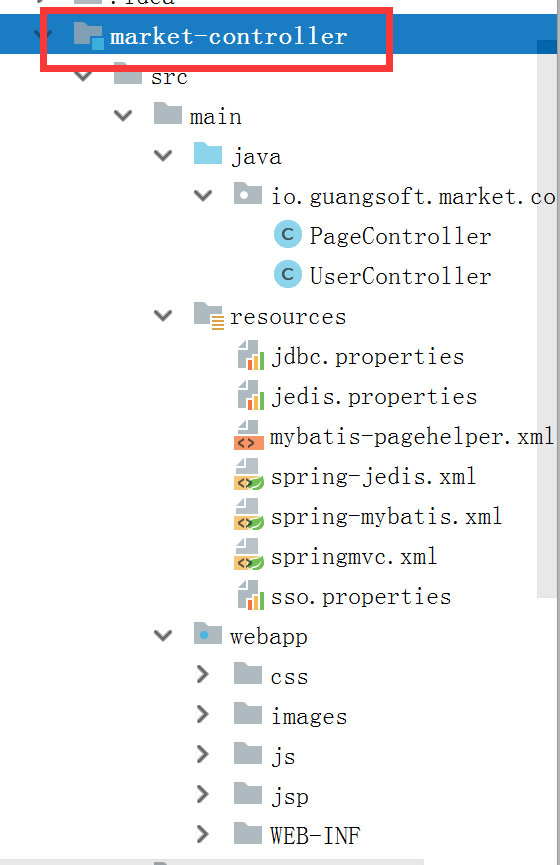
springmvc.xml
 <?xml version="1.0" encoding="UTF-8"?>

 <beans xmlns="http://www.springframework.org/schema/beans"

     xmlns:xsi="http://www.w3.org/2001/XMLSchema-instance" xmlns:p="http://www.springframework.org/schema/p"

     xmlns:context="http://www.springframework.org/schema/context"

     xmlns:mvc="http://www.springframework.org/schema/mvc"

     xsi:schemaLocation="http://www.springframework.org/schema/beans http://www.springframework.org/schema/beans/spring-beans.xsd

         http://www.springframework.org/schema/mvc http://www.springframework.org/schema/mvc/spring-mvc-4.0.xsd

         http://www.springframework.org/schema/context http://www.springframework.org/schema/context/spring-context.xsd">

         <!-- 解析properties文件的工具类 -->

         <context:property-placeholder location="classpath:*.properties"/>

         <!-- 扫描controller组件 -->

         <context:component-scan base-package="io.guangsoft.market.controller"/>

         <!-- 开启注解驱动 -->

         <mvc:annotation-driven />

         <!-- 配置视图解析 -->

         <bean class="org.springframework.web.servlet.view.InternalResourceViewResolver">

             <property name="prefix" value="/jsp/" />

             <property name="suffix" value=".jsp" />

         </bean>

         <!-- 资源映射 -->

         <mvc:resources location="/css/" mapping="/css/**"/>

         <mvc:resources location="/js/" mapping="/js/**"/>

         <mvc:resources location="/images/" mapping="/images/**"/>

  </beans>
web.xml
 <?xml version="1.0" encoding="UTF-8"?>

 <web-app version="2.5"

     xmlns="http://java.sun.com/xml/ns/javaee"

     xmlns:xsi="http://www.w3.org/2001/XMLSchema-instance"

     xsi:schemaLocation="http://java.sun.com/xml/ns/javaee

     http://java.sun.com/xml/ns/javaee/web-app_2_5.xsd">

     <!-- 启动spring -->

     <context-param>

         <param-name>contextConfigLocation</param-name>

         <param-value>classpath:spring-*.xml</param-value>

     </context-param>

     <listener>

         <listener-class>org.springframework.web.context.ContextLoaderListener</listener-class>

     </listener>

     <!-- 解决post乱码 -->

     <filter>

         <filter-name>CharacterEncodingFilter</filter-name>

         <filter-class>org.springframework.web.filter.CharacterEncodingFilter</filter-class>

         <init-param>

             <param-name>encoding</param-name>

             <param-value>utf-8</param-value>

         </init-param>

     </filter>

     <filter-mapping>

         <filter-name>CharacterEncodingFilter</filter-name>

         <url-pattern>/*</url-pattern>

     </filter-mapping>

     <!-- 启动springmvc -->

     <servlet>

         <servlet-name>market</servlet-name>

         <servlet-class>org.springframework.web.servlet.DispatcherServlet</servlet-class>

         <!-- contextConfigLocation不是必须的, 如果不配置contextConfigLocation, springmvc的配置文件默认在:WEB-INF/servlet的name+"-servlet.xml" -->

         <init-param>

             <param-name>contextConfigLocation</param-name>

             <param-value>classpath:springmvc.xml</param-value>

         </init-param>

         <load-on-startup>1</load-on-startup>

     </servlet>

     <servlet-mapping>

         <servlet-name>market</servlet-name>

         <url-pattern>/</url-pattern>

     </servlet-mapping>

     <welcome-file-list>

         <welcome-file>index.html</welcome-file>

         <welcome-file>index.htm</welcome-file>

         <welcome-file>index.jsp</welcome-file>

         <welcome-file>default.html</welcome-file>

         <welcome-file>default.htm</welcome-file>

         <welcome-file>default.jsp</welcome-file>

     </welcome-file-list>

 </web-app>
PageController.java
 package io.guangsoft.market.controller;

 import org.springframework.stereotype.Controller;

 import org.springframework.ui.Model;

 import org.springframework.web.bind.annotation.RequestMapping;

 /**

  * 页面跳转

  */

 @Controller

 public class PageController {

     @RequestMapping("/login")

     public String showLogin(String redirect, Model model) {

         model.addAttribute("redirect", redirect);

         return "login";

     }

     @RequestMapping("/register")

     public String showRegister() {

         return "register";

     }

 }
UserController.java
 package io.guangsoft.market.controller;

 import javax.servlet.http.HttpServletRequest;

 import javax.servlet.http.HttpServletResponse;

 import io.guangsoft.market.util.bean.GResult;

 import io.guangsoft.market.dao.bean.TbUser;

 import io.guangsoft.market.service.UserService;

 import io.guangsoft.market.util.utils.CookieUtil;

 import io.guangsoft.market.util.utils.GResultUtil;

 import org.apache.commons.lang3.StringUtils;

 import org.springframework.beans.factory.annotation.Autowired;

 import org.springframework.beans.factory.annotation.Value;

 import org.springframework.http.converter.json.MappingJacksonValue;

 import org.springframework.stereotype.Controller;

 import org.springframework.web.bind.annotation.PathVariable;

 import org.springframework.web.bind.annotation.RequestMapping;

 import org.springframework.web.bind.annotation.RequestMethod;

 import org.springframework.web.bind.annotation.ResponseBody;

 /**

  * 用户登录服务controller

  */

 @Controller

 @RequestMapping("/user")

 public class UserController {

     @Autowired

     private UserService userService;

     @Value("${REDIS_USER_SESSION_KEY}")

     private String cookieName;

     /**

      * 用户注册数据校验接口

      */

     @RequestMapping(value="/check/{param}/{type}",method=RequestMethod.GET)

     @ResponseBody

     public Object checkData(@PathVariable String param,@PathVariable int type,String callback){

         GResult result = null;

         //数据校验

         if(type != 1 && type != 2 && type != 3){

            result = GResultUtil.fail(-1, "参数类型有误!");

         }else{

         //调用业务层做数据校验

            result = this.userService.userParamCheck(param, type);

         }

         //判断是否使用jsonp调用方式

         if(callback != null && callback.length() > 0){

             MappingJacksonValue mapping = new MappingJacksonValue(result);

             mapping.setJsonpFunction(callback);

             return mapping;

         }

         return result;

     }

     /**

      * 用户注册接口

      */

     @RequestMapping(value="/register",method=RequestMethod.POST)

     @ResponseBody

     public GResult userRegister(TbUser user){

         try{

             return this.userService.userRegister(user);

         }catch(Exception e){

             e.printStackTrace();

             return GResultUtil.fail(-1, "注册失败. 请校验数据后请再提交数据!");

         }

     }

     /**

      * 用户登录接口

      */

     @RequestMapping(value="/login",method=RequestMethod.POST)

     @ResponseBody

     public GResult userLogin(String username,String password,HttpServletRequest request,HttpServletResponse repsonse){

         try{

             GResult result = this.userService.userLogin(username, password);

             if(result.getgCode() == 0) {

                 CookieUtil.setCookie(request, repsonse, cookieName, result.getgData().toString());

             }

             return result;

         }catch(Exception e){

             e.printStackTrace();

             return GResultUtil.fail(-1,  e.getMessage());

         }

     }

     /**

      * 根据token查询用户

      */

     @RequestMapping(value="/token/{token}",method=RequestMethod.GET)

     @ResponseBody

     public Object findUserByToken(@PathVariable String token,String callback){

         GResult result = this.userService.findUserByToken(token);

         //判断是否含有jsonp

         if(!StringUtils.isBlank(callback)){

             MappingJacksonValue mapping = new MappingJacksonValue(result);

             mapping.setJsonpFunction(callback);

             return mapping;

         }

         return result;

     }

 }
基于SSM的单点登陆05的更多相关文章
- 基于SSM的单点登陆04
jdbc.properties JDBC_DRIVER=org.mariadb.jdbc.Driver JDBC_URL=jdbc:mariadb://127.0.0.1:3306/market JD ...
- 基于SSM的单点登陆01
使用SSM的Maven聚合项目 建立父项目market的pom文件 <?xml version="1.0" encoding="UTF-8"?> & ...
- 基于SSM的单点登陆03
TbUser.java和TbUserExample.java,TbUserMapper.java,TbUserMapper.xml由mybatis框架生成. generatorConfig.xml & ...
- 基于SSM的单点登陆02
pom文件 <?xml version="1.0" encoding="UTF-8"?> <project xmlns="http: ...
- Spring Security 解析(六) —— 基于JWT的单点登陆(SSO)开发及原理解析
Spring Security 解析(六) -- 基于JWT的单点登陆(SSO)开发及原理解析 在学习Spring Cloud 时,遇到了授权服务oauth 相关内容时,总是一知半解,因此决定先把 ...
- 集成基于OAuth协议的单点登陆
在之前的一篇文章中,我们已经介绍了如何为一个应用添加对CAS协议的支持,进而使得我们的应用可以与所有基于CAS协议的单点登陆服务通讯.但是现在的单点登陆服务实际上并不全是通过实现CAS协议来完成的.例 ...
- 集成基于CAS协议的单点登陆
相信大家对单点登陆(SSO,Single Sign On)这个名词并不感到陌生吧?简单地说,单点登陆允许多个应用使用同一个登陆服务.一旦一个用户登陆了一个支持单点登陆的应用,那么在进入其它使用同一单点 ...
- ASP.NET 单点登陆
第一种:同主域但不同子域之间实现单点登陆 Form验证其实是基于身份cookie的验证.客户登陆后,生成一个包含用户身份信息(包含一个ticket)的cookie,这个cookie的名字就是在web. ...
- ASP.NET在不同情况下实现单点登陆(SSO)的方法
第一种:同主域但不同子域之间实现单点登陆 Form验证其实是基于身份cookie的验证.客户登陆后,生成一个包含用户身份信息(包含一个ticket)的cookie,这个cookie的名字就是在web. ...
随机推荐
- Install EPEL repo on CentOS 7 / RHEL 7
On CentOS 7, we have found without downloading the epel-release RPM package(as we used to do on prev ...
- 首次接触XAMPP,端口被占用困恼
本人运气比较好,首次安装XAMPP就碰到了各种问题啊!并且已经解决,以下是我问题的出处并且解决. 问题描述: apache无法打开,并且连带的出现了mySql无法打开.(即80端口冲突问题) 解决办法 ...
- git & github 菜鸟笔记
1.概念: 最先进的分布式版本控制系统 文件修改该提交的内容:---版本 文件名 用户 说明 日期 GitHub网站上线了,它为开源项目免费提供Git存储 --CVS及SVN都是集中式的版本控制系统, ...
- Django Admin后台管理模块的使用
Admin后台管理模块的使用 Django的管理员模块是Django的标准库django.contrib的一部分.这个包还包括其它一些实用的模块: django.contrib.auth django ...
- AWS系列-申请MySQL
1.1 打开aws控制台,可以直接搜索MySQL 1.2 打开MySQL(rds)控制面板 点击启动数据库实例(这个只是启动创建的意思,不是启动下面创建好的node.我也不懂为啥翻译过来是这个意思.. ...
- python 之 GIL(线程和进程的应用)
一.GIL:http://www.tuicool.com/articles/7zIra2r http://www.zhihu.com/question/23474039 二.线程锁 在threadi ...
- 【BZOJ3798】特殊的质数 分块打表
[BZOJ3798]特殊的质数 Description 求[A,B]之间的质数个数,并且满足X=Q^2+P^2,P,Q是正整数. Input 第一行输入A,B Output 输出有多少组P,Q满足条件 ...
- css3动画效果:2 简易动画
1. transition动画:鼠标移上去 旋转放大 关键点-- :hover \ transform: scale(*) rotate(*deg) cards 2.关键帧动画: 位移动画 t ...
- Oracle是如何工作的?实例是如何响应用户请求?一条SQL的执行过程~
Oracle 是如何工作的? Select id,name from t order by id ; – SQL 解析(查看语法是否错误,如果没有错误,分析语意,执行此语句的权限) – 执行计划(OR ...
- pro-select-limit-if
drop procedure if exists p9; CREATE PROCEDURE p9 () BEGIN DECLARE a INT; DECLARE b INT; DECLARE c IN ...