
html+css3 实现各种loading效果
效果见下图
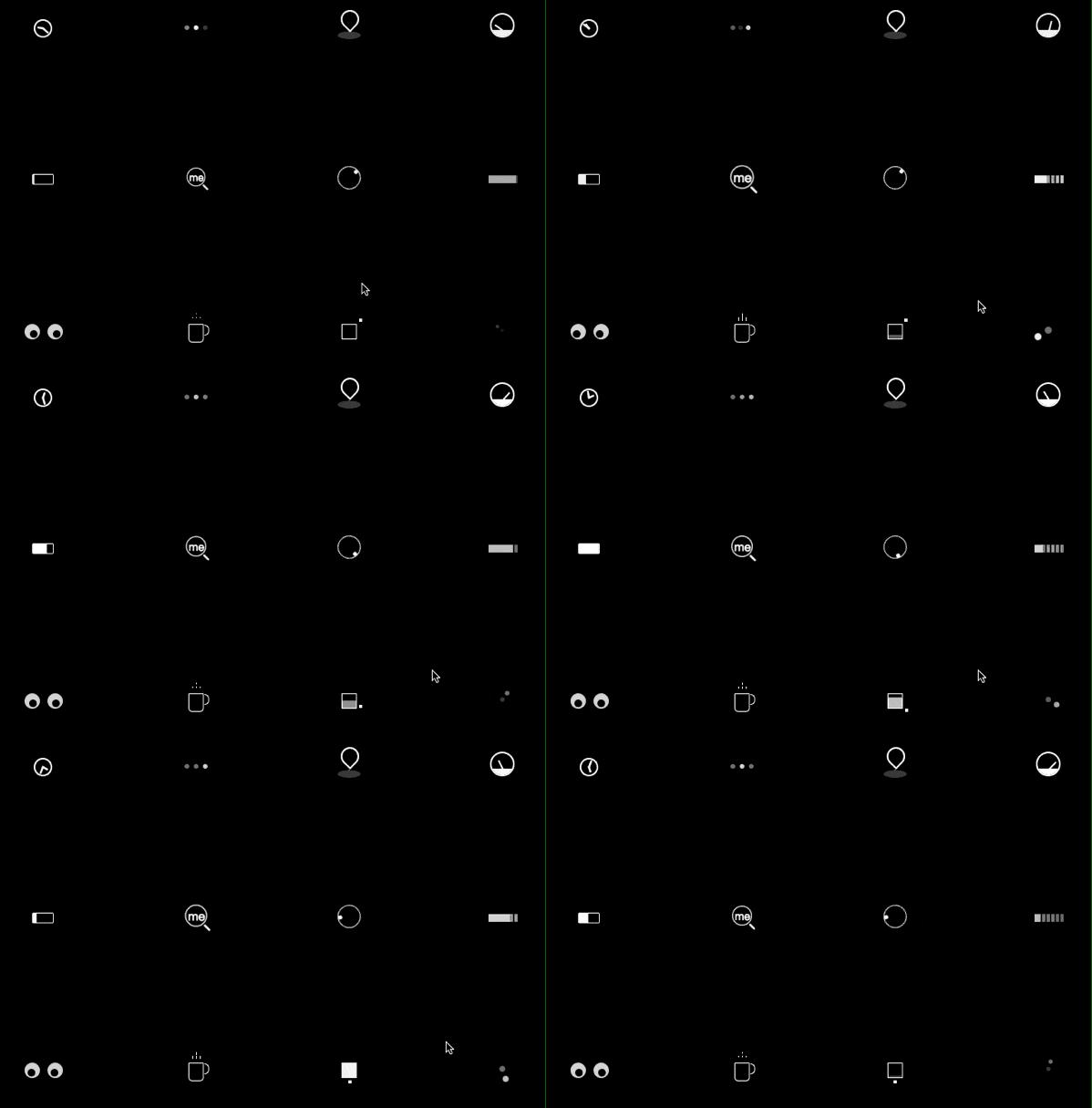
代码:
建议直接去本人github上浏览代码
https://github.com/wuliqiangqiang/loading
<!DOCTYPE html>
<html>
<head>
<title>loading效果</title>
<link rel="stylesheet" href="./time.css">
<link rel="stylesheet" href="./typing.css">
<link rel="stylesheet" href="./location_indicator.css">
<link rel="stylesheet" href="./magnifier.css">
<link rel="stylesheet" href="./square.css">
<link rel="stylesheet" href="./egg.css">
<link rel="stylesheet" href="./dashboard.css">
<link rel="stylesheet" href="./coffee_cup.css">
<link rel="stylesheet" href="./clound.css">
<link rel="stylesheet" href="./circle.css">
<link rel="stylesheet" href="./battery.css">
<link rel="stylesheet" href="./help.css">
<style type="text/css">
* {
-webkit-box-sizing: border-box;
-moz-box-sizing: border-box;
box-sizing: border-box;
}
/* 浮动 */
.cf:before,
.cf:after {
content: " ";
display: table;
}
.cf:after {
clear: both;
}
html {
color: #fff;
background-color: #000;
}
.wrapper {
width: 700px;
margin: 0 auto;
}
.row {
text-align: center;
padding: 50px 0;
}
.span,
.span_large {
float: left;
width: 100px;
background-color: rgba(0, 0, 0, 0.02);
height: 100px;
vertical-align: middle;
border-radius: 1px;
margin-right: 100px;
}
.span:last-child {
margin-right: 0px;
}
/* loading块 */
.battery {
width: 28px;
height: 14px;
border: 1px #fff solid;
border-radius: 2px;
-webkit-animation: charge 4s linear infinite;
-moz-animation: charge 4s linear infinite;
animation: charge 4s linear infinite;
margin: 40px auto 0;
}
.battery:after {
width: 2px;
height: 7px;
background-color: #fff;
border-radius: 0px 1px 1px 0px;
position: absolute;
content: "";
top: 2px;
right: -4px;
}
@-webkit-keyframes charge {
0% {
box-shadow: inset 0px 0px 0px #fff;
}
100% {
box-shadow: inset 30px 0px 0px #fff;
}
}
@-moz-keyframes charge {
0% {
box-shadow: inset 0px 0px 0px #fff;
}
100% {
box-shadow: inset 30px 0px 0px #fff;
}
}
@keyframes charge {
0% {
box-shadow: inset 0px 0px 0px #fff;
}
100% {
box-shadow: inset 30px 0px 0px #fff;
}
}
.circle {
margin: 40px auto;
position: relative;
width: 8px;
height: 8px;
background-color: rgba(255, 255, 255, 0.5);
box-shadow: -14px 0px 0px rgba(255, 255, 255, 1);
border-radius: 50%;
-webkit-animation: circle_classic 1s ease-in-out infinite alternate;
-moz-animation: circle_classic 1s ease-in-out infinite alternate;
animation: circle_classic 1s ease-in-out infinite alternate;
}
@-webkit-keyframes circle_classic {
0% {
opacity: 0.1;
-webkit-transform: rotate(0deg) scale(0.5);
}
100% {
opacity: 1;
-webkit-transform: rotate(360deg) scale(1.2);
}
}
@-moz-keyframes circle_classic {
0% {
opacity: 0.1;
-moz-transform: rotate(0deg) scale(0.5);
}
100% {
opacity: 1;
-moz-transform: rotate(360deg) scale(1.2);
}
}
@keyframes circle_classic {
0% {
opacity: 0.1;
transform: rotate(0deg) scale(0.5);
}
100% {
opacity: 1;
transform: rotate(360deg) scale(1.2);
}
}
.cloud {
margin: 42px 30px;
width: 4px;
height: 10px;
opacity: 0.5;
position: relative;
box-shadow: 6px 0px 0px 0px rgba(255, 255, 255, 1),
12px 0px 0px 0px rgba(255, 255, 255, 1),
18px 0px 0px 0px rgba(255, 255, 255, 1),
24px 0px 0px 0px rgba(255, 255, 255, 1),
30px 0px 0px 0px rgba(255, 255, 255, 1),
36px 0px 0px 0px rgba(255, 255, 255, 1);
-webkit-animation: rain 1s linear infinite alternate;
-moz-animation: rain 1s linear infinite alternate;
animation: rain 1s linear infinite alternate;
}
.cloud:after {
width: 40px;
height: 10px;
position: absolute;
content: "";
background-color: rgba(255, 255, 255, 1);
top: 0px;
opacity: 1;
-webkit-animation: line_flow 2s linear infinite reverse;
-moz-animation: line_flow 2s linear infinite reverse;
animation: line_flow 2s linear infinite reverse;
}
@-webkit-keyframes rain {
0% {
box-shadow: 6px 0px 0px 0px rgba(255, 255, 255, 1),
12px 0px 0px 0px rgba(255, 255, 255, 0.9),
18px 0px 0px 0px rgba(255, 255, 255, 0.7),
24px 0px 0px 0px rgba(255, 255, 255, 0.6),
30px 0px 0px 0px rgba(255, 255, 255, 0.3),
36px 0px 0px 0px rgba(255, 255, 255, 0.2);
}
100% {
box-shadow: 6px 0px 0px 0px rgba(255, 255, 255, 0.2),
12px 0px 0px 0px rgba(255, 255, 255, 0.3),
18px 0px 0px 0px rgba(255, 255, 255, 0.6),
24px 0px 0px 0px rgba(255, 255, 255, 0.7),
30px 0px 0px 0px rgba(255, 255, 255, 0.9),
36px 0px 0px 0px rgba(255, 255, 255, 1);
opacity: 1;
}
}
@-moz-keyframes rain {
0% {
box-shadow: 6px 0px 0px 0px rgba(255, 255, 255, 1),
12px 0px 0px 0px rgba(255, 255, 255, 0.9),
18px 0px 0px 0px rgba(255, 255, 255, 0.7),
24px 0px 0px 0px rgba(255, 255, 255, 0.6),
30px 0px 0px 0px rgba(255, 255, 255, 0.3),
36px 0px 0px 0px rgba(255, 255, 255, 0.2);
}
100% {
box-shadow: 6px 0px 0px 0px rgba(255, 255, 255, 0.2),
12px 0px 0px 0px rgba(255, 255, 255, 0.3),
18px 0px 0px 0px rgba(255, 255, 255, 0.6),
24px 0px 0px 0px rgba(255, 255, 255, 0.7),
30px 0px 0px 0px rgba(255, 255, 255, 0.9),
36px 0px 0px 0px rgba(255, 255, 255, 1);
opacity: 1;
}
}
@keyframes rain {
0% {
box-shadow: 6px 0px 0px 0px rgba(255, 255, 255, 1),
12px 0px 0px 0px rgba(255, 255, 255, 0.9),
18px 0px 0px 0px rgba(255, 255, 255, 0.7),
24px 0px 0px 0px rgba(255, 255, 255, 0.6),
30px 0px 0px 0px rgba(255, 255, 255, 0.3),
36px 0px 0px 0px rgba(255, 255, 255, 0.2);
}
100% {
box-shadow: 6px 0px 0px 0px rgba(255, 255, 255, 0.2),
12px 0px 0px 0px rgba(255, 255, 255, 0.3),
18px 0px 0px 0px rgba(255, 255, 255, 0.6),
24px 0px 0px 0px rgba(255, 255, 255, 0.7),
30px 0px 0px 0px rgba(255, 255, 255, 0.9),
36px 0px 0px 0px rgba(255, 255, 255, 1);
opacity: 1;
}
}
@-webkit-keyframes line_flow {
0% {
width: 0px;
}
100% {
width: 40px;
}
}
@-moz-keyframes line_flow {
0% {
width: 0px;
}
100% {
width: 40px;
}
}
@keyframes line_flow {
0% {
width: 0px;
}
100% {
width: 40px;
}
}
.coffee_cup {
width: 20px;
height: 24px;
border: 1px rgba(255, 255, 255, 1) solid;
border-radius: 0px 0px 5px 5px;
position: relative;
margin: 36px auto;
}
.coffee_cup:after,
.coffee_cup:before {
position: absolute;
content: "";
}
.coffee_cup:after {
width: 5px;
height: 12px;
border: 1px #fff solid;
border-left: none;
border-radius: 0px 20px 20px 0px;
left: 20px;
}
.coffee_cup:before {
width: 1px;
height: 6px;
background-color: rgba(255, 255, 255, 1);
top: -10px;
left: 4px;
box-shadow: 5px 0px 0px 0px rgba(255, 255, 255, 1),
5px -5px 0px 0px rgba(255, 255, 255, 1),
10px 0px 0px 0px rgba(255, 255, 255, 1);
-webkit-animation: steam 1s linear infinite alternate;
-moz-animation: steam 1s linear infinite alternate;
animation: steam 1s linear infinite alternate;
}
@-webkit-keyframes steam {
0% {
height: 0px;
}
100% {
height: 6px;
}
}
@-moz-keyframes steam {
0% {
height: 0px;
}
100% {
height: 6px;
}
}
@keyframes steam {
0% {
height: 0px;
}
100% {
height: 6px;
}
}
.dashboard {
width: 32px;
height: 32px;
margin: 30px auto;
border: 2px rgba(255, 255, 255, 1) solid;
border-radius: 100%;
position: relative;
overflow: hidden;
z-index: 1;
}
.dashboard:after,
.dashboard:before {
position: absolute;
content: "";
}
.dashboard:after {
width: 14px;
height: 2px;
top: 20px;
-webkit-transform-origin: 1px 1px;
-moz-transform-origin: 1px 1px;
transform-origin: 1px 1px;
background-color: rgba(255, 255, 255, 1);
-webkit-animation: dashboard_hand 2s linear infinite alternate;
-moz-animation: dashboard_hand 2s linear infinite alternate;
animation: dashboard_hand 2s linear infinite alternate;
}
.dashboard:before {
width: 32px;
height: 10px;
background-color: rgba(255, 255, 255, 1);
top: 20px;
left: -2px;
}
@-webkit-keyframes dashboard_hand {
0% {
-webkit-transform: rotate(-160deg);
}
100% {
-webkit-transform: rotate(-20deg);
}
}
@-moz-keyframes dashboard_hand {
0% {
-moz-transform: rotate(-160deg);
}
100% {
-moz-transform: rotate(-20deg);
}
}
@keyframes dashboard_hand {
0% {
transform: rotate(-160deg);
}
100% {
transform: rotate(-20deg);
}
}
.eye {
width: 20px;
height: 20px;
background-color: rgba(255, 255, 255, 0.8);
border-radius: 50%;
box-shadow: 30px 0px 0px 0px rgba(255, 255, 255, 0.8);
position: relative;
margin: 36px 26px;
}
.eye:after {
background-color: #000;
width: 10px;
height: 10px;
box-shadow: 30px 0px 0px 0px #000;
border-radius: 50%;
left: 9px;
top: 8px;
position: absolute;
content: "";
-webkit-animation: eyeball 1s linear infinite alternate;
-moz-animation: eyeball 1s linear infinite alternate;
animation: eyeball 1s linear infinite alternate;
}
@-webkit-keyframes eyeball {
0% {
left: 9px;
}
100% {
left: 1px;
}
}
@-moz-keyframes eyeball {
0% {
left: 9px;
}
100% {
left: 1px;
}
}
@keyframes eyeball {
0% {
left: 9px;
}
100% {
left: 1px;
}
}
.help {
width: 30px;
height: 30px;
border: 1px #fff solid;
border-radius: 50%;
-webkit-animation: rotation 1s ease-in-out infinite;
-moz-animation: rotation 1s ease-in-out infinite;
animation: rotation 1s ease-in-out infinite;
margin: 30px auto;
}
.help:after {
width: 5px;
height: 5px;
background-color: rgba(255, 255, 255, 1);
border-radius: 100%;
position: absolute;
content: "";
}
@-webkit-keyframes rotation {
0% {
-webkit-transform: rotate(0deg);
}
100% {
-webkit-transform: rotate(360deg);
}
}
@-moz-keyframes rotation {
0% {
-moz-transform: rotate(0deg);
}
100% {
-moz-transform: rotate(360deg);
}
}
@keyframes rotation {
0% {
transform: rotate(0deg);
}
100% {
transform: rotate(360deg);
}
}
.location_indicator {
margin: 30px auto;
position: relative;
left: -9px;
}
.location_indicator:before,
.location_indicator:after {
position: absolute;
content: "";
}
.location_indicator:before {
width: 20px;
height: 20px;
border-radius: 100% 100% 100% 0;
box-shadow: 0px 0px 0px 2px rgba(255, 255, 255, 1);
-webkit-animation: mapping 1s linear infinite;
-moz-animation: mapping 1s linear infinite;
animation: mapping 1s linear infinite;
-webkit-transform: rotate(-46deg);
-moz-transform: rotate(-46deg);
transform: rotate(-46deg);
}
.location_indicator:after {
width: 30px;
height: 10px;
border-radius: 100%;
left: 44px;
background-color: rgba(255, 255, 255, 0.2);
top: 24px;
z-index: -1;
}
@-webkit-keyframes mapping {
0% {
top: 0;
}
50% {
top: -5px;
}
100% {
top: 0;
}
}
@-moz-keyframes mapping {
0% {
top: 0;
}
50% {
top: -5px;
}
100% {
top: 0;
}
}
@-keyframes mapping {
0% {
top: 0;
}
50% {
top: -5px;
}
100% {
top: 0;
}
}
.magnifier {
width: 20px;
height: 20px;
box-shadow: 0px 0px 0px 1px #fff;
border-radius: 50%;
position: relative;
margin: 34px auto;
-webkit-animation: magnify 1s linear infinite alternate;
-moz-animation: magnify 1s linear infinite alternate;
animation: magnify 1s linear infinite alternate;
}
.magnifier:after,
.magnifier:before {
position: absolute;
content: "";
}
.magnifier:before {
content: "me";
font-size: 12px;
left: 2px;
text-align: center;
top: 2px;
}
.magnifier:after {
width: 2px;
height: 8px;
background-color: #fff;
bottom: -6px;
left: 20px;
border-radius: 2px;
-webkit-transform: rotate(-45deg);
-moz-transform: rotate(-45deg);
transform: rotate(-45deg);
}
@-webkit-keyframes magnify {
0% {
-webkit-transform: scale(1);
}
100% {
-webkit-transform: scale(1.5);
}
}
@-moz-keyframes magnify {
0% {
-moz-transform: scale(1);
}
100% {
-moz-transform: scale(1.5);
}
}
@keyframes magnify {
0% {
transform: scale(1);
}
100% {
transform: scale(1.5);
}
}
.square {
width: 20px;
height: 20px;
border: 1px rgba(255, 255, 255, 1) solid;
margin: 36px auto;
position: relative;
-webkit-animation: fill_color 5s linear infinite;
-moz-animation: fill_color 5s linear infinite;
animation: fill_color 5s linear infinite;
}
.square:after {
width: 4px;
height: 4px;
position: absolute;
content: "";
background-color: rgba(255, 255, 255, 1);
top: -8px;
left: 0px;
-webkit-animation: square_check 1s ease-in-out infinite;
-moz-animation: square_check 1s ease-in-out infinite;
animation: square_check 1s ease-in-out infinite;
}
@-webkit-keyframes square_check {
25% {
left: 22px;
top: -8px;
}
50% {
left: 22px;
top: 22px;
}
75% {
left: -9px;
top: 22px;
}
100% {
left: -9px;
top: -7px;
}
}
@-moz-keyframes square_check {
25% {
left: 22px;
top: -8px;
}
50% {
left: 22px;
top: 22px;
}
75% {
left: -9px;
top: 22px;
}
100% {
left: -9px;
top: -7px;
}
}
@keyframes square_check {
25% {
left: 22px;
top: -8px;
}
50% {
left: 22px;
top: 22px;
}
75% {
left: -9px;
top: 22px;
}
100% {
left: -9px;
top: -7px;
}
}
@-webkit-keyframes fill_color {
0% {
box-shadow: inset 0px 0px 0px 0px rgba(255, 255, 255, 0.1);
}
100% {
box-shadow: inset 0px -20px 0px 0px rgba(255, 255, 255, 1);
}
}
@-moz-keyframes fill_color {
0% {
box-shadow: inset 0px 0px 0px 0px rgba(255, 255, 255, 0.1);
}
100% {
box-shadow: inset 0px -20px 0px 0px rgba(255, 255, 255, 1);
}
}
@keyframes fill_color {
0% {
box-shadow: inset 0px 0px 0px 0px rgba(255, 255, 255, 0.1);
}
100% {
box-shadow: inset 0px -20px 0px 0px rgba(255, 255, 255, 1);
}
}
.timer {
width: 24px;
height: 24px;
background-color: transparent;
box-shadow: inset 0px 0px 0px 2px #fff;
border-radius: 50%;
position: relative;
margin: 38px auto;
}
.timer:after,
.timer:before {
position: absolute;
content: "";
background-color: #fff;
}
.timer:after {
width: 10px;
height: 2px;
top: 11px;
left: 11px;
-webkit-transform-origin: 1px 1px;
-moz-transform-origin: 1px 1px;
transform-origin: 1px 1px;
-webkit-animation: minhand 2s linear infinite;
-moz-animation: minhand 2s linear infinite;
animation: minhand 2s linear infinite;
}
.timer:before {
width: 8px;
height: 2px;
top: 11px;
left: 11px;
-webkit-transform-origin: 1px 1px;
-moz-transform-origin: 1px 1px;
transform-origin: 1px 1px;
-webkit-animation: hrhand 8s linear infinite;
-moz-animation: hrhand 8s linear infinite;
animation: hrhand 8s linear infinite;
}
@-webkit-keyframes minhand {
0% {
-webkit-transform: rotate(0deg)
}
100% {
-webkit-transform: rotate(360deg)
}
}
@-moz-keyframes minhand {
0% {
-moz-transform: rotate(0deg)
}
100% {
-moz-transform: rotate(360deg)
}
}
@keyframes minhand {
0% {
transform: rotate(0deg)
}
100% {
transform: rotate(360deg)
}
}
@-webkit-keyframes hrhand {
0% {
-webkit-transform: rotate(0deg)
}
100% {
-webkit-transform: rotate(360deg)
}
}
@-moz-keyframes hrhand {
0% {
-moz-transform: rotate(0deg)
}
100% {
-moz-transform: rotate(360deg)
}
}
@keyframes hrhand {
0% {
transform: rotate(0deg)
}
100% {
transform: rotate(360deg)
}
}
.typing_loader {
width: 6px;
height: 6px;
border-radius: 50%;
-webkit-animation: typing 1s linear infinite alternate;
-moz-animation: Typing 1s linear infinite alternate;
animation: typing 1s linear infinite alternate;
margin: 46px auto;
position: relative;
left: -12px;
}
@-webkit-keyframes typing {
0% {
background-color: rgba(255, 255, 255, 1);
box-shadow: 12px 0px 0px 0px rgba(255, 255, 255, 0.2),
24px 0px 0px 0px rgba(255, 255, 255, 0.2);
}
25% {
background-color: rgba(255, 255, 255, 0.4);
box-shadow: 12px 0px 0px 0px rgba(255, 255, 255, 2),
24px 0px 0px 0px rgba(255, 255, 255, 0.2);
}
75% {
background-color: rgba(255, 255, 255, 0.4);
box-shadow: 12px 0px 0px 0px rgba(255, 255, 255, 0.2),
24px 0px 0px 0px rgba(255, 255, 255, 1);
}
}
@-moz-keyframes typing {
0% {
background-color: rgba(255, 255, 255, 1);
box-shadow: 12px 0px 0px 0px rgba(255, 255, 255, 0.2),
24px 0px 0px 0px rgba(255, 255, 255, 0.2);
}
25% {
background-color: rgba(255, 255, 255, 0.4);
box-shadow: 12px 0px 0px 0px rgba(255, 255, 255, 2),
24px 0px 0px 0px rgba(255, 255, 255, 0.2);
}
75% {
background-color: rgba(255, 255, 255, 0.4);
box-shadow: 12px 0px 0px 0px rgba(255, 255, 255, 0.2),
24px 0px 0px 0px rgba(255, 255, 255, 1);
}
}
@keyframes typing {
0% {
background-color: rgba(255, 255, 255, 1);
box-shadow: 12px 0px 0px 0px rgba(255, 255, 255, 0.2),
24px 0px 0px 0px rgba(255, 255, 255, 0.2);
}
25% {
background-color: rgba(255, 255, 255, 0.4);
box-shadow: 12px 0px 0px 0px rgba(255, 255, 255, 2),
24px 0px 0px 0px rgba(255, 255, 255, 0.2);
}
75% {
background-color: rgba(255, 255, 255, 0.4);
box-shadow: 12px 0px 0px 0px rgba(255, 255, 255, 0.2),
24px 0px 0px 0px rgba(255, 255, 255, 1);
}
}
</style>
</head>
<body>
<div class="wrapper">
<div class="row cf">
<div class="span">
<div class="timer"></div>
</div>
<div class="span">
<div class="typing_loader"></div>
</div>
<div class="span">
<div class="location_indicator"></div>
</div>
<div class="span">
<div class="dashboard"></div>
</div>
</div>
<div class="row cf">
<div class="span">
<div class="battery"></div>
</div>
<div class="span">
<div class="magnifier"></div>
</div>
<div class="span">
<div class="help"></div>
</div>
<div class="span">
<div class="cloud"></div>
</div>
</div>
<div class="row cf">
<div class="span">
<div class="eye"></div>
</div>
<div class="span">
<div class="coffee_cup"></div>
</div>
<div class="span">
<div class="square"></div>
</div>
<div class="span">
<div class="circle"></div>
</div>
</div>
</div>
</body>
</html>
html+css3 实现各种loading效果的更多相关文章
- CSS3饼状loading效果
概述 之前看到很多饼状loading效果是用图片的方式实现的,本例子采用的是纯CSS3实现,这样可以节省资源空间,有兴趣的小伙伴可以看下~ 详细 代码下载:http://www.demodashi.c ...
- 10种CSS3实现的Loading效果
原文链接:http://www.cnblogs.com/jr1993/p/4622039.html 第一种效果: 代码如下: <div class="loading"> ...
- HTML5+CSS3 loading 效果收集--转载
用gif图片来做loading的时代已经过去了,它显得太low了,而用HTML5/CSS3以及SVG和canvas来做加载动画显得既炫酷又逼格十足.这已经成为一种趋势. 这里收集了几十个用html5和 ...
- 【转】 CSS3实现10种Loading效果
昨晚用CSS3实现了几种常见的Loading效果,虽然很简单,但还是分享一下,顺便也当是做做笔记…… PS:如需转载,请注明出处! 第1种效果: 代码如下: <div class="l ...
- CSS3轻松实现清新 Loading 效果
至今HTML5中国已经为大家分享过几百种基于 CSS3 的Loading加载动画,效果酷炫代码简洁,非常值得学习借鉴;今天就先给大家分享两个常用的CSS3的Loading的案例. 第一种效果: HTM ...
- CSS3实现10种Loading效果
昨晚用CSS3实现了几种常见的Loading效果,虽然很简单,但还是分享一下,顺便也当是做做笔记…… 第1种效果: 代码如下: <div class="loading"> ...
- CSS3实现8种Loading效果【第二波】
原文:CSS3实现8种Loading效果[第二波] 今晚吃完饭回宿舍又捣鼓了另外几种Loading效果,老规矩,直接“上菜“…… 注:gif图片动画有些卡顿,非实际效果! PS:若要转载请注明出处,尊 ...
- 用CSS3实现饼状loading效果
原文地址:http://visugar.com/2017/05/17/CSS3%E9%A5%BC%E7%8A%B6loading%E6%95%88%E6%9E%9C/ 写在前面 (附录有源码及效果) ...
- css3 之炫酷的loading效果
css3 之炫酷的loading效果 今天实现了一个炫酷的loading效果,基本全用css来实现,主要练习一下css3的熟练运用 js需要引入jquery 只用到了一点点js 先看效果图 html: ...
随机推荐
- python生成html表格
最近做一个小工具,需要将统计数据生成html表格.在网上搜罗一圈后发现用pandas生成表格非常好用.代码如下: import pandas as pd def convertToHtml(resul ...
- 13_Redis安全
[1.设置密码] [2.绑定IP] [3.命令禁止或重命名] [4.修改默认端口]
- 10_Redis实现分布式锁
来源:吴兆锋, https://wudashan.cn/2017/10/23/Redis-Distributed-Lock-Implement/ 前言 分布式锁一般有三种实现方式:1. 数据库乐观锁: ...
- 关于安卓开发的学习一:webview
在网上看到几篇不错的博客,分享和学习一下! Android使用WebView加载网页 https://blog.csdn.net/tuke_tuke/article/details/51684254 ...
- Echarts实现隐藏x轴,y轴,刻度线,网格
"yAxis": [ { //就是一月份这个显示为一个线段,而不是数轴那种一个点点 "show" : true, "boundaryGap" ...
- Linux 学习笔记之关机问题
在linux领域内大多用在服务器上,很少遇到关机的操作. 正确的关机流程为:sync > shutdown > reboot > halt 关机指令为:shutdown ,你可以ma ...
- 捕获Task.WhenALl返回的Task的Exception
如果有一个任务抛出异常,则Task.WhenAll 会出错,并把这个异常放在返回的Task 中.如果多个任务抛出异常,则这些异常都会放在返回的Task 中.但是,如果这个Task 在被await 调用 ...
- 【Leetcode】【Medium】Combination Sum
Given a set of candidate numbers (C) and a target number (T), find all unique combinations in C wher ...
- Java 基本IO操作
1.基本IO操作 有时候我们编写的程序除了自身会定义一些数据信息外,还需要引用外界的数据,或是将自身的数据发送到外界,这时我们需要使用输入与输出. 1)输入与输出 输入:是一个从外 ...
- 第五周 day5 python学习笔记
1.软件开发的常规目录结构 更加详细信息参考博客:http://www.cnblogs.com/alex3714/articles/5765046.html 2.python中的模块 ...