
html+css3 实现各种loading效果
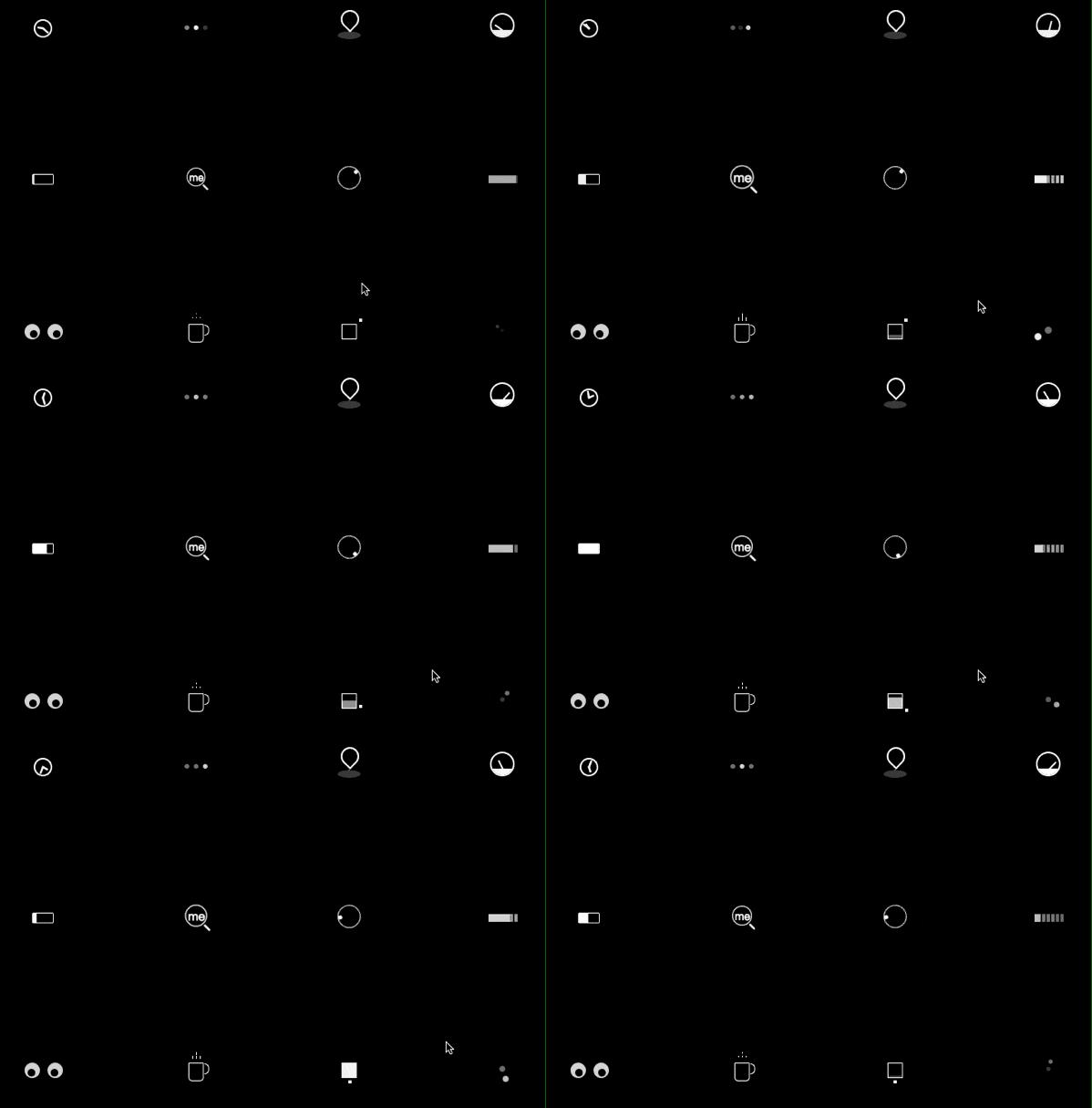
效果见下图
代码:
建议直接去本人github上浏览代码
https://github.com/wuliqiangqiang/loading
<!DOCTYPE html>
<html>
<head>
<title>loading效果</title>
<link rel="stylesheet" href="./time.css">
<link rel="stylesheet" href="./typing.css">
<link rel="stylesheet" href="./location_indicator.css">
<link rel="stylesheet" href="./magnifier.css">
<link rel="stylesheet" href="./square.css">
<link rel="stylesheet" href="./egg.css">
<link rel="stylesheet" href="./dashboard.css">
<link rel="stylesheet" href="./coffee_cup.css">
<link rel="stylesheet" href="./clound.css">
<link rel="stylesheet" href="./circle.css">
<link rel="stylesheet" href="./battery.css">
<link rel="stylesheet" href="./help.css">
<style type="text/css">
* {
-webkit-box-sizing: border-box;
-moz-box-sizing: border-box;
box-sizing: border-box;
}
/* 浮动 */
.cf:before,
.cf:after {
content: " ";
display: table;
}
.cf:after {
clear: both;
}
html {
color: #fff;
background-color: #000;
}
.wrapper {
width: 700px;
margin: 0 auto;
}
.row {
text-align: center;
padding: 50px 0;
}
.span,
.span_large {
float: left;
width: 100px;
background-color: rgba(0, 0, 0, 0.02);
height: 100px;
vertical-align: middle;
border-radius: 1px;
margin-right: 100px;
}
.span:last-child {
margin-right: 0px;
}
/* loading块 */
.battery {
width: 28px;
height: 14px;
border: 1px #fff solid;
border-radius: 2px;
-webkit-animation: charge 4s linear infinite;
-moz-animation: charge 4s linear infinite;
animation: charge 4s linear infinite;
margin: 40px auto 0;
}
.battery:after {
width: 2px;
height: 7px;
background-color: #fff;
border-radius: 0px 1px 1px 0px;
position: absolute;
content: "";
top: 2px;
right: -4px;
}
@-webkit-keyframes charge {
0% {
box-shadow: inset 0px 0px 0px #fff;
}
100% {
box-shadow: inset 30px 0px 0px #fff;
}
}
@-moz-keyframes charge {
0% {
box-shadow: inset 0px 0px 0px #fff;
}
100% {
box-shadow: inset 30px 0px 0px #fff;
}
}
@keyframes charge {
0% {
box-shadow: inset 0px 0px 0px #fff;
}
100% {
box-shadow: inset 30px 0px 0px #fff;
}
}
.circle {
margin: 40px auto;
position: relative;
width: 8px;
height: 8px;
background-color: rgba(255, 255, 255, 0.5);
box-shadow: -14px 0px 0px rgba(255, 255, 255, 1);
border-radius: 50%;
-webkit-animation: circle_classic 1s ease-in-out infinite alternate;
-moz-animation: circle_classic 1s ease-in-out infinite alternate;
animation: circle_classic 1s ease-in-out infinite alternate;
}
@-webkit-keyframes circle_classic {
0% {
opacity: 0.1;
-webkit-transform: rotate(0deg) scale(0.5);
}
100% {
opacity: 1;
-webkit-transform: rotate(360deg) scale(1.2);
}
}
@-moz-keyframes circle_classic {
0% {
opacity: 0.1;
-moz-transform: rotate(0deg) scale(0.5);
}
100% {
opacity: 1;
-moz-transform: rotate(360deg) scale(1.2);
}
}
@keyframes circle_classic {
0% {
opacity: 0.1;
transform: rotate(0deg) scale(0.5);
}
100% {
opacity: 1;
transform: rotate(360deg) scale(1.2);
}
}
.cloud {
margin: 42px 30px;
width: 4px;
height: 10px;
opacity: 0.5;
position: relative;
box-shadow: 6px 0px 0px 0px rgba(255, 255, 255, 1),
12px 0px 0px 0px rgba(255, 255, 255, 1),
18px 0px 0px 0px rgba(255, 255, 255, 1),
24px 0px 0px 0px rgba(255, 255, 255, 1),
30px 0px 0px 0px rgba(255, 255, 255, 1),
36px 0px 0px 0px rgba(255, 255, 255, 1);
-webkit-animation: rain 1s linear infinite alternate;
-moz-animation: rain 1s linear infinite alternate;
animation: rain 1s linear infinite alternate;
}
.cloud:after {
width: 40px;
height: 10px;
position: absolute;
content: "";
background-color: rgba(255, 255, 255, 1);
top: 0px;
opacity: 1;
-webkit-animation: line_flow 2s linear infinite reverse;
-moz-animation: line_flow 2s linear infinite reverse;
animation: line_flow 2s linear infinite reverse;
}
@-webkit-keyframes rain {
0% {
box-shadow: 6px 0px 0px 0px rgba(255, 255, 255, 1),
12px 0px 0px 0px rgba(255, 255, 255, 0.9),
18px 0px 0px 0px rgba(255, 255, 255, 0.7),
24px 0px 0px 0px rgba(255, 255, 255, 0.6),
30px 0px 0px 0px rgba(255, 255, 255, 0.3),
36px 0px 0px 0px rgba(255, 255, 255, 0.2);
}
100% {
box-shadow: 6px 0px 0px 0px rgba(255, 255, 255, 0.2),
12px 0px 0px 0px rgba(255, 255, 255, 0.3),
18px 0px 0px 0px rgba(255, 255, 255, 0.6),
24px 0px 0px 0px rgba(255, 255, 255, 0.7),
30px 0px 0px 0px rgba(255, 255, 255, 0.9),
36px 0px 0px 0px rgba(255, 255, 255, 1);
opacity: 1;
}
}
@-moz-keyframes rain {
0% {
box-shadow: 6px 0px 0px 0px rgba(255, 255, 255, 1),
12px 0px 0px 0px rgba(255, 255, 255, 0.9),
18px 0px 0px 0px rgba(255, 255, 255, 0.7),
24px 0px 0px 0px rgba(255, 255, 255, 0.6),
30px 0px 0px 0px rgba(255, 255, 255, 0.3),
36px 0px 0px 0px rgba(255, 255, 255, 0.2);
}
100% {
box-shadow: 6px 0px 0px 0px rgba(255, 255, 255, 0.2),
12px 0px 0px 0px rgba(255, 255, 255, 0.3),
18px 0px 0px 0px rgba(255, 255, 255, 0.6),
24px 0px 0px 0px rgba(255, 255, 255, 0.7),
30px 0px 0px 0px rgba(255, 255, 255, 0.9),
36px 0px 0px 0px rgba(255, 255, 255, 1);
opacity: 1;
}
}
@keyframes rain {
0% {
box-shadow: 6px 0px 0px 0px rgba(255, 255, 255, 1),
12px 0px 0px 0px rgba(255, 255, 255, 0.9),
18px 0px 0px 0px rgba(255, 255, 255, 0.7),
24px 0px 0px 0px rgba(255, 255, 255, 0.6),
30px 0px 0px 0px rgba(255, 255, 255, 0.3),
36px 0px 0px 0px rgba(255, 255, 255, 0.2);
}
100% {
box-shadow: 6px 0px 0px 0px rgba(255, 255, 255, 0.2),
12px 0px 0px 0px rgba(255, 255, 255, 0.3),
18px 0px 0px 0px rgba(255, 255, 255, 0.6),
24px 0px 0px 0px rgba(255, 255, 255, 0.7),
30px 0px 0px 0px rgba(255, 255, 255, 0.9),
36px 0px 0px 0px rgba(255, 255, 255, 1);
opacity: 1;
}
}
@-webkit-keyframes line_flow {
0% {
width: 0px;
}
100% {
width: 40px;
}
}
@-moz-keyframes line_flow {
0% {
width: 0px;
}
100% {
width: 40px;
}
}
@keyframes line_flow {
0% {
width: 0px;
}
100% {
width: 40px;
}
}
.coffee_cup {
width: 20px;
height: 24px;
border: 1px rgba(255, 255, 255, 1) solid;
border-radius: 0px 0px 5px 5px;
position: relative;
margin: 36px auto;
}
.coffee_cup:after,
.coffee_cup:before {
position: absolute;
content: "";
}
.coffee_cup:after {
width: 5px;
height: 12px;
border: 1px #fff solid;
border-left: none;
border-radius: 0px 20px 20px 0px;
left: 20px;
}
.coffee_cup:before {
width: 1px;
height: 6px;
background-color: rgba(255, 255, 255, 1);
top: -10px;
left: 4px;
box-shadow: 5px 0px 0px 0px rgba(255, 255, 255, 1),
5px -5px 0px 0px rgba(255, 255, 255, 1),
10px 0px 0px 0px rgba(255, 255, 255, 1);
-webkit-animation: steam 1s linear infinite alternate;
-moz-animation: steam 1s linear infinite alternate;
animation: steam 1s linear infinite alternate;
}
@-webkit-keyframes steam {
0% {
height: 0px;
}
100% {
height: 6px;
}
}
@-moz-keyframes steam {
0% {
height: 0px;
}
100% {
height: 6px;
}
}
@keyframes steam {
0% {
height: 0px;
}
100% {
height: 6px;
}
}
.dashboard {
width: 32px;
height: 32px;
margin: 30px auto;
border: 2px rgba(255, 255, 255, 1) solid;
border-radius: 100%;
position: relative;
overflow: hidden;
z-index: 1;
}
.dashboard:after,
.dashboard:before {
position: absolute;
content: "";
}
.dashboard:after {
width: 14px;
height: 2px;
top: 20px;
-webkit-transform-origin: 1px 1px;
-moz-transform-origin: 1px 1px;
transform-origin: 1px 1px;
background-color: rgba(255, 255, 255, 1);
-webkit-animation: dashboard_hand 2s linear infinite alternate;
-moz-animation: dashboard_hand 2s linear infinite alternate;
animation: dashboard_hand 2s linear infinite alternate;
}
.dashboard:before {
width: 32px;
height: 10px;
background-color: rgba(255, 255, 255, 1);
top: 20px;
left: -2px;
}
@-webkit-keyframes dashboard_hand {
0% {
-webkit-transform: rotate(-160deg);
}
100% {
-webkit-transform: rotate(-20deg);
}
}
@-moz-keyframes dashboard_hand {
0% {
-moz-transform: rotate(-160deg);
}
100% {
-moz-transform: rotate(-20deg);
}
}
@keyframes dashboard_hand {
0% {
transform: rotate(-160deg);
}
100% {
transform: rotate(-20deg);
}
}
.eye {
width: 20px;
height: 20px;
background-color: rgba(255, 255, 255, 0.8);
border-radius: 50%;
box-shadow: 30px 0px 0px 0px rgba(255, 255, 255, 0.8);
position: relative;
margin: 36px 26px;
}
.eye:after {
background-color: #000;
width: 10px;
height: 10px;
box-shadow: 30px 0px 0px 0px #000;
border-radius: 50%;
left: 9px;
top: 8px;
position: absolute;
content: "";
-webkit-animation: eyeball 1s linear infinite alternate;
-moz-animation: eyeball 1s linear infinite alternate;
animation: eyeball 1s linear infinite alternate;
}
@-webkit-keyframes eyeball {
0% {
left: 9px;
}
100% {
left: 1px;
}
}
@-moz-keyframes eyeball {
0% {
left: 9px;
}
100% {
left: 1px;
}
}
@keyframes eyeball {
0% {
left: 9px;
}
100% {
left: 1px;
}
}
.help {
width: 30px;
height: 30px;
border: 1px #fff solid;
border-radius: 50%;
-webkit-animation: rotation 1s ease-in-out infinite;
-moz-animation: rotation 1s ease-in-out infinite;
animation: rotation 1s ease-in-out infinite;
margin: 30px auto;
}
.help:after {
width: 5px;
height: 5px;
background-color: rgba(255, 255, 255, 1);
border-radius: 100%;
position: absolute;
content: "";
}
@-webkit-keyframes rotation {
0% {
-webkit-transform: rotate(0deg);
}
100% {
-webkit-transform: rotate(360deg);
}
}
@-moz-keyframes rotation {
0% {
-moz-transform: rotate(0deg);
}
100% {
-moz-transform: rotate(360deg);
}
}
@keyframes rotation {
0% {
transform: rotate(0deg);
}
100% {
transform: rotate(360deg);
}
}
.location_indicator {
margin: 30px auto;
position: relative;
left: -9px;
}
.location_indicator:before,
.location_indicator:after {
position: absolute;
content: "";
}
.location_indicator:before {
width: 20px;
height: 20px;
border-radius: 100% 100% 100% 0;
box-shadow: 0px 0px 0px 2px rgba(255, 255, 255, 1);
-webkit-animation: mapping 1s linear infinite;
-moz-animation: mapping 1s linear infinite;
animation: mapping 1s linear infinite;
-webkit-transform: rotate(-46deg);
-moz-transform: rotate(-46deg);
transform: rotate(-46deg);
}
.location_indicator:after {
width: 30px;
height: 10px;
border-radius: 100%;
left: 44px;
background-color: rgba(255, 255, 255, 0.2);
top: 24px;
z-index: -1;
}
@-webkit-keyframes mapping {
0% {
top: 0;
}
50% {
top: -5px;
}
100% {
top: 0;
}
}
@-moz-keyframes mapping {
0% {
top: 0;
}
50% {
top: -5px;
}
100% {
top: 0;
}
}
@-keyframes mapping {
0% {
top: 0;
}
50% {
top: -5px;
}
100% {
top: 0;
}
}
.magnifier {
width: 20px;
height: 20px;
box-shadow: 0px 0px 0px 1px #fff;
border-radius: 50%;
position: relative;
margin: 34px auto;
-webkit-animation: magnify 1s linear infinite alternate;
-moz-animation: magnify 1s linear infinite alternate;
animation: magnify 1s linear infinite alternate;
}
.magnifier:after,
.magnifier:before {
position: absolute;
content: "";
}
.magnifier:before {
content: "me";
font-size: 12px;
left: 2px;
text-align: center;
top: 2px;
}
.magnifier:after {
width: 2px;
height: 8px;
background-color: #fff;
bottom: -6px;
left: 20px;
border-radius: 2px;
-webkit-transform: rotate(-45deg);
-moz-transform: rotate(-45deg);
transform: rotate(-45deg);
}
@-webkit-keyframes magnify {
0% {
-webkit-transform: scale(1);
}
100% {
-webkit-transform: scale(1.5);
}
}
@-moz-keyframes magnify {
0% {
-moz-transform: scale(1);
}
100% {
-moz-transform: scale(1.5);
}
}
@keyframes magnify {
0% {
transform: scale(1);
}
100% {
transform: scale(1.5);
}
}
.square {
width: 20px;
height: 20px;
border: 1px rgba(255, 255, 255, 1) solid;
margin: 36px auto;
position: relative;
-webkit-animation: fill_color 5s linear infinite;
-moz-animation: fill_color 5s linear infinite;
animation: fill_color 5s linear infinite;
}
.square:after {
width: 4px;
height: 4px;
position: absolute;
content: "";
background-color: rgba(255, 255, 255, 1);
top: -8px;
left: 0px;
-webkit-animation: square_check 1s ease-in-out infinite;
-moz-animation: square_check 1s ease-in-out infinite;
animation: square_check 1s ease-in-out infinite;
}
@-webkit-keyframes square_check {
25% {
left: 22px;
top: -8px;
}
50% {
left: 22px;
top: 22px;
}
75% {
left: -9px;
top: 22px;
}
100% {
left: -9px;
top: -7px;
}
}
@-moz-keyframes square_check {
25% {
left: 22px;
top: -8px;
}
50% {
left: 22px;
top: 22px;
}
75% {
left: -9px;
top: 22px;
}
100% {
left: -9px;
top: -7px;
}
}
@keyframes square_check {
25% {
left: 22px;
top: -8px;
}
50% {
left: 22px;
top: 22px;
}
75% {
left: -9px;
top: 22px;
}
100% {
left: -9px;
top: -7px;
}
}
@-webkit-keyframes fill_color {
0% {
box-shadow: inset 0px 0px 0px 0px rgba(255, 255, 255, 0.1);
}
100% {
box-shadow: inset 0px -20px 0px 0px rgba(255, 255, 255, 1);
}
}
@-moz-keyframes fill_color {
0% {
box-shadow: inset 0px 0px 0px 0px rgba(255, 255, 255, 0.1);
}
100% {
box-shadow: inset 0px -20px 0px 0px rgba(255, 255, 255, 1);
}
}
@keyframes fill_color {
0% {
box-shadow: inset 0px 0px 0px 0px rgba(255, 255, 255, 0.1);
}
100% {
box-shadow: inset 0px -20px 0px 0px rgba(255, 255, 255, 1);
}
}
.timer {
width: 24px;
height: 24px;
background-color: transparent;
box-shadow: inset 0px 0px 0px 2px #fff;
border-radius: 50%;
position: relative;
margin: 38px auto;
}
.timer:after,
.timer:before {
position: absolute;
content: "";
background-color: #fff;
}
.timer:after {
width: 10px;
height: 2px;
top: 11px;
left: 11px;
-webkit-transform-origin: 1px 1px;
-moz-transform-origin: 1px 1px;
transform-origin: 1px 1px;
-webkit-animation: minhand 2s linear infinite;
-moz-animation: minhand 2s linear infinite;
animation: minhand 2s linear infinite;
}
.timer:before {
width: 8px;
height: 2px;
top: 11px;
left: 11px;
-webkit-transform-origin: 1px 1px;
-moz-transform-origin: 1px 1px;
transform-origin: 1px 1px;
-webkit-animation: hrhand 8s linear infinite;
-moz-animation: hrhand 8s linear infinite;
animation: hrhand 8s linear infinite;
}
@-webkit-keyframes minhand {
0% {
-webkit-transform: rotate(0deg)
}
100% {
-webkit-transform: rotate(360deg)
}
}
@-moz-keyframes minhand {
0% {
-moz-transform: rotate(0deg)
}
100% {
-moz-transform: rotate(360deg)
}
}
@keyframes minhand {
0% {
transform: rotate(0deg)
}
100% {
transform: rotate(360deg)
}
}
@-webkit-keyframes hrhand {
0% {
-webkit-transform: rotate(0deg)
}
100% {
-webkit-transform: rotate(360deg)
}
}
@-moz-keyframes hrhand {
0% {
-moz-transform: rotate(0deg)
}
100% {
-moz-transform: rotate(360deg)
}
}
@keyframes hrhand {
0% {
transform: rotate(0deg)
}
100% {
transform: rotate(360deg)
}
}
.typing_loader {
width: 6px;
height: 6px;
border-radius: 50%;
-webkit-animation: typing 1s linear infinite alternate;
-moz-animation: Typing 1s linear infinite alternate;
animation: typing 1s linear infinite alternate;
margin: 46px auto;
position: relative;
left: -12px;
}
@-webkit-keyframes typing {
0% {
background-color: rgba(255, 255, 255, 1);
box-shadow: 12px 0px 0px 0px rgba(255, 255, 255, 0.2),
24px 0px 0px 0px rgba(255, 255, 255, 0.2);
}
25% {
background-color: rgba(255, 255, 255, 0.4);
box-shadow: 12px 0px 0px 0px rgba(255, 255, 255, 2),
24px 0px 0px 0px rgba(255, 255, 255, 0.2);
}
75% {
background-color: rgba(255, 255, 255, 0.4);
box-shadow: 12px 0px 0px 0px rgba(255, 255, 255, 0.2),
24px 0px 0px 0px rgba(255, 255, 255, 1);
}
}
@-moz-keyframes typing {
0% {
background-color: rgba(255, 255, 255, 1);
box-shadow: 12px 0px 0px 0px rgba(255, 255, 255, 0.2),
24px 0px 0px 0px rgba(255, 255, 255, 0.2);
}
25% {
background-color: rgba(255, 255, 255, 0.4);
box-shadow: 12px 0px 0px 0px rgba(255, 255, 255, 2),
24px 0px 0px 0px rgba(255, 255, 255, 0.2);
}
75% {
background-color: rgba(255, 255, 255, 0.4);
box-shadow: 12px 0px 0px 0px rgba(255, 255, 255, 0.2),
24px 0px 0px 0px rgba(255, 255, 255, 1);
}
}
@keyframes typing {
0% {
background-color: rgba(255, 255, 255, 1);
box-shadow: 12px 0px 0px 0px rgba(255, 255, 255, 0.2),
24px 0px 0px 0px rgba(255, 255, 255, 0.2);
}
25% {
background-color: rgba(255, 255, 255, 0.4);
box-shadow: 12px 0px 0px 0px rgba(255, 255, 255, 2),
24px 0px 0px 0px rgba(255, 255, 255, 0.2);
}
75% {
background-color: rgba(255, 255, 255, 0.4);
box-shadow: 12px 0px 0px 0px rgba(255, 255, 255, 0.2),
24px 0px 0px 0px rgba(255, 255, 255, 1);
}
}
</style>
</head>
<body>
<div class="wrapper">
<div class="row cf">
<div class="span">
<div class="timer"></div>
</div>
<div class="span">
<div class="typing_loader"></div>
</div>
<div class="span">
<div class="location_indicator"></div>
</div>
<div class="span">
<div class="dashboard"></div>
</div>
</div>
<div class="row cf">
<div class="span">
<div class="battery"></div>
</div>
<div class="span">
<div class="magnifier"></div>
</div>
<div class="span">
<div class="help"></div>
</div>
<div class="span">
<div class="cloud"></div>
</div>
</div>
<div class="row cf">
<div class="span">
<div class="eye"></div>
</div>
<div class="span">
<div class="coffee_cup"></div>
</div>
<div class="span">
<div class="square"></div>
</div>
<div class="span">
<div class="circle"></div>
</div>
</div>
</div>
</body>
</html>
html+css3 实现各种loading效果的更多相关文章
- CSS3饼状loading效果
概述 之前看到很多饼状loading效果是用图片的方式实现的,本例子采用的是纯CSS3实现,这样可以节省资源空间,有兴趣的小伙伴可以看下~ 详细 代码下载:http://www.demodashi.c ...
- 10种CSS3实现的Loading效果
原文链接:http://www.cnblogs.com/jr1993/p/4622039.html 第一种效果: 代码如下: <div class="loading"> ...
- HTML5+CSS3 loading 效果收集--转载
用gif图片来做loading的时代已经过去了,它显得太low了,而用HTML5/CSS3以及SVG和canvas来做加载动画显得既炫酷又逼格十足.这已经成为一种趋势. 这里收集了几十个用html5和 ...
- 【转】 CSS3实现10种Loading效果
昨晚用CSS3实现了几种常见的Loading效果,虽然很简单,但还是分享一下,顺便也当是做做笔记…… PS:如需转载,请注明出处! 第1种效果: 代码如下: <div class="l ...
- CSS3轻松实现清新 Loading 效果
至今HTML5中国已经为大家分享过几百种基于 CSS3 的Loading加载动画,效果酷炫代码简洁,非常值得学习借鉴;今天就先给大家分享两个常用的CSS3的Loading的案例. 第一种效果: HTM ...
- CSS3实现10种Loading效果
昨晚用CSS3实现了几种常见的Loading效果,虽然很简单,但还是分享一下,顺便也当是做做笔记…… 第1种效果: 代码如下: <div class="loading"> ...
- CSS3实现8种Loading效果【第二波】
原文:CSS3实现8种Loading效果[第二波] 今晚吃完饭回宿舍又捣鼓了另外几种Loading效果,老规矩,直接“上菜“…… 注:gif图片动画有些卡顿,非实际效果! PS:若要转载请注明出处,尊 ...
- 用CSS3实现饼状loading效果
原文地址:http://visugar.com/2017/05/17/CSS3%E9%A5%BC%E7%8A%B6loading%E6%95%88%E6%9E%9C/ 写在前面 (附录有源码及效果) ...
- css3 之炫酷的loading效果
css3 之炫酷的loading效果 今天实现了一个炫酷的loading效果,基本全用css来实现,主要练习一下css3的熟练运用 js需要引入jquery 只用到了一点点js 先看效果图 html: ...
随机推荐
- Java Collections Framework知识结构目录
The core collection interfaces are the foundation of the Java Collections Framework. The Java Collec ...
- Linux-->Mysql:安装,测试
环境准备 mysql下载地址:https://dev.mysql.com/get/Downloads/MySQL-5.7/mysql-5.7.19-linux-glibc2.12-x86_64.tar ...
- Batch Normalization 笔记
原理 BN的效果 Why BN works? 原理 输入层可以归一化,那么其他层也应该可以归一化.但是有个重要的问题,为什么要引入beta和gamma. 为什么要引入beta和gamma 不总是要标准 ...
- maven构建报错org.apache.maven.lifecycle.LifecycleExecutionException
2017年06月04日 15:03:10 阅读数:7991 maven构建报错 org.apache.maven.lifecycle.LifecycleExecutionException: Fail ...
- Sqlserver2008+搜索型注入技术
简单的判断搜索型注入漏洞存在不存在的办法是先搜索',如果出错,说明90%存在这个漏洞.然后搜索%,如果正常返回,说明95%有洞了. 然后再搜索一个关键字,比如2006吧,正常返回所有2006相关的信息 ...
- 区间DP学习总结
这段时间学习了区间DP,所以试着把学到的东西稍作总结,以备不时之需. 学习区间DP首先要弄清区间DP是为了解决什么问题:一般的DP主要是特征是一次往往只操作一个数值或者存储可以不连续的物品的状态(比如 ...
- 「SLYZ Online Judge#74 Be」
只有学校里的电脑才能看的题目 昊哥从牛客搬的,懒得找原题了 题意就是多组询问,每次询问一条树上路径,将这条路径上的点拿下来做\(0/1\)背包,求使得点权和为\(K\)的倍数的方案有几种 \(n< ...
- Linux(十一) 文件目录权限 chmod umask chown
一 文件目录权限定义 首先我们先认识一下文件目录的权限定义,请看下面ls -l的结果我们发现一个文件或者目录的前面有10位的信息,第一位表示文件类型,大概有一下几种类型:d 表示目录 - 普通文件 b ...
- 一张图解释 implicit
- Spring知识概括梳理
1. Spring 容器 http://blog.csdn.net/chenssy/article/details/8188570 2. Spring 注解 1)@Autowired http://b ...