
SSAS 聚合设计提升CUBE的查询性能(转载)
Problem
What exactly are SQL Server Analysis Services (SSAS) Aggregations and how exactly can I review and use them?
Solution
Aggregations in SSAS offer a wonderful opportunity to improve query performance and calculation times by "pre aggregating" sets of data. These aggregations allow a cube query to ask for a specific value or set of values for a specific group of dimension attributes (a set), and have the calculation already completed before the query was even asked. The aggregation and related query could ask for a single value or actually cover a whole set of values to be returned. Without the aggregations, the query would return results much slower and with more CPU and memory intensity as the query must complete the aggregation calculations at run time, which of course takes significantly longer than if the data points are already summarized to the desired level of the query. Of course it is a trade off between creating a large number of aggregations which speed up query performance versus increase processing time and memory needed to process the cube.
Establishing Aggregations
There are three distinct methods of defining aggregations currently available to cube designers.
The first method utilizes the Aggregation Design wizard to create a group of aggregations by comparing the amount of space required to store and process the aggregation vs. the time it would take to query for the same values. Siddharth Mehta completed an excellent tip on using the Aggregation Design wizard, which is available at: http://www.mssqltips.com/sqlservertip/2439/optimize-a-sql-server-analysis-services-measure-group-partition-for-performance/. This method is a good start; however it treats all possible combinations of aggregations as equally possible, so some aggregations may get created, but never be used.
The second method, called Usage Based Optimization, uses the SSAS Query log which must be turned on and then is used as a basis to establish the aggregations. This method addresses the problem with the Aggregation Design wizard by recording every n number of queries from SSAS. This recording is controlled by the Log \ Query Log properties and is set at the server level as shown in the below illustration. The tip, http://www.mssqltips.com/sqlservertip/2876/improve-sql-server-analysis-services-performance-with-the-usage-based-optimization-wizard/, written by Daniel Calbimonte provides a superb review of this topic. We could record every query, but that method has the potential to generate a very large table with many queries (which could impact performance).

So if we have these two methods of creating aggregations why do we need a third method?
The third method allows us to actually create aggregations based on the intended use of the SSAS database and at the desired level of detail or summation. In essence, this method allows us to decide exactly what aggregations need to be created at any desired attribute or hierarchy level and combination of attributes. Often, I compare the Aggregation Design wizard and the Query Log to the Database Tuning Adviser (DTA) in regular SQL Server. They both provide good starter advice to assist with creating high performing and responsive queries. However, you will often need to move beyond this introductory level of detail as your Cube increases in size, use, and complexity.
The first step in the process is to review your existing aggregates. We will again use the AdventureWorks DW SSAS database to review the existing aggregations and create new aggregations from scratch. This database is available for download for free, on CodePlex at: http://msftdbprodsamples.codeplex.com/releases/view/55330. Once you have the SQL Server and OLAP AdventureWorks databases installed, you will start SQL Server Data Tools (SSDT); SSDT is the new name for Business Intelligence Development Studio in SQL Server 2012.
We can now review the data aggregations that were previously created and then move to creating some new aggregations. In order to see the existing aggregations, you need to open the AdventrureWorks Cube and then click on the aggregation tab, as seen in the next screen print.

Before we move on, let us discuss a few concepts shown in the above screen print. First, on the left side, you see all your measure groups. In the above instance, the Internet Sales measure group has 1 Aggregation Design. In its simplest form an Aggregation Design is like a container or folder for the embedded aggregations. These aggregation designs can be tied to one or more partitions, but to only one measure group. For the above example, the Internet Sales aggregation design is tied to the Internet Sales partition and contains 41 individual aggregations. If no aggregations have been defined then the aggregation design says "Unassigned Aggregation Design" as illustrated next.

Although it is not readily apparent, two views aggregation views are available and each enables different options and settings. The default view is the standard view and is displayed next. You will notice the first two buttons are not grayed and are available to utilize. These buttons invoke the Aggregation Design wizard and Usage Based Optimization wizard. The standard view is invoked by clicking on the 4th button from the left.

The advanced view is implemented by clicking on the 5th button from the left (with the sigma symbol), and is shown below. You notice how the Aggregation Design wizard button and Usage Based Optimization wizard button both dim when you move to the advanced view, but the New Aggregation button, to the right of the standard view is available. The standard view definitely does not provide any details above the specific aggregation details, so we must move to the advanced view to see these details.

On the advanced view, as shown below, we need to select the measure group name, the Aggregation Design name, the sorting we would like to see and finally what range of aggregations we would like to display (steps 1 to 4). As the number of aggregations increases, the range field helps to manage the list and keep you from scrolling forever. You will also notice in the below screen print, that we actually get to see what dimension attributes make up each aggregate; one aggregate is setup for the Promotion Category while another if setup for the Discount Percent.

As an example, say after analyzing our usage patterns, we decide we need to add an aggregation by Product and Fiscal Year as those items will make up a common query for the Internet Sales measure group. To complete this task, you can right mouse click in aggregation detail area and select New Aggregation.

The new aggregation becomes A0 while the remaining aggregations "move" one column to the right (note the numbering is zero based). Now to create the aggregation, we simply click on the check box next to the dimension attributes which should be included in the aggregation and as shown below. Finally to complete the process, click on the save button.

SSAS also provides "caution warning messages" in the status row. This warning stems from the fact that within the Ship Date dimension, a hierarchy relationship already exists between the Date field and the Fiscal Year field, and thus creating an aggregation with both these items would be redundant. Also notice how next to each attribute the number of attribute values is listed which gives you an indication of the aggregation size.

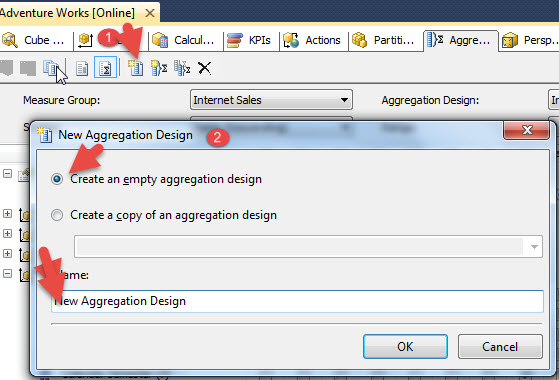
We can also create a new Aggregation Design by clicking on the New Aggregation Design button, step 1 in the below screen print. Then we define whether we want to copy an existing aggregation design or create a completely new one. Finally, the aggregation design needs to be named. As you can preview in the second screen print below, the new aggregation design was added to the Internet Sales measure group.

Conclusion
Just like with SQL Server indexes, there are several layers of design available for setting up aggregations in SSAS. You can use the Aggregation Design wizard and Usage Based Optimization wizard to setup aggregations in just a few steps. However, SSAS also provides a method of reviewing and even adding individual aggregation designs (aggregation groups) and individual aggregations. In order to create new aggregations, you must switch to the advanced view within the cube aggregation tab. Once on the Advanced view, individual dimension attributes can be added to your own custom aggregations which are tailored to your specific SSAS cube design and usage.
Next Steps
•Check out these related resources:
Optimize a SQL Server Analysis Services Measure Group Partition for Performance
Improve SQL Server Analysis Services Performance with the Usage Based Optimization Wizard
•SSAS Aggregations and Impact on Storage - http://technet.microsoft.com/en-us/library/ms174915(v=sql.110).aspx
SSAS 聚合设计提升CUBE的查询性能(转载)的更多相关文章
- 提升50%!Presto如何提升Hudi表查询性能?
分享一篇关于使用Hudi Clustering来优化Presto查询性能的talk talk主要分为如下几个部分 演讲者背景介绍 Apache Hudi介绍 数据湖演进和用例说明 Hudi Clust ...
- 从oracle往greenplum迁移,查询性能不满足要求的定位以及调优过程
一.前言 在一次对比oracle和greenplum查询性能过程中,由于greenplum查询性能不理想,因此进行定位分析,提升greenplum的查询性能 二.环境信息 初始情况下,搭建一个小的集群 ...
- 自适应查询执行:在运行时提升Spark SQL执行性能
前言 Catalyst是Spark SQL核心优化器,早期主要基于规则的优化器RBO,后期又引入基于代价进行优化的CBO.但是在这些版本中,Spark SQL执行计划一旦确定就不会改变.由于缺乏或者不 ...
- 查询性能提升3倍!Apache Hudi 查询优化了解下?
从 Hudi 0.10.0版本开始,我们很高兴推出在数据库领域中称为 Z-Order 和 Hilbert 空间填充曲线的高级数据布局优化技术的支持. 1. 背景 Amazon EMR 团队最近发表了一 ...
- 高性能MySQL笔记 第6章 查询性能优化
6.1 为什么查询速度会慢 查询的生命周期大致可按照顺序来看:从客户端,到服务器,然后在服务器上进行解析,生成执行计划,执行,并返回结果给客户端.其中“执行”可以认为是整个生命周期中最重要的阶段. ...
- mysql笔记03 查询性能优化
查询性能优化 1. 为什么查询速度会慢? 1). 如果把查询看作是一个任务,那么它由一系列子任务组成,每个子任务都会消耗一定的时间.如果要优化查询,实际上要优化其子任务,要么消除其中一些子任务,要么减 ...
- Elasticsearch索引和查询性能调优的21条建议
Elasticsearch部署建议 1. 选择合理的硬件配置:尽可能使用 SSD Elasticsearch 最大的瓶颈往往是磁盘读写性能,尤其是随机读取性能.使用SSD(PCI-E接口SSD卡/SA ...
- 关于领域驱动设计(DDD)中聚合设计的一些思考
关于DDD的理论知识总结,可参考这篇文章. DDD社区官网上一篇关于聚合设计的几个原则的简单讨论: 文章地址:http://dddcommunity.org/library/vernon_2011/, ...
- Redis 优化查询性能
一次使用 Redis 优化查询性能的实践 应用背景 有一个应用需要上传一组ID到服务器来查询这些ID所对应的数据,数据库中存储的数据量是7千万,每次上传的ID数量一般都是几百至上千数量级别. 以前 ...
随机推荐
- 2014年最大福利:185个Google排名因素!免费电子书下载
本博开张以来最大规模的干货放送!新手老手都有用! 不要再去追求PR了,不要再去发博客发论坛发外链了! 关注真正有用的Google排名因素! 整整185项,每一项都附带说明,必要的地方会给出一些附加的阅 ...
- sqlserver 中server 函数GETDATE(),DEFAULT用法
alter table Persons add datenow date DEFAULT GETDATE() null, datetimenow datetime DEFAULT GETDATE()n ...
- JMeter学习-014-JMeter 配置元件实例之 - 用户定义的变量 参数化配置
前文讲述了通过 CSV Data Set Config 实现参数化配置(详情敬请参阅:JMeter学习-010-JMeter 配置元件实例之 - CSV Data Set Config 参数化配置), ...
- JS-009-屏幕分辨率、浏览器显示区域、元素位置获取
此文简略讲述有关屏幕大小.元素位置及大小获取. 执行文中脚本时,请先打开 Chrome 浏览器,并切换至开发者工具的控制台,并打开网址:http://www.yixun.com/,文中元素事例为页面元 ...
- JavaScript实现dropdownlist选定值后将选定值的key与value填入两个textbox中
<script language="javascript" type="text/javascript"> var txtText0 = " ...
- Linux console on LCD
有时候需要将开机启动的信息输出到LCD上,并且在终端上进行调试.本文记录更改的方法. 参考链接 http://blog.csdn.net/chenbang110/article/details/787 ...
- imx6 android5.1 打开 调试串口
imx6的工板烧录android 5.1的镜像,uboot中能使用debug口,kernel,文件系统中不能使用debug口. 打开kenel和文件系统debug口方法,在uboot的bootargs ...
- iOS 使用UIView的一种有效方法
在一个典型的MVC结构 中,Model部分负责保存目标数据,View部分主要负责实现数据的界面以及将数据显示出来,二者在Controller的操作下协同工作.在iOS应用中,View的实现主要由UIV ...
- Java实现热替换
package test; import java.io.ByteArrayOutputStream; import java.io.FileInputStream; import java.nio. ...
- convert Timestamp to Real time
select r.ring_buffer_address, r.ring_buffer_type, dateadd (ms, r.[timestamp] - sysinfo.sqlserver_sta ...