
自定义tableViewCell
http://my.oschina.net/joanfen/blog/137601
效果如下图:可触发按钮事件

1、创建一个Empty Application
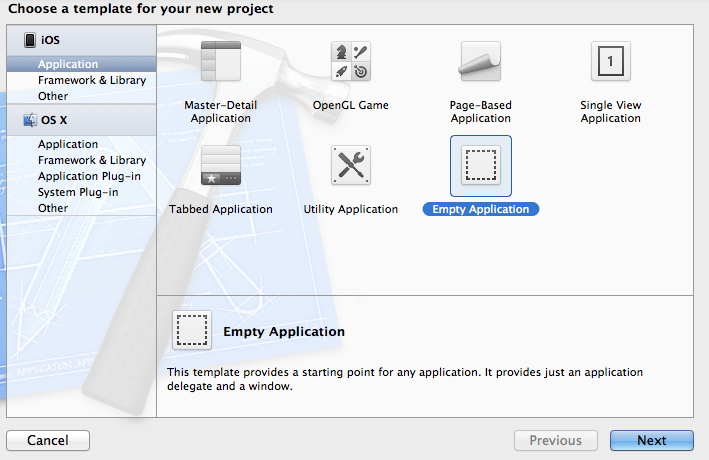
2、新建一个TableViewController,命名为MyTable

2.1在AppDelegate.h中添加@class 和property
|
1
2
3
4
5
6
7
8
9
10
11
12
|
#import <UIKit/UIKit.h>@class MyTable;@interface AppDelegate : UIResponder <UIApplicationDelegate>@property (strong, nonatomic) UIWindow *window;//声明@property (strong, nonatomic) MyTable *MyTableView;@end |
2.2在AppDelegate.m的 didFinishLaunchingWithOptions方法中
|
1
2
3
4
5
6
7
8
9
10
11
12
13
14
15
16
|
- (BOOL)application:(UIApplication *)application didFinishLaunchingWithOptions:(NSDictionary *)launchOptions{ self.window = [[UIWindow alloc] initWithFrame:[[UIScreen mainScreen] bounds]]; self.window.backgroundColor = [UIColor whiteColor]; _MyTableView = [[MyTable alloc] initWithNibName:@"MyTable" bundle:nil]; //创建一个navigationController,也可不创建,直接将window的rootViewController设定为MyTableView,此处创建是为了让程序有NavigationController的属性,方便Push视图 UINavigationController *nv = [[UINavigationController alloc] initWithRootViewController:self.MyTableView]; self.window.rootViewController = nv; [self.window makeKeyAndVisible]; return YES;} |
2.3、在MyTable的viewWillAppear方法中
|
1
2
3
4
5
|
-(void)viewWillAppear:(BOOL)animated{ [super viewWillAppear:animated]; self.title = @"自定义Table";} |
3、新建一个UITableViewCell类,命名为MyCell
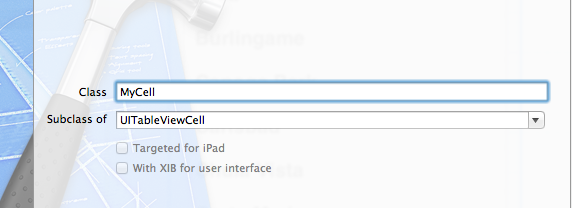
4、新建一个View,命名与上面的相同(也可不同,只是命名相同更加方便)

4.1、将此View中的View删除,拖一个TableViewCell进来,将此tableViewCell的Custom Class改成3中新建的类MyCell
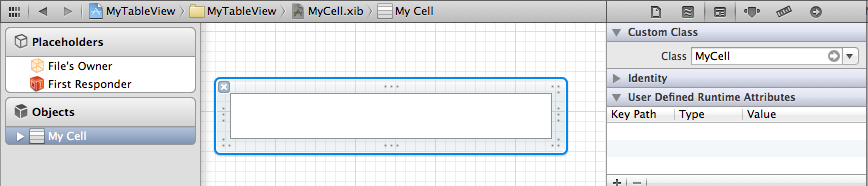
4.2.1、在cell中添加一个Label,创建映射
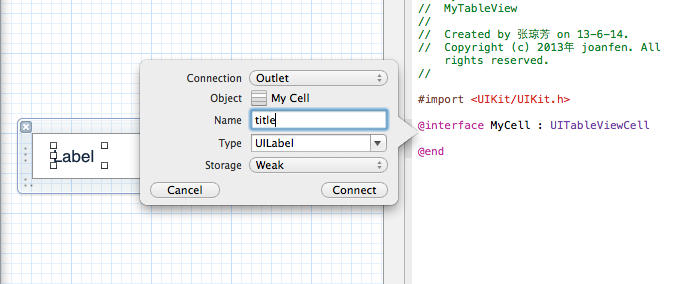
4.2.2、在Cell中添加一个TextField,创建映射
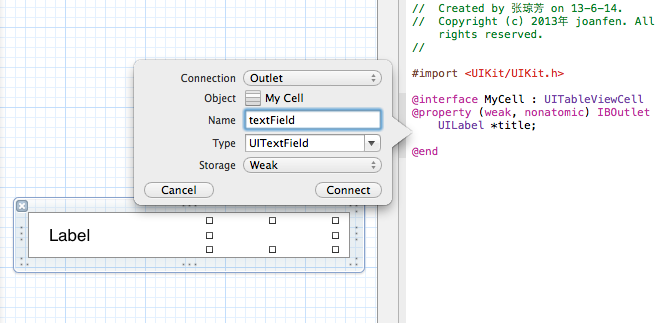
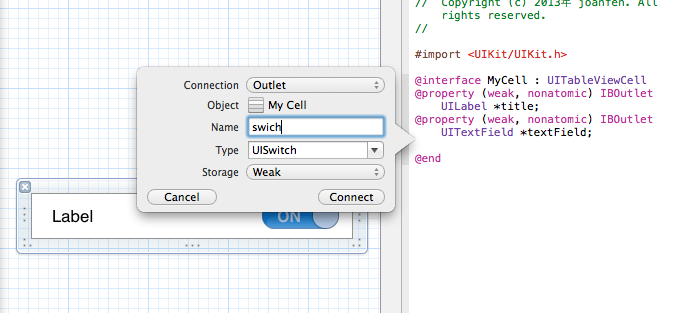
4.3.3、在Cell中添加一个Switch,创建映射
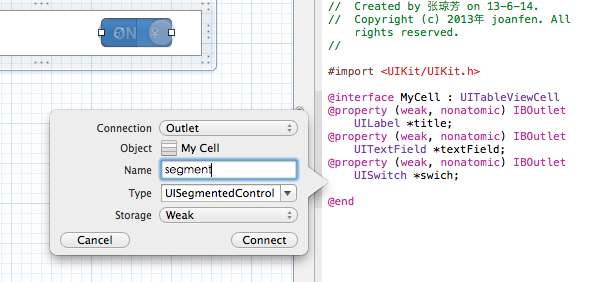
4.3.4、在Cell中添加一个segment,创建映射
5、在MyTable.m中,补充tableViewDataSource方法
|
1
2
3
4
5
6
7
8
9
10
11
12
13
|
- (NSInteger)numberOfSectionsInTableView:(UITableView *)tableView{ // Return the number of sections. return 1;}- (NSInteger)tableView:(UITableView *)tableView numberOfRowsInSection:(NSInteger)section{ // Return the number of rows in the section. return 4;} |
补充CellForRow方法
|
1
2
3
4
5
6
7
8
9
10
11
12
13
14
15
16
17
18
19
20
21
22
23
24
25
26
27
28
29
30
31
32
33
34
35
36
37
38
|
- (UITableViewCell *)tableView:(UITableView *)tableView cellForRowAtIndexPath:(NSIndexPath *)indexPath{ static NSString *CellIdentifier = @"MyCell"; //自定义cell MyCell *cell = (MyCell *)[tableView dequeueReusableCellWithIdentifier:CellIdentifier]; if (cell ==nil) { //加载MyCell.xib文件,此处loadNibNamed后面的参数CellIdentifier必须与MyCell.xib文件名相同,否则会无法加载,报错崩溃 NSArray *nibArray = [[NSBundle mainBundle] loadNibNamed:CellIdentifier owner:self options:nil]; cell = (MyCell *)[nibArray objectAtIndex:0]; } cell.accessoryType = UITableViewCellAccessoryDisclosureIndicator; NSArray *array = [NSArray arrayWithObjects:@"姓名",@"性别",@"学历",@"保险", nil]; cell.title.text = [array objectAtIndex:indexPath.row]; //根据行数来确定每行内容 if (indexPath.row == 0||indexPath.row==2) { cell.textField.hidden = NO; cell.swich.hidden = YES; cell.segment.hidden = YES; } else if(indexPath.row == 1){ cell.textField.hidden = YES; cell.segment.hidden = NO; cell.swich.hidden = YES; } else if(indexPath.row == 3) { cell.textField.hidden = YES; cell.swich.hidden = NO; cell.segment.hidden = YES; } //设置TextField代理 cell.textField.delegate = self; return cell;}
|
自定义tableViewCell的更多相关文章
- 自定义 TableViewCell 的分割线
刚开始自定义 tableViewCell 的时候,用的是直接在 cell 上加一张 imageView 的方法,如果在点击 cell 的时候有页面的跳转,这样做没什么问题,但是,如果在点击 cell ...
- IOS开发自定义tableviewcell的注意点😄
自定义tableviewcell 1.xib,nib拖控件:awakefromnib: 设置2,不拖控件:- (instancetype)initWithStyle:(UITableViewCellS ...
- 自定义TableViewCell 的方式实现自定义TableView(带源码)
转载于:http://www.cnblogs.com/macroxu-1982/archive/2012/08/30/2664121.html 实现的效果 实现过程 Step One 创建 自定义Ta ...
- TableView,自定义TableViewCell
自定义Table 原理: http://blog.jobbole.com/67272/ http://www.cnblogs.com/wangxiaofeinin/p/3532831.html 补充: ...
- 在自定义TableViewCell类里面添加按钮事件触发不了的一些实践
我的自定义cell上面有5个控件,分别是一个背景的UIImageView,一个专辑的UIImageView(上面加了一个播放的button),一个专辑名字的UIImageView(上面加了显示标题的U ...
- [iOS基础控件 - 6.6] 展示团购数据 自定义TableViewCell
A.需求 1.头部广告 2.自定义cell:含有图片.名称.购买数量.价格 3.使用xib设计自定义cell,自定义cell继承自UITableViewCell 4.尾部“加载更多按钮”,以及其被点击 ...
- OC开发_代码片段——使用Xib自定义tableViewCell
一.实现步骤 1.新建一个XIB文件:描述cell——tableCell.xib 2.新建UITableViewCell的子类,也就是cell文件:封装XIB内部的所有东西——TestCell.m \ ...
- iOS开发:自定义tableViewCell处理的问题
还在适配iOS6,索性下一个版本不适配了~~~~~ 问题: *** Assertion failure in -[ PCDiaryDetailReplyCell layoutSublayersOfLa ...
- 自定义tableviewCell的分割线
第一种:addsubview UIView *line = [[UIView alloc]initWithFrame:CGRectMake(10, cellH-0.5, DEVW-10, 0.5)]; ...
随机推荐
- 认识C和内存管理
认识C和内存管理 C程序内存空间分为下面5类: stack栈: 存放着局部变量和函数参数等数据,向下生长 (可读可写可执行) heap堆: 给动态分配内存使用,向上生长 (可读可写可执行) bss ...
- SpringJUnit4ClassRunner拉起来的单元测试怎么装配Container实例
由于历史代码的原因,产品中部分spring装配的实例需要通过Container的实现类(自定义的)去获取.那么当在单元测试中怎么实例化这个Container实现呢? 实例化Container实现需要A ...
- 微信消息回复C#
第一句话都会这么去写:程序猿就是苦逼,除了开发还要会写博文!哎,继上次写了C#成为微信开发者后,博友们积极查看本篇博客,在此深表感谢.顺便报一下上篇博客的网址:http://www.cnblogs.c ...
- 从零开始攻略PHP(4)——数组的使用
1.数组的概念 数组就是一个用来存储一系列变量值的命名区域. 每个数组元素有一个相关的索引(也成为关键字),它可以用来访问元素. PHP允许间隔性地使用数字或字符串作为数组的索引. 2.数字索引数组 ...
- swift语言实战晋级-第9章 游戏实战-跑酷熊猫-7-8 移动平台的算法
在上个小节,我们完成了平台的产生.那么我们来实现一下让平台移动.平台的移动,我们只需要在平台工厂类中写好移动的方法,然后在GameScene类中统一控制就行了. 在GameScene类中,有个upda ...
- 当As3遇见Swift(二)
字符串:String 都是用String来表示,都是值类型,在传递过程中都会进行拷贝. 计算字符数量 As3: str.length Swift: countElements(str) 数组:Arra ...
- 大数据Spark超经典视频链接全集
论坛贴吧等信息发布参考模板 Scala.Spark史上最全面.最详细.最彻底的一整套视频全集(特别是机器学习.Spark Core解密.Spark性能优化.Spark面试宝典.Spark项目案例等). ...
- bzoj4137 [FJOI2015]火星商店问题
比较容易想到的做法是线段树套字典树,修改操作时在字典树上经过的节点维护一个最近被访问过的时间,这样询问操作只经过满足时间条件的节点,时间复杂度O(NlogN^2)但是因为线段树每个节点都要套个字典树, ...
- CCF真题之画图
201409-2 问题描述 在一个定义了直角坐标系的纸上,画一个(x1,y1)到(x2,y2)的矩形指将横坐标范围从x1到x2,纵坐标范围从y1到y2之间的区域涂上颜色. 下图给出了一个画了两个矩形的 ...
- Linux mail 命令参数
linux mail 命令参数: 使用mail发邮件时,必须先将sendmail服务启动. mail –s “邮件主题” –c”抄送地址” –b “密送地址” -- -f 发送人邮件地址 –F 发件人 ...