
C# 生成中间含有LOGO的二维码
效果如下:
1、无LOGO的二维码:
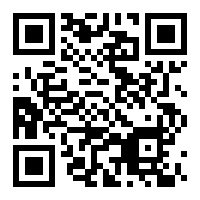
2、含有LOGO的二维码:

一、下载QrCode程序集:
使用的程序集有:
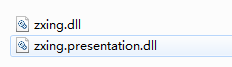
下载地址:
二、QRCodeHelper 工具类:
using System;

using System.Collections.Generic;

using System.Drawing;

using System.Drawing.Drawing2D;

using System.Drawing.Imaging;

using System.Linq;

using System.Text;

using System.Threading.Tasks;

using ZXing;

using ZXing.QrCode;

using ZXing.QrCode.Internal;

namespace Test.One.Common

{

    public class QRCodeHelper

    {

        /// <summary>

        /// 将图片按一定的比例压缩

        /// </summary>

        /// <param name="b">资源图片</param>

        /// <param name="destHeight">高度</param>

        /// <param name="destWidth">宽度</param>

        /// <returns></returns>

        public static Bitmap GetThumbnail(Bitmap b, int destHeight, int destWidth)

        {

            System.Drawing.Image imgSource = b;

            System.Drawing.Imaging.ImageFormat thisFormat = imgSource.RawFormat;

            int sW = , sH = ;

            // 按比例缩放

            int sWidth = imgSource.Width;

            int sHeight = imgSource.Height;

            if (sHeight > destHeight || sWidth > destWidth)

            {

                if ((sWidth * destHeight) > (sHeight * destWidth))

                {

                    sW = destWidth;

                    sH = (destWidth * sHeight) / sWidth;

                }

                else

                {

                    sH = destHeight;

                    sW = (sWidth * destHeight) / sHeight;

                }

            }

            else

            {

                sW = sWidth;

                sH = sHeight;

            }

            Bitmap outBmp = new Bitmap(destWidth, destHeight);

            Graphics g = Graphics.FromImage(outBmp);

            g.Clear(Color.Transparent);

            // 设置画布的描绘质量

            g.CompositingQuality = CompositingQuality.HighQuality;

            g.SmoothingMode = SmoothingMode.HighQuality;

            g.InterpolationMode = InterpolationMode.HighQualityBicubic;

            g.DrawImage(imgSource, new Rectangle((destWidth - sW) / , (destHeight - sH) / , sW, sH), , , imgSource.Width, imgSource.Height, GraphicsUnit.Pixel);

            g.Dispose();

            // 以下代码为保存图片时,设置压缩质量

            EncoderParameters encoderParams = new EncoderParameters();

            long[] quality = new long[];

            quality[] = ;

            EncoderParameter encoderParam = new EncoderParameter(System.Drawing.Imaging.Encoder.Quality, quality);

            encoderParams.Param[] = encoderParam;

            imgSource.Dispose();

            return outBmp;

        }

        /// <summary>

        /// 生成二维码

        /// </summary>

        /// <param name="content">需要生成二维码的内容</param>

        /// <param name="size">二维码图片长宽大小</param>

        /// <returns></returns>

        public static Bitmap Create(string content, int size)

        {

            try

            {

                var options = new QrCodeEncodingOptions

                {

                    DisableECI = true,

                    CharacterSet = "UTF-8",

                    Width = size,

                    Height = size,

                    Margin = ,

                    ErrorCorrection = ErrorCorrectionLevel.H

                };

                var writer = new BarcodeWriter();

                writer.Format = BarcodeFormat.QR_CODE;

                writer.Options = options;

                var bmp = writer.Write(content);

                return bmp;

            }

            catch (Exception ex)

            {

                return null;

            }

        }

        #region 合并用户QR图片和用户头像

        /// <summary>

        /// 合并用户QR图片和用户头像

        /// </summary>

        /// <param name="qrImg">QR图片(二维码图片)</param>

        /// <param name="headerImg">用户头像</param>

        /// <param name="n">缩放比例</param>

        /// <returns></returns>

        public static Bitmap MergeQrImg(Bitmap qrImg, Bitmap headerImg, double n = 0.23)

        {

            int margin = ;

            float dpix = qrImg.HorizontalResolution;

            float dpiy = qrImg.VerticalResolution;

            var _newWidth = ( * qrImg.Width -  * margin) * 1.0f / ;

            var _headerImg = ZoomPic(headerImg, _newWidth / headerImg.Width);

            //处理头像

            int newImgWidth = _headerImg.Width + margin;

            Bitmap headerBgImg = new Bitmap(newImgWidth, newImgWidth);

            headerBgImg.MakeTransparent();

            Graphics g = Graphics.FromImage(headerBgImg);

            g.InterpolationMode = System.Drawing.Drawing2D.InterpolationMode.HighQualityBicubic;

            g.SmoothingMode = System.Drawing.Drawing2D.SmoothingMode.HighQuality;

            g.Clear(Color.Transparent);

            Pen p = new Pen(new SolidBrush(Color.White));

            Rectangle rect = new Rectangle(, , newImgWidth - , newImgWidth - );

            using (GraphicsPath path = CreateRoundedRectanglePath(rect, ))

            {

                g.DrawPath(p, path);

                g.FillPath(new SolidBrush(Color.White), path);

            }

            //画头像

            Bitmap img1 = new Bitmap(_headerImg.Width, _headerImg.Width);

            Graphics g1 = Graphics.FromImage(img1);

            g1.InterpolationMode = System.Drawing.Drawing2D.InterpolationMode.HighQualityBicubic;

            g1.SmoothingMode = System.Drawing.Drawing2D.SmoothingMode.HighQuality;

            g1.Clear(Color.Transparent);

            Pen p1 = new Pen(new SolidBrush(Color.Gray));

            Rectangle rect1 = new Rectangle(, , _headerImg.Width - , _headerImg.Width - );

            using (GraphicsPath path1 = CreateRoundedRectanglePath(rect1, ))

            {

                g1.DrawPath(p1, path1);

                TextureBrush brush = new TextureBrush(_headerImg);

                g1.FillPath(brush, path1);

            }

            g1.Dispose();

            PointF center = new PointF((newImgWidth - _headerImg.Width) / , (newImgWidth - _headerImg.Height) / );

            g.DrawImage(img1, center.X, center.Y, _headerImg.Width, _headerImg.Height);

            g.Dispose();

            Bitmap backgroudImg = new Bitmap(qrImg.Width, qrImg.Height);

            backgroudImg.MakeTransparent();

            backgroudImg.SetResolution(dpix, dpiy);

            headerBgImg.SetResolution(dpix, dpiy);

            Graphics g2 = Graphics.FromImage(backgroudImg);

            g2.Clear(Color.Transparent);

            g2.DrawImage(qrImg, , );

            PointF center2 = new PointF((qrImg.Width - headerBgImg.Width) / , (qrImg.Height - headerBgImg.Height) / );

            g2.DrawImage(headerBgImg, center2);

            g2.Dispose();

            return backgroudImg;

        }

        #endregion

        #region 图形处理

        /// <summary>

        /// 创建圆角矩形

        /// </summary>

        /// <param name="rect">区域</param>

        /// <param name="cornerRadius">圆角角度</param>

        /// <returns></returns>

        private static GraphicsPath CreateRoundedRectanglePath(Rectangle rect, int cornerRadius)

        {

            //下午重新整理下,圆角矩形

            GraphicsPath roundedRect = new GraphicsPath();

            roundedRect.AddArc(rect.X, rect.Y, cornerRadius * , cornerRadius * , , );

            roundedRect.AddLine(rect.X + cornerRadius, rect.Y, rect.Right - cornerRadius * , rect.Y);

            roundedRect.AddArc(rect.X + rect.Width - cornerRadius * , rect.Y, cornerRadius * , cornerRadius * , , );

            roundedRect.AddLine(rect.Right, rect.Y + cornerRadius * , rect.Right, rect.Y + rect.Height - cornerRadius * );

            roundedRect.AddArc(rect.X + rect.Width - cornerRadius * , rect.Y + rect.Height - cornerRadius * , cornerRadius * , cornerRadius * , , );

            roundedRect.AddLine(rect.Right - cornerRadius * , rect.Bottom, rect.X + cornerRadius * , rect.Bottom);

            roundedRect.AddArc(rect.X, rect.Bottom - cornerRadius * , cornerRadius * , cornerRadius * , , );

            roundedRect.AddLine(rect.X, rect.Bottom - cornerRadius * , rect.X, rect.Y + cornerRadius * );

            roundedRect.CloseFigure();

            return roundedRect;

        }

        /// <summary>

        /// 图片按比例缩放

        /// </summary>

        private static Image ZoomPic(Image initImage, double n)

        {

            //缩略图宽、高计算

            double newWidth = initImage.Width;

            double newHeight = initImage.Height;

            newWidth = n * initImage.Width;

            newHeight = n * initImage.Height;

            //生成新图

            //新建一个bmp图片

            System.Drawing.Image newImage = new System.Drawing.Bitmap((int)newWidth, (int)newHeight);

            //新建一个画板

            System.Drawing.Graphics newG = System.Drawing.Graphics.FromImage(newImage);

            //设置质量

            newG.InterpolationMode = System.Drawing.Drawing2D.InterpolationMode.HighQualityBicubic;

            newG.SmoothingMode = System.Drawing.Drawing2D.SmoothingMode.HighQuality;

            //置背景色

            newG.Clear(Color.Transparent);

            //画图

            newG.DrawImage(initImage, new System.Drawing.Rectangle(, , newImage.Width, newImage.Height), new System.Drawing.Rectangle(, , initImage.Width, initImage.Height), System.Drawing.GraphicsUnit.Pixel);

            newG.Dispose();

            return newImage;

        }

        #endregion

    }

}
测试代码:
using System;

using System.Collections.Generic;

using System.Drawing;

using System.Linq;

using System.Text;

using System.Threading.Tasks;

using Test.One.Common;

namespace Test.One.Test

{

    class Program

    {

        static void Main(string[] args)

        {

            #region  测试一、生成中间没有LOGO的二维码

            //需要生成二维码的内容

            //string content = "https://www.baidu.com";

            //Bitmap bitmap = QRCodeHelper.Create(content, 300);

            //string filename = DateTime.Now.ToFileTime().ToString();

            //string saveFileUrl = string.Format(@"E:\RQCode\{0}.png", filename);

            //bitmap.Save(saveFileUrl, System.Drawing.Imaging.ImageFormat.Png);

            //bitmap.Dispose(); //释放资源

            #endregion

            #region 测试二、生成带有LOGO二维码

            //string qrFileUrl = @"E:\RQCode\131272918918217301.png";

            //string headerFileUrl = @"E:\RQCode\111.png";

            //string filename = DateTime.Now.ToFileTime().ToString();

            //string saveFileUrl = string.Format(@"E:\RQCode\{0}.png", filename);

            //Bitmap qrCodeBitmap = new Bitmap(qrFileUrl);

            //Bitmap headerBitmap = new Bitmap(headerFileUrl);

            //Bitmap qrAndHeaderBitmap = QRCodeHelper.MergeQrImg(qrCodeBitmap, headerBitmap);

            //qrAndHeaderBitmap.Save(saveFileUrl, System.Drawing.Imaging.ImageFormat.Png);

            //qrAndHeaderBitmap.Dispose(); //释放资源

            //qrCodeBitmap.Dispose();

            //headerBitmap.Dispose();

            #endregion

            #region 测试三、生成无LOGO和有LOGO的二维码

            string content = "http://www.baidu.com";

            Bitmap bitmap = QRCodeHelper.Create(content, );

            string qrCodefilename = DateTime.Now.ToFileTime().ToString();

            string qrCodeSaveFileUrl = string.Format(@"E:\RQCode\{0}.png", qrCodefilename);

            bitmap.Save(qrCodeSaveFileUrl, System.Drawing.Imaging.ImageFormat.Png);

            string headerFileUrl = @"E:\RQCode\111.png";

            string filename = DateTime.Now.ToFileTime().ToString();

            string saveFileUrl = string.Format(@"E:\RQCode\{0}.png", filename);

            Bitmap headerBitmap = new Bitmap(headerFileUrl);

            Bitmap qrAndHeaderBitmap = QRCodeHelper.MergeQrImg(bitmap, headerBitmap);

            qrAndHeaderBitmap.Save(saveFileUrl, System.Drawing.Imaging.ImageFormat.Png);

            qrAndHeaderBitmap.Dispose(); //释放资源

            bitmap.Dispose();

            headerBitmap.Dispose();

            #endregion

            Console.ReadLine();

        }

    }

}
C# 生成中间含有LOGO的二维码的更多相关文章
- 随手记一次利用开源zxing生成带嵌入logo的二维码图片
之前就在项目里面用过zxing生成二维码,最近另一个项目同样需要用到二维码,故重新在学了学利用zxing生成二维码 接下来先做准备工作了,因为我是用vs2013上开发的,故选择了.net4.5版本的z ...
- PHP生成带logo图像二维码的两种方法
本文主要和大家分享PHP生成带logo图像二维码的两种方法,主要以文字和代码的形式和大家分享,希望能帮助到大家. 一.利用Google API生成二维码Google提供了较为完善的二维码生成接口,调用 ...
- Thinkphp3.2结合phpqrcode生成二维码(含Logo的二维码),附案例
首先,下载phpqrcode,将其解压到项目ThinkPHP\Library\Vendor目录下.Index_index.html(模板可自行配置) <form action="{:U ...
- windows phone 生产含logo的二维码
这几天了解二维码了解的比较多,不过就是没深入了解.google了一下生产含logo二维码的思路,就是把logo给画到生成的二维码上,还是因为二维码的纠错能力足够好啊,用Graphics对图片进行操作? ...
- Java实现带logo的二维码
Java实现带logo的二维码 二维码应用到生活的各个方面,会用代码实现二维码,我想一定是一项加分的技能.好了,我们来一起实现一下吧. 我们实现的二维码是基于QR Code的标准的,QR Code是由 ...
- C#生成带logo的二维码
带logo的二维码生成分为两步骤:首先根据输入的内容生成二维码图片,然后读取本地的logo图片,通过图片处理生成带logo的二维码. 生成的二维码效果如下: 下面直接贴出二维码生成类 QRCode ...
- .NET生成带Logo的二维码
使用ThoughtWorks.QRCode生成,利用这个库来生成带Logo的二维码(就是中间嵌了一个图片的二维码),直接见代码: HttpContext context = HttpContext.C ...
- C# 生成二维码,彩色二维码,带有Logo的二维码及普通条形码
每次写博客,第一句话都是这样的:程序员很苦逼,除了会写程序,还得会写博客!当然,希望将来的一天,某位老板看到此博客,给你的程序员职工加点薪资吧!因为程序员的世界除了苦逼就是沉默.我眼中的程序员大多都不 ...
- C# ZXing.Net生成二维码、识别二维码、生成带Logo的二维码(二)
1.使用ZXint.Net生成带logo的二维码 /// <summary> /// 生成带Logo的二维码 /// </summary> /// <param name ...
随机推荐
- 用gameMaker做个小游戏
看下面这个课程链接,半小时学会 http://study.163.com/course/courseMain.htm?courseId=352004#/courseMain 这是我做的:http:// ...
- Android 自定义Drawable
1.使用BitmapShader实现图片圆角 public class CornerDrawable extends Drawable { private Paint mPaint; private ...
- cwRsync window下的跨服务器的文件同步
cwRsync 是window下的文件同步软件,可以跨服务器运行,第一次运行的时候是全部备份同步,之后的同步采用的是增量同步 这个软件分为服务端和客户端. 服务器是需要同步的文件源, 客户端相当于是备 ...
- xfire框架内部基本结构解析
1 概述 xfire是webservice的一个实现框架,是apache旗下CXF的前身,是一个比较被广泛使用的webservice框架,网上有很多关于如何使用xfire或cxf的hello worl ...
- 安卓开发笔记——自定义HorizontalScrollView控件(实现QQ5.0侧滑效果)
对于滑动菜单栏SlidingMenu,大家应该都不陌生,在市场上的一些APP应用里经常可以见到,比如人人网,FaceBook等. 前段时间QQ5.0版本出来后也采用了这种设计风格:(下面是效果图) 之 ...
- 安卓开发笔记——重识Activity
Activity并不是什么新鲜的东西,老生常谈,这里只是随笔记录一些笔记. 每当说起Activity,感觉最关注的还是它的生命周期,因为要使我们的应用程序更加健壮,客户体验更加良好,如果对生命周期不熟 ...
- Virgo Tomcat Server 指南-Hello World
Eclipse发布了最新的Virgo Tomccat Server.VTS是一个应用服务器与OSGi紧密结合并且可以开发bundles形式的Spring web apps应用,他们同样拥有OSGi和S ...
- sql server 2008 提示评估期已过的解决方法(升级无效)
提示窗口: 解决步骤: 第一步:进入SQL2008配置工具中的安装中心 第二步:再进入维护界面,选择版本升级 第三步:进入产品密钥,输入密钥 第四步:一直点下一步,直到升级完毕. SQL Server ...
- Safari下默认10位数字为电话号码,点击拨号
<meta content="telephone=no" name="format-detection"/>
- C#基础总结之三循环控制-for-数组-乘法表-arraylist
#region 第三天 作业 乘法表 ////正三角 //for (int i = 1; i < 10; i++) //{ // for (int j = 1; j <= i; j++) ...