
在指定控件位置弹出popup window
先看效果图
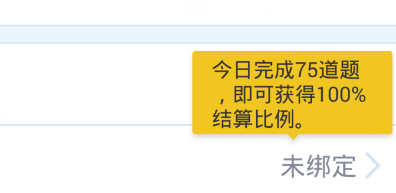
黄色的就是弹出的popup window
首先自定义一个view用来显示,文件名为layout_my_view.xml
<?xml version="1.0" encoding="utf-8"?>
<LinearLayout xmlns:android="http://schemas.android.com/apk/res/android"
              android:layout_width="wrap_content"
              android:layout_height="wrap_content"
              android:background="@drawable/bg_tips"
              android:orientation="vertical">

    <TextView
        android:layout_width="wrap_content"
        android:layout_height="wrap_content"
        android:paddingLeft="10dp"
        android:paddingRight="10dp"
        android:textSize="13dp"
        android:textColor="#333333"
        android:text="。。。"/>

</LinearLayout>

java 代码实现
public class TipsView extends LinearLayout {

    public TipsView(Context context) {

        super(context);

        init();

    }

    public TipsView(Context context, AttributeSet attrs) {

        super(context, attrs);

        init();

    }

    @TargetApi(Build.VERSION_CODES.HONEYCOMB)

    public TipsView(Context context, AttributeSet attrs, int defStyle) {

        super(context, attrs, defStyle);

        init();

    }

    private void init() {

        inflate(getContext(), R.layout.layout_my_view, this);

    }

}
调用代码
private void showTips() {

        if (mTipsView == null) {

            mTipsView = new TipsView(this);

            mPopupWindow = new PopupWindow(mTipsView, RelativeLayout.LayoutParams.WRAP_CONTENT,

                    RelativeLayout.LayoutParams.WRAP_CONTENT, true);

            // 如果不设置PopupWindow的背景,无论是点击外部区域还是Back键都无法dismiss弹框

            mPopupWindow.setBackgroundDrawable(getResources().getDrawable(android.R.color

                    .transparent));

            mPopupWindow.setFocusable(true);

            mPopupWindow.setOutsideTouchable(true);

        }

        if (mPopupWindow.isShowing()) {

            return;

        }

        // 设置好参数之后再show

        int local[] = new int[2];

        //弹出控件的位置,坐标存在local数组

        mTvBindFlag.getLocationOnScreen(local);

        int width = mTipsView.getWidth();

        int height = mTipsView.getHeight();

        if (width == 0 || height == 0) {

            // 获取测量后的宽度

            int w = View.MeasureSpec.makeMeasureSpec(0, View.MeasureSpec.UNSPECIFIED);

            int h = View.MeasureSpec.makeMeasureSpec(0, View.MeasureSpec.UNSPECIFIED);

            mTipsView.measure(w, h);

            width = mTipsView.getMeasuredWidth();

            height = mTipsView.getMeasuredHeight();

        }

        // x坐标计算方式:complete_count_txt的x坐标加上他的长度一半(相当于complete_count_txt的横向居中位置)

        // ,再减少弹出气泡宽度的一半(相当于向左移动气泡一半的宽度,就居中显示在complete_count_txt了)

        int x = local[0] + (mTvBindFlag.getWidth() / 2) - width / 2;

        // y坐标计算方式:complete_count_txt的y坐标减去气泡的高度

        int y = local[1] - height;

        // 通过绝对位置显示

       @param parent a parent view to get the {@link android.view.View#getWindowToken()} token from

     * @param gravity the gravity which controls the placement of the popup window

     * @param x the popup's x location offset

     * @param y the popup's y location offset

     */

     // public void showAtLocation(View parent, int gravity, int x, int y)

        mPopupWindow.showAtLocation(mTvBindFlag, Gravity.NO_GRAVITY, x, y);

    }
在指定控件位置弹出popup window的更多相关文章
- 背水一战 Windows 10 (36) - 控件(弹出类): ToolTip, Popup, PopupMenu
[源码下载] 背水一战 Windows 10 (36) - 控件(弹出类): ToolTip, Popup, PopupMenu 作者:webabcd 介绍背水一战 Windows 10 之 控件(弹 ...
- 控件(弹出类): ToolTip, Popup, PopupMenu
示例1.ToolTip 的示例Controls/FlyoutControl/ToolTipDemo.xaml <Page x:Class="Windows10.Controls.Fly ...
- 背水一战 Windows 10 (35) - 控件(弹出类): FlyoutBase, Flyout, MenuFlyout
[源码下载] 背水一战 Windows 10 (35) - 控件(弹出类): FlyoutBase, Flyout, MenuFlyout 作者:webabcd 介绍背水一战 Windows 10 之 ...
- 背水一战 Windows 10 (37) - 控件(弹出类): MessageDialog, ContentDialog
[源码下载] 背水一战 Windows 10 (37) - 控件(弹出类): MessageDialog, ContentDialog 作者:webabcd 介绍背水一战 Windows 10 之 控 ...
- ocx控件避免弹出警告的类--2
本文与 OCX控件避免弹出安全警告的类 http://www.cnblogs.com/lidabo/archive/2013/03/26/2981852.html 有些类似,只不过增加了几行代码(红色 ...
- 小程序中点击input控件键盘弹出时placeholder文字上移
最近做的一个小程序项目中,出现了点击input控件键盘弹出时placeholder文字上移,刚开始以为是软键盘弹出布局上移问题是传说中典型的fixed 软键盘顶起问题,因此采纳了网上搜到的" ...
- 控件(弹出类): FlyoutBase, Flyout, MenuFlyout
1.FlyoutBase(基类) 的示例Controls/FlyoutControl/FlyoutBaseDemo.xaml <Page x:Class="Windows10.Cont ...
- 问题-PopupMenu是哪个控件调用弹出的?
相关资料: http://bbs.csdn.net/topics/310195683 问题现象:今天有朋友问我个简单的问题,在多个Edit上弹出菜单,怎么判断是哪个Edit调用的.我想了想这个我还真不 ...
- C# 禁止 Webbrowser 控件的弹出脚本错误对话框
当IE浏览器遇到脚本错误时浏览器,左下 角会出现一个黄色图标,点击可以查看脚本错误的详细信息,并不会有弹出的错误信息框.当我们使用 WebBrowser控件时有错误信息框弹出,这样程序显的很不友好,而 ...
随机推荐
- Dynamics Webservice Call with Credential
Dynamics Webservice call with credential /// <summary> ///WebServiceHelper 的摘要说明 /// </summ ...
- git 代码组织
在20145306CSAPP2E文件夹下建立相应的文件夹: src:存放源代码文件 include: 存放头文件 bin:存放编译后的目标文件.可执行文件等 lib:存放项目所需的静态库.动态(共享) ...
- nginx的gzip选项和expire过期时间记录
最近,参加了公司的组织的一个公开课,收获还是挺多的,下面来总结接一下: 一. 使用nginx来进行网页内容的压缩编码与传输速度的优化: 先来观察一下news.sina.com.cn在请求和传输的时候发 ...
- 【译】为什么这样宏定义#define INT_MIN (-2147483647 - 1)?
2的32次方为2147483648*2,0~(2147483648*2-1)这是32位机上无符号整数代表的范围.而32机的int范围为-2147483648~+2147483647 stackover ...
- Java系列笔记(6) - 并发(上)
目录 1,基本概念 2,volatile 3,atom 4,ThreadLocal 5,CountDownLatch和CyclicBarrier 6,信号量 7,Condition 8,Exchang ...
- checkbox绿色圆圈样式
抄自: http://www.cnblogs.com/xyzhanjiang/p/3989836.html?utm_source=tuicool&utm_medium=referral < ...
- vc 中调用COM组件的方法
需求:1.创建myCom.dll,该COM只有一个组件,两个接口: IGetRes--方法Hello(), IGetResEx--方法HelloEx() 2.在工程中导入组件或类型库 #im ...
- Linux Shell脚本入门--cut命令
Linux Shell脚本入门--cut命令 cut cut 命令可以从一个文本文件或者文本流中提取文本列. cut语法 [root@www ~]# cut -d'分隔字符' -f fields &l ...
- 表格制作模块xlwt
import xlwtworkbook = xlwt.Workbook(encoding = 'ascii') #创建workbook 括号内容视情况而定sheetname = 'Sheet'book ...
- [转载] Android中Xposed框架篇---利用Xposed框架实现拦截系统方法
本文转载自: http://www.wjdiankong.cn/android%E4%B8%ADxposed%E6%A1%86%E6%9E%B6%E7%AF%87-%E5%88%A9%E7%94%A8 ...