
Android应用中动态更改主题的实现
在android应用程序中我们可能需要切换模式,如晚上切换到夜间模式便于阅读等。本文参考了网上的一些资料,并结合实例,实现了动态更改主题的效果。
Android中实现theme主题可以使用在activity中使用setTheme(int)的方法,SDK中对此方法的说明为:
//Set the base theme for this context. Note that this should be called before any views are instantiated in the Context (for example before calling android.app.Activity.setContentView or android.view.LayoutInflater.inflate).

//需要在setcontentview函数或者inflate函数之前使用。
效果图如下:

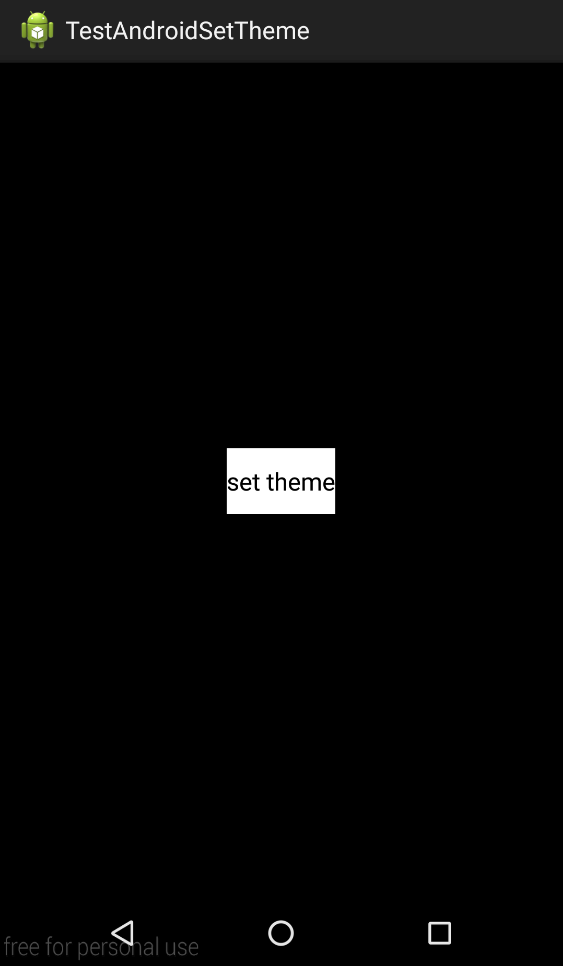
实现步骤:
首先需要定义一个属性,此属性用于赋值给控件的属性,相当于控件属性值的“变量”。
在attrs.xml中,定义三个属性,属性的format均为reference|color
<resources>

    <attr name="button_bg" format="reference|color" />

    <attr name="activity_bg" format="reference|color" />

    <attr name="text_cl" format="reference|color" />

</resources>
接下来,在styles.xml中,编写自定义的Theme
<style name="AppBaseTheme" parent="android:Theme.Light">

    </style>

    <style name="AppTheme" parent="AppBaseTheme">

        <item name="text_cl">#ffffff</item>

        <item name="button_bg">#000000</item>

        <item name="activity_bg">#ffffff</item>

    </style>

    <style name="DarkTheme" parent="AppBaseTheme">

        <item name="text_cl">#000000</item>

        <item name="button_bg">#ffffff</item>

        <item name="activity_bg">#000000</item>

</style>
选择一种模式作为程序的默认theme,注意:由于我是在layout布局文件中定义的view的样式,因此,为了保证theme切换时不会出现找不到资源的问题,因此需要在每一种用到的自定义theme中,都加上item。这里的item如text_cl和view的textColor属性的format是一致的。
Android manifest文件:
<?xml version="1.0" encoding="utf-8"?>

<manifest xmlns:android="http://schemas.android.com/apk/res/android"

    package="com.example.testandroidsettheme"

    android:versionCode="1"

    android:versionName="1.0" >

    <uses-sdk

        android:minSdkVersion="8"

        android:targetSdkVersion="18" />

    <application

        android:allowBackup="true"

        android:name="com.example.testandroidsettheme.app.MyApp"

        android:icon="@drawable/ic_launcher"

        android:label="@string/app_name"

        android:theme="@style/AppTheme" >

        <activity

            android:name="com.example.testandroidsettheme.MainActivity"

            android:label="@string/app_name" >

            <intent-filter>

                <action android:name="android.intent.action.MAIN" />

                <category android:name="android.intent.category.LAUNCHER" />

            </intent-filter>

        </activity>

    </application>

</manifest>
我将android:theme="@style/AppTheme"作为默认的样式。
主界面layout布局:
<LinearLayout xmlns:android="http://schemas.android.com/apk/res/android"

    android:layout_width="match_parent"

    android:layout_height="match_parent"

    android:background="?activity_bg"

    android:gravity="center"

    android:orientation="vertical" >

    <Button

        android:id="@+id/button0"

        android:layout_width="wrap_content"

        android:layout_height="wrap_content"

        android:background="?button_bg"

        android:textColor="?text_cl"

        android:text="set theme" />

</LinearLayout>
在布局文件中,button的background属性采用的是当前theme下的button_bg的属性值,外部的linearlayout采用的是当前theme下的activity_bg的属性值,在填写此属性值时,需要在前面添加”?”,表示这是一个style中的变量。
在需要切换显示不同theme的activity中,一些博客中在button点击事件中使用
setTheme(int);
recreate();
的方式,我发现此种方式无法实现theme的切换,因为recreate()方法会重新创建此activity,之前的setTheme()无效。我的实现方式如下:
public class MainActivity extends Activity {

    public Button button0;

    @Override

    protected void onCreate(Bundle savedInstanceState) {

        super.onCreate(savedInstanceState);

        MyApp app = (MyApp)MainActivity.this.getApplication();

        if(app.theme == 0){

            //使用默认主题

        }else{

            //使用自定义的主题

            setTheme(app.theme);

        }

        setContentView(R.layout.activity_main);

        button0 = (Button) this.findViewById(R.id.button0);

        button0.setOnClickListener(new View.OnClickListener() {

            @Override

            public void onClick(View v) {

                MyApp app = (MyApp)MainActivity.this.getApplication();

                app.theme = R.style.DarkTheme;

                recreate();

            }

        });

    }

}

public class MyApp extends Application{

    public int theme = 0;

}
在此activityoncreate()中的setContentView()方法调用之前,判断当前的theme,并调用setTheme(),实现改变theme的效果。
注意:这种方法实现切换theme不是很友好,因为在activity重新创建时,可能会有闪屏的现象。比较好的解决方案如知乎客户端采用的是截屏,并渐隐图片的过度方式,具体的实现还有待学习。
参考资料:http://www.kymjs.com/code/2015/05/26/01/
Android应用中动态更改主题的实现的更多相关文章
- android ArrayAdapter 如何动态更改数据
在android开发中ListView是比较常用的组件,它以列表的形式展示具体内容,并且能够根据数据的长度自适应显示,使用adpater与listview捆绑后,有时希望在程序使用过程中能动态的更改l ...
- Android代码中动态设置图片的大小(自动缩放),位置
项目中需要用到在代码中动态调整图片的位置和设置图片大小,能自动缩放图片,用ImageView控件,具体做法如下: 1.布局文件 <RelativeLayout xmlns:android=&qu ...
- 在带(继承)TextView的控件中,在代码中动态更改TextView的文字颜色
今天由于公司项目需求,须要实现一种类似tab的选项卡,当时直接想到的就是使用RadioGroup和RadioButton来实现. 这种方法全然没问题.可是在后来的开发过程中,却遇到了一些困扰非常久的小 ...
- VS2013中如何更改主题颜色(深色)和恢复默认的窗口布局
1.通常情况下,我们会根据个人爱好更改VS2013的主题颜色,一开始我喜欢白色,后来我偏爱深色. 依次选择:工具->选项->常规->主题->深色->确定,ok 2.我们在 ...
- Android中动态更新ListView(转)
在使用ListView时,会遇到当ListView列表滑动到最底端时,添加新的列表项的问题,本文通过代码演示如何动态的添加新的列表项到ListView中.实现步骤:调用ListView的setOnSc ...
- 关于Android NDK中调用第三方的动态库
因为最近在整合Android 上RTSP播放器的网络库,因需要调用自己编译的网络库,调用一直出现问题,开始时是直接在Android.mk 中加入LOCAL_SHARED_LIBRARIES := li ...
- Android开发中无处不在的设计模式——动态代理模式
继续更新设计模式系列.写这个模式的主要原因是近期看到了动态代理的代码. 先来回想一下前5个模式: - Android开发中无处不在的设计模式--单例模式 - Android开发中无处不在的设计模式-- ...
- Android中样式及主题
Android应用程序中不可避免的需要使用的样式和主题,样式指定一般指定View的高度.字体.字体颜色.背景,Android里的样荐定义在Style.xml文件里.主题也是一种样式,只不过它是应用在整 ...
- Android项目中JNI技术生成并调用.so动态库实现详解
生成 jni方式有两种:一种是通过SWIG从C++代码生成过度的java代码:另一种是通过javah的方式从java代码自动生成过度的C++代码.两种方式下的步骤流程正好相反. 第一种方式:由于需要配 ...
随机推荐
- ymPrompt消息组件
<script src="jb51.net/prompt/jquery-1.7.1.js" type="text/javascript"></ ...
- centos 安装PGSQL
centos 安装PGSQLCentOS下yum安装PostgreSQL目录 1 Configure YUM repository2 Install PGDG RPM file3 Install Po ...
- JQuery学习(选择器-基本-*)
<%@ page language="java" import="java.util.*" pageEncoding="UTF-8"% ...
- jenkins2 pipeline高级
jenkins2 pipeline里groovy的高级用法.翻译自:https://github.com/jenkinsci/pipeline-plugin/blob/master/TUTORIAL. ...
- [BTS] EXCEPTION OBJECT_UNKNOWN RAISED
Today, I generate a RFC schema, an error throwed by WCF-SAP adapter wazard. Microsoft.Adapters.SAP.R ...
- latex数字加粗后变宽
latex的数字默认用的是Times New Roman字体,这个字体有个不优美之处就是加粗后会变宽,如下图所示: 平常倒是也无所谓.昨天在把实验数据整理进表格时,为了凸显每个数据集上各个实验方法的优 ...
- C语言实现冒泡排序-整数排序
我一直觉得排序算法挺重要的,但是却没有深入的去理解它: 没有深入理解就无法用代码将它实现: 在腾讯的在线模拟考试中就有一题问到冒泡排序: 我几乎是傻眼了!我知道这样的问题是最基础的: 无论过去怎样现在 ...
- paip.互联网产品要成功的要素
paip.互联网产品要成功的要素 作者Attilax 艾龙, EMAIL:1466519819@qq.com 来源:attilax的专栏 地址:http://blog.csdn.net/atti ...
- OJ-上海交大-1021. 从前有座山
html,body,div,span,applet,object,iframe,h1,h2,h3,h4,h5,h6,p,blockquote,pre,a,abbr,acronym,address,bi ...
- 遵循amd规范的require.js(适合浏览器端)
1. 下载require.js 2. 引用 html <!DOCTYPE html> <html lang="en"> <head> <m ...