
[Angularjs]ng-show和ng-hide
写在前面
上篇文章介绍了ng-select和ng-options指令的使用,这篇文章继续指令的学习,本篇文章讲学习ng-show和ng-hide指令。
系列文章
[Angularjs]ng-select和ng-options
ng-show和ng-hide
ng-Show 和ng-Hide 允许我们显示或隐藏不同的元素。这有助于创建Angular应用时,更方便的操作元素的显示与隐藏,而不必使用css或者js操作元素的显示与隐藏,这些交给angularjs来实现就可以了。我们只需要做的就是为ng-show和ng-hide指定显示或者隐藏的条件就可以了。
一个例子
控制元素的显示与隐藏,可以通过三种方式来实现,分别是:布尔值,表达式,函数。
布尔值
<!DOCTYPE html>

<html xmlns="http://www.w3.org/1999/xhtml" ng-app="app">

<head>

    <title>show-hide</title>

    <script src="JS/angular.min.js"></script>

    <script>

        var app = angular.module('app', []);

        app.controller('showHideController', function ($scope) {

            $scope.isShow = true;

        });

    </script>

    <style>

        .div {

            border: 1px solid #0094ff;

            background-color: rebeccapurple;

        }

    </style>

</head>

<body>

    <div ng-controller="showHideController">

        <div ng-show="isShow" class="div">this is a div which is show</div>

        <div ng-show="!isShow" class="div">this is a div which is hide</div>

        <button ng-click="!isShow">按钮</button>

    </div>

</body>

</html>
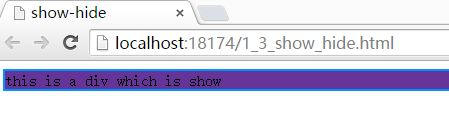
上面的例子,为ng-show指定了isShow的变量,通过该值是否为true,控制div的显示与隐藏。
函数
当然你可以通过,添加一个按钮,通过单击按钮,动态的修改isShow的值。可以这样:
<!DOCTYPE html>

<html xmlns="http://www.w3.org/1999/xhtml" ng-app="app">

<head>

    <title>show-hide</title>

    <script src="JS/angular.min.js"></script>

    <script>

        var app = angular.module('app', []);

        app.controller('showHideController', function ($scope) {

            $scope.isShow = true;

            $scope.showorhide = function () {

                $scope.isShow = !$scope.isShow;

            }

        });

    </script>

    <style>

        .div {

            border: 1px solid #0094ff;

            background-color: rebeccapurple;

        }

    </style>

</head>

<body>

    <div ng-controller="showHideController">

        <div ng-show="isShow" class="div">this is a div which is show</div>

        <!--<div ng-show="!isShow" class="div">this is a div which is hide</div>-->

        <button ng-click="showorhide()">按钮</button>

    </div>

</body>

</html>
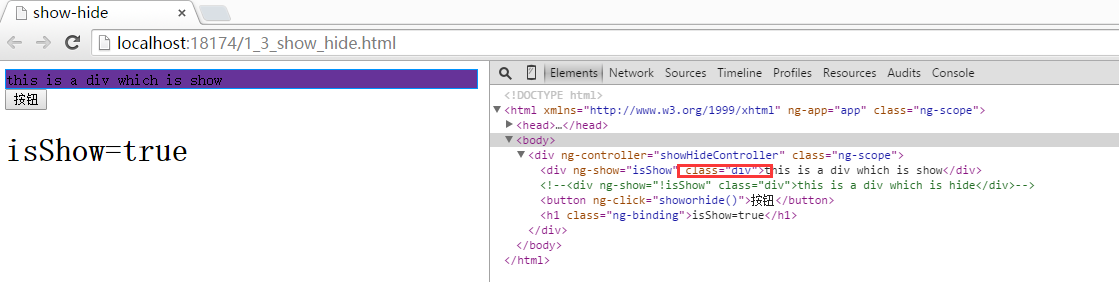
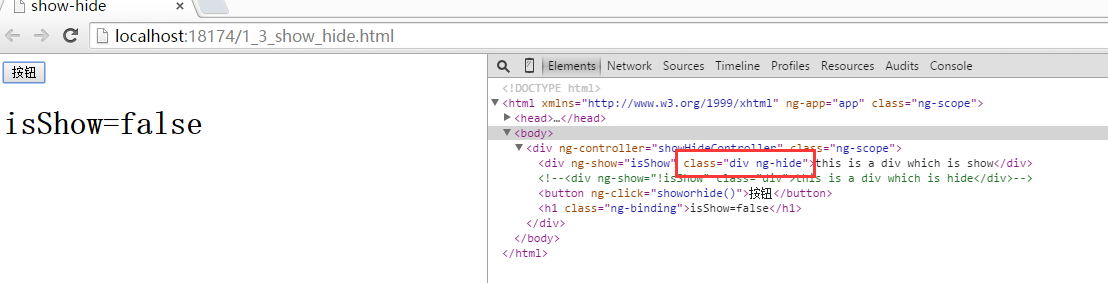
通过单击按钮,就会切换div的显示与隐藏,如果你监视一下dom,你会发现ng-show的实现也是通过,为元素addClass或者removeClass实现的。
表达式
<!DOCTYPE html>

<html xmlns="http://www.w3.org/1999/xhtml" ng-app="app">

<head>

    <title>show-hide</title>

    <script src="JS/angular.min.js"></script>

    <script>

        var app = angular.module('app', []);

        app.controller('showHideController', function ($scope) {

            $scope.isShow = true;

            $scope.showorhide = function () {

                $scope.isShow = !$scope.isShow;

                $scope.animal = '';

            }

        });

    </script>

    <style>

        .div {

            border: 1px solid #0094ff;

            background-color: rebeccapurple;

        }

    </style>

</head>

<body>

    <div ng-controller="showHideController">

        <div ng-show="isShow" class="div">this is a div which is show</div>

        <!--<div ng-show="!isShow" class="div">this is a div which is hide</div>-->

        <button ng-click="showorhide()">按钮</button>

        <h1>isShow={{isShow}}</h1>

        <input type="text" name="name" value="" ng-model="animal" placeholder="请输入一种动物" />

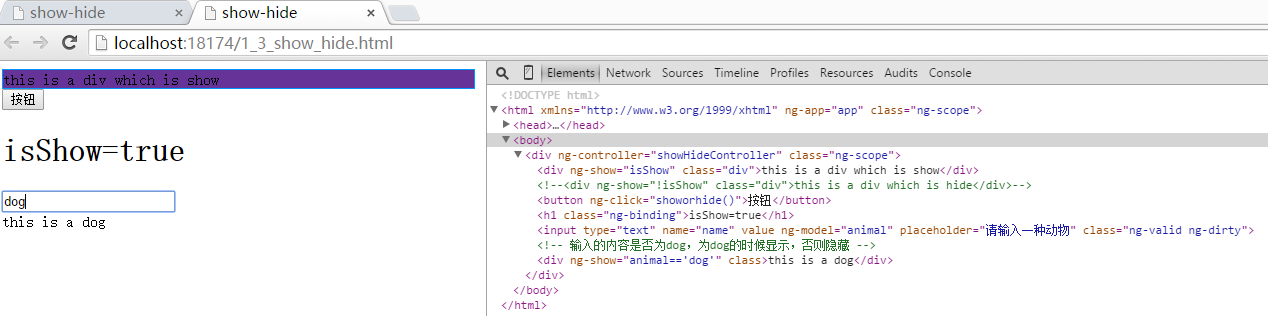
        <!-- 输入的内容是否为dog,为dog的时候显示,否则隐藏 -->

        <div ng-show="animal=='dog'">this is a dog</div>

    </div>

</body>

</html>
总结
上面列举的三个例子,分别从为ng-show或者ng-hide设置布尔值, 表达式, 以及 函数,实现的元素显示和隐藏功能 但这三种模式将能应用到更多的场景。其实归结到底的话算是一种:控制一个布尔值来改变元素的显示与隐藏的。关于ng-hide的用法与ng-show的用法类似。这里不再赘述。
[Angularjs]ng-show和ng-hide的更多相关文章
- angularjs中常用的ng指令介绍【转载】
原文:http://www.cnblogs.com/lvdabao/p/3379659.html 一.模板中可使用的东西及表达式 模板中可以使用的东西包括以下四种: 指令(directive).ng提 ...
- AngularJs出现错误Error: [ng:areq]
1.没有对应的控制器 2.有控制器但是路径没有配对
- Angular6之ng build | ng build --aot | ng build --prod 差异
由于写了大半年的项目终于要告一段落并且即将进行第二阶段优化开发,emmm 基础版本已经二十多个模块了,必不可少的优化是很重要的,尽管项目上使用多层嵌套懒加载,但是在首屏加载的时候,任然很慢啊,因为一直 ...
- 在库中使用schematics——ng add与ng update
起步 创建一个angular库 ng new demo --create-application=false ng g library my-lib 可见如下目录结构 ├── node_modules ...
- angular 2 - 001 ng cli的安装和使用
angular cli 创建项目和组件 ng new my-app --skip-install cd my-app cnpm install ng serve localhost:4200 angu ...
- Angular 中后台前端解决方案 - Ng Alain 介绍
背景 之前项目使用过vue.js+iview,习惯了后端开发的我,总觉得使用不习惯,之前分析易企秀前端代码,接触到了angular js,完备的相关功能,类似后端开发的体验,让人耳目一新,全新的ang ...
- How to Pronounce the Letters NG – No Hard G
How to Pronounce the Letters NG – No Hard G Share Tweet Share Most of the time when you see the lett ...
- angular2 ng build --prod 报错:Module not found: Error: Can't resolve './$$_gendir/app/app.module.ngfactory'
调试页面 ng serve 正常 ng build 也正常 ng build --prod 异常:Module not found: Error: Can't resolve './$$_gendir ...
- ng 构建
1.ng 构建和部署 构建:编译和合并ng build 部署:复制dist里面的文件到服务器 2.多环境的支持 配置环境package.json "scripts": { &quo ...
- Flume NG高可用集群搭建详解
.Flume NG简述 Flume NG是一个分布式,高可用,可靠的系统,它能将不同的海量数据收集,移动并存储到一个数据存储系统中.轻量,配置简单,适用于各种日志收集,并支持 Failover和负载均 ...
随机推荐
- 【CSS】css网页背景图片设置
刚学CSS,了解了下网页背景图设置,顺便记录下. 下面主要是实现背景图位置保持不变,即不随滚动条动而动的功能. body { background-image:url(images/bck.png); ...
- C++哈弗曼编码
// haffman.cpp : 定义控制台应用程序的入口点. // #include "stdafx.h" #include<iostream> using name ...
- 这些HTML、CSS知识点,面试和平时开发都需要 (转)
http://www.cnblogs.com/w-wanglei/p/5414979.html No1.HTML 1.网页结构 网页结构一般都包含文档声明DOCTYPE,并且在head中的meta应该 ...
- IOS 应用生命周期
*当第一次运行程序时候:(active)didFinishLaunchingWithOptions(加载完毕)->applicationDidBecomeActive(获取焦点)*当点击home ...
- IOS开发之——Masonry 只支持OC,暂不支持swift
前言 1 MagicNumber -> autoresizingMask -> autolayout 以上是纯手写代码所经历的关于页面布局的三个时期 在iphone1-iphone3gs时 ...
- UIAccessibilityElement
UIaccessibilityElement类封装的项目信息对一些特殊的人可见,默认情况下是不可访问的.例如,一个图标或文字图像不会自动访问,因为它没有继承的UIView(或UIControl).一个 ...
- 从无重复大数组找TOP N元素的最优解说起
有一类面试题,既可以考察工程师算法.也可以兼顾实践应用.甚至创新思维,这些题目便是好的题目,有区分度表现为可以有一般解,也可以有最优解.最近就发现了一个这样的好题目,拿出来晒一晒. 1 题目 原文: ...
- servlet设置缓存时间以及文件的下载
缓存时间的设置: public void doGet(HttpServletRequest request, HttpServletResponse response) throws ServletE ...
- [Aaronyang] 写给自己的WPF4.5 笔记[3MenuItem中的icon]
敢于尝试,就等于你已经向成功迈出了第一步 --Aaronyang的博客(www.ayjs.net)-www.8mi.me =============时隔两年后再看WPF========== 因为以前的 ...
- RestFul API初识
python Restful API 微博开放平台: open.weibo.com: 点击文档进入API查看界面 点击API文档进行查看: 比如点开粉丝数的API可以看到: pro.jsonlint. ...