
ASP.NET Core 1.0 中使用 Swagger 生成文档
之前文章有介绍在ASP.NET WebAPI 中使用Swagger生成文档,ASP.NET Core 1.0中同样也支持。
依赖包
"dependencies": {

    "Swashbuckle.SwaggerGen": "6.0.0-rc1-final",

    "Swashbuckle.SwaggerUi": "6.0.0-rc1-final"

  }
项目属性选中“生成时生成输出”选项用来生成XML注释
Startup类
public class Startup

    {

        //private readonly string pathXml = @"\\Mac\Home\Desktop\asp.net core\learn_asp.net core 1.0\artifacts\bin\SwaggerForASP.NETCore\Debug\dnx451\SwaggerForASP.NETCore1.0.xml";

        private readonly string pathXml = @"C:\Users\irving\Desktop\asp.net core\LearningASP.NETCore\artifacts\bin\LearningASP.NETCore\Debug\dnx451\LearningASP.NETCore.xml";

        public Startup(IHostingEnvironment env)

        {

            // Set up configuration sources.

            var builder = new ConfigurationBuilder()

                .AddJsonFile("appsettings.json")

                .AddEnvironmentVariables();

            Configuration = builder.Build();

        }

        public IConfigurationRoot Configuration { get; set; }

        // This method gets called by the runtime. Use this method to add services to the container.

        public void ConfigureServices(IServiceCollection services)

        {

            // Add framework services.

            services.AddMvc();

            services.AddSwaggerGen();

            services.ConfigureSwaggerDocument(options =>

            {

                options.SingleApiVersion(new Info

                {

                    License = new License { Name = "irving", Url = @"http://cnblogs.com/irving" },

                    Contact = new Contact { Name = "irving", Email = "zhouyongtao@outlook.com", Url = @"http://cnblogs.com/irving" },

                    Version = "v1",

                    Title = "ASP.NET Core 1.0 WebAPI",

                    Description = "A Simple For ASP.NET Core 1.0 WebAPI",

                    TermsOfService = "None"

                });

                options.OperationFilter(new ApplyXmlActionComments(pathXml));

            });

            services.ConfigureSwaggerSchema(options =>

            {

                options.IgnoreObsoleteProperties = true;

                options.DescribeAllEnumsAsStrings = true;

                options.ModelFilter(new ApplyXmlTypeComments(pathXml));

            });

        }

        // This method gets called by the runtime. Use this method to configure the HTTP request pipeline.

        public void Configure(IApplicationBuilder app, IHostingEnvironment env, ILoggerFactory loggerFactory)

        {

            loggerFactory.AddConsole(Configuration.GetSection("Logging"));

            loggerFactory.AddDebug();

            if (env.IsDevelopment())

            {

                app.UseBrowserLink();

                app.UseDeveloperExceptionPage();

            }

            else

            {

                app.UseExceptionHandler("/Home/Error");

            }

            app.UseIISPlatformHandler();

            app.UseStaticFiles();

            app.UseMvc(routes =>

            {

                routes.MapRoute(

                    name: "default",

                    template: "{controller=Home}/{action=Index}/{id?}");

            });

            app.UseSwaggerGen();

            app.UseSwaggerUi();

        }

        // Entry point for the application.

        public static void Main(string[] args) => WebApplication.Run<Startup>(args);

    }
OrdersController类
    [Route("api/orders")]

    public class OrdersController : Controller

    {

        [HttpGet]

        [Route("info")]

        public async Task<ActionResult> Info()

        {

            return await Task.Run(() =>

            {

                return Json(new { name = "irving", age =  });

            }).ContinueWith(t => t.Result);

        }

        // GET: api/values

        [HttpGet]

        public IEnumerable<string> Get()

        {

            return new string[] { "value1", "value2" };

        }

        // GET api/values/5

        [HttpGet("{id}")]

        public string Get(int id)

        {

            return "value";

        }

        // POST api/values

        [HttpPost]

        public void Post([FromBody]string value)

        {

        }

        // PUT api/values/5

        [HttpPut("{id}")]

        public void Put(int id, [FromBody]string value)

        {

        }

        // DELETE api/values/5

        [HttpDelete("{id}")]

        public void Delete(int id)

        {

        }

    }
访问:http://localhost/swagger/ui/index.html
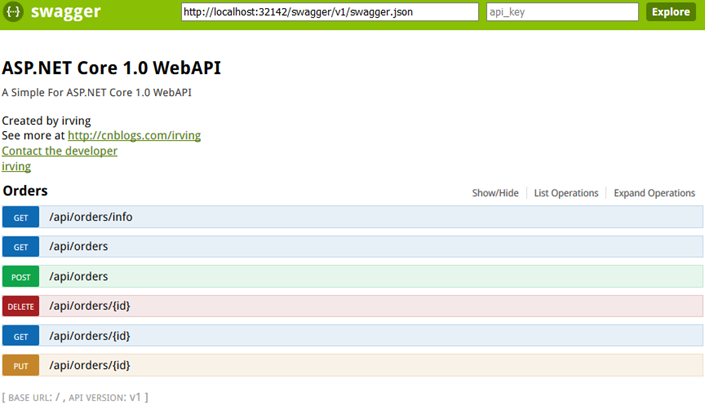
REFER:
http://damienbod.com/2015/12/13/asp-net-5-mvc-6-api-documentation-using-swagger/
https://api.gitcafe.com/apidoc/
Swagger框架学习分享http://blog.csdn.net/u010827436/article/details/44417637
Micro Service工具集之Swagger:可测试的样式化API文档http://ningandjiao.iteye.com/blog/1948874
https://github.com/aspnet/Docs/blob/master/aspnetcore/tutorials/web-api-help-pages-using-swagger.md
https://docs.microsoft.com/en-us/aspnet/core/tutorials/getting-started-with-swashbuckle?view=aspnetcore-2.1
ASP.NET Core 1.0 中使用 Swagger 生成文档的更多相关文章
- asp.net core 3.0 中使用 swagger
asp.net core 3.0 中使用 swagger Intro 上次更新了 asp.net core 3.0 简单的记录了一下 swagger 的使用,那个项目的 api 比较简单,都是匿名接口 ...
- 在ASP.NET Core 3.0中使用Swagger
1.使用NuGet安装以下依赖: Swashbuckle.AspNetCore 注:版本选最高版本的,我选 5.0 rc4 2.在ConfigureServices添加以下代码 services.Ad ...
- ASP.NET Core Web API中使用Swagger
本节导航 Swagger介绍 在ASP.NET CORE 中的使用swagger 在软件开发中,管理和测试API是一件重要而富有挑战性的工作.在我之前的文章<研发团队,请管好你的API文档& ...
- ASP.NET Core 1.0 中的依赖项管理
var appInsights=window.appInsights||function(config){ function r(config){t[config]=function(){var i= ...
- 在ASP.NET Core 1.0中如何发送邮件
(此文章同时发表在本人微信公众号"dotNET每日精华文章",欢迎右边二维码来关注.) 题记:目前.NET Core 1.0中并没有提供SMTP相关的类库,那么要如何从ASP.NE ...
- 用ASP.NET Core 1.0中实现邮件发送功能
准备将一些项目迁移到 asp.net core 先从封装类库入手,在遇到邮件发送类时发现在 asp.net core 1.0中并示提供SMTP相关类库,于是网上一搜发现了MailKit 好东西一定要试 ...
- 在ASP.NET Core 2.0中使用CookieAuthentication
在ASP.NET Core中关于Security有两个容易混淆的概念一个是Authentication(认证),一个是Authorization(授权).而前者是确定用户是谁的过程,后者是围绕着他们允 ...
- 如何在ASP.NET Core 2.0中使用Razor页面
如何在ASP.NET Core 2.0中使用Razor页面 DotNetCore2017-11-22 14:49 问题 如何在ASP.NET Core 2.0中使用Razor页面 解 创建一个空的项 ...
- ASP.NET Core 3.0中使用动态控制器路由
原文:Dynamic controller routing in ASP.NET Core 3.0 作者:Filip W 译文:https://www.cnblogs.com/lwqlun/p/114 ...
随机推荐
- CSS盒子模型学习记录3(侧面导航栏)
学习http://www.blueidea.com/tech/web/2007/4545_2.asp 代码试验 html <!DOCTYPE html PUBLIC "-//W3C// ...
- shopnc 二次开发 每日签到积分领取
/* 开始shopnc!!!!! url:xxx.com/index.php?act=index&op=userjf 一个四线城市的半吊子程序员~ 实现:前台模板文件 随便加入<a> ...
- Binder的设计和框架
转自:http://wangkuiwu.github.io/2014/09/01/Binder-Introduce/ 1. Binder架构解析 1.1 Binder模型 上图中涉及到Binder模型 ...
- asp.net前台绑定时间格式时,定义时间格式
<%#Eval("news_time","{0:yyyy-MM-dd}") %><%#((DateTime)Eval("news_t ...
- Linux启动/停止/重启Mysql数据库的方法——转载
Mysql启动.停止.重启常用命令 a.启动方式1.使用 service 启动:[root@localhost /]# service mysqld start (5.0版本是mysqld)[root ...
- nginx 的基础配置[转]
nginx 的基础配置 分类: 工具软件2013-11-13 23:26 11人阅读 评论(0) 收藏 举报 目录(?)[-] 管理配置文件 全局配置 虚拟机server配置 location配置 ...
- jquery中prop()与attr()方法的区别
一.prop() 简单来说是当需要判断真假时使用,如复选框时: if( $(this).prop('checked')){ //当返回true时在这里调用 }else{ //当返回false时在这里调 ...
- 状态机学习(二)解析INI文件
题目来自<系统程序员成长计划> 作者:李先静. 状态变化如下 #include <string> #include <iostream> using namespa ...
- dropbear
生成ssh连接所需要的公钥,如下: /usr/bin/dropbearkey -t dss -f /etc/dropbear/dropbear_dss_host_key (dss加密,长度默认 ...
- 与jquery serializeArray()一起使用的函数,主要来方便提交表单
<script> $(function() { $("#butsubmit").click(function() { var data = convertArray($ ...