
CSS水平垂直居中总结
行内元素水平居中
把行内元素包裹在块级父元素中,且父元素中的css设置text-align:center;
<!DOCTYPE html>

<html>

<head>

    <meta http-equiv="content-type" content="text/html;charset=utf-8">

    <title>css水平垂直居中</title>

    <style>

        body{background:#000;}

        #container{

            background: #ccc;

            text-align: center;

        }

    </style>

</head>

<body>

<div id="container">行内元素水平居中</div>

</body>

</html>

块状元素水平居中
将块状元素的左右外边距设置为auto即可。
<!DOCTYPE html>

<html>

<head>

    <meta http-equiv="content-type" content="text/html;charset=utf-8">

    <title>块状元素水平居中</title>

    <style>

        body{background:#000;}

        #container{

            background: #ccc;

        }

        #box1{

            width:300px;

            height:300px;

            background:#fff;

            margin: 0 auto;

            text-align: center;

        }

    </style>

</head>

<body>

<div id="container">

    <div id="box1">块状元素水平居中</div>

</div>

</body>

</html>

多个块状元素水平居中的情况:
1、传统方法:将水平排列的块状元素设置为:display:inline-block;然后父元素设置为text-align:center;即可。
<!DOCTYPE html>

<html>

<head>

    <meta http-equiv="content-type" content="text/html;charset=utf-8">

    <title>多个块状元素水平居中</title>

    <style>

        body{background:#000;}

        #container{

            background: #ccc;

            text-align: center;

        }

        .box1{

            width:300px;

            height:300px;

            background:#fff;

            display: inline-block;

        }

    </style>

</head>

<body>

<div id="container">

    <div class="box1">块状元素水平居中</div>

    <div class="box1">块状元素水平居中</div>

    <div class="box1">块状元素水平居中</div>

</div>

</body>

</html>

2、使用弹性盒子:将父元素设置为display:-webkit-box;-webkit-box-pack:justify(或center);注意兼容性
<!DOCTYPE html>

<html>

<head>

    <meta http-equiv="content-type" content="text/html;charset=utf-8">

    <title>多个块状元素水平居中</title>

    <style>

        body{background:#000;}

        #container{

            background: #ccc;

            display: -webkit-box;

            -webkit-box-pack:justify;/*box-pack决定了父元素水平空间的使用*/

        }

        .box1{

            width:300px;

            height:300px;

            background:#fff;

        }

    </style>

</head>

<body>

<div id="container">

    <div class="box1">块状元素水平居中</div>

    <div class="box1">块状元素水平居中</div>

    <div class="box1">块状元素水平居中</div>

</div>

</body>

</html>

已知元素宽高水平垂直居中
1、绝对定位与margin
这个方法使用了position:absolute;有固定宽高的div,被设置为top:0;bottom:0;因为它有固定高度,不能与上下的间距都为0,margin:auto;会使它居中。
<!DOCTYPE html>

<html>

<head>

    <meta http-equiv="content-type" content="text/html;charset=utf-8">

    <title>多个块状元素水平居中</title>

    <style>

        body{background:#000;}

        #container{

            background: #ccc;

            position: relative;

            width:1000px;

            height:500px;

        }

        .box1{

            position: absolute;

            background:#fff;

            width: 300px;

            height: 300px;

            top: 0;

            left: 0;

            bottom: 0;

            right: 0;

            margin: auto;

        }

    </style>

</head>

<body>

<div id="container">

    <div class="box1">已知元素宽高水平垂直居中</div>

</div>

</body>

</html>

2、绝对定位与margin负值
利用绝对定位,将元素的top、left值设为50%,然后设置外边距margin-left:width/2;margin-top:height/2;实现垂直居中效果
<!DOCTYPE html>

<html>

<head>

    <meta http-equiv="content-type" content="text/html;charset=utf-8">

    <title>多个块状元素水平居中</title>

    <style>

        body{background:#000;}

        #container{

            background: #ccc;

            position: relative;

            width:1000px;

            height:500px;

        }

        .box1{

            position: absolute;

            background:#fff;

            width: 300px;

            height: 300px;

            top: 50%;

            left: 50%;

            margin-left:-150px;

            margin-top:-150px;

        }

    </style>

</head>

<body>

<div id="container">

    <div class="box1">已知元素宽高水平垂直居中</div>

</div>

</body>

</html>
未知元素宽高水平垂直居中
1、把div的显示方式设置为表格,使用表格的vertical-align属性
<!DOCTYPE html>

<html>

<head lang="en">

    <meta charset="UTF-8">

    <title>未知宽高的元素水平垂直居中</title>

    <style>

        body{background: #000;font-size: 24px;}

        #wrapper{

            display: table;

            background: #ccc;

            width: 1000px;

            height:300px;

        }

        #cell{

            display: table-cell;

            text-align: center;

            vertical-align: middle;

        }

    </style>

</head>

<body>

<div id="wrapper">

    <div id="cell">

        <div class="content">未知宽高的元素水平垂直居中</div>

    </div>

</div>

</body>

</html>

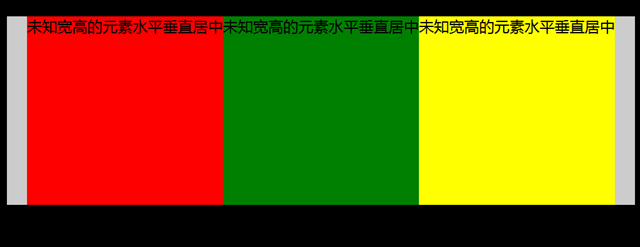
2、跟上面提到的多个块状元素水平居中的用法差不多,这里用到弹性盒子是要注意浏览器的兼容性;(这里被居中元素的宽度由其里面的内容决定)
<!DOCTYPE html>

<html>

<head lang="en">

    <meta charset="UTF-8">

    <title>未知宽高的元素水平垂直居中</title>

    <style>

        body{background: #000;font-size: 24px;}

        #container{

            margin:30px auto;

            background: #ccc;

            width: 1000px;

            height:300px;

            display: -webkit-box;

            -webkit-box-pack:center;

        }

        #container .box1{

            background: red;

        }

        #container .box2{

            background: green;

        }

        #container .box3{

            background: yellow;

        }

    </style>

</head>

<body>

<div id="container">

    <div class="box1">未知宽高的元素水平垂直居中</div>

    <div class="box2">未知宽高的元素水平垂直居中</div>

    <div class="box3">未知宽高的元素水平垂直居中</div>

</div>

</body>

</html>
CSS水平垂直居中总结的更多相关文章
- css水平垂直居中对齐方式
1.文字或者内联元素的垂直水平居中对齐 css属性 -- 水平居中:text-aligin:center; 垂直居中: line-height:height; 例子:. html: <div c ...
- 把简单做好也不简单-css水平垂直居中
44年前我们把人送上月球,但在CSS中我们仍然不能很好实现水平垂直居中. 作者:Icarus 原文链接:http://xdlrt.github.io/2016/12/15/2016-12-15 水平垂 ...
- CSS水平垂直居中的方法
原文链接:http://caibaojian.com/370.html 水平垂直居中,特别是使用在列表的时候经常会用到的,以前有需求的时候我也做过类似的代码,是使用display:table-cell ...
- css 水平垂直居中总结
空闲总结了下水平垂直居中方案,欢迎补充: 水平居中 水平居中有两种情况: 子元素是内联元素 这种那个情况下只需要在父元素定义: text-align:center; 例子: html: //省略了bo ...
- CSS水平垂直居中的几种方法2
直接进入主题! 一.脱离文档流元素的居中 方法一:margin:auto法 CSS代码: div{ width: 400px; height: 400px; position: relative; b ...
- CSS水平垂直居中的几种方法
直接进入主题! 一.脱离文档流元素的居中 方法一:margin:auto法 CSS代码: div{ width: 400px; height: 400px; position: relative; b ...
- 常见的几种 CSS 水平垂直居中解决办法
用CSS实现元素的水平居中,比较简单,可以设置text-align center,或者设置 margin-left:auto; margin-right:auto 之类的即可. 主要麻烦的地方还是在垂 ...
- 介绍一种css水平垂直居中的方法(非常好用!)
这次介绍一下一个水平垂直居中的css方法,这个方法可以说是百试百灵,废话不多说,直接附上代码: html,body{ width:100%; height:100%; } 你需要居中的元素{ posi ...
- css水平垂直居中
margin法(水平居中) 需要满足三个条件: 元素定宽 元素为块级元素或行内元素设置display:block 元素的margin-left和margin-right都必须设置为auto 三个条件缺 ...
随机推荐
- wget的使用详解
我在工作中, 经常下载遥感影像,每个影像都很大,使用普通的ftphelpe下载不太稳定,最终选择了linux下一款牛逼的下载工具wget,使用它的windows移植版本的.在此写此文,希望对和我一样保 ...
- Revenge of Nim hdu 4994 (博弈)
http://acm.split.hdu.edu.cn/showproblem.php?pid=4994 题意:现在有两个人在取石子,共有n堆石子,每堆石子取完后才可以取下一堆石子,最后一个取石子的人 ...
- C#完美实现斐波那契数列
/// <summary> /// Use recursive method to implement Fibonacci /// </summary ...
- Asp.Net MVC4入门指南(3):添加一个视图
在本节中,您需要修改HelloWorldController类,从而使用视图模板文件,干净优雅的封装生成返回到客户端浏览器HTML的过程. 您将创建一个视图模板文件,其中使用了ASP.NET MVC ...
- 插件兼容CommonJS, AMD, CMD 和 原生 JS
模块标准 CommonJS CommonJS 有三个全局变量 module.exports 和 require.但是由于 AMD 也有 require 这个全局变量,故不使用这个变量来进行检测. 如果 ...
- 20145321 Git的安装使用及今后学习规划
20145321 Git的安装使用及今后学习规划 Git安装使用及解决遇到的问题 之前上传代码都没有按照老师的方法弄,当时看到git教程感觉很麻烦,于是都是写完之后再一个个 程序贴上去,而现在使用过后 ...
- Apache配置多域名 AH00548: NameVirtualHost has no effect and will be removed in the next release
httpd-vhosts.conf 中首行 NameVirtualHost *:80 删除掉即可解决.
- arcgis学习
将使用arcgis的一些技巧记下来,以供翻阅 1.判断点在面内 insert into grid_res_relation (GRIDID, GRIDTYPE, RESID, restype, typ ...
- linux下进度条的编写和实现
实现了一个简单的进度条,主要技术啥的算不上,但有几个需要注意的点 首先是回车符,回车符可不是\n,我们可以把\n看成是两个动作的合体,分别是,回车和换行,都有自己对应的符号,这利用回车符一直在同一个位 ...
- Tempter of the Bone---hdu1010(dfs+剪枝)
http://acm.hdu.edu.cn/showproblem.php?pid=1010 折磨我一下午 题目大意: 从s点走到d点能否恰好走k步 刚开始以为是广搜,其实是深搜. dfs多优化一 ...