
CSS水平垂直居中总结
行内元素水平居中
把行内元素包裹在块级父元素中,且父元素中的css设置text-align:center;
<!DOCTYPE html>

<html>

<head>

    <meta http-equiv="content-type" content="text/html;charset=utf-8">

    <title>css水平垂直居中</title>

    <style>

        body{background:#000;}

        #container{

            background: #ccc;

            text-align: center;

        }

    </style>

</head>

<body>

<div id="container">行内元素水平居中</div>

</body>

</html>

块状元素水平居中
将块状元素的左右外边距设置为auto即可。
<!DOCTYPE html>

<html>

<head>

    <meta http-equiv="content-type" content="text/html;charset=utf-8">

    <title>块状元素水平居中</title>

    <style>

        body{background:#000;}

        #container{

            background: #ccc;

        }

        #box1{

            width:300px;

            height:300px;

            background:#fff;

            margin: 0 auto;

            text-align: center;

        }

    </style>

</head>

<body>

<div id="container">

    <div id="box1">块状元素水平居中</div>

</div>

</body>

</html>

多个块状元素水平居中的情况:
1、传统方法:将水平排列的块状元素设置为:display:inline-block;然后父元素设置为text-align:center;即可。
<!DOCTYPE html>

<html>

<head>

    <meta http-equiv="content-type" content="text/html;charset=utf-8">

    <title>多个块状元素水平居中</title>

    <style>

        body{background:#000;}

        #container{

            background: #ccc;

            text-align: center;

        }

        .box1{

            width:300px;

            height:300px;

            background:#fff;

            display: inline-block;

        }

    </style>

</head>

<body>

<div id="container">

    <div class="box1">块状元素水平居中</div>

    <div class="box1">块状元素水平居中</div>

    <div class="box1">块状元素水平居中</div>

</div>

</body>

</html>

2、使用弹性盒子:将父元素设置为display:-webkit-box;-webkit-box-pack:justify(或center);注意兼容性
<!DOCTYPE html>

<html>

<head>

    <meta http-equiv="content-type" content="text/html;charset=utf-8">

    <title>多个块状元素水平居中</title>

    <style>

        body{background:#000;}

        #container{

            background: #ccc;

            display: -webkit-box;

            -webkit-box-pack:justify;/*box-pack决定了父元素水平空间的使用*/

        }

        .box1{

            width:300px;

            height:300px;

            background:#fff;

        }

    </style>

</head>

<body>

<div id="container">

    <div class="box1">块状元素水平居中</div>

    <div class="box1">块状元素水平居中</div>

    <div class="box1">块状元素水平居中</div>

</div>

</body>

</html>

已知元素宽高水平垂直居中
1、绝对定位与margin
这个方法使用了position:absolute;有固定宽高的div,被设置为top:0;bottom:0;因为它有固定高度,不能与上下的间距都为0,margin:auto;会使它居中。
<!DOCTYPE html>

<html>

<head>

    <meta http-equiv="content-type" content="text/html;charset=utf-8">

    <title>多个块状元素水平居中</title>

    <style>

        body{background:#000;}

        #container{

            background: #ccc;

            position: relative;

            width:1000px;

            height:500px;

        }

        .box1{

            position: absolute;

            background:#fff;

            width: 300px;

            height: 300px;

            top: 0;

            left: 0;

            bottom: 0;

            right: 0;

            margin: auto;

        }

    </style>

</head>

<body>

<div id="container">

    <div class="box1">已知元素宽高水平垂直居中</div>

</div>

</body>

</html>

2、绝对定位与margin负值
利用绝对定位,将元素的top、left值设为50%,然后设置外边距margin-left:width/2;margin-top:height/2;实现垂直居中效果
<!DOCTYPE html>

<html>

<head>

    <meta http-equiv="content-type" content="text/html;charset=utf-8">

    <title>多个块状元素水平居中</title>

    <style>

        body{background:#000;}

        #container{

            background: #ccc;

            position: relative;

            width:1000px;

            height:500px;

        }

        .box1{

            position: absolute;

            background:#fff;

            width: 300px;

            height: 300px;

            top: 50%;

            left: 50%;

            margin-left:-150px;

            margin-top:-150px;

        }

    </style>

</head>

<body>

<div id="container">

    <div class="box1">已知元素宽高水平垂直居中</div>

</div>

</body>

</html>
未知元素宽高水平垂直居中
1、把div的显示方式设置为表格,使用表格的vertical-align属性
<!DOCTYPE html>

<html>

<head lang="en">

    <meta charset="UTF-8">

    <title>未知宽高的元素水平垂直居中</title>

    <style>

        body{background: #000;font-size: 24px;}

        #wrapper{

            display: table;

            background: #ccc;

            width: 1000px;

            height:300px;

        }

        #cell{

            display: table-cell;

            text-align: center;

            vertical-align: middle;

        }

    </style>

</head>

<body>

<div id="wrapper">

    <div id="cell">

        <div class="content">未知宽高的元素水平垂直居中</div>

    </div>

</div>

</body>

</html>

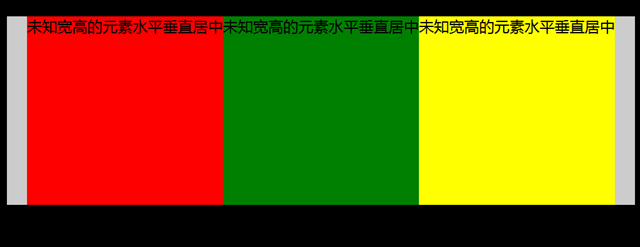
2、跟上面提到的多个块状元素水平居中的用法差不多,这里用到弹性盒子是要注意浏览器的兼容性;(这里被居中元素的宽度由其里面的内容决定)
<!DOCTYPE html>

<html>

<head lang="en">

    <meta charset="UTF-8">

    <title>未知宽高的元素水平垂直居中</title>

    <style>

        body{background: #000;font-size: 24px;}

        #container{

            margin:30px auto;

            background: #ccc;

            width: 1000px;

            height:300px;

            display: -webkit-box;

            -webkit-box-pack:center;

        }

        #container .box1{

            background: red;

        }

        #container .box2{

            background: green;

        }

        #container .box3{

            background: yellow;

        }

    </style>

</head>

<body>

<div id="container">

    <div class="box1">未知宽高的元素水平垂直居中</div>

    <div class="box2">未知宽高的元素水平垂直居中</div>

    <div class="box3">未知宽高的元素水平垂直居中</div>

</div>

</body>

</html>
CSS水平垂直居中总结的更多相关文章
- css水平垂直居中对齐方式
1.文字或者内联元素的垂直水平居中对齐 css属性 -- 水平居中:text-aligin:center; 垂直居中: line-height:height; 例子:. html: <div c ...
- 把简单做好也不简单-css水平垂直居中
44年前我们把人送上月球,但在CSS中我们仍然不能很好实现水平垂直居中. 作者:Icarus 原文链接:http://xdlrt.github.io/2016/12/15/2016-12-15 水平垂 ...
- CSS水平垂直居中的方法
原文链接:http://caibaojian.com/370.html 水平垂直居中,特别是使用在列表的时候经常会用到的,以前有需求的时候我也做过类似的代码,是使用display:table-cell ...
- css 水平垂直居中总结
空闲总结了下水平垂直居中方案,欢迎补充: 水平居中 水平居中有两种情况: 子元素是内联元素 这种那个情况下只需要在父元素定义: text-align:center; 例子: html: //省略了bo ...
- CSS水平垂直居中的几种方法2
直接进入主题! 一.脱离文档流元素的居中 方法一:margin:auto法 CSS代码: div{ width: 400px; height: 400px; position: relative; b ...
- CSS水平垂直居中的几种方法
直接进入主题! 一.脱离文档流元素的居中 方法一:margin:auto法 CSS代码: div{ width: 400px; height: 400px; position: relative; b ...
- 常见的几种 CSS 水平垂直居中解决办法
用CSS实现元素的水平居中,比较简单,可以设置text-align center,或者设置 margin-left:auto; margin-right:auto 之类的即可. 主要麻烦的地方还是在垂 ...
- 介绍一种css水平垂直居中的方法(非常好用!)
这次介绍一下一个水平垂直居中的css方法,这个方法可以说是百试百灵,废话不多说,直接附上代码: html,body{ width:100%; height:100%; } 你需要居中的元素{ posi ...
- css水平垂直居中
margin法(水平居中) 需要满足三个条件: 元素定宽 元素为块级元素或行内元素设置display:block 元素的margin-left和margin-right都必须设置为auto 三个条件缺 ...
随机推荐
- 1.Java内存区域
Java虚拟机在执行java程序的过程中会把他管理的内存划分为若干个不同的数据区域各自用途.创建以及销毁时间各不相同.有的随着虚拟机进行的启动而存在,有的区域依赖于线程的启动和结束而建立以及销毁.如图 ...
- mesos框架编译部署
mesos是什么呢? 一个分布式调度框架,让你编写代码时面对整个集群像面对一台机器那么简单.所有的运行,资源调度都可以由它来帮你搞掂. 1.mesos安装有两种方式: 1)参考官网的getstart, ...
- 最新做路径动画必备Simple Waypoint System5.1.1最新做路径动画必备Simple Waypoint System5.1.1
NEW IN 5.0: up to 400% faster thanks to the DOTween engine! UnityEvents, new movement options and mo ...
- oracle sql优化笔记
oracle优化一般分为:1.sql优化(现在oracle都会根据sql语句先进行必要的优化处理,这种应该用户不大了,但是像关联和嵌套查询肯定是和影响性能的) A.oracle的sql语句的条件是从右 ...
- Android之ListView——ArrayAdapter的学习与总结
问题:当ListView选定的ListItem视图中存在一些UI组件,如CheckBox,希望保存状态,但实际上第一次完成时发现勾选后的选项在列表往下滑再滑回去后,状态没有保存 解决过程: 1)思考后 ...
- 修改Broforce无限人数,死亡不减反加
看B站直播发现这个有趣的游戏,找了半天修改器无效,Cheat Engine怎么找指针有点忘了,直接找数值每关都要重来,想来想去还是简单粗暴的反编译好了. 顺便做下C#反编译备忘. 首先把DLL反成IL ...
- VS2010中使用GDAL(一)
初次使用visual studio 对工具不熟悉,有些步骤可以配置的 (1)在VS2005中新建win32控制台程序 testGDALconsole,(向导中附加选项不能选为空项目) 将C:\GDAL ...
- angularjs+jasmine单元测试入门
使用cordova.angularjs.ionic开发hybrid App有一段时间了.为了做单元测试,之前一直是把要测的某一部分产品代码复制到另一个单独的工程中来写测试代码,测好了以后再复制回去.弊 ...
- 解决Maven中OutOfMemory错误
当Maven项目很大,或者你运行诸如 mvn site 这样的命令的时候,maven运行需要很大的内存,在默认配置下,就可能遇到java的堆溢出.如: [INFO] Building jar: / ...
- 【转载】关于Linux Shell 特殊字符
一.通配符 1.一般通配符 ① * (星号):匹配字符的0次或多次出现 举例:f*可以匹配f.fa.fls.a 注意:“.”和“/”必须显示匹配 ...