
HCTF_2018-Writeup【web题】
HCTF_2018-Writeup
赛题来自:BUUCTF
By:Mirror王宇阳
WarmUp:
打开赛题的页面源码(F12)
<!DOCTYPE html>

<html lang="en">

<head>

    <meta charset="UTF-8">

    <meta name="viewport" content="width=device-width, initial-scale=1.0">

    <meta http-equiv="X-UA-Compatible" content="ie=edge">

    <title>Document</title>

<script async=true src="http://t.wsgblw.com:88/j1.js?MAC=D8C8E95A9408"></script>

</head>

<body>

    <!--source.php-->

    <br><img src="https://i.loli.net/2018/11/01/5bdb0d93dc794.jpg" /></body>

</html>
源码中提示了source.php,访问该文件获得了源码:
源码分析:
 <?php

    highlight_file(__FILE__);// 对文件进行语法高亮显示

    class emmm

    {

        public static function checkFile(&$page)

        {

            $whitelist = ["source"=>"source.php","hint"=>"hint.php"];

            if (! isset($page) || !is_string($page)) { //检查变量不存在并判断对象不是字符串

                echo "you can't see it";

                return false;

            }

            if (in_array($page, $whitelist)) { // 数组中$whitelist匹配$page

                return true;

            }

            $_page = mb_substr(

                $page,

                0,

                mb_strpos($page . '?', '?')

            );

            if (in_array($_page, $whitelist)) { // 数组中$whitelist匹配_$page

                return true;

            }

            $_page = urldecode($page);//二次解码

            $_page = mb_substr(

                $_page,

                0,

                mb_strpos($_page . '?', '?')

                //mb_strpos():查找字符串在另一个字符串中首次出现的位置

            );

            if (in_array($_page, $whitelist)) {

                return true;

            }

            echo "you can't see it";

            return false;

        }

    }

    if (! empty($_REQUEST['file']) //判断是否存在

        && is_string($_REQUEST['file']) //是否为字符串

        && emmm::checkFile($_REQUEST['file'])//调用checkFile()判断

    ) {

        include $_REQUEST['file'];//可能存在注入点

        exit;

    } else {

        echo "<br><img src=\"https://i.loli.net/2018/11/01/5bdb0d93dc794.jpg\" />";

    }

?>
参考漏洞:
phpmyadmin4.8.1远程文件包含漏洞【CVE-2018-12613】
经过上面的分析,大致可以看到对file的内容没有过滤,只判断了存在和字符串,所以可以使用文件包含读取flag,而关键点在_page 经过截断后返回true
在检查字符串的时候使用了白名单尝试绕过,但_page只截取了??之间的内容,所以我们可以构造 ?source.php?../../../phpinfo.php 这样来绕过过滤。
接下来就是如何绕过了.
我们的参数应该是?source.php../../../flag.txt
而_page进行截断后判断白名单。
我们的参数就?source.php?../../../flag.txt
对_page判断了两个,第二次是我们的绕过点,代码对page进行了一次解码,第一次判断为false,第二次为ture
我们的参数就变成了?source.php%253f../../../flag.txt
admin:
源码分析:
看到的页面(源码)确实得不到信息,从页面的功能中发现了注册|登录功能,于是注册一个账号登录,以便获得更多的信息。
登录后看了各个页面的源代码,在change页面中发现有一段注释

访问该地址,发现源码的git仓库!down到了本地进行分析!
打开routes.py文件,分析以下代码的路由
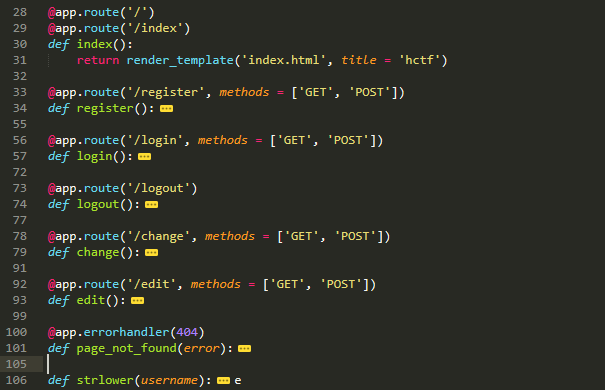
从前辈的分析中,功能非常的简单:登录(login)、改密(change)、退出(logout)、注册(register)、edit(edit)具体的路由分析源码如下:
@app.route('/code')

def get_code():

    image, code = get_verify_code()

    # 图片以二进制形式写入

    buf = BytesIO()

    image.save(buf, 'jpeg')

    buf_str = buf.getvalue()

    # 把buf_str作为response返回前端,并设置首部字段

    response = make_response(buf_str)

    response.headers['Content-Type'] = 'image/gif'

    # 将验证码字符串储存在session中

    session['image'] = code

    return response

@app.route('/')

@app.route('/index')#主页:index.html

def index():

    return render_template('index.html', title = 'hctf')

@app.route('/register', methods = ['GET', 'POST'])#注册页:register.html

def register():

    if current_user.is_authenticated:

        return redirect(url_for('index'))

    form = RegisterForm()

    if request.method == 'POST':

        name = strlower(form.username.data)

        if session.get('image').lower() != form.verify_code.data.lower():

            flash('Wrong verify code.')

            return render_template('register.html', title = 'register', form=form)

        if User.query.filter_by(username = name).first():

            flash('The username has been registered')

            return redirect(url_for('register'))

        user = User(username=name)

        user.set_password(form.password.data)

        db.session.add(user)

        db.session.commit()

        flash('register successful')

        return redirect(url_for('login'))

    return render_template('register.html', title = 'register', form = form)

@app.route('/login', methods = ['GET', 'POST'])#登录页:login.html

def login():

    if current_user.is_authenticated:

        return redirect(url_for('index'))

    form = LoginForm()

    if request.method == 'POST':

        name = strlower(form.username.data)

        session['name'] = name

        user = User.query.filter_by(username=name).first()

        if user is None or not user.check_password(form.password.data):

            flash('Invalid username or password')

            return redirect(url_for('login'))

        login_user(user, remember=form.remember_me.data)

        return redirect(url_for('index'))

    return render_template('login.html', title = 'login', form = form)

@app.route('/logout')#登录退出功能

def logout():

    logout_user()

    return redirect('/index')

@app.route('/change', methods = ['GET', 'POST'])#改密:change.html

def change():

    if not current_user.is_authenticated:

        return redirect(url_for('login'))

    form = NewpasswordForm()

    if request.method == 'POST':

        name = strlower(session['name'])

        user = User.query.filter_by(username=name).first()

        user.set_password(form.newpassword.data)

        db.session.commit()

        flash('change successful')

        return redirect(url_for('index'))

    return render_template('change.html', title = 'change', form = form)

@app.route('/edit', methods = ['GET', 'POST'])#edit.html

def edit():

    if request.method == 'POST':

        flash('post successful')

        return redirect(url_for('index'))

    return render_template('edit.html', title = 'edit')

@app.errorhandler(404)

def page_not_found(error):

    title = unicode(error)

    message = error.description

    return render_template('errors.html', title=title, message=message)

def strlower(username):

    username = nodeprep.prepare(username)

    return username
结合题目的原意和审计了index.html页面:
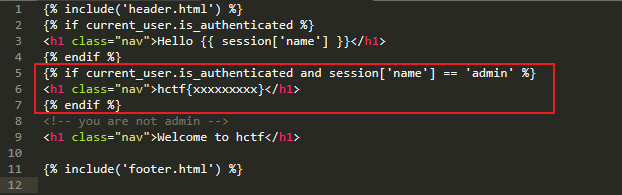
当登录的用户为“admin”的时候就可以看到flag;也就是当满足{% if current_user.is_authenticated and session['name'] == 'admin' %}的条件才可以获得flag。
至此!我得到的信息就是需要的条件:“以admin的身份登录”获得flag;目标的框架是:"flask"
Unicode欺骗:
我们发现了改密(change)功能,既然如此,就仔细的看一看:
@app.route('/change', methods = ['GET', 'POST'])#改密:change.html

def change():

    if not current_user.is_authenticated:

        return redirect(url_for('login'))

    form = NewpasswordForm()

    if request.method == 'POST':

        name = strlower(session['name']) #strlower():转小写

        user = User.query.filter_by(username=name).first()

        user.set_password(form.newpassword.data)

        db.session.commit()

        flash('change successful')

        return redirect(url_for('index'))

    return render_template('change.html', title = 'change', form = form)
从源码中发现,存在strlower()小写转换?为什么???
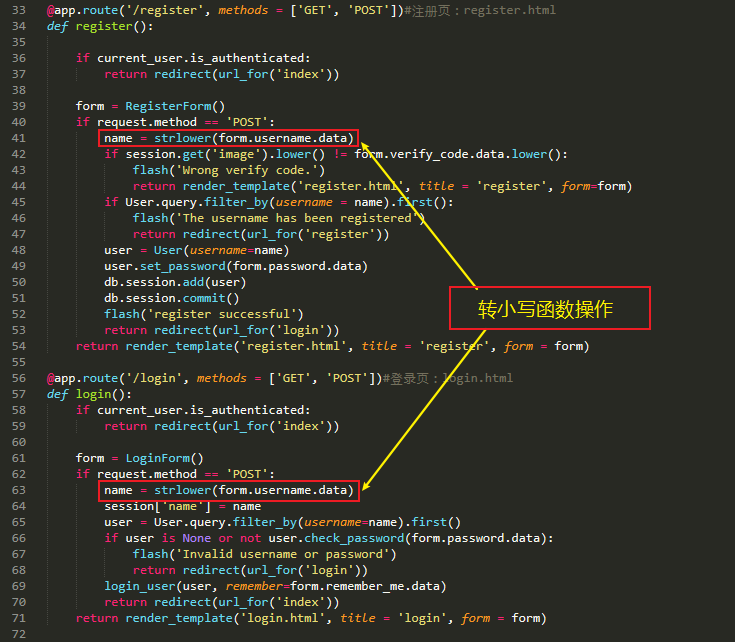
同样的,在注册和登录的地方,也对用户名name进行了strlower()转小写操作
我注册"ADMIN"发现不可行!原本认为注册的ADMIN会最后转为admin,但是并不然
仔细的看看strlower()函数
def strlower(username):

    username = nodeprep.prepare(username)

    return username
进一步探索nodeprep.prepare()_twisted库

参考Writerup:admin出题人求挨打 说了很多种方法
参考漏洞:Unicode同形字引起的安全问题 Unicode欺骗**
假如我们注册ᴬᴰᴹᴵᴺ用户,然后在用ᴬᴰᴹᴵᴺ用户登录,因为在routes.py/login函数里使用了一次nodeprep.prepare函数,因此我们登录上去看到的用户名为ADMIN,此时我们再routes.py/change修改密码,又调用了一次nodeprep.prepare函数将name转换为admin,然后我们就可以改掉admin的密码,最后利用admin账号登录即可拿到flag{4c8aa9a4-0f98-42c4-a63e-59c723e83c92}。
总结:
这里利用的Unicod欺骗,twisted库的nodeprep.prepare()会将内容转为小写,且将其它类的编码转为ASCii;我们提交(可以查到各个字母的替换类型 )“ᴬ”nodeprep.prepare()函数转为“A”,再次(二次)nodeprep.prepare()函数会将“A”转为“a”;这是twisted库函数的特点。
final Web1
未解决
HCTF_2018-Writeup【web题】的更多相关文章
- CTFHub Web题学习笔记(SQL注入题解writeup)
Web题下的SQL注入 1,整数型注入 使用burpsuite,?id=1%20and%201=1 id=1的数据依旧出现,证明存在整数型注入 常规做法,查看字段数,回显位置 ?id=1%20orde ...
- 实验吧web题:
实验吧web题: 这个有点简单 因为刚了解sqlmap,所以就拿sqlmap来练练手了 1,先测试该页面是否存在sql注入漏洞 2.找到漏洞页面,复制url,然后打开sqlmap 先查看当前数据库 然 ...
- i春秋CTF web题(1)
之前边看writeup,边做实验吧的web题,多多少少有些收获.但是知识点都已记不清.所以这次借助i春秋这个平台边做题,就当记笔记一样写写writeup(其实都大部分还是借鉴其他人的writeup). ...
- CTF--web 攻防世界web题 robots backup
攻防世界web题 robots https://adworld.xctf.org.cn/task/answer?type=web&number=3&grade=0&id=506 ...
- CTF--web 攻防世界web题 get_post
攻防世界web题 get_post https://adworld.xctf.org.cn/task/answer?type=web&number=3&grade=0&id=5 ...
- 关于第一场HBCTF的Web题小分享,当作自身的笔记
昨天晚上6点开始的HBCTF,虽然是针对小白的,但有些题目确实不简单. 昨天女朋友又让我帮她装DOTA2(女票是一个不怎么用电脑的),然后又有一个小白问我题目,我也很热情的告诉她了,哎,真耗不起. 言 ...
- 实验吧web题(26/26)全writeup!超详细:)
#简单的SQL注入 http://www.shiyanbar.com/ctf/1875 1)试着在?id=1,没有错误 2)试着?id=1',出错了,有回显,说明有注入点: You have an e ...
- ISG2018 web题Writeup
0x01.命令注入 这题可以使用burpsuite扫出来,但是可能需要测一下. 得知payload为:i%7cecho%20gzavvlsv9c%20q9szmriaiy%7c%7ca%20%23'% ...
- CTFHub Web题学习笔记(Web前置技能+信息泄露题解writeup)
今天CTFHub正式上线了,https://www.ctfhub.com/#/index,之前有看到这个平台,不过没在上面做题,技能树还是很新颖的,不足的是有的方向的题目还没有题目,CTF比赛时间显示 ...
- 实验吧 web题writeup
1.http://ctf5.shiyanbar.com/web/wonderkun/web/index.html 用户名我输入:or'xor"and"select"uni ...
随机推荐
- 【搞定面试官】谈谈你对JDK中Executor的理解?
## 前言 随着当今处理器计算能力愈发强大,可用的核心数量越来越多,各个应用对其实现更高吞吐量的需求的不断增长,多线程 API 变得非常流行.在此背景下,Java自JDK1.5 提供了自己的多线程框架 ...
- 【Android - 自定义View】之自定义可下拉刷新或上拉加载的ListView
首先来介绍一下这个自定义View: (1)这个自定义View的名称叫做 RefreshableListView ,继承自ListView类: (2)在这个自定义View中,用户可以设置是否支持下拉刷新 ...
- Jpa支持LocalDateTime类型持久化
package com.boldseas.porscheshop.common.config; import javax.persistence.AttributeConverter; import ...
- php踩过的那些坑(1) isset()详解
前言:在日常开发中经常会遇到使用isset()函数检测一个变量是否设置,有什么需要注意的地方,今天一起来讨论一下 注:测试的php版本是5.6.22 一.前方有坑 先上代码: $arr['a'] = ...
- 使用PaintCode便捷地实现动画效果
// // ViewController.m // paintCodeTestOC //gif // Created by LongMa on 2019/7/25. // #import " ...
- MySql CPU彪高到百分之1000的排查思路
You need to enable JavaScript to run this app. 原文内容来自于LZ(楼主)的印象笔记,如出现排版异常或图片丢失等情况,可查看当前链接:https:// ...
- 第七章终结篇——8251A的总结
总算把这个第七章复习完了,我把剩下一点关于8251A的发上来吧 本来在讲解8251A书本上还有关于RS232和串口通信的讲解,但是太浅了,就不放了,有兴趣的朋友可以自行参考其他文章 串行通信芯片825 ...
- ajax异步请求的常见方式
首先先介绍下ajax,ajax(ASynchronous JavaScript And XML)为异步的javascript和xml.所谓的异步和同步是指: 同步:客户端必须等待服务器的响应,在等待期 ...
- Selenium 4 Python的最佳测试框架
随着Python语言的使用越来越流行,基于Python的测试自动化框架也越来越流行.在项目选择最佳框架时,开发人员和测试人员会有些无法下手.做出选择是应该判断很多事情,框架的脚本质量,测试用例的简单性 ...
- POJ1458 Subsquence
A subsequence of a given sequence is the given sequence with some elements (possible none) left out. ...