
使用apache的poi来实现数据导出到excel的功能——方式一
利用poi导出复杂样式的excel表格的实现。
我们要实现的效果是:
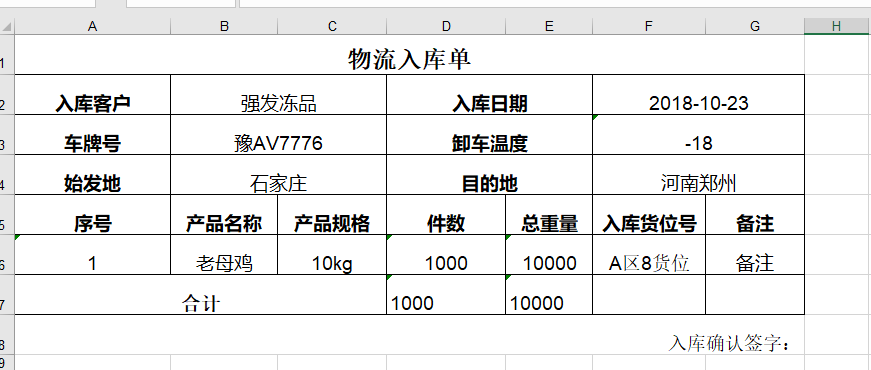
我们利用提前设计好模板样式,再在模板中填充数据的方式。
首先,pom.xml引入poi。
<dependency>

   <groupId>org.apache.poi</groupId>

   <artifactId>poi</artifactId>

   <version>3.9</version>

</dependency>

<dependency>

   <groupId>org.apache.poi</groupId>

   <artifactId>poi-ooxml</artifactId>

   <version>3.9</version>

</dependency>
然后,编写代码部分。
   @RequestMapping("/print")

    public void print(String param,HttpServletResponse response, HttpServletRequest request) throws Exception{

        //获取模板存放的路径

        String path=request.getSession().getServletContext().getRealPath("/")+"/ExcelTemplate/";

        InputStream is=new FileInputStream(new File(path+"表单模板.xls"));

        HSSFWorkbook wb=new HSSFWorkbook(is);

        HSSFSheet sheet = wb.getSheetAt();

        Row nRow=null;

        Cell nCell=null;

        //行号

        int  rowNo=;

        //列号

        int colNo=;

        //获取模板上的第六行单元格样式

        nRow=sheet.getRow();

        //内容样式

        nCell=nRow.getCell();

        CellStyle textStartStyle=nCell.getCellStyle();

        nCell=nRow.getCell();

        CellStyle textCenterStyle=nCell.getCellStyle();

        nCell=nRow.getCell();

        CellStyle textEndStyle=nCell.getCellStyle();

        //大标题================================================

        nRow=sheet.getRow(rowNo++);  //获取第一行对象

        nCell=nRow.getCell(colNo);  //获取第一个单元格对象

        nCell.setCellValue("入流入库单");

        //获取第二行

        colNo=;

        nRow=sheet.getRow(rowNo++);

        nCell=nRow.getCell(colNo++);//第二行第二列

        nCell.setCellValue("测试客户");

        nCell=nRow.getCell(colNo+=);//第二行第四列

        nCell.setCellValue("2018-09-18");

        //获取第三行

        colNo=;

        nRow=sheet.getRow(rowNo++);

        nCell=nRow.getCell(colNo++);//第三行第二列

        nCell.setCellValue("豫A 123");

        nCell=nRow.getCell(colNo+=);//第三行第四列

        nCell.setCellValue("-18");

        //获取第四行

        colNo=;

        nRow=sheet.getRow(rowNo++);

        nCell=nRow.getCell(colNo++);//第四行第二列

        nCell.setCellValue("郑州");

        nCell=nRow.getCell(colNo+=);//第四行第四列

        nCell.setCellValue("漯河");

        //插入行

        for(int j=;j<;j++){

            colNo=;

            rowNo++;

            sheet.shiftRows(rowNo, sheet.getLastRowNum(), ,true,false);

            nRow=sheet.createRow(rowNo);

            nCell=nRow.createCell(colNo++);

            nCell.setCellValue("");

            nCell.setCellStyle(textCenterStyle);

            nCell=nRow.createCell(colNo++);

            nCell.setCellValue("小苹果");

            nCell.setCellStyle(textCenterStyle);

            nCell=nRow.createCell(colNo++);

            nCell.setCellValue("1kg/袋");

            nCell.setCellStyle(textCenterStyle);

            nCell=nRow.createCell(colNo++);

            nCell.setCellValue("");

            nCell.setCellStyle(textCenterStyle);

            nCell=nRow.createCell(colNo++);

            nCell.setCellValue("");

            nCell.setCellStyle(textCenterStyle);

            nCell=nRow.createCell(colNo++);

            nCell.setCellValue("仓库1");

            nCell.setCellStyle(textCenterStyle);

            nCell=nRow.createCell(colNo++);

            nCell.setCellValue("beizhu");

            nCell.setCellStyle(textEndStyle);

        }

        //换行

        rowNo++;

        //获取第六行

        nRow=sheet.getRow(rowNo++);

        nCell=nRow.getCell();

        nCell.setCellValue("");

        nCell=nRow.getCell();

        nCell.setCellValue("");

        //下载

        DownloadUtil dUtil=new DownloadUtil();

        ByteArrayOutputStream os=new ByteArrayOutputStream();

        wb.write(os);

        dUtil.download(os, response, "测试单.xls");

        os.flush();

        os.close();

    }
其中,"表单模板.xls"是提前设计维护好的excel,例如:
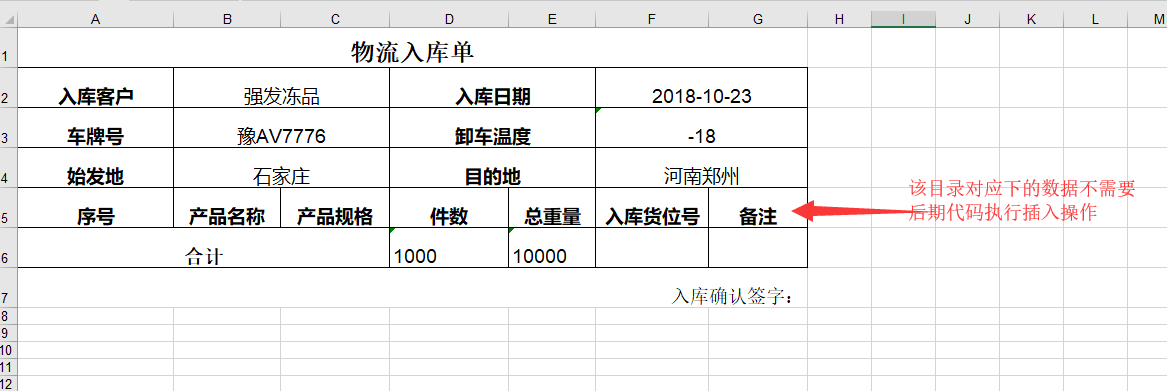
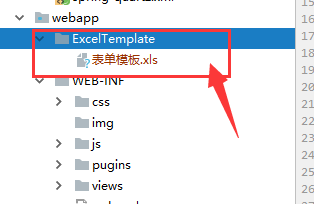
该模板放置路径,与代码中需要一致,例如存放地址为:
download.java工具类内容如下:
package cn.tf.jk.util;

import java.io.ByteArrayOutputStream;

import java.io.File;

import java.io.FileInputStream;

import java.io.IOException;

import javax.servlet.ServletOutputStream;

import javax.servlet.http.HttpServletResponse;

public class DownloadUtil {

    /**

     * @param filePath 要下载的文件路径

     * @param returnName 返回的文件名

     * @param response HttpServletResponse

     * @param delFlag 是否删除文件

     */

    protected void download(String filePath,String returnName,HttpServletResponse response,boolean delFlag){

        this.prototypeDownload(new File(filePath), returnName, response, delFlag);

    }

    /**

     * @param file 要下载的文件

     * @param returnName 返回的文件名

     * @param response HttpServletResponse

     * @param delFlag 是否删除文件

     */

    protected void download(File file,String returnName,HttpServletResponse response,boolean delFlag){

        this.prototypeDownload(file, returnName, response, delFlag);

    }

    /**

     * @param file 要下载的文件

     * @param returnName 返回的文件名

     * @param response HttpServletResponse

     * @param delFlag 是否删除文件

     */

    public void prototypeDownload(File file,String returnName,HttpServletResponse response,boolean delFlag){

        // 下载文件

        FileInputStream inputStream = null;

        ServletOutputStream outputStream = null;

        try {

            if(!file.exists()) return;

            response.reset();

            //设置响应类型    PDF文件为"application/pdf",WORD文件为:"application/msword", EXCEL文件为:"application/vnd.ms-excel"。

            response.setContentType("application/octet-stream;charset=utf-8");

            //设置响应的文件名称,并转换成中文编码

            //returnName = URLEncoder.encode(returnName,"UTF-8");

            returnName = response.encodeURL(new String(returnName.getBytes(),"iso8859-1"));    //保存的文件名,必须和页面编码一致,否则乱码

            //attachment作为附件下载;inline客户端机器有安装匹配程序,则直接打开;注意改变配置,清除缓存,否则可能不能看到效果

            response.addHeader("Content-Disposition",   "attachment;filename="+returnName);

            //将文件读入响应流

            inputStream = new FileInputStream(file);

            outputStream = response.getOutputStream();

            int length = ;

            int readLength=;

            byte buf[] = new byte[];

            readLength = inputStream.read(buf, , length);

            while (readLength != -) {

                outputStream.write(buf, , readLength);

                readLength = inputStream.read(buf, , length);

            }

        } catch (Exception e) {

            e.printStackTrace();

        } finally {

            try {

                outputStream.flush();

            } catch (IOException e) {

                e.printStackTrace();

            }

            try {

                outputStream.close();

            } catch (IOException e) {

                e.printStackTrace();

            }

            try {

                inputStream.close();

            } catch (IOException e) {

                e.printStackTrace();

            }

            //删除原文件

            if(delFlag) {

                file.delete();

            }

        }

    }

    /**

     * by tony 2013-10-17

     * @param byteArrayOutputStream 将文件内容写入ByteArrayOutputStream

     * @param response HttpServletResponse    写入response

     * @param returnName 返回的文件名

     */

    public void download(ByteArrayOutputStream byteArrayOutputStream, HttpServletResponse response, String returnName) throws IOException{

        response.setContentType("application/octet-stream;charset=utf-8");

        returnName = response.encodeURL(new String(returnName.getBytes(),"iso8859-1"));            //保存的文件名,必须和页面编码一致,否则乱码

        response.addHeader("Content-Disposition",   "attachment;filename=" + returnName);

        response.setContentLength(byteArrayOutputStream.size());

        ServletOutputStream outputstream = response.getOutputStream();    //取得输出流

        byteArrayOutputStream.writeTo(outputstream);                    //写到输出流

        byteArrayOutputStream.close();                                    //关闭

        outputstream.flush();                                            //刷数据

    }

}
前端调用:
 var url = "newOrderCtrl/print";

  postHref(url,param);//param是传输过去的参数,如果没有的话可以为空
jquery中postHref:
function postHref(url,param){

    if(param && url){

        var form = $("<form>");   //定义一个form表单

        form.attr('style','display:none');   //在form表单中添加查询参数

        form.attr('method','post');

        form.attr('action',url);

       var $param = $("<input type='text' name='param' />");

        $param.attr('value',JSON.stringify(param));

        form.append($param);

        form.appendTo('body');

        form.css('display','none');

        form.submit();

    }else{

        console.log("url或param为空!");

        return false;

    }

}
参考地址:https://blog.csdn.net/sdksdk0/article/details/53393453
源码下载地址:https://github.com/sdksdk0/JK
使用apache的poi来实现数据导出到excel的功能——方式一的更多相关文章
- 使用apache的poi来实现数据导出到excel的功能——方式二
此次,介绍利用poi与layui table结合导出excel.这次不需要从数据库中查询出来的数据进行每一行的拼接那么麻烦,我们这次将标题定义一个id值,对应从数据库中查找出来的字段名即可. 1.po ...
- Java利用Apache POI将数据库数据导出为excel
将数据库中的数据导出为excel文件,供其他人查看 public class POITest { public static void main(String[] args) { POITest te ...
- 使用POI把查询到的数据表数据导出到Excel中,一个表一个sheet.最详细!!!
一.需求 我们会遇到开发任务: 经理:小王,你来做一下把数据库里的数据导出到Excel中,一个表是一个sheet,不要一个表一个Excel. 小王:好的,经理.(内心一脸懵逼) 二.前期准备 首先我们 ...
- struts2结合poi-3.7实现数据导出为excel
我们在处理数据的时候,有可能要将数据导出到excel文件中,那么java中是怎么实现的呢?apache开发的poi就可以帮我们实现啦,它也是开源的代码,导入相应的jar包,就可以轻松实现,下面让我们来 ...
- 大批量数据导出到Excel的实现
在平时的项目中,将数据导出到Excel的需求是很常见的,在此对一些常见的方法做以总结,并提供一种大数据量导出的实现. OLEDB 使用OLEDB可以很方便导出Excel,思路很简单,处理时将Exc ...
- 学习笔记 DataGridView数据导出为Excel
DataGridView数据导出为Excel 怎样把WinForm下的“DGV”里的绑定数据库后的数据导出到Excel中. 比如:在窗体里有个一“DGV”,DataGridView1,绑定了数据源 ...
- 将C1Chart数据导出到Excel
大多数情况下,当我们说将图表导出到Excel时,意思是将Chart当成图片导出到Excel中.如果是这样,你可以参考帮助文档中保存和导出C1Chart章节. 不过,也有另一种情况,当你想把图表中的数据 ...
- vb.net-三种将datagridview数据导出为excel文件的函数
第一种方法较慢,但是数据格式都比较好,需要引用excel的 Microsoft.Office.Interop.Excel.dll office.dll #Region "导出excel函数 ...
- 数据导出至Excel文件--好库编程网http://code1.okbase.net/codefile/SerializeHelper.cs_2012122018724_118.htm
using System; using System.IO; using System.Data; using System.Collections; using System.Data.OleDb; ...
随机推荐
- 【原创】Linux Suspend流程分析
背景 Read the fucking source code! --By 鲁迅 A picture is worth a thousand words. --By 高尔基 说明: Kernel版本: ...
- Synchronized机制下偏向锁、轻量级锁、重量级锁的适用场景
上次总结了Synchronized机制下的锁的种类和原理,这次总结一下几种锁的适用场景. 偏向锁 一个线程获取某个对象的偏向锁的成本是很低的,只需把对象头的偏向线程id改为自己就好,如果偏向线程id已 ...
- (数据科学学习手札68)pandas中的categorical类型及应用
一.简介 categorical是pandas中对应分类变量的一种数据类型,与R中的因子型变量比较相似,例如性别.血型等等用于表征类别的变量都可以用其来表示,本文就将针对categorical的相关内 ...
- BS/CS 区别
转载自:https://www.cnblogs.com/chenmingjun 一.CS和BS含义: CS即Client/Server(客户机/服务器)结构.C/S结构在技术上很成熟,它的主要特点是交 ...
- CodeForces-768B-Code For 1+DFS类似线段树思想
Code For 1 题意:对于一个n,可以将它分解为n/2,n%2,n/2三个数字,重复上述操作知道虽有值为1或0为止: 求L---R区间数列的和: 思路:首先画着画着可以发现这是一个类似线段数的结 ...
- Numbers That Count POJ - 1016
"Kronecker's Knumbers" is a little company that manufactures plastic digits for use in sig ...
- codeforces 798 D. Mike and distribution(贪心+思维)
题目链接:http://codeforces.com/contest/798/problem/D 题意:给出两串长度为n的数组a,b,然后要求长度小于等于n/2+1的p数组是的以p为下表a1-ap的和 ...
- 现代 JavaScript 教程到底是什么?
手册与规范 <现代 JavaScript 教程>是开源的现代 JavaScript 从入门到进阶的优质教程,它旨在帮助你逐渐掌握 JavaScript 这门语言.但是一旦你已经熟悉了这门语 ...
- Salesforce LWC学习(六) @salesforce & lightning/ui*Api Reference
上一篇中我们在demo中使用了很多的 @salesforce 以及 lightning/ui*Api的方法,但是很多没有细节的展开.其实LWC中针对这些module提供了很多好用的方法,下面对这两种进 ...
- Java日志框架总结
1. 前言 从写代码开始,就陆陆续续接触到了许多日志框架,较常用的属于LOG4J,LogBack等.每次自己写项目时,就copy前人的代码或网上的demo.配置log4j.properties或者lo ...