
Spring Boot缓存Ehcache
<!-- Spring Boot 缓存支持启动器 -->

        <dependency>

            <groupId>org.springframework.boot</groupId>

            <artifactId>spring-boot-starter-cache</artifactId>

        </dependency>

        <!-- Ehcache 坐标 -->

        <dependency>

            <groupId>net.sf.ehcache</groupId>

            <artifactId>ehcache</artifactId>

</dependency><ehcache xmlns:xsi="http://www.w3.org/2001/XMLSchema-instance" xsi:noNamespaceSchemaLocation="../config/ehcache.xsd">
<diskStore path="java.io.tmpdir"/> <!--defaultCache:echcache 的默认缓存策略 -->
<defaultCache maxElementsInMemory="10000"
eternal="false"
timeToIdleSeconds="120"
timeToLiveSeconds="120"
maxElementsOnDisk="10000000"
diskExpiryThreadIntervalSeconds="120"
memoryStoreEvictionPolicy="LRU">
<persistence strategy="localTempSwap"/>
</defaultCache> <!-- 自定义缓存策略 -->
<cache name="users"
maxElementsInMemory="10000"
eternal="false"
timeToIdleSeconds="120"
timeToLiveSeconds="120"
maxElementsOnDisk="10000000"
diskExpiryThreadIntervalSeconds="120"
memoryStoreEvictionPolicy="LRU">
<persistence strategy="localTempSwap"/>
</cache>
</ehcache>#项目端口配置
server.port=8080
server.address=0.0.0.0
spring.datasource.driver-class-name=com.mysql.cj.jdbc.Driver
spring.datasource.url=jdbc:mysql://localhost:3306/ssm?characterEncoding=UTF8&useSSL=false&serverTimezone=UTC
spring.datasource.username=root
spring.datasource.password=root
spring.datasouce.type=com.alibaba.druid.pool.DruidDataSource
spring.jpa.hibernate.ddl-auto=update
spring.jpa.show-sql=true
spring.devtools.restart.enabled=true
spring.cache.ehcache.config=classpath:ehcache.xml
package com.bjsxt;

import org.springframework.boot.SpringApplication;

import org.springframework.boot.autoconfigure.SpringBootApplication;

import org.springframework.cache.annotation.EnableCaching;

@SpringBootApplication

@EnableCaching//启用缓存机制

public class BootDataApplication {

    public static void main(String[] args) {

        SpringApplication.run(BootDataApplication.class, args);

    }

}
package com.bjsxt.service.impl;

import com.bjsxt.dao.UserDao;

import com.bjsxt.pojo.Users;

import com.bjsxt.service.UserService;

import org.springframework.beans.factory.annotation.Autowired;

import org.springframework.cache.annotation.CacheEvict;

import org.springframework.cache.annotation.Cacheable;

import org.springframework.data.domain.Page;

import org.springframework.data.domain.Pageable;

import org.springframework.stereotype.Service;

import java.util.List;

@Service

public class UserServiceImpl implements UserService {

    @Autowired

    UserDao ud;

    @Override

    @CacheEvict(value = "users",allEntries = true)//清空缓存

    public void addUser(Users users) {

        ud.save(users);

    }

    @Override

    @Cacheable(value = "users")//配置缓存,查找缓存文件

    public List<Users> findall() {

        List<Users> usersList = ud.findAll();

        return usersList;

    }

    @Override

    @Cacheable(value = "users",key = "#pageable.pageSize")//配置缓存,配置缓存的key

    public Page<Users> findUserByPage(Pageable pageable) {

        Page<Users> usersPage = ud.findAll(pageable);

        return usersPage;

    }

}
package com.bjsxt.pojo;

import lombok.Data;

import javax.persistence.*;

import java.io.Serializable;

@Entity

@Table(name = "users")

@Data

public class Users implements Serializable {

    @Id

    @GeneratedValue(strategy = GenerationType.IDENTITY)

    @Column(name = "userid")

    private int userid;

    @Column(name = "username")

    private String username;

    @Column(name = "userage")

    private int userage;

    public Users(){}

    public Users(String username, int userage) {

        this.username = username;

        this.userage = userage;

    }

}
package com.bjsxt.test;

import com.bjsxt.BootDataApplication;

import com.bjsxt.dao.UserDao;

import com.bjsxt.pojo.Users;

import com.bjsxt.service.UserService;

import org.junit.Test;

import org.junit.runner.RunWith;

import org.springframework.beans.factory.annotation.Autowired;

import org.springframework.boot.test.context.SpringBootTest;

import org.springframework.data.domain.Page;

import org.springframework.data.domain.PageRequest;

import org.springframework.data.domain.Pageable;

import org.springframework.data.jpa.domain.Specification;

import org.springframework.test.context.junit4.SpringJUnit4ClassRunner;

import javax.persistence.criteria.CriteriaBuilder;

import javax.persistence.criteria.CriteriaQuery;

import javax.persistence.criteria.Predicate;

import javax.persistence.criteria.Root;

import java.util.ArrayList;

import java.util.List;

@RunWith(SpringJUnit4ClassRunner.class)

@SpringBootTest(classes = BootDataApplication.class)

public class UserTest {

    @Autowired

    UserService us;

    @Autowired

    UserDao ud;

    /**

     * 添加用户

     */

    @Test

    public void TestAddUser(){

        Users users=new Users();

        users.setUsername("杨彪");

        users.setUserage(27);

        us.addUser(users);

    }

    @Test

    public void findByNameAndAge(){

        Specification<Users> spec=new Specification<Users>() {

            @Override

            public Predicate toPredicate(Root<Users> root, CriteriaQuery<?> criteriaQuery, CriteriaBuilder criteriaBuilder) {

                /*List<Predicate> predicates=new ArrayList<>();

                predicates.add(criteriaBuilder.equal(root.get("username"),"asd"));

                predicates.add(criteriaBuilder.equal(root.get("userage"),"123"));

                Predicate[] arr=new Predicate[predicates.size()];

                return criteriaBuilder.and(predicates.toArray(arr));*/

               return criteriaBuilder.or(criteriaBuilder.equal(root.get("username"),"asd"),criteriaBuilder.equal(root.get("userage"),"22"));

            }

        };

        List<Users> users = ud.findAll(spec);

        for (Users user : users) {

            System.out.println(user);

        }

    }

    /**

     * 测试使用缓存查询所有,第二次不会打印sql语句

     */

    @Test

    public void TestFindAll(){

        System.out.println("第一次查询:");

        List<Users> users = us.findall();

        for (Users user : users) {

            System.out.println("First:"+user);

        }

        Users use=new Users();

        use.setUsername("杨彪3");

        use.setUserage(22);

        us.addUser(use);

        System.out.println("\n第二次查询:");

        List<Users> u = us.findall();

        for (Users user : u) {

            System.out.println("Second:"+user);

        }

    }

    @Test

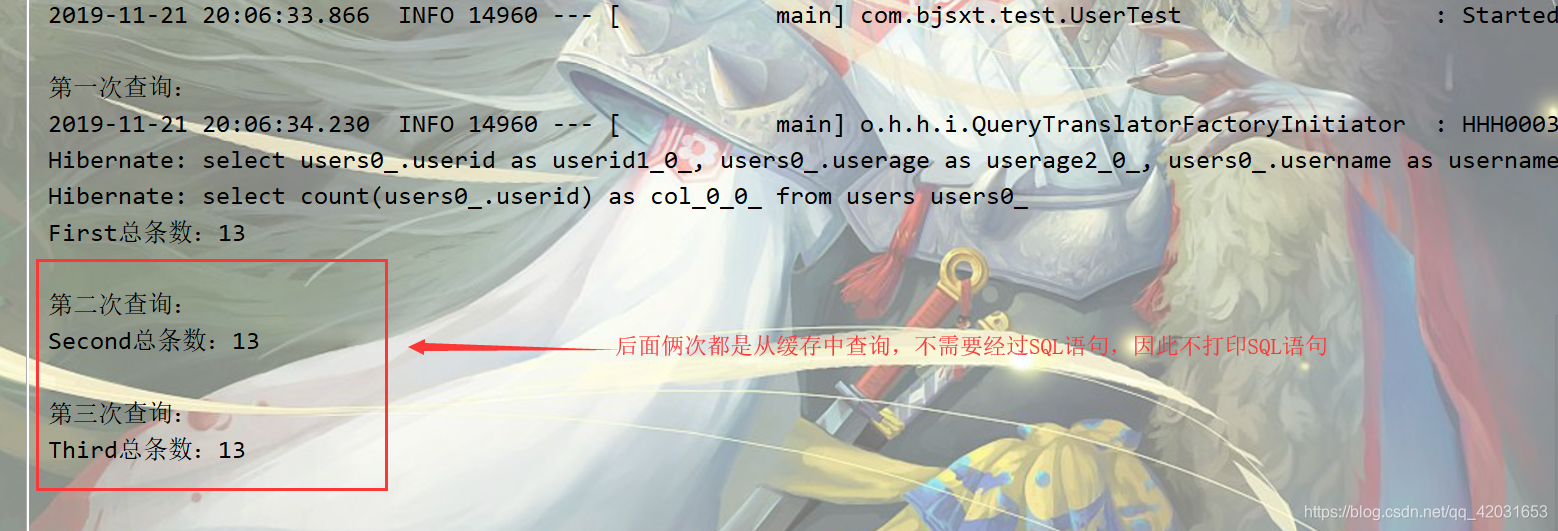
    public void findUserByPage(){

        Pageable pageable=new PageRequest(0,2);

        System.out.println("第一次查询:");

        Page<Users> userByPage = us.findUserByPage(pageable);

        long totalElements = userByPage.getTotalElements();

        System.out.println("First总条数:"+totalElements);

        System.out.println("\n第二次查询:");

        Page<Users> userByPage2 = us.findUserByPage(pageable);

        long totalElements2 = userByPage2.getTotalElements();

        System.out.println("Second总条数:"+totalElements2);

        System.out.println("\n第三次查询:");

        pageable=new PageRequest(1,2);

        Page<Users> userByPage3 = us.findUserByPage(pageable);

        long totalElements3 = userByPage3.getTotalElements();

        System.out.println("Third总条数:"+totalElements3);

    }

}
Spring Boot缓存Ehcache的更多相关文章
- (37)Spring Boot集成EHCache实现缓存机制【从零开始学Spring Boot】
[本文章是否对你有用以及是否有好的建议,请留言] 写后感:博主写这么一系列文章也不容易啊,请评论支持下. 如果看过我之前(35)的文章这一篇的文章就会很简单,没有什么挑战性了. 那么我们先说说这一篇文 ...
- Spring Boot集成EHCache实现缓存机制
SpringBoot 缓存(EhCache 2.x 篇) SpringBoot 缓存 在 Spring Boot中,通过@EnableCaching注解自动化配置合适的缓存管理器(CacheManag ...
- 另一种缓存,Spring Boot 整合 Ehcache
用惯了 Redis ,很多人已经忘记了还有另一个缓存方案 Ehcache ,是的,在 Redis 一统江湖的时代,Ehcache 渐渐有点没落了,不过,我们还是有必要了解下 Ehcache ,在有的场 ...
- Spring Boot 集成 Ehcache 缓存,三步搞定!
作者:谭朝红 www.ramostear.com/articles/spring_boot_ehcache.html 本次内容主要介绍基于Ehcache 3.0来快速实现Spring Boot应用程序 ...
- spring boot 使用Ehcache
1-引入maven依赖: 2-增加ehcache.xml 3-bootstrap.yml配置ehcache.xml的路径 4-启动类加注解@EnableCaching 5-使用处加注解@Cacheab ...
- Spring Boot2 系列教程(三十)Spring Boot 整合 Ehcache
用惯了 Redis ,很多人已经忘记了还有另一个缓存方案 Ehcache ,是的,在 Redis 一统江湖的时代,Ehcache 渐渐有点没落了,不过,我们还是有必要了解下 Ehcache ,在有的场 ...
- 3步轻松搞定Spring Boot缓存
作者:谭朝红 前言 本次内容主要介绍基于Ehcache 3.0来快速实现Spring Boot应用程序的数据缓存功能.在Spring Boot应用程序中,我们可以通过Spring Caching来快速 ...
- Spring Boot整合EhCache
本文讲解Spring Boot与EhCache的整合. 1 EhCache简介 EhCache 是一个纯Java的进程内缓存框架,具有快速.精干等特点,是Hibernate中默认CacheProvid ...
- Spring boot缓存初体验
spring boot缓存初体验 1.项目搭建 使用MySQL作为数据库,spring boot集成mybatis来操作数据库,所以在使用springboot的cache组件时,需要先搭建一个简单的s ...
随机推荐
- 关于Python中的yield的理解
生成器:yield表达式构成的函数就是生成器:每一个生成器都是一个迭代器(但是迭代器不一定是生成器).return就是迭代器: yield的功能类似于return,不同之处在于它返回的是生成器. 什么 ...
- PHP压缩文件夹的方法
PHP压缩文件夹的方法<pre> public function addFileToZip($path, $zip) { $handler = opendir($path); //打开当前 ...
- Idea集成SpringBoot实现两种热部署方式(亲测有效)
即将介绍的两种热部署方式: 1.SpringLoaded 2.DevTools 区别: SpringLoader:SpringLoader 在部署项目时使用的是热部署的方式. DevTools:Dev ...
- 使用Charles设置https代理到http以及证书安装(服务端篇)
1.下载ssl证书到[登录],并且设置证书[始终信任] 2.SSL Proxying设置,Location为*,可以抓全部接口的https请求 参考:https://www.jianshu.com/p ...
- Python之selenium自动化PART1
本文适合有经验的测试童鞋 一.Selenium自动化测试环境搭建 1.cmd --- pip install selenium==2.53.0 (如果selenium后面不跟==,表示默认安装最新版本 ...
- 初探three.js
相信大多数选择前端的小伙伴都有一个设计师的梦,今天我来说一说three.js.three.js是一款运行在浏览器中的 3D 引擎,你可以用它创建各种三维场景,包括了摄影机.光影.材质等各种对象.学习了 ...
- PostGIS 爆管分析之找出总阀门
这个算法算是被摒弃了,但是很多自己思考过后留下的成果,虽然不用了,留着做记录. 算法目的是为了发生爆管后找到总阀门,这里分了几个步骤: 1.找到爆管点所在管段 2.通过遍历找到爆管点所有影响的阀门 3 ...
- 剖析nsq消息队列目录
剖析nsq消息队列(一) 简介及去中心化实现原理 剖析nsq消息队列(二) 去中心化源码解析 剖析nsq消息队列(三) 消息传输的可靠性和持久化[一] 剖析nsq消息队列(三) 消息传输的可靠性和持久 ...
- pdf 在线预览之 vue-pdf插件
vue-pdf 支持到ie11npm安装:npm install --save vue-pdf 组件template: <div class="show-pdf"> ...
- 菜鸟系列Fabric源码学习—orderer服务启动
Fabric 1.4 orderer 服务启动流程 1.提要 orderer提供broadcast和deliver两个服务接口.orderer节点与各个peer节点通过grpc连接,orderer将所 ...