
(三十八)c#Winform自定义控件-圆形进度条-HZHControls
官网
前提
入行已经7,8年了,一直想做一套漂亮点的自定义控件,于是就有了本系列文章。
GitHub:https://github.com/kwwwvagaa/NetWinformControl
码云:https://gitee.com/kwwwvagaa/net_winform_custom_control.git
如果觉得写的还行,请点个 star 支持一下吧
欢迎前来交流探讨: 企鹅群568015492 idkey=6e08741ef16fe53bf0314c1c9e336c4f626047943a8b76bac062361bab6b4f8d">
目录
https://www.cnblogs.com/bfyx/p/11364884.html
准备工作
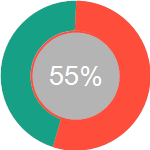
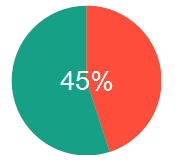
我们理一下思路,进度条支持圆环或扇形显示,支持百分比和数值显示
开始
添加一个用户控件,命名UCProcessEllipse
定义2个枚举
  public enum ValueType

     {

         /// <summary>

         /// 百分比

         /// </summary>

         Percent,

         /// <summary>

         /// 数值

         /// </summary>

         Absolute

     }

     public enum ShowType

     {

         /// <summary>

         /// 圆环

         /// </summary>

         Ring,

         /// <summary>

         /// 扇形

         /// </summary>

         Sector

     }
添加属性
  [Description("值改变事件"), Category("自定义")]

         public event EventHandler ValueChanged;

         private Color m_backEllipseColor = Color.FromArgb(, , );

         /// <summary>

         /// 圆背景色

         /// </summary>

         [Description("圆背景色"), Category("自定义")]

         public Color BackEllipseColor

         {

             get { return m_backEllipseColor; }

             set

             {

                 m_backEllipseColor = value;

                 Refresh();

             }

         }

         private Color m_coreEllipseColor = Color.FromArgb(, , );

         /// <summary>

         /// 内圆颜色,ShowType=Ring 有效

         /// </summary>

         [Description("内圆颜色,ShowType=Ring 有效"), Category("自定义")]

         public Color CoreEllipseColor

         {

             get { return m_coreEllipseColor; }

             set

             {

                 m_coreEllipseColor = value;

                 Refresh();

             }

         }

         private Color m_valueColor = Color.FromArgb(, , );

         [Description("值圆颜色"), Category("自定义")]

         public Color ValueColor

         {

             get { return m_valueColor; }

             set

             {

                 m_valueColor = value;

                 Refresh();

             }

         }

         private bool m_isShowCoreEllipseBorder = true;

         /// <summary>

         /// 内圆是否显示边框,ShowType=Ring 有效

         /// </summary>

         [Description("内圆是否显示边框,ShowType=Ring 有效"), Category("自定义")]

         public bool IsShowCoreEllipseBorder

         {

             get { return m_isShowCoreEllipseBorder; }

             set

             {

                 m_isShowCoreEllipseBorder = value;

                 Refresh();

             }

         }

         private ValueType m_valueType = ValueType.Percent;

         /// <summary>

         /// 值文字类型

         /// </summary>

         [Description("值文字类型"), Category("自定义")]

         public ValueType ValueType

         {

             get { return m_valueType; }

             set

             {

                 m_valueType = value;

                 Refresh();

             }

         }

         private int m_valueWidth = ;

         /// <summary>

         /// 外圆值宽度

         /// </summary>

         [Description("外圆值宽度,ShowType=Ring 有效"), Category("自定义")]

         public int ValueWidth

         {

             get { return m_valueWidth; }

             set

             {

                 if (value <=  || value > Math.Min(this.Width, this.Height))

                     return;

                 m_valueWidth = value;

                 Refresh();

             }

         }

         private int m_valueMargin = ;

         /// <summary>

         /// 外圆值间距

         /// </summary>

         [Description("外圆值间距"), Category("自定义")]

         public int ValueMargin

         {

             get { return m_valueMargin; }

             set

             {

                 if (value <  || m_valueMargin >= m_valueWidth)

                     return;

                 m_valueMargin = value;

                 Refresh();

             }

         }

         private int m_maxValue = ;

         /// <summary>

         /// 最大值

         /// </summary>

         [Description("最大值"), Category("自定义")]

         public int MaxValue

         {

             get { return m_maxValue; }

             set

             {

                 if (value > m_value || value <= )

                     return;

                 m_maxValue = value;

                 Refresh();

             }

         }

         private int m_value = ;

         /// <summary>

         /// 当前值

         /// </summary>

         [Description("当前值"), Category("自定义")]

         public int Value

         {

             get { return m_value; }

             set

             {

                 if (m_maxValue < value || value <= )

                     return;

                 m_value = value;

                 if (ValueChanged != null)

                 {

                     ValueChanged(this, null);

                 }

                 Refresh();

             }

         }

         private Font m_font = new Font("Arial Unicode MS", );

         [Description("文字字体"), Category("自定义")]

         public override Font Font

         {

             get

             {

                 return m_font;

             }

             set

             {

                 m_font = value;

                 Refresh();

             }

         }

         Color m_foreColor = Color.White;

         [Description("文字颜色"), Category("自定义")]

         public override Color ForeColor

         {

             get

             {

                 return m_foreColor;

             }

             set

             {

                 m_foreColor = value;

                 Refresh();

             }

         }

         private ShowType m_showType = ShowType.Ring;

         [Description("显示类型"), Category("自定义")]

         public ShowType ShowType

         {

             get { return m_showType; }

             set

             {

                 m_showType = value;

                 Refresh();

             }

         }
重绘
   protected override void OnPaint(PaintEventArgs e)

         {

             base.OnPaint(e);

             var g = e.Graphics;

             g.SmoothingMode = SmoothingMode.AntiAlias;  //使绘图质量最高,即消除锯齿

             g.InterpolationMode = InterpolationMode.HighQualityBicubic;

             g.CompositingQuality = CompositingQuality.HighQuality;

             int intWidth = Math.Min(this.Size.Width, this.Size.Height);

             //底圆

             g.FillEllipse(new SolidBrush(m_backEllipseColor), new Rectangle(new Point(, ), new Size(intWidth, intWidth)));

             if (m_showType == HZH_Controls.Controls.ShowType.Ring)

             {

                 //中心圆

                 int intCore = intWidth - m_valueWidth * ;

                 g.FillEllipse(new SolidBrush(m_coreEllipseColor), new Rectangle(new Point(m_valueWidth, m_valueWidth), new Size(intCore, intCore)));

                 //中心圆边框

                 if (m_isShowCoreEllipseBorder)

                 {

                     g.DrawEllipse(new Pen(m_valueColor, ), new Rectangle(new Point(m_valueWidth + , m_valueWidth + ), new Size(intCore - , intCore - )));

                 }

                 if (m_value >  && m_maxValue > )

                 {

                     float fltPercent = (float)m_value / (float)m_maxValue;

                     if (fltPercent > )

                     {

                         fltPercent = ;

                     }

                     g.DrawArc(new Pen(m_valueColor, m_valueWidth - m_valueMargin * ), new RectangleF(new Point(m_valueWidth /  + m_valueMargin / , m_valueWidth /  + m_valueMargin / ), new SizeF(intWidth - m_valueWidth - m_valueMargin /  + (m_valueMargin ==  ?  : ), intWidth - m_valueWidth - m_valueMargin /  + (m_valueMargin ==  ?  : ))), -, fltPercent * );

                     string strValueText = m_valueType == HZH_Controls.Controls.ValueType.Percent ? fltPercent.ToString("0%") : m_value.ToString();

                     System.Drawing.SizeF _txtSize = g.MeasureString(strValueText, this.Font);

                     g.DrawString(strValueText, this.Font, new SolidBrush(this.ForeColor), new PointF((intWidth - _txtSize.Width) /  + , (intWidth - _txtSize.Height) /  + ));

                 }

             }

             else

             {

                 if (m_value >  && m_maxValue > )

                 {

                     float fltPercent = (float)m_value / (float)m_maxValue;

                     if (fltPercent > )

                     {

                         fltPercent = ;

                     }

                     g.FillPie(new SolidBrush(m_valueColor), new Rectangle(m_valueMargin, m_valueMargin, intWidth - m_valueMargin * , intWidth - m_valueMargin * ), -, fltPercent * );

                     string strValueText = m_valueType == HZH_Controls.Controls.ValueType.Percent ? fltPercent.ToString("0%") : m_value.ToString();

                     System.Drawing.SizeF _txtSize = g.MeasureString(strValueText, this.Font);

                     g.DrawString(strValueText, this.Font, new SolidBrush(this.ForeColor), new PointF((intWidth - _txtSize.Width) /  + , (intWidth - _txtSize.Height) /  + ));

                 }

             }

         }
完整代码如下
 using System;

 using System.Collections.Generic;

 using System.ComponentModel;

 using System.Drawing;

 using System.Data;

 using System.Linq;

 using System.Text;

 using System.Windows.Forms;

 using System.Drawing.Drawing2D;

 namespace HZH_Controls.Controls

 {

     public partial class UCProcessEllipse : UserControl

     {

         [Description("值改变事件"), Category("自定义")]

         public event EventHandler ValueChanged;

         private Color m_backEllipseColor = Color.FromArgb(, , );

         /// <summary>

         /// 圆背景色

         /// </summary>

         [Description("圆背景色"), Category("自定义")]

         public Color BackEllipseColor

         {

             get { return m_backEllipseColor; }

             set

             {

                 m_backEllipseColor = value;

                 Refresh();

             }

         }

         private Color m_coreEllipseColor = Color.FromArgb(, , );

         /// <summary>

         /// 内圆颜色,ShowType=Ring 有效

         /// </summary>

         [Description("内圆颜色,ShowType=Ring 有效"), Category("自定义")]

         public Color CoreEllipseColor

         {

             get { return m_coreEllipseColor; }

             set

             {

                 m_coreEllipseColor = value;

                 Refresh();

             }

         }

         private Color m_valueColor = Color.FromArgb(, , );

         [Description("值圆颜色"), Category("自定义")]

         public Color ValueColor

         {

             get { return m_valueColor; }

             set

             {

                 m_valueColor = value;

                 Refresh();

             }

         }

         private bool m_isShowCoreEllipseBorder = true;

         /// <summary>

         /// 内圆是否显示边框,ShowType=Ring 有效

         /// </summary>

         [Description("内圆是否显示边框,ShowType=Ring 有效"), Category("自定义")]

         public bool IsShowCoreEllipseBorder

         {

             get { return m_isShowCoreEllipseBorder; }

             set

             {

                 m_isShowCoreEllipseBorder = value;

                 Refresh();

             }

         }

         private ValueType m_valueType = ValueType.Percent;

         /// <summary>

         /// 值文字类型

         /// </summary>

         [Description("值文字类型"), Category("自定义")]

         public ValueType ValueType

         {

             get { return m_valueType; }

             set

             {

                 m_valueType = value;

                 Refresh();

             }

         }

         private int m_valueWidth = ;

         /// <summary>

         /// 外圆值宽度

         /// </summary>

         [Description("外圆值宽度,ShowType=Ring 有效"), Category("自定义")]

         public int ValueWidth

         {

             get { return m_valueWidth; }

             set

             {

                 if (value <=  || value > Math.Min(this.Width, this.Height))

                     return;

                 m_valueWidth = value;

                 Refresh();

             }

         }

         private int m_valueMargin = ;

         /// <summary>

         /// 外圆值间距

         /// </summary>

         [Description("外圆值间距"), Category("自定义")]

         public int ValueMargin

         {

             get { return m_valueMargin; }

             set

             {

                 if (value <  || m_valueMargin >= m_valueWidth)

                     return;

                 m_valueMargin = value;

                 Refresh();

             }

         }

         private int m_maxValue = ;

         /// <summary>

         /// 最大值

         /// </summary>

         [Description("最大值"), Category("自定义")]

         public int MaxValue

         {

             get { return m_maxValue; }

             set

             {

                 if (value > m_value || value <= )

                     return;

                 m_maxValue = value;

                 Refresh();

             }

         }

         private int m_value = ;

         /// <summary>

         /// 当前值

         /// </summary>

         [Description("当前值"), Category("自定义")]

         public int Value

         {

             get { return m_value; }

             set

             {

                 if (m_maxValue < value || value <= )

                     return;

                 m_value = value;

                 if (ValueChanged != null)

                 {

                     ValueChanged(this, null);

                 }

                 Refresh();

             }

         }

         private Font m_font = new Font("Arial Unicode MS", );

         [Description("文字字体"), Category("自定义")]

         public override Font Font

         {

             get

             {

                 return m_font;

             }

             set

             {

                 m_font = value;

                 Refresh();

             }

         }

         Color m_foreColor = Color.White;

         [Description("文字颜色"), Category("自定义")]

         public override Color ForeColor

         {

             get

             {

                 return m_foreColor;

             }

             set

             {

                 m_foreColor = value;

                 Refresh();

             }

         }

         private ShowType m_showType = ShowType.Ring;

         [Description("显示类型"), Category("自定义")]

         public ShowType ShowType

         {

             get { return m_showType; }

             set

             {

                 m_showType = value;

                 Refresh();

             }

         }

         public UCProcessEllipse()

         {

             InitializeComponent();

             this.SetStyle(ControlStyles.AllPaintingInWmPaint, true);

             this.SetStyle(ControlStyles.DoubleBuffer, true);

             this.SetStyle(ControlStyles.ResizeRedraw, true);

             this.SetStyle(ControlStyles.Selectable, true);

             this.SetStyle(ControlStyles.SupportsTransparentBackColor, true);

             this.SetStyle(ControlStyles.UserPaint, true);

         }

         protected override void OnPaint(PaintEventArgs e)

         {

             base.OnPaint(e);

             var g = e.Graphics;

             g.SmoothingMode = SmoothingMode.AntiAlias;  //使绘图质量最高,即消除锯齿

             g.InterpolationMode = InterpolationMode.HighQualityBicubic;

             g.CompositingQuality = CompositingQuality.HighQuality;

             int intWidth = Math.Min(this.Size.Width, this.Size.Height);

             //底圆

             g.FillEllipse(new SolidBrush(m_backEllipseColor), new Rectangle(new Point(, ), new Size(intWidth, intWidth)));

             if (m_showType == HZH_Controls.Controls.ShowType.Ring)

             {

                 //中心圆

                 int intCore = intWidth - m_valueWidth * ;

                 g.FillEllipse(new SolidBrush(m_coreEllipseColor), new Rectangle(new Point(m_valueWidth, m_valueWidth), new Size(intCore, intCore)));

                 //中心圆边框

                 if (m_isShowCoreEllipseBorder)

                 {

                     g.DrawEllipse(new Pen(m_valueColor, ), new Rectangle(new Point(m_valueWidth + , m_valueWidth + ), new Size(intCore - , intCore - )));

                 }

                 if (m_value >  && m_maxValue > )

                 {

                     float fltPercent = (float)m_value / (float)m_maxValue;

                     if (fltPercent > )

                     {

                         fltPercent = ;

                     }

                     g.DrawArc(new Pen(m_valueColor, m_valueWidth - m_valueMargin * ), new RectangleF(new Point(m_valueWidth /  + m_valueMargin / , m_valueWidth /  + m_valueMargin / ), new SizeF(intWidth - m_valueWidth - m_valueMargin /  + (m_valueMargin ==  ?  : ), intWidth - m_valueWidth - m_valueMargin /  + (m_valueMargin ==  ?  : ))), -, fltPercent * );

                     string strValueText = m_valueType == HZH_Controls.Controls.ValueType.Percent ? fltPercent.ToString("0%") : m_value.ToString();

                     System.Drawing.SizeF _txtSize = g.MeasureString(strValueText, this.Font);

                     g.DrawString(strValueText, this.Font, new SolidBrush(this.ForeColor), new PointF((intWidth - _txtSize.Width) /  + , (intWidth - _txtSize.Height) /  + ));

                 }

             }

             else

             {

                 if (m_value >  && m_maxValue > )

                 {

                     float fltPercent = (float)m_value / (float)m_maxValue;

                     if (fltPercent > )

                     {

                         fltPercent = ;

                     }

                     g.FillPie(new SolidBrush(m_valueColor), new Rectangle(m_valueMargin, m_valueMargin, intWidth - m_valueMargin * , intWidth - m_valueMargin * ), -, fltPercent * );

                     string strValueText = m_valueType == HZH_Controls.Controls.ValueType.Percent ? fltPercent.ToString("0%") : m_value.ToString();

                     System.Drawing.SizeF _txtSize = g.MeasureString(strValueText, this.Font);

                     g.DrawString(strValueText, this.Font, new SolidBrush(this.ForeColor), new PointF((intWidth - _txtSize.Width) /  + , (intWidth - _txtSize.Height) /  + ));

                 }

             }

         }

     }

     public enum ValueType

     {

         /// <summary>

         /// 百分比

         /// </summary>

         Percent,

         /// <summary>

         /// 数值

         /// </summary>

         Absolute

     }

     public enum ShowType

     {

         /// <summary>

         /// 圆环

         /// </summary>

         Ring,

         /// <summary>

         /// 扇形

         /// </summary>

         Sector

     }

 }
 namespace HZH_Controls.Controls

 {

     partial class UCProcessEllipse

     {

         /// <summary>

         /// 必需的设计器变量。

         /// </summary>

         private System.ComponentModel.IContainer components = null;

         /// <summary>

         /// 清理所有正在使用的资源。

         /// </summary>

         /// <param name="disposing">如果应释放托管资源,为 true;否则为 false。</param>

         protected override void Dispose(bool disposing)

         {

             if (disposing && (components != null))

             {

                 components.Dispose();

             }

             base.Dispose(disposing);

         }

         #region 组件设计器生成的代码

         /// <summary>

         /// 设计器支持所需的方法 - 不要

         /// 使用代码编辑器修改此方法的内容。

         /// </summary>

         private void InitializeComponent()

         {

             components = new System.ComponentModel.Container();

             this.AutoScaleMode = System.Windows.Forms.AutoScaleMode.Font;

         }

         #endregion

     }

 }
用处及效果
最后的话
如果你喜欢的话,请到 https://gitee.com/kwwwvagaa/net_winform_custom_control 点个星 星吧
(三十八)c#Winform自定义控件-圆形进度条-HZHControls的更多相关文章
- (四十六)c#Winform自定义控件-水波进度条-HZHControls
官网 http://www.hzhcontrols.com 前提 入行已经7,8年了,一直想做一套漂亮点的自定义控件,于是就有了本系列文章. GitHub:https://github.com/kww ...
- (三十)c#Winform自定义控件-文本框(三)
前提 入行已经7,8年了,一直想做一套漂亮点的自定义控件,于是就有了本系列文章. 开源地址:https://gitee.com/kwwwvagaa/net_winform_custom_control ...
- android 自定义控件——(四)圆形进度条
----------------------------------↓↓圆形进度条(源代码下有属性解释)↓↓---------------------------------------------- ...
- NeHe OpenGL教程 第三十八课:资源文件
转自[翻译]NeHe OpenGL 教程 前言 声明,此 NeHe OpenGL教程系列文章由51博客yarin翻译(2010-08-19),本博客为转载并稍加整理与修改.对NeHe的OpenGL管线 ...
- Android自定义控件系列之应用篇——圆形进度条
一.概述 在上一篇博文中,我们给大家介绍了Android自定义控件系列的基础篇.链接:http://www.cnblogs.com/jerehedu/p/4360066.html 这一篇博文中,我们将 ...
- Java进阶(三十八)快速排序
Java进阶(三十八)快速排序 前言 有没有既不浪费空间又可以快一点的排序算法呢?那就是"快速排序"啦!光听这个名字是不是就觉得很高端呢. 假设我们现在对"6 1 2 7 ...
- Qt自定义控件系列(一) --- 圆形进度条
本系列主要使用Qt painter来实现一些基础控件.主要是对平时自行编写的一些自定义控件的总结. 为了简洁.低耦合,我们尽量不使用图片,qrc,ui等文件,而只使用c++的.h和.cpp文件. 由于 ...
- SQL注入之Sqli-labs系列第三十八关、第三十九关,第四十关(堆叠注入)
0x1 堆叠注入讲解 (1)前言 国内有的称为堆查询注入,也有称之为堆叠注入.个人认为称之为堆叠注入更为准确.堆叠注入为攻击者提供了很多的攻击手段,通过添加一个新 的查询或者终止查询,可以达到修改数据 ...
- 微信小程序把玩(三十八)获取设备信息 API
原文:微信小程序把玩(三十八)获取设备信息 API 获取设备信息这里分为四种, 主要属性: 网络信息wx.getNetWorkType, 系统信息wx.getSystemInfo, 重力感应数据wx. ...
随机推荐
- 《Java基础知识》Java线程的概念
按照规划,从本篇开始我们开启『并发』系列内容的总结,从本篇的线程开始,到线程池,到几种并发集合源码的分析,我们一点点来,希望你也有耐心,因为并发这块知识是你职业生涯始终绕不过的坎,任何一个项目都或多或 ...
- NetCore MemoryCache使用
引用类库 1.Install-Package Microsoft.Extensions.Caching.Memory MemoryCacheOptions 缓存配置 1.ExpirationScanF ...
- 15.junit测试类使用及注解
1.junit简介 JUnit是一个Java语言的单元测试框架,可以大大缩短你的测试时间和准确度.多数Java的开发环境都已经集成了JUnit作为单元测试的工具. 2.实现junitDemo示例 2. ...
- MySQL数据篇 (一)存储过程实现简单的数据修改及事务的使用
1.需求,手动给会员新增京币,并且添加分配日志,返回修改是否成功 CREATE DEFINER=`jszapi`@`%` PROCEDURE `p_allot_user_coin`(IN `_memb ...
- LICEcap 动画屏幕录制软件
下载地址 https://licecap.en.softonic.com/ LICEcap捕捉屏幕的区域并保存为gif动画或lcf格式 效果请看下面的链接 https://www.cnblogs ...
- 集合系列 Map(十四):WeakedHashMap
WeakedHashMap 也是 Map 集合的哈希实现,但其余 HashMap 的不同之处在于.其每个节点的 value 引用是弱引用,可以方便 GC 回收. public class WeakHa ...
- 利用keras自带房价数据集进行房价预测
import numpy as np from keras.datasets import boston_housing from keras import layers from keras imp ...
- MySQL数据库基础笔记
数据库 数据库就是存储和管理数据的仓库,用户可以对数据库中的数据进行增删改查等操作. 数据库的分类 关系型数据库(Oracle.MySQL.SQLite等) 非关系型数据库(Redis.MongoDB ...
- WPF数据可视化-瀑布图
实现方式一: 将数据(Point[])根据索引沿X轴使用虚拟画布进行绘制,每个数据绘制大小为1px * 1px:最终绘制出的宽度等于数据的总长度.标记并存储当前绘制的图为PreviousBitmap; ...
- laravel开发大型电商网站之异常设计思路分析
令人讨厌的异常 提起异常,大家都很反感,当信心满满的写完一段代码,刷新页面发现上面写着大大的 Exception 是最心烦的时候了.模块给领导演示的时候,如果报了异常,也是最让人崩溃的时候了. 在一般 ...