
Centos5.5+LAMP环境
Note:如果网络正常,apache服务正常,仍然不能访问网页。需要检查linux 防火墙是否关闭。
(
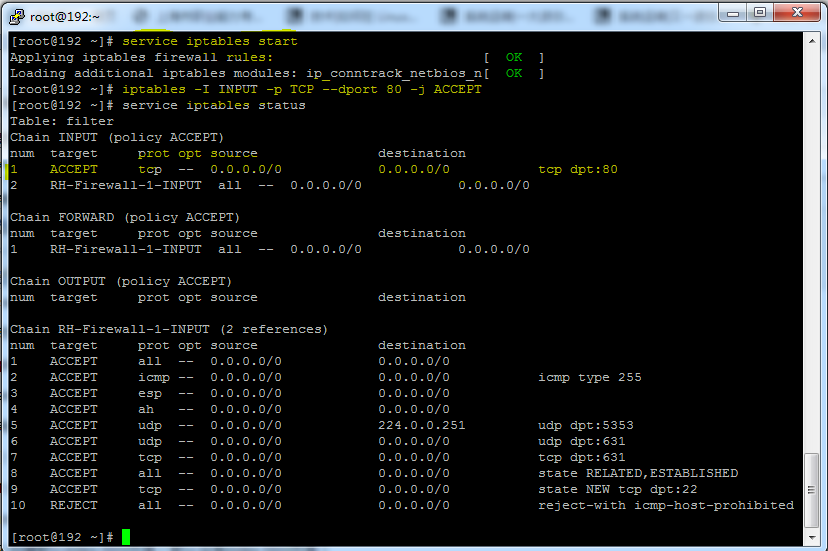
先重新启动防火墙
service iptables start
然后输入配置防火墙的命令并查看配置后的防火墙策略
iptables -I INPUT -p TCP --dport 80 -j ACCEPT
service iptables status
完成后如图所示,配置完成,远程访问服务器上的网页已经OK了
)
1.安装apache
[root@admin-pc mnt]# yum -y install httpd*
2.创建默认index.html页面(默认没有index.html页面)
[root@admin-pc mnt]# vi /var/www/html/index.html
<html>
<body>
this is a test a page for apache
</body>
</html>
3.enable ip访问在配置文件中
[root@admin-pc mnt]# vi /etc/httpd/conf/httpd.conf
ServerName www.example.com:80
4.重新启动 apache服务
[root@admin-pc mnt]# /etc/init.d/httpd stop
[root@admin-pc mnt]# /etc/init.d/httpd start
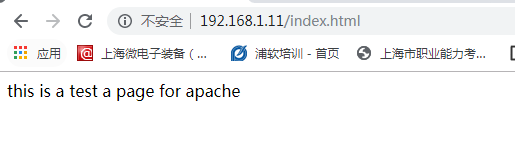
5.打开浏览器http://192.168.1.11/index.html
#安装mysql
1.[root@admin-pc mnt]# yum -y install mysql mysql-server
2.登录mysql(默认用户名和密码为空)
3.修改用户名和密码为root 123
[root@admin-pc mnt]# mysqladmin -u root -p password 123
4,重新登录mysql
[root@admin-pc mnt]# mysql -uroot -p123
Welcome to the MySQL monitor. Commands end with ; or \g.
Your MySQL connection id is 67
Server version: 5.0.95 Source distribution
Copyright (c) 2000, 2011, Oracle and/or its affiliates. All rights reserved.
Oracle is a registered trademark of Oracle Corporation and/or its
affiliates. Other names may be trademarks of their respective
owners.
Type 'help;' or '\h' for help. Type '\c' to clear the current input statement.
mysql>
#安装 php
1.yum安装php
[root@admin-pc mnt]# yum -y install php*
2.创建index.php页面
[root@admin-pc mnt]# vi /var/www/html/index.php
3.编辑index.php页面
<?php
phpinfo();
?>
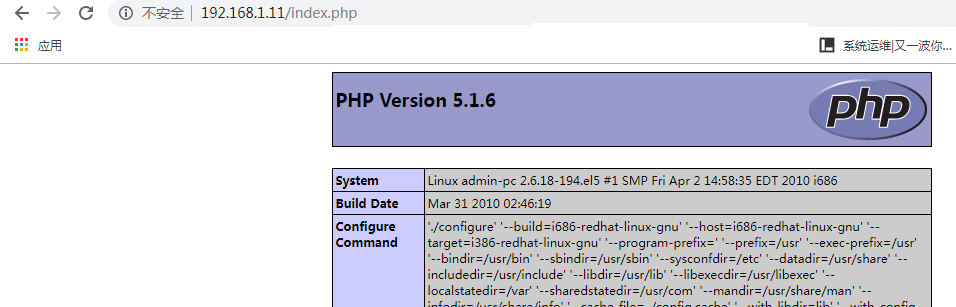
4.打开浏览器http://192.168.1.11/index.php
Centos5.5+LAMP环境的更多相关文章
- (转)CentOS5.5 下搭建 PHP 环境(最佳的LAMP环境)
本文详细阐述在 Linux 系统中搭建 PHP 环境,由于 PHP 就是由 C 语言编写的,最初也是运行在 Linux 系统中,所以Linux 是 PHP 的最佳环境. 关于本文中使用到的软件,请点击 ...
- lamp环境centos6.4
http://www.centos.bz/2011/09/centos-compile-lamp-apache-mysql-php/comment-page-1/#comments 编译安装: 首先卸 ...
- CentOS 6.5下的lamp环境rsyslog+MySQL+loganalyzer实现日志集中分析管理
前言 rsyslog系统日志,在CentOS5上叫syslog,而在CentOS6上叫rsyslog,是增强版的syslog,CentOS5上的配置文件在/etc/syslog.conf下,而Cent ...
- CentOS使用yum源中自带的rpm包安装LAMP环境
CentOS使用yum源中自带的rpm包安装LAMP环境.这是Linux下安装LAMP的环境一种最基本最简便的方式.新手可以从容安装使用. 1. 安装基础包(可选安装)yum install -y w ...
- Ubuntu14.04 lamp环境 php 无法加载mcrypt扩展
Ubuntu14.04中安装后的LAMP环境(http://www.cnblogs.com/daiyu/p/4380657.html)中没有加载:mcrypt扩展,后期再laravel5使用中发现报错 ...
- CentOS 7 yum方式配置LAMP环境
环境:CentOS 7 最小化安装 采用Putty连接 方法:采用YUM安装方法 目的:搭建Apache+Mysql+PHP环境 1,安装Apache yum install httpd //默认情况 ...
- CentOS下搭建LAMP环境详解
前言:在这里将介绍如何在CentOS下搭建LAMP环境(全部使用源码编译安装),用于web服务器开发. •LAMP: Linux + Apache + PHP + Mysql. •系统: CentOS ...
- 7. LAMP环境搭建
一.准备工作 1.安装编译工具gcc.gcc-c++ 注意解决依赖关系,推荐使用yum安装,若不能联网可使用安装光盘做为yum源-- 1)编辑yum配置文件: # mount /dev/cdrom / ...
- Ubuntu-server14.04搭建LAMP环境
转自:http://www.cnblogs.com/myzhibie/p/4330327.html 对于很多PHP初学开发者来讲,搭建一个可用于生产的LAMP环境是一件费时费力的事情,本文以 ubun ...
随机推荐
- 2分钟就能学会的【Google/百度搜索大法】了解一下?
之前我在知乎回答了「日常生活中有哪些十分钟就能学会并可以终生受用的技能」,现在也整理分享给公众号的朋友们. 作为一个入坑8年国际贸易的老阿姨,真心推荐[google搜索大法](同样适用于百度). 2分 ...
- ClassLoad
是什么 用来加载 Class 的.它负责将 Class 的字节码形式转换成内存形式的 Class 对象.字节码可以来自于磁盘文件 .class,也可以是 jar 包里的 .class,也可以来自远程服 ...
- 【转载】Hadoop面试(1)
转自:http://www.cnblogs.com/xiaolong1032/p/4504992.html 列举出hadoop常用的一些InputFormat InputFormat是用来对我们的输入 ...
- js实现页面下拉后展示导航,以及点击导航自动滑动到相关页面
//监控,下拉750px后展示导航 $(window).scroll(function(){ var $this = $(this); var targetTop = $(this).scrollTo ...
- CSP2019感想
我觉得自己好弱啊. 想更新博客,可是又没有人看. 本来自己还不算太弱,可是自己越来越腐败. 看看自己,连更新博客的资本都没有了呢.别人写些什么都是经典干货.自己写什么自己都觉得垃圾,只好默默地删掉. ...
- selenium通过cookies直接免密登录
前提知识: 1.webdriver中提供了操作cookie的相关方法: get_cookies() 获得cookie信息 add_cookie(cookie_di ...
- CSS学习(9)块盒模型应用
1.改变宽高范围 默认情况下,width和height设置的是内容盒的宽高 页面重构师:将psd文件(设计稿)制作为静态页面 衡量设计稿尺寸的时候,往往使用的是边框盒 CSS3中 box-sizing ...
- python中写入txt文件需要换行,以及\r 和\n
在Python中,用open()函数打开一个txt文件,写入一行数据之后需要一个换行 如果直接用 f.write(’\n’)只会在后面打印一个字符串’\n’,而不是换行’需要用 f.write(’\r ...
- dubbo+zookeeper搭建笔记
参考博客: http://blog.csdn.net/u013142781/article/details/50396621#reply http://blog.csdn.net/u013142781 ...
- Windows 下 Hbuilder 真机调试(Android,iphone)
概述:主要讲讲自己在使用 HBuilder 真机调试功能时遇到的问题,以及如何解决.Android 相对没有遇到什么大问题,在电脑安装如360手机助手就可以正常使用了,主要问题是在 iphone 上( ...