
第二篇 Springboot mybatis generate根据数据库表自动生成实体类、Mapper和Mapper.xml
源码链接:https://pan.baidu.com/s/1iP4UguBufHbcIEv4Ux4wDw
提取码:j6z9
目录结构如下:只需增加一个generatorConfig.xml文件和在pom.xml中配置下Mybatis generator代码生成插件即可

pom.xml中增加如下配置:
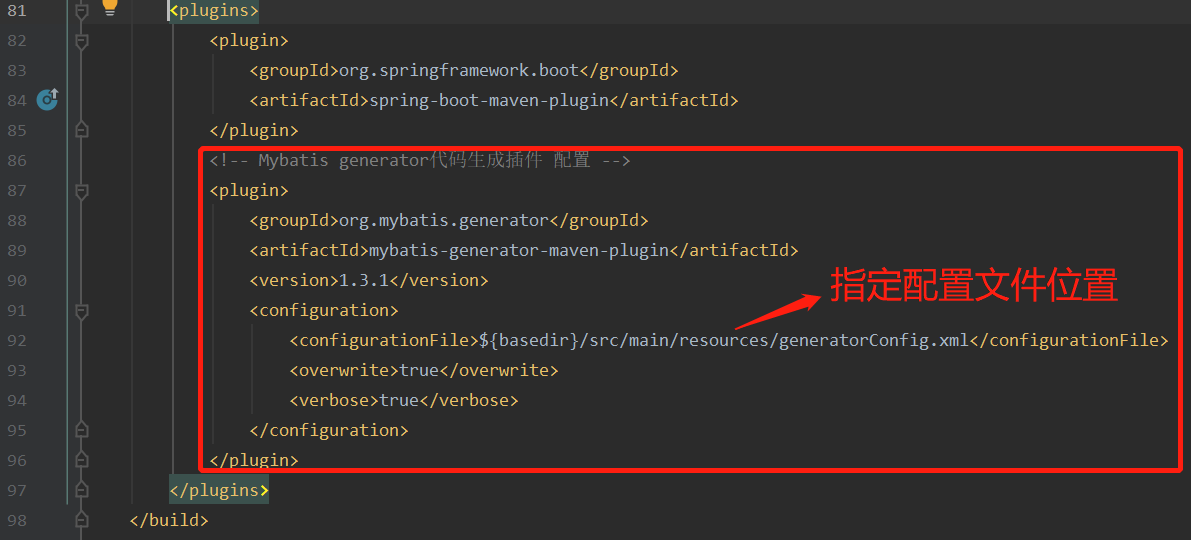
pom.xml中相关依赖及build插件部分代码
<dependencies>

    <dependency>

        <groupId>org.springframework.boot</groupId>

        <artifactId>spring-boot-starter-web</artifactId>

    </dependency>

    <dependency>

        <groupId>org.mybatis.spring.boot</groupId>

        <artifactId>mybatis-spring-boot-starter</artifactId>

        <version>2.1.1</version>

    </dependency>

    <dependency>

        <groupId>mysql</groupId>

        <artifactId>mysql-connector-java</artifactId>

        <scope>runtime</scope>

    </dependency>

    <dependency>

        <groupId>org.springframework.boot</groupId>

        <artifactId>spring-boot-starter-thymeleaf</artifactId>

        <version>2.1.4.RELEASE</version>

    </dependency>

    <dependency>

        <groupId>org.springframework.boot</groupId>

        <artifactId>spring-boot-starter-jdbc</artifactId>

    </dependency>

    <dependency>

        <groupId>org.springframework.boot</groupId>

        <artifactId>spring-boot-starter-test</artifactId>

        <scope>test</scope>

        <exclusions>

            <exclusion>

                <groupId>org.junit.vintage</groupId>

                <artifactId>junit-vintage-engine</artifactId>

            </exclusion>

        </exclusions>

    </dependency>

</dependencies>

<build>

    <!-- maven工程在默认情况下src/main/java目录下的mapper文件是不发布到target目录下的 -->

    <!-- 增加下面resource配置将resources目录下的文件和java目录下的配置文件添加资源映射-->

    <resources>

        <resource>

            <directory>src/main/resources</directory>

            <includes>

                <include>**/*.*</include>

            </includes>

            <filtering>true</filtering>

        </resource>

        <resource>

            <directory>src/main/java</directory>

            <includes>

                <include>**/*.properties</include>

                <include>**/*.xml</include>

            </includes>

            <filtering>false</filtering>

        </resource>

    </resources>

    <plugins>

        <plugin>

            <groupId>org.springframework.boot</groupId>

            <artifactId>spring-boot-maven-plugin</artifactId>

        </plugin>

        <!-- Mybatis generator代码生成插件 配置 -->

        <plugin>

            <groupId>org.mybatis.generator</groupId>

            <artifactId>mybatis-generator-maven-plugin</artifactId>

            <version>1.3.1</version>

            <configuration>

                <configurationFile>${basedir}/src/main/resources/generatorConfig.xml</configurationFile>

                <overwrite>true</overwrite>

                <verbose>true</verbose>

            </configuration>

        </plugin>

    </plugins>

</build>
generatorConfig.xml文件内容如下:
<!--数据库驱动包路径 -->

<classPathEntry location="C:\Users\heave\.m2\repository\mysql\mysql-connector-java\5.1.30\mysql-connector-java-5.1.30.jar"/>

<context id="DB2Tables" targetRuntime="MyBatis3">

    <!--关闭注释 -->

    <commentGenerator>

        <property name="suppressAllComments" value="true"/>

    </commentGenerator>

    <!--数据库连接信息 -->

    <jdbcConnection driverClass="com.mysql.jdbc.Driver" connectionURL="jdbc:mysql://localhost:3306/big_strong?characterEncoding=utf-8"

                    userId="root" password="123456">

    </jdbcConnection>

    <!--生成的model 包路径 -->

    <javaModelGenerator targetPackage="big.strong.disheng.user.model" targetProject="src/main/java">

        <property name="enableSubPackages" value="ture"/>

        <property name="trimStrings" value="false"/>

    </javaModelGenerator>

    <!--生成xml mapper文件 路径 -->

    <sqlMapGenerator targetPackage="big.strong.disheng.user.dao" targetProject="src/main/java">

        <property name="enableSubPackages" value="ture"/>

    </sqlMapGenerator>

    <!-- 生成的Dao接口 的包路径 -->

    <javaClientGenerator type="XMLMAPPER" targetPackage="big.strong.disheng.user.dao" targetProject="src/main/java">

        <property name="enableSubPackages" value="ture"/>

    </javaClientGenerator>

    <!--对应数据库表名 tableName数据库表名称,domainObjectName生成model类的名称 -->

    <table tableName="role" domainObjectName="Role" enableCountByExample="false"

           enableSelectByExample="false" enableUpdateByExample="false" enableDeleteByExample="false">

        <property name="useActualColumnNames" value="true"/>

    </table>

    <table tableName="permission" domainObjectName="Permission" enableCountByExample="false"

           enableSelectByExample="false" enableUpdateByExample="false" enableDeleteByExample="false">

        <property name="useActualColumnNames" value="true"/>

    </table>

    <table tableName="user_role" domainObjectName="UserRole" enableCountByExample="false"

           enableSelectByExample="false" enableUpdateByExample="false" enableDeleteByExample="false">

        <property name="useActualColumnNames" value="true"/>

    </table>

    <table tableName="role_permission" domainObjectName="RolePermission" enableCountByExample="false"

           enableSelectByExample="false" enableUpdateByExample="false" enableDeleteByExample="false">

        <property name="useActualColumnNames" value="true"/>

    </table>

</context>
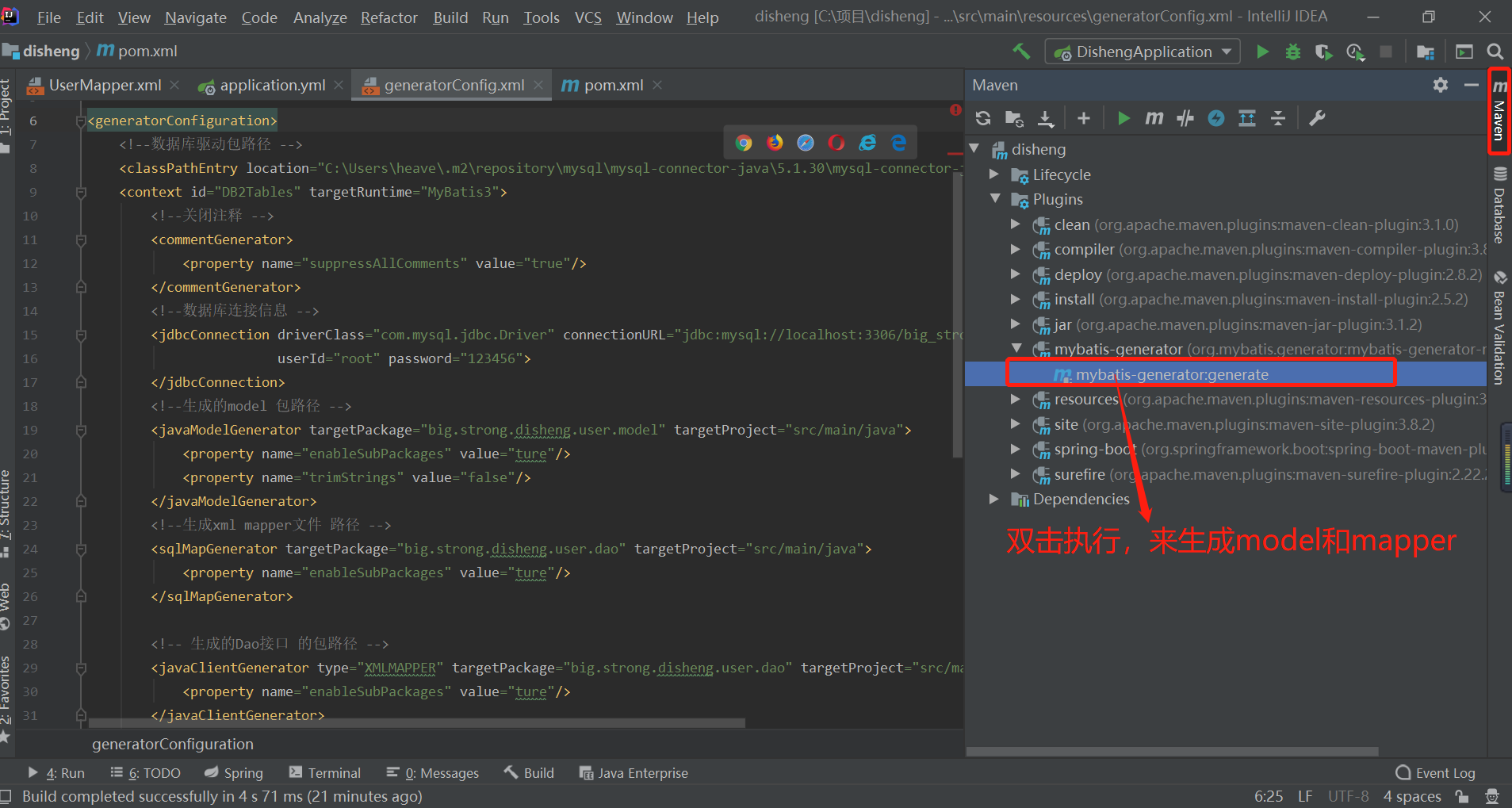
双击之后控制台会输出
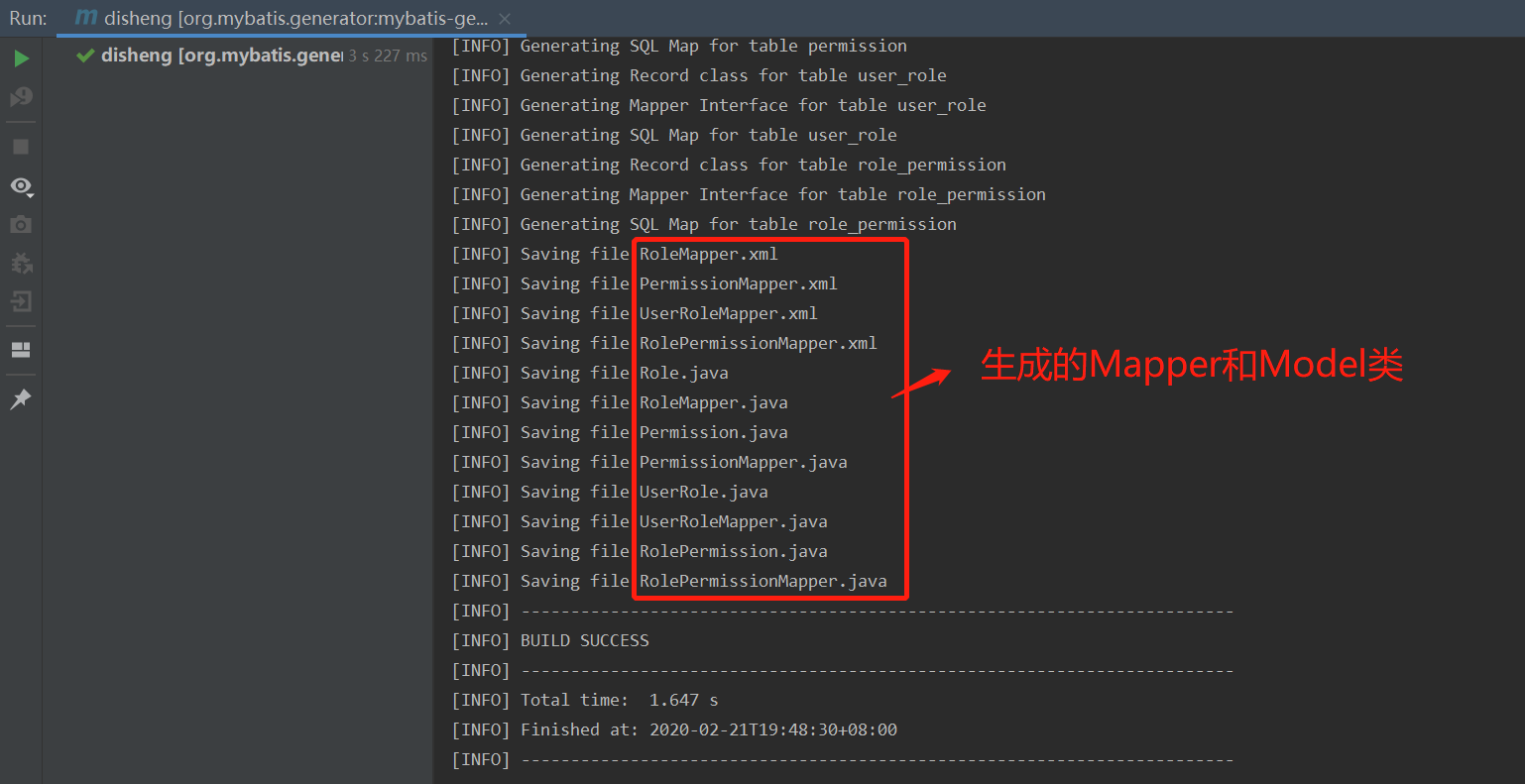
完成
源码链接:https://pan.baidu.com/s/1iP4UguBufHbcIEv4Ux4wDw
提取码:j6z9
第二篇 Springboot mybatis generate根据数据库表自动生成实体类、Mapper和Mapper.xml的更多相关文章
- 根据数据库表自动生成实体类、xml和dao---mybatis
网盘链接: https://pan.baidu.com/s/1AVGz0bDa_Y5zjk7vXa2eHw 提取码: 2gr6 1.记事本打开generatorConfig.xml文件 2(1,2,3 ...
- 使用mybatis-generator-core-1.3.2.jar根据数据库表自动生成实体
1 导入mybatis-generator-core-1.3.2.jar 2配置mbg.xml <?xml version="1.0" encoding="UTF- ...
- MyBatis 逆向工程——根据数据表自动生成model、xml映射文件、mapper接口
MyBatis Generator(MBG)的使用 MBG可以根据数据表生成对应的model.xml映射文件.mapper接口,只是简单的生成,还需要根据需求修改. 1.下载jar包 https:// ...
- mybits根据表自动生成 java类和mapper 文件
mybits根据表自动生成 java类和mapper 文件 我这个脑子啊,每次创建新的工程都会忘记是怎么集成mybits怎么生成mapper文件的,so today , I can't write t ...
- Idea根据表自动生成实体
Idea根据表自动生成实体: 首先说下这种方式有个缺点,就是如果表里面有日期.时间类型,那么需要手动的设置映射类型 第一步:在Idea中配置好数据库: 在Idea窗口右边,点击Database按钮 配 ...
- 使用.net core efcore根据数据库结构自动生成实体类
源码 github,已更新最新代码 https://github.com/leoparddne/GenEntities/ 使用的DB是mysql,所有先nuget一下mysql.data 创建t4模板 ...
- 基于Dapper的开源Lambda扩展,且支持分库分表自动生成实体之基础介绍
LnskyDB LnskyDB是基于Dapper的Lambda扩展,支持按时间分库分表,也可以自定义分库分表方法.而且可以T4生成实体类免去手写实体类的烦恼. 文档地址: https://lining ...
- SpringBoot整合Mybatis 使用generator自动生成实体类代码、Mapper代码、dao层代码
1.新建一个SpringBoot项目,并引入Mybatis和mybatis-generator相关的依赖. <dependency> <groupId>org.springfr ...
- idea 根据数据库表自动创建持久化类
一.点击最右边的Database: 二.点击,再点DataSource选择数据库类型,配置数据库信息: 三.打开项目结构,选择,找到你的项目,点击,添加hibernate: 四.如果有现成的cfg.x ...
随机推荐
- Python工具类(一)—— 操作Mysql数据库
如何调用直接看__main__函数里如何调用此工具类就阔以啦! # encoding=utf-8 import pymysql # 导入所有Mysql配置常量,请自行指定文件 from conf.se ...
- Ansible配合Virtualenv安装配置
Ansible的两种安装模式(Centos7) 1.Yum包管理安装 #yum -y install ansible 2.Git源代码安装[推荐] git clone https://github.c ...
- OAuth2.0的那点荒唐小秘密 -几个简单概念和原理
OAuth2.0这个名词你是否在项目中时常听到呢?是否觉得好像懂,又好像不太懂呢? 最近一直想写篇关于OAuth2.0的东西,记录下我的学习与感悟,然各种理由的拖延,直到今日才静下心来写下这篇博客.当 ...
- 从0开发3D引擎(七):学习Reason语言
目录 上一篇博文 介绍Reason Reason的优势 如何学习Reason? 介绍Reason的部分知识点 大家好,本文介绍Reason语言以及学习Reason的方法. 上一篇博文 从0开发3D引擎 ...
- Entity Framework 6+ 连接Mysql
好吧.这个博客开不开的 我感觉.. 都一样了. 前言: 公司改造Sqlserver ->Mysql Sql2016老夫对不住你啊.. 好 前沿结束. 需要的家伙: 1.mysql-for-vis ...
- hash算法与拉链法解决冲突
<?php class HashNode { public $key; public $value; public $nextNode; public function __construct( ...
- day05【数组】
day05[数组] 1.数组 概念:是一种容器,可以同时存放多个数据. 特点: 数组是一种引用数据类型 数组当中的多个数据,类型必须统一 数组的长度在程序的运行期间不可改变 初始化:在内存当中创建一个 ...
- tensorflow 案例
import tensorflow as tf import numpy as np #添加一层inputs输入的数据,in_size为输入节点数,out_size为输出节点数,下一个为激励函数 de ...
- windows 安裝 gcc 編譯器 - MinGW
MinGW 介紹 MinGW 全稱 Minimalist GNU For Windows,是個精簡的Windows平台C/C++.ADA及Fortran編譯器,相比Cygwin而言,體積要小很多,使用 ...
- 《Android Studio实战 快速、高效地构建Android应用》--Android Studio操作
前言 摩尔定律:CPU的处理能力大约18个月翻一倍 Android&Java:想要在Android Studio中开发Android App,必须以充分了解Java为前提(Java流行的原因: ...